S bend Table Leg
-
Hi THere
Has anyone got any idea how I can model these table legs? Im really stuck, perhaps there is a plug I could use. So far I have a profile from tracing the image. Any suggestions? !!
thanks in advance!
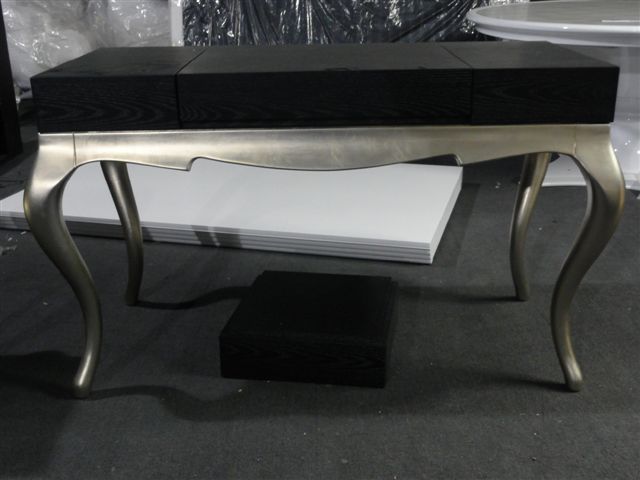
-
Im not as good with this plugin as I should be, but it seems you could make this with artisan (subdivide and smooth 2). Solo is an expert with it though-maybe he will offer his advice.
-
@N08/5978917785/" target="_blank" rel="noopener noreferrer nofollow ugc">

That's called a cabriole leg. The way most folks would approach that is to draw the leg 'blank' and then add the profile to the two outside faces. Hold the profile off one face a little bit (second from left) and then use Push/Pull to push both profiles. Select all of the geometry and run Intersect Faces>With Selection. Delete the waste. I just softened the outside corner (far right) but you could set up a profile for Follow Me and run it along the outside to create a real rounded surface
-
Thanks very much for both replies, I will definately look into that plugin looks very useful, and Dave , I will try that method thanks for posting such a great explanation ! I'll post my results!
Peter
-
Hi Zootsuit,
You could also use Tgi3D SU Amorph's cross section tool as shown in the following thread.
http://forums.sketchucation.com/viewtopic.php?f=15&t=39008
It would be a bit more involved then the one in that thread as you need to get the basic shape first with top and bottom having different geometries, but it should be doable.
-
Hi folks.
Using the search capabilities of this forum I found this thread.
http://forums.sketchucation.com/viewtopic.php?f=18&t=725
In the first post, you will find a tutorial.
As pointed out, once this basic shape is done, you can use the "Follow me" Tool to effectively round the sharp edges or simply smooth the sharp edges for a somewhat approximate rounded look.
Just ideas.
-
Thanks for all the replies. Jean, I had recently found that tutorial for the cabriole leg and tried it last night. It worked great, although I used Fredo6's round corners plug in to smooth the edges and it didn’t work that cleanly, had a few areas to clean up. It looks ok with profiles off, I just hope it renders ok, Ill give it a go in Podium and post the results
I'd just like to say that as someone coming back to Sketchup (& CAD in general) after a 2 year break , it’s great to see how it has progressed and that this community are as supportive and creative as ever! I’ve always felt part of Sketchup’s appeal is the ability for everyday users to develop new plug-ins based on their experience and needs, with the support and input of an active community. And the amazing response from this community has been a lifeline to myself and I'm sure many others learning.
It seems that Sketchup has now almost got to a point where its modelling abilities and toolset matches more complex (and confusing) programs such as 3DS max etc. As I’m restarting my career in 3D visualisation I hope I can absorb as much knowledge as I can from this forum, and in return contribute and help others as i learn, as others have done for me.
-
Hi There
Following all the help I had on this (thanks again!) I've successfully modelled and completed the project. Ive posted the renderings in the gallery if anyones interested there's a link below
thanks again


Hello! It looks like you're interested in this conversation, but you don't have an account yet.
Getting fed up of having to scroll through the same posts each visit? When you register for an account, you'll always come back to exactly where you were before, and choose to be notified of new replies (either via email, or push notification). You'll also be able to save bookmarks and upvote posts to show your appreciation to other community members.
With your input, this post could be even better 💗
Register Login


Advertisement