sketchucation logo sketchucation
    • 登入
    Oops, your profile's looking a bit empty! To help us tailor your experience, please fill in key details like your SketchUp version, skill level, operating system, and more. Update and save your info on your profile page today!
    🔌 Smart Spline | Fluid way to handle splines for furniture design and complex structures. Download

    {REQ} Perimeter Trace?

    已排程 已置頂 已鎖定 已移動 Plugins
    21 貼文 8 Posters 2.1k 瀏覽 8 Watching
    正在載入更多貼文
    • 從舊到新
    • 從新到舊
    • 最多點贊
    回覆
    • 在新貼文中回覆
    登入後回覆
    此主題已被刪除。只有擁有主題管理權限的使用者可以查看。
    • EarthMoverE 離線
      EarthMover
      最後由 編輯

      I'm looking for a script that will trace an outline of a collective set of geometry while maintaining the Z height established by the lowest most edges. I want to extract the perimeter shape to help with inserting models into a GE terrain via Instant Site Grader, or to skin and glean a total area. Is this possible via ruby? I know I can flatten all (silhouette to plane) but I was hoping to preserve the Z within the angled lines of the footprint.
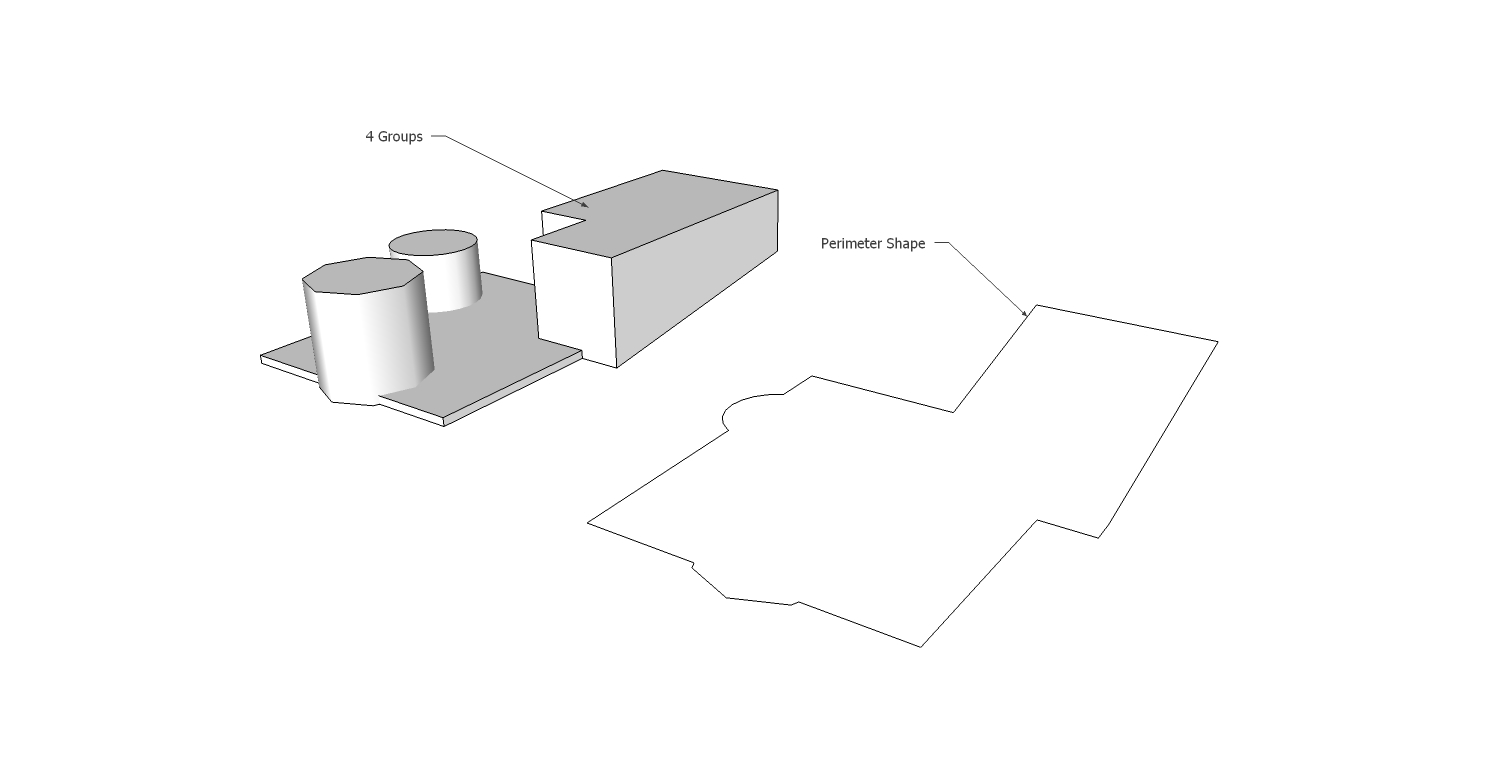
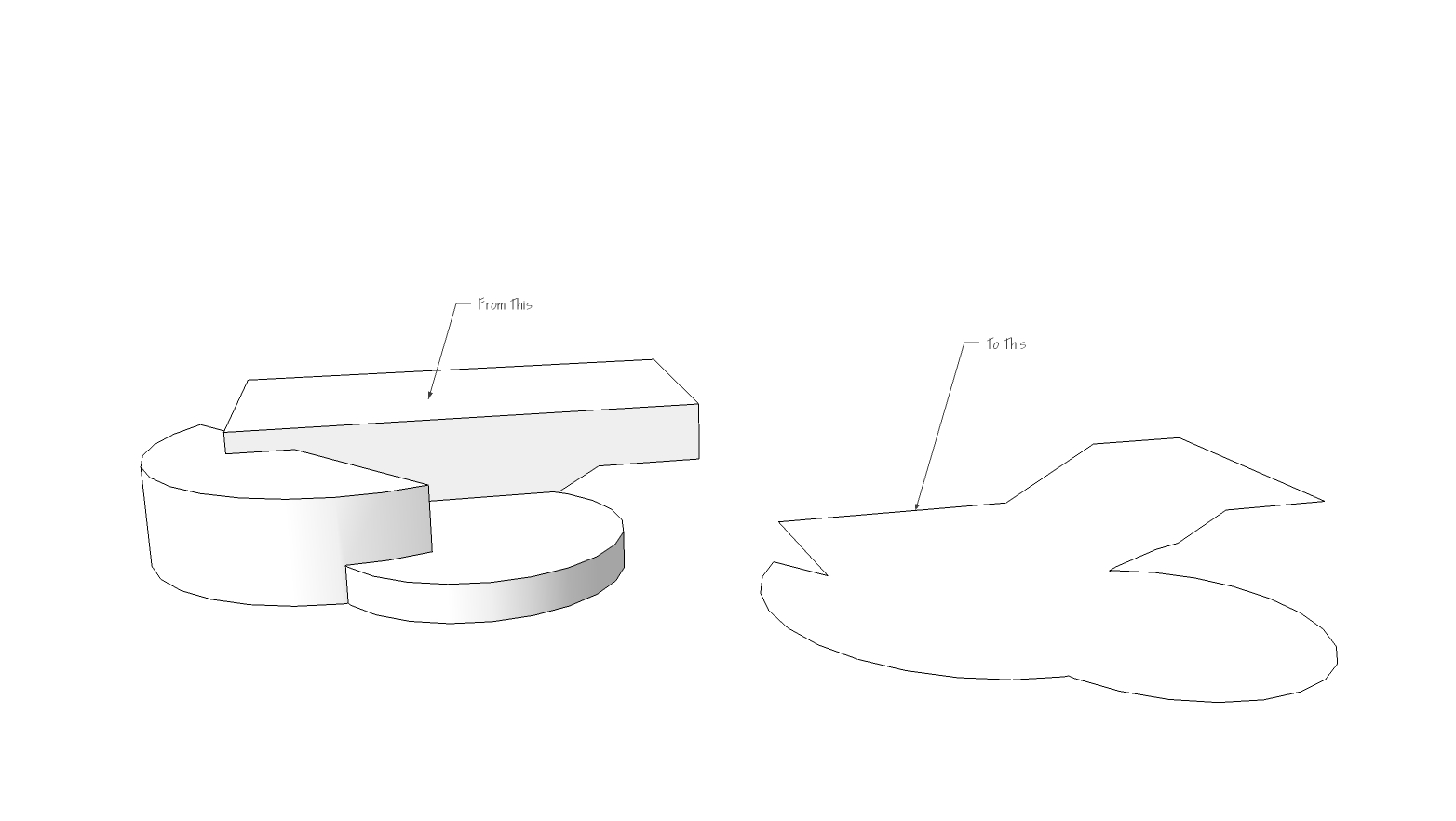
      Shape from Perimeter.jpg


      Perimeter Trace.jpg

      3D Artist at Clearstory 3D Imaging
      Guide Tool at Winning With Sketchup
      Content Creator at Skapeup

      1 條回覆 最後回覆 回覆 引用 0
      • soloS 離線
        solo
        最後由 編輯

        That would be a handy one. +1 👍

        http://www.solos-art.com

        If you see a toilet in your dreams do not use it.

        1 條回覆 最後回覆 回覆 引用 0
        • pilouP 離線
          pilou
          最後由 編輯

          Copy move the bases of Ground 0 : Intersect them
          then
          Select outer Edges by Chris Fullmer ?

          Frenchy Pilou
          Is beautiful that please without concept!
          My Little site :)

          1 條回覆 最後回覆 回覆 引用 0
          • KrisidiousK 離線
            Krisidious
            最後由 編輯

            slice and section both do this...

            By: Kristoff Rand
            Home DesignerUnique House Plans

            1 條回覆 最後回覆 回覆 引用 0
            • TIGT 離線
              TIG Moderator
              最後由 編輯

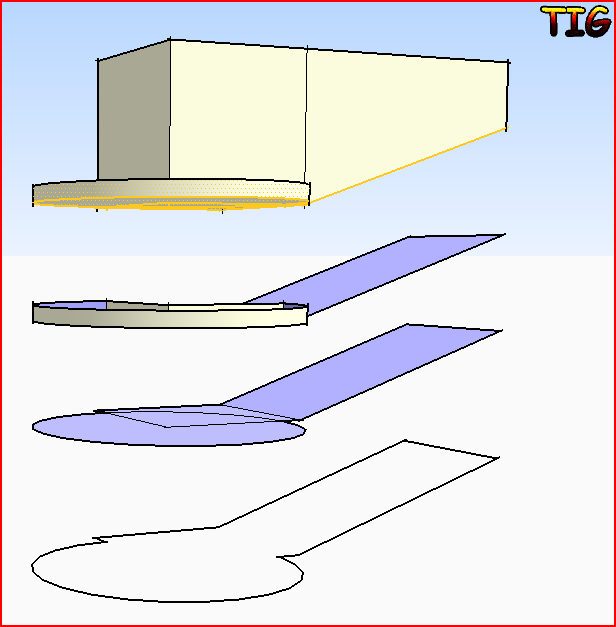
              Change to a side view [perspective off] select the bottom parts with fences + ctrl to add to selection, remove any unwanted upper parts by ctrl+shift and right-left fencing them.
              You can quickly assemble a selection of the bottom parts - don't initially worry about faces or a few extra pieces etc.
              Move+ctrl constrained vertically to make a copy.
              With the copy highlighted Group it.
              Edit the group and erase unwanted pieces, faces, inner edges etc.
              You then have the outline replicated in its own group below the original - if desire move it back, snapping into place...Capture.PNG
              TIG

              1 條回覆 最後回覆 回覆 引用 0
              • EarthMoverE 離線
                EarthMover
                最後由 編輯

                Guys....I'm talking about doing it to an entire model in one go. (the example I used was simplified to show the basic concept) I wouldn't want to start cutting up the geometry, exploding groups and intersecting. I understand how to do it manually, but was looking for a better way.

                Kris & Pilou, I'm not looking to flatten anything or glean a cross section, but rather to trace the perimeter while maintaining the lowest Z height.

                The challenge of the script would be to first define the outer bounds, similar to what TIG's silhouette to plane script does. Then perhaps if the silhouette border edges where placed below the model and projected upwards until they intersect with a perimeter edge. Perhaps a method may be to have the script place Cpoints along they silhouette perimeter and project (drape upwards) the Cpoints until they hit geometry (whether inside group or component), as a way of raytracing the border. I'm not sure. I just know something that would do this "automagically" would be a real time saver. If it's not possible, that fine too...I bill by the hour. 💚 😆

                3D Artist at Clearstory 3D Imaging
                Guide Tool at Winning With Sketchup
                Content Creator at Skapeup

                1 條回覆 最後回覆 回覆 引用 0
                • TIGT 離線
                  TIG Moderator
                  最後由 編輯

                  How about this way ?
                  Use the silhouette-tool to project the outline onto a horizontal workplane that is located well below everything.
                  Take that silhouette, select all of its edges and use EEbyEdgesByVectorToObject...
                  Pick a vertically constrained vector from the silhouette up through the whole terrain and beyond.
                  At this point you will have a group of vertically extruded faces that stop at the 'terrain' - edit that group and use the fence select tool [in a side elevation] to select all of the unwanted lower edges/faces and delete them.
                  Now you have just the upper outline left that follows the terrain... 😄

                  TIG

                  1 條回覆 最後回覆 回覆 引用 0
                  • sdmitchS 離線
                    sdmitch
                    最後由 編輯

                    earthmover, Here is my somewhat feable attempt at a plugin to generate the outlines you were looking for.


                    Create outline of structures

                    Nothing is worthless, it can always be used as a bad example.

                    http://sdmitch.blogspot.com/

                    1 條回覆 最後回覆 回覆 引用 0
                    • TIGT 離線
                      TIG Moderator
                      最後由 編輯

                      But doesn't this project it all flat to a plane an add faces -all of which he doesn't want ??
                      He wants just the bottom-most edges of the form on the 'terrain', with inner edges or faces - as my kludged up method provides...

                      TIG

                      1 條回覆 最後回覆 回覆 引用 0
                      • sdmitchS 離線
                        sdmitch
                        最後由 編輯

                        I must admit I'm not at all sure what he wants but given the examples furnished and "maintaining the lowest Z height" what else could it be?

                        Nothing is worthless, it can always be used as a bad example.

                        http://sdmitch.blogspot.com/

                        1 條回覆 最後回覆 回覆 引用 0
                        • pilouP 離線
                          pilou
                          最後由 編輯

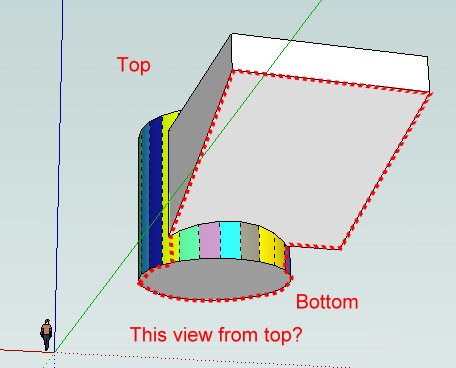
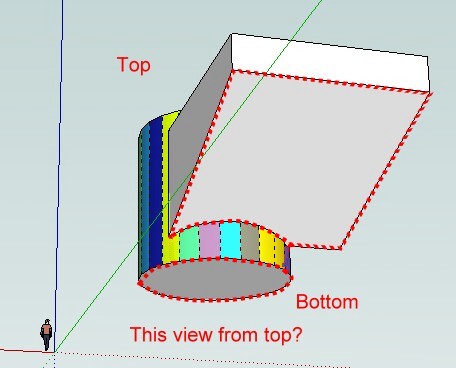
                          This ?
                          this.jpg
                          or this?
                          this1.jpg
                          or other? 😄

                          Frenchy Pilou
                          Is beautiful that please without concept!
                          My Little site :)

                          1 條回覆 最後回覆 回覆 引用 0
                          • pilouP 離線
                            pilou
                            最後由 編輯

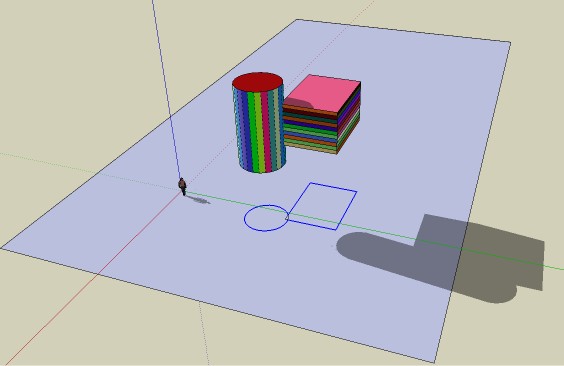
                            And using the sand box Drape on a big rectangular plan that is not possible? 🤓
                            Draw a big rectangle under all the project at any Z altitude
                            Select all your components groups etc
                            Launch the Drape sand box
                            Then double clic on the surface rectangle outside the projection, and deselect Surface's rectangle and perimeter's rectangle with 2 boxes selection right to left at near 2 oposite coins' rectangle 😄
                            You have your perimeter! 😎
                            All takes 2 seconds if your are not very well handy! 😄

                            Hum, I am not sure to understand the problem 😳

                            perimeter.jpg

                            Frenchy Pilou
                            Is beautiful that please without concept!
                            My Little site :)

                            1 條回覆 最後回覆 回覆 引用 0
                            • K 離線
                              kyyu
                              最後由 編輯

                              Here is a quick snippet of code. To run it type "ky_shell_bottom" in the ruby console. If you want only the perimeter edges, then uncomment the few lines of code at the end.
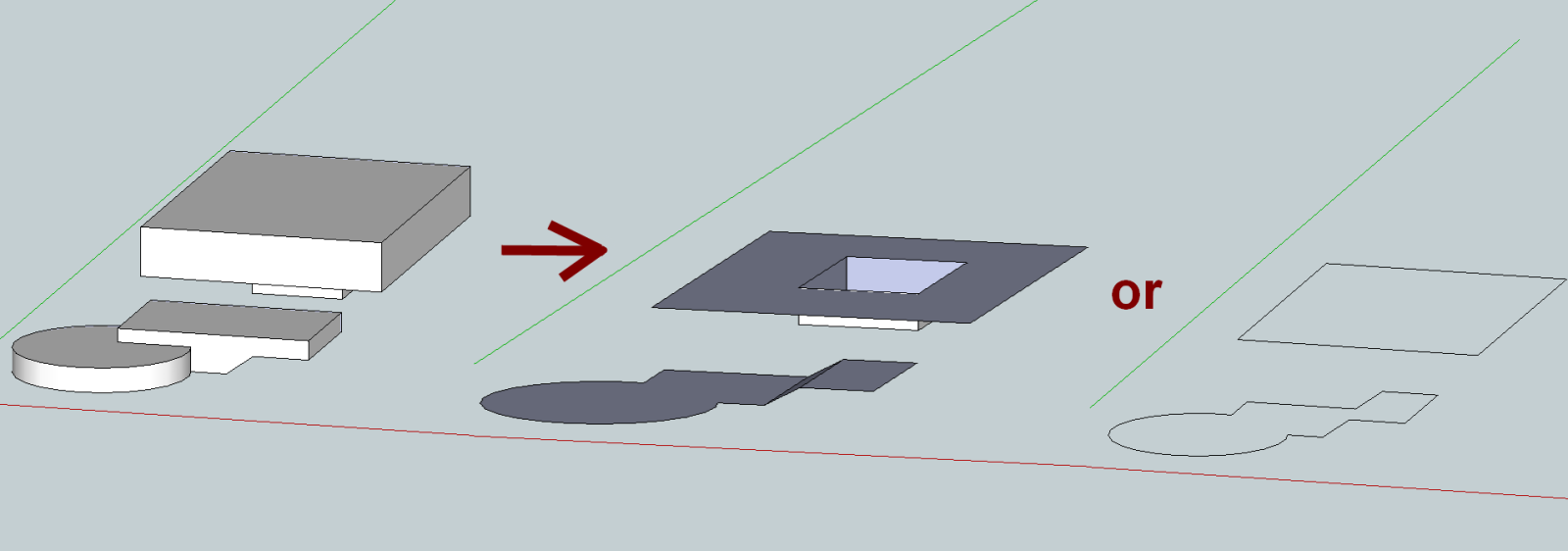
                              shell bottom.png
                              test_shell bottom.skp
                              ky_shell_bottom_snippit.rb

                              1 條回覆 最後回覆 回覆 引用 0
                              • TIGT 離線
                                TIG Moderator
                                最後由 編輯

                                I think he wants Pilou's first image...
                                You would get this using my method... where you project everything down to a much lower horizontal Workplane as a Silhouette, then project the silhouette edges up with EEbyVectorToObject through the terrain so it trims to its underside, finally you fence-select the flat silhouette, extruded-faces and their vertical-edges, so that you are left with an 'outline' of the footprints applied over the terrain, with little or no more effort required...

                                TIG

                                1 條回覆 最後回覆 回覆 引用 0
                                • sdmitchS 離線
                                  sdmitch
                                  最後由 編輯

                                  EarthMover, Let me see if I have this straight. You want to create a face which is the outline of a selected surface structure. This face is located at or slightly below the lowest elevation of the selected structure. Then you want faces created that connect the outline to the structure that can be used to intersect with the surface. If so I offer FootPrint.rb version 2.

                                  There is one requirement and that is that the bottom faces of the structure have a normal.z < 0.


                                  Before and after model


                                  Create footprint of structure

                                  Nothing is worthless, it can always be used as a bad example.

                                  http://sdmitch.blogspot.com/

                                  1 條回覆 最後回覆 回覆 引用 0
                                  • EarthMoverE 離線
                                    EarthMover
                                    最後由 編輯

                                    Thanks for the help everyone. I tried both plugins posted, but neither did the trick. KYYU's was close, but it didn't work with groups which had nested groups within it.

                                    TIG's method and tools worked perfectly and while it would be nice to have a single click procedure, the Silhouette to Plane combined with Extrude Edges by Vector to Object is a solid workflow for gleaning perimeter edges.

                                    Here's a video of the process. I show it with an un-nested group and a nested set of groups. I also had issues if the Workplane overlapped the Silhouette before Extruding the Edges. Other than that, it accomplished what I needed. Thanks again.

                                    [flash=800,600:3v7yphiu]http://www.youtube.com/v/kp0sB_sjSEk[/flash:3v7yphiu]


                                    Perimeter Trace Test.skp

                                    3D Artist at Clearstory 3D Imaging
                                    Guide Tool at Winning With Sketchup
                                    Content Creator at Skapeup

                                    1 條回覆 最後回覆 回覆 引用 0
                                    • J 離線
                                      jorge2011
                                      最後由 編輯

                                      hello sir EarthMover.
                                      can you tell me what is plugin uvproyection> planar is seen in the video?
                                      thanks

                                      1 條回覆 最後回覆 回覆 引用 0
                                      • EarthMoverE 離線
                                        EarthMover
                                        最後由 編輯

                                        Sure Jorge, it's here - http://forums.sketchucation.com/viewtopic.php?t=34552

                                        3D Artist at Clearstory 3D Imaging
                                        Guide Tool at Winning With Sketchup
                                        Content Creator at Skapeup

                                        1 條回覆 最後回覆 回覆 引用 0
                                        • J 離線
                                          jorge2011
                                          最後由 編輯

                                          thanks

                                          1 條回覆 最後回覆 回覆 引用 0
                                          • TIGT 離線
                                            TIG Moderator
                                            最後由 編輯

                                            Glad my tools [WorkPlane/Silhouette/EEbyVectorToObject] used in sequence helped...
                                            I hadn't tried it... but it seemed the obvious solution... 😄

                                            It could be automated into one script BUT how often do you need to do it? 🤓

                                            TIG

                                            1 條回覆 最後回覆 回覆 引用 0
                                            • 1
                                            • 2
                                            • 1 / 2
                                            • 第一個貼文
                                              最後的貼文
                                            Buy SketchPlus
                                            Buy SUbD
                                            Buy WrapR
                                            Buy eBook
                                            Buy Modelur
                                            Buy Vertex Tools
                                            Buy SketchCuisine
                                            Buy FormFonts

                                            Advertisement