sketchucation logo sketchucation
    • Login
    Oops, your profile's looking a bit empty! To help us tailor your experience, please fill in key details like your SketchUp version, skill level, operating system, and more. Update and save your info on your profile page today!
    ⚠️ Important | Libfredo 15.6b introduces important bugfixes for Fredo's Extensions Update

    Hide X Lines or Construct Lines

    Scheduled Pinned Locked Moved Plugins
    19 Posts 8 Posters 2.6k Views 8 Watching
    Loading More Posts
    • Oldest to Newest
    • Newest to Oldest
    • Most Votes
    Reply
    • Reply as topic
    Log in to reply
    This topic has been deleted. Only users with topic management privileges can see it.
    • GaieusG Offline
      Gaieus
      last edited by

      You can assign a shortcut key to this menu item, too.

      Gai...

      1 Reply Last reply Reply Quote 0
      • B Offline
        bjornkn
        last edited by

        Why don't you just add a shortcut then?
        I use Shift+N to show/hide construction lines, N for measure and Ctrl+Shift+N to delete all construction lines.
        And H to toggle visibility of other objects while editing group/comp, and Shift+H for showing instances,
        I use those all the time, along with Shift+X to toggle hidden lines on/off and X for X-ray.

        1 Reply Last reply Reply Quote 0
        • jeff hammondJ Offline
          jeff hammond
          last edited by

          @bjornkn said:

          Why don't you just add a shortcut then?

          the original question was hinting that he wanted to add the plugin as a shortcut (no selecting/grouping/layers etc)..

          David was just hoping someone would write a plugin for something that already existed in native sketchup!
          poor guy πŸ˜‰

          dotdotdot

          1 Reply Last reply Reply Quote 0
          • boofredlayB Offline
            boofredlay
            last edited by

            Alright now David, sign the book:
            http://forums.sketchucation.com/viewtopic.php?f=15&t=17315&hilit=d%27oh

            http://www.coroflot.com/boofredlay

            1 Reply Last reply Reply Quote 0
            • GaieusG Offline
              Gaieus
              last edited by

              It's not exactly like that, David but...

              You: "Hello my name is David and I am an idiot. . ."

              Crowd: Hi David. Welcome! πŸ˜†

              Gai...

              1 Reply Last reply Reply Quote 0
              • david_hD Offline
                david_h
                last edited by

                I've paid my penance. . .
                D'oh Book

                If I make it look easy...It is probably easy

                1 Reply Last reply Reply Quote 0
                • david_hD Offline
                  david_h
                  last edited by

                  okay! Okay! I get it.. . Im a dummy. I stand up into the light and admit it.

                  ME: "Hello my name is David and I am an idiot. . ."

                  Crowd: Hi David.

                  and Yes I did add the shortcut no problemo. . . and yeah Eric .. I will sign the D'oh Book.

                  D πŸ’š

                  If I make it look easy...It is probably easy

                  1 Reply Last reply Reply Quote 0
                  • boofredlayB Offline
                    boofredlay
                    last edited by

                    Good, now come clean my house πŸ˜„

                    http://www.coroflot.com/boofredlay

                    1 Reply Last reply Reply Quote 0
                    • david_hD Offline
                      david_h
                      last edited by

                      I could use a bit of a get away. ..

                      Seriously. . .How're things going there for you anyway? Focus has kinda turned toward Joplin Mo. . .

                      Are you getting it back together alright?

                      If I make it look easy...It is probably easy

                      1 Reply Last reply Reply Quote 0
                      • boofredlayB Offline
                        boofredlay
                        last edited by

                        Well again we (my family) did not have any damage. As far as the region there is still much to do. We had a big storm come through last night with 60-80 mph straight line winds and a couple small rotations. Luckily we did not get any damage from that but some people did. Power was/is out for part of the region again too.

                        I go out again Saturday for more debris cleanup.

                        http://www.coroflot.com/boofredlay

                        1 Reply Last reply Reply Quote 0
                        • david_hD Offline
                          david_h
                          last edited by

                          Well.. . good luck as always. We're with ya.

                          D

                          If I make it look easy...It is probably easy

                          1 Reply Last reply Reply Quote 0
                          • E Offline
                            errror404
                            last edited by

                            Hey guys, I know about show/hide guidelines... is there another button to erase them all on one shot?

                            thanks!

                            1 Reply Last reply Reply Quote 0
                            • cottyC Offline
                              cotty
                              last edited by

                              The only thing you have to do is: call it a button πŸ˜‰
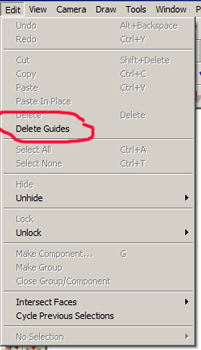

                              deleteguides.png

                              my SketchUp gallery

                              1 Reply Last reply Reply Quote 0
                              • Dave RD Offline
                                Dave R
                                last edited by

                                @errror404 said:

                                Hey guys, I know about show/hide guidelines... is there another button to erase them all on one shot?

                                thanks!

                                No plugin required. I assigned a keyboard shortcut for Edit>Delete Guides. Do that and you can have a real button.

                                Etaoin Shrdlu

                                %

                                (THERE'S NO PLACE LIKE)

                                G28 X0.0 Y0.0 Z0.0

                                M30

                                %

                                1 Reply Last reply Reply Quote 0
                                • E Offline
                                  errror404
                                  last edited by

                                  @cotty said:

                                  The only thing you have to do is: call it a button πŸ˜‰

                                  Thanks... it was a matter of just finding where it was!!

                                  1 Reply Last reply Reply Quote 0
                                  • 1 / 1
                                  • First post
                                    Last post
                                  Buy SketchPlus
                                  Buy SUbD
                                  Buy WrapR
                                  Buy eBook
                                  Buy Modelur
                                  Buy Vertex Tools
                                  Buy SketchCuisine
                                  Buy FormFonts

                                  Advertisement




