sketchucation logo sketchucation
    • Login
    Oops, your profile's looking a bit empty! To help us tailor your experience, please fill in key details like your SketchUp version, skill level, operating system, and more. Update and save your info on your profile page today!
    Mac User? | Join the Rayscaper Beta for Mac Learn More

    Hide X Lines or Construct Lines

    Scheduled Pinned Locked Moved Plugins
    19 Posts 8 Posters 3.4k Views 8 Watching
    Loading More Posts
    • Oldest to Newest
    • Newest to Oldest
    • Most Votes
    Reply
    • Reply as topic
    Log in to reply
    This topic has been deleted. Only users with topic management privileges can see it.
    • B
      bjornkn
      last edited by

      Why don't you just add a shortcut then?
      I use Shift+N to show/hide construction lines, N for measure and Ctrl+Shift+N to delete all construction lines.
      And H to toggle visibility of other objects while editing group/comp, and Shift+H for showing instances,
      I use those all the time, along with Shift+X to toggle hidden lines on/off and X for X-ray.

      1 Reply Last reply
      Reply Quote 0
      • jeff hammondJ
        jeff hammond
        last edited by

        @bjornkn said:

        Why don't you just add a shortcut then?

        the original question was hinting that he wanted to add the plugin as a shortcut (no selecting/grouping/layers etc)..

        David was just hoping someone would write a plugin for something that already existed in native sketchup!
        poor guy πŸ˜‰

        dotdotdot

        1 Reply Last reply
        Reply Quote 0
        • boofredlayB
          boofredlay
          last edited by

          Alright now David, sign the book:
          http://forums.sketchucation.com/viewtopic.php?f=15&t=17315&hilit=d%27oh

          http://www.coroflot.com/boofredlay

          1 Reply Last reply
          Reply Quote 0
          • GaieusG
            Gaieus
            last edited by

            It's not exactly like that, David but...

            You: "Hello my name is David and I am an idiot. . ."

            Crowd: Hi David. Welcome! πŸ˜†

            Gai...

            1 Reply Last reply
            Reply Quote 0
            • david_hD
              david_h
              last edited by

              I've paid my penance. . .
              D'oh Book

              If I make it look easy...It is probably easy

              1 Reply Last reply
              Reply Quote 0
              • david_hD
                david_h
                last edited by

                okay! Okay! I get it.. . Im a dummy. I stand up into the light and admit it.

                ME: "Hello my name is David and I am an idiot. . ."

                Crowd: Hi David.

                and Yes I did add the shortcut no problemo. . . and yeah Eric .. I will sign the D'oh Book.

                D πŸ’š

                If I make it look easy...It is probably easy

                1 Reply Last reply
                Reply Quote 0
                • boofredlayB
                  boofredlay
                  last edited by

                  Good, now come clean my house πŸ˜„

                  http://www.coroflot.com/boofredlay

                  1 Reply Last reply
                  Reply Quote 0
                  • david_hD
                    david_h
                    last edited by

                    I could use a bit of a get away. ..

                    Seriously. . .How're things going there for you anyway? Focus has kinda turned toward Joplin Mo. . .

                    Are you getting it back together alright?

                    If I make it look easy...It is probably easy

                    1 Reply Last reply
                    Reply Quote 0
                    • boofredlayB
                      boofredlay
                      last edited by

                      Well again we (my family) did not have any damage. As far as the region there is still much to do. We had a big storm come through last night with 60-80 mph straight line winds and a couple small rotations. Luckily we did not get any damage from that but some people did. Power was/is out for part of the region again too.

                      I go out again Saturday for more debris cleanup.

                      http://www.coroflot.com/boofredlay

                      1 Reply Last reply
                      Reply Quote 0
                      • david_hD
                        david_h
                        last edited by

                        Well.. . good luck as always. We're with ya.

                        D

                        If I make it look easy...It is probably easy

                        1 Reply Last reply
                        Reply Quote 0
                        • E
                          errror404
                          last edited by

                          Hey guys, I know about show/hide guidelines... is there another button to erase them all on one shot?

                          thanks!

                          1 Reply Last reply
                          Reply Quote 0
                          • cottyC
                            cotty
                            last edited by

                            The only thing you have to do is: call it a button πŸ˜‰
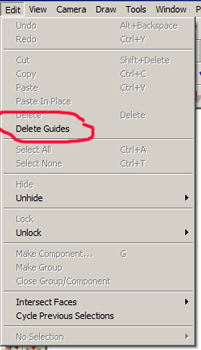

                            deleteguides.png

                            my SketchUp gallery

                            1 Reply Last reply
                            Reply Quote 0
                            • Dave RD
                              Dave R
                              last edited by

                              @errror404 said:

                              Hey guys, I know about show/hide guidelines... is there another button to erase them all on one shot?

                              thanks!

                              No plugin required. I assigned a keyboard shortcut for Edit>Delete Guides. Do that and you can have a real button.

                              Etaoin Shrdlu

                              %

                              (THERE'S NO PLACE LIKE)

                              G28 X0.0 Y0.0 Z0.0

                              M30

                              %

                              1 Reply Last reply
                              Reply Quote 0
                              • E
                                errror404
                                last edited by

                                @cotty said:

                                The only thing you have to do is: call it a button πŸ˜‰

                                Thanks... it was a matter of just finding where it was!!

                                1 Reply Last reply
                                Reply Quote 0

                                Hello! It looks like you're interested in this conversation, but you don't have an account yet.

                                Getting fed up of having to scroll through the same posts each visit? When you register for an account, you'll always come back to exactly where you were before, and choose to be notified of new replies (either via email, or push notification). You'll also be able to save bookmarks and upvote posts to show your appreciation to other community members.

                                With your input, this post could be even better πŸ’—

                                Register Login
                                • 1 / 1
                                • First post
                                  Last post
                                Buy SketchPlus
                                Buy SUbD
                                Buy WrapR
                                Buy eBook
                                Buy Modelur
                                Buy Vertex Tools
                                Buy SketchCuisine
                                Buy FormFonts

                                Advertisement



