[Plugin] Pen Tool +
-
Pen Tool +
[highlight=#800000:1yrimny6]NOTE: If upgrading from 1.5 then please delete the Pen Tool+.rb file and rob_hsltool folder from your plugins folder.[/highlight:1yrimny6]
Overview:
To help when manually stitching softened meshes
To quickly creates curves with lines
To sketch guide lines, points
To create lines with or without facesDescription:
Similar to native Line Tool in use but has 7 primary features :-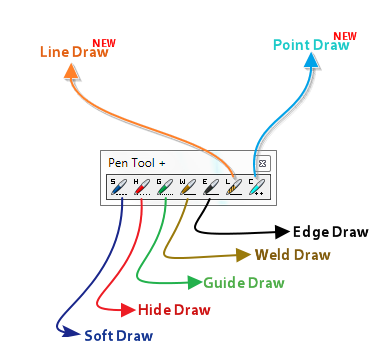
[1] Soft Draw allows the sketching of softened/smoothened lines (Hidden Geometry On)
[2] Hide Drawallows the sketching of hidden lines (Hidden Geometry On)
[3] Guide Draw allows the sketching of guide lines
[4] Weld Draw allows the sketching of curves
[5] Edge Draw allows the sketching of edges [lines] without making faces
[6] Line Draw allows the sketching of edges with faces
[7] Point Draw allows the sketching of construction points
Usage:
Run via 'Draw' menu or via the 'Pen Tool +' toolbar
[flash=600,450:1yrimny6]http://www.youtube.com/v/u6mdaWG3FAc[/flash:1yrimny6]Requirements:
Tested on SU8+ only (PC)
Installation:Please get the latest version from the SketchUcation PluginStore http://sketchucation.com/pluginstore?pln=Pen_Tools
[highlight=#800000:1yrimny6]NOTE: If upgrading from 1.5 please delete the Pen Tool+.rb file and rob_hsltool folder from your plugins folder.[/highlight:1yrimny6]
Version 1.1
- VCB Fix
- Edge Draw added
Version 1.2
- Group/Component bug fixed
- Midpoint 'jumping' on intersection' fixed
Version 1.3
- Weld bug addressed (don't click too fast when using Weld Draw mode)
Version 1.4
- Line Draw and Point Draw added
Version 1.5
- Clash addressed
Version 1.6.0
- Added Extension compatibility and custom folder goodness
Version 1.7.0
- Fix glitch with 'langhandler' which meant that in newer SketchUp versions lines always started at the origin, and some tools failed completely. [TIG]
Many thanks goes to TIG for helping me out with this tool.
-
Nice. I especially like the Weld Draw.

-
It can be a bit funky but that's part of it's charm

-
Funky already

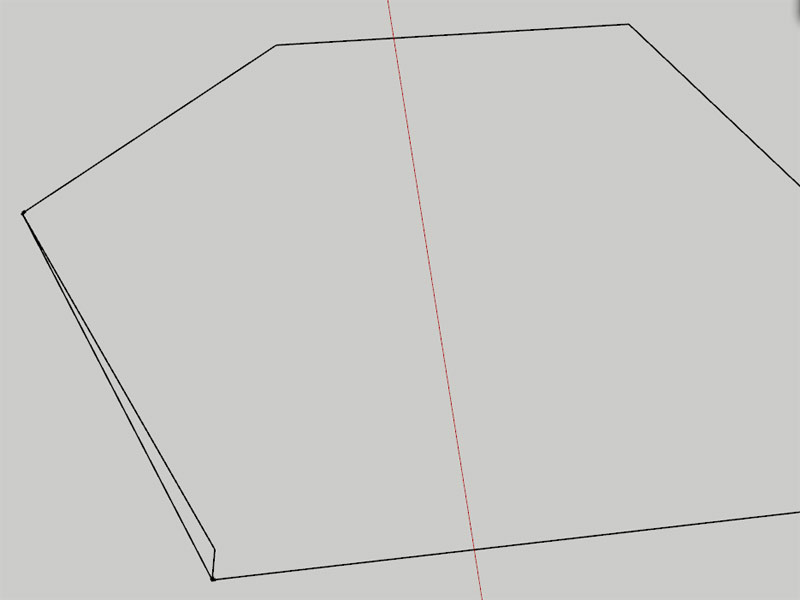
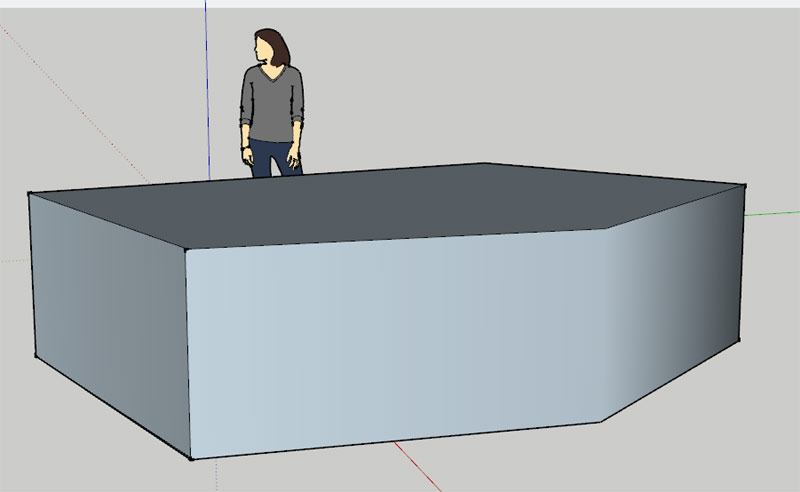
I am getting artifacts with the Weld Line. See image.
Also when you close a loop with the weld line then push/pull the face the edges created by the operation are not all soften/smoothed.
I am running a PC with Windows 7.Great start however.
I will be out the rest of the day so I won't be able to respond for a while.
-
Well well well - Rich is becoming a scripting monkey.
I'll congratulate you by making a feature request:
Tool that draws normal Edge.
The difference from the native Edge Tool: Doesn't auto generate faces. It can be bloody annoying at time that SketchUp keeps trying to generate faces for each edge created. -
@unknownuser said:
Well well well - Rich is becoming a scripting monkey
I wanna live the rock'n'roll life you enjoy
-
Congratulations, Rich.
-
Useful tool Rich.
-
Good start Rich. You'll need to get some shades like ThomThom has.
So now the requests begin. If you enter a length for the line in the VCB, the line is drawn but the tool continues from the start point rather than the end. Is it possible to fix that so it behaves like the native Line tool? And you only get one shot at entering the length of the line so if you change your mind or make an error when typing the length, you have to Undo and start over. Can that be fixed to operate like the native Line tool? Maybe both things go hand in hand?
-
@unknownuser said:
shades like ThomThom has
what shades?
@unknownuser said:
possible to fix that so it behaves like the native Line tool?
Yes, feel free to do so
@unknownuser said:
Maybe both things go hand in hand?
Like peanuts and gum Dave
-
@unknownuser said:
@unknownuser said:
shades like ThomThom has
what shades?
Those things over his eyes. What are those things anyway?
-
Eyebrows?
There's a fix coming on the VCB issue and an extra Edge Draw mode that doesn't create faces
-
Very cool idea -- thank-you!

Best,
Jason. -
Little update with Thom's and Dave's suggestions [not Eric's
 ]
] -
Well, Rich, congrats, really. I remember when Remus also wrote a plugin - now "non-scripters" are slowly becoming a minority here...

I remember a wise man once answering this question:
@unknownuser said:
Do you build or have you built any SketchUp Ruby Scripts?
like this...
@unknownuser said:
There are so many talented and generous ruby scripters out there that it would be a waste of resources to start playing with it and keep hindering them in their work with my basic questions...
And sorry for not having been able to me of more help - I have just come back home.
Nice icons, too!
-
Thanks Csaba, there are still some little gremlins [not Mike] to iron out
-
Thanks Rich.
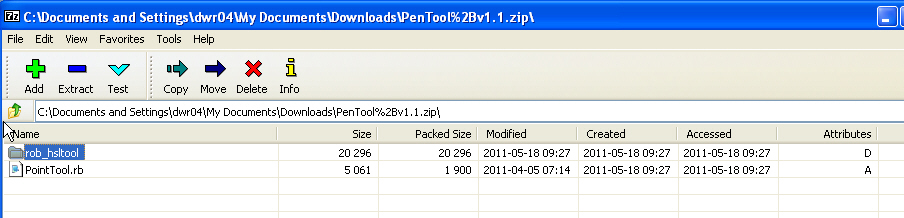
Out of curiosity, is this what I should see when I open the ZIP file?
-
try again
-
Cool!

-







Hello! It looks like you're interested in this conversation, but you don't have an account yet.
Getting fed up of having to scroll through the same posts each visit? When you register for an account, you'll always come back to exactly where you were before, and choose to be notified of new replies (either via email, or push notification). You'll also be able to save bookmarks and upvote posts to show your appreciation to other community members.
With your input, this post could be even better 💗
Register Login


Advertisement