sketchucation logo sketchucation
    • 登入
    Oops, your profile's looking a bit empty! To help us tailor your experience, please fill in key details like your SketchUp version, skill level, operating system, and more. Update and save your info on your profile page today!
    🔌 Smart Spline | Fluid way to handle splines for furniture design and complex structures. Download

    [Plugin] Pen Tool +

    已排程 已置頂 已鎖定 已移動 Plugins
    126 貼文 40 Posters 103.6k 瀏覽 40 Watching
    正在載入更多貼文
    • 從舊到新
    • 從新到舊
    • 最多點贊
    回覆
    • 在新貼文中回覆
    登入後回覆
    此主題已被刪除。只有擁有主題管理權限的使用者可以查看。
    • TIGT 離線
      TIG Moderator
      最後由 編輯

      @matt.gordon320 said:

      Hi Rich! Thanks again for releasing what has been one of my favorite plugins. I've started setting up the SketchUp installs for my firm, and I've got a little quirk to pass by you:

      I'm using Fredo6's 000_Additionalpluginsfolder.rb to pull scripts from a network hard drive to each individual station. For some reason I can't work out, the icons for PenTools don't show up, I just get a blank tool bar, though the buttons and the menu items under the draw menu work fine. In short, the script works, but the icons are missing!

      Any thoughts on where to start looking?

      Thanks!

      -Matt
      Edit the main file PenTool+.rb with a plain-text editor [like Notepad or Notepad++]
      Find line #1773...
      plugins = Sketchup.find_support_file("Plugins")
      change it to:
      plugins = File.dirname(__FILE__)
      and then Save the file.
      Restart SketchUp, and it should now find the custom plugins-folder location OK...

      Rich should really make this simple amendment to his toolset to allow wider use of custom plugins-folders easier... It's one of the few that still use the outdated find_support_file which always looks to the main Plugins folder 😒

      TIG

      1 條回覆 最後回覆 回覆 引用 0
      • Rich O BrienR 離線
        Rich O Brien Moderator
        最後由 編輯

        @Matt

        Silent update in the PluginStore

        NOTE: If upgrading from 1.5 to 1.6.0 please delete the Pen Tool+.rb file and rob_hsltool folder from your plugins folder.

        Download the free D'oh Book for SketchUp 📖

        1 條回覆 最後回覆 回覆 引用 0
        • M 離線
          matt.gordon320
          最後由 編輯

          Thanks both TIG and Rich!

          1 條回覆 最後回覆 回覆 引用 0
          • A 離線
            alexkara
            最後由 編輯

            The first time I use any of the pen tools, tool a line is automatically drawn from my starting point to the central Axis. Thereafter it behaves OK. This happens also when I change back to it.

            Anyone have this issue and is there a workaround I am missing. ❓

            1 條回覆 最後回覆 回覆 引用 0
            • Dave RD 離線
              Dave R
              最後由 編輯

              I'm not seeing that at all with these tools.

              What operating system, SketchUp version, etc.? Please complete your profile.

              Etaoin Shrdlu

              %

              (THERE'S NO PLACE LIKE)

              G28 X0.0 Y0.0 Z0.0

              M30

              %

              1 條回覆 最後回覆 回覆 引用 0
              • A 離線
                alexkara
                最後由 編輯

                I have updated my profile.

                Tried to attach a screen dump but did not know how.

                Anyone have any suggestions?

                1 條回覆 最後回覆 回覆 引用 0
                • P 離線
                  Pherim
                  最後由 編輯

                  I have the same issue, but only in Sketchup 2015 64bit. Are you sure your profile is correctly updated? It works for me in SU 2013 without problems.

                  Also, soft draw doesn't work at all in SU2015, the lines start from the origin and are not softened, and weld draw always generates a new line from the origin with every click instead of a continuous line.

                  1 條回覆 最後回覆 回覆 引用 0
                  • TIGT 離線
                    TIG Moderator
                    最後由 編輯

                    There is v1.7.0 updated in the PluginStore http://sketchucation.com/pluginstore?pln=Pen_Tools I've updated it for Rich - it now avoids the errors causing the first point to auto-create and to always be at the origin, and also some of the tools [like soft/weld] to be messed up completely...

                    If you get issues with tools like this, then it's always useful to try them with the Ruby Console open and pass on any errors.
                    In the case of these 'Pen Tools' there were clear error-messages relating to the string translations, which worked with earlier versions of SketchUp if the 'example,rb' tools had also been setup, but which now no longer work with newer SUp versions, and Ruby2 is not as forgiving either !

                    It was a simple fix to edit the file and delete the 21 erroneous 'langhandler' calls highlighted in the error-messages...

                    I think it now works fine - please test and report if I'm wrong !

                    TIG

                    1 條回覆 最後回覆 回覆 引用 0
                    • Clayton49C 離線
                      Clayton49
                      最後由 編輯

                      To all,

                      I was looking for a tool to just draw dashed lines, this tool seems to suggest it can do this o.k. therefore does it work with SU-PRO-2017 ? Or is there another tool that can draw dashed lines or various line styles similar to plain 2D-CAD ?

                      I seem to remember a set of tools that just functioned like 2D-CAD, but unsure if it had line style options ?

                      Anyway a tool like this would be quite useful to add further detail to extracted sectional model views for floor plans etc, as not everything needs to be modeled in 3D-SU. 2D items like: plan doors swings, plaster lines & symbols to name a few.

                      Over & out,
                      CJT54

                      Over & out,
                      Clayton.

                      %(#008000)[Trotman & Taylor
                      Architectural Consultants]

                      1 條回覆 最後回覆 回覆 引用 0
                      • Dave RD 離線
                        Dave R
                        最後由 編輯

                        There is a tool for drawing guides that you might use as dashed lines but remember, they will be deleted if you hit Delete Guides.
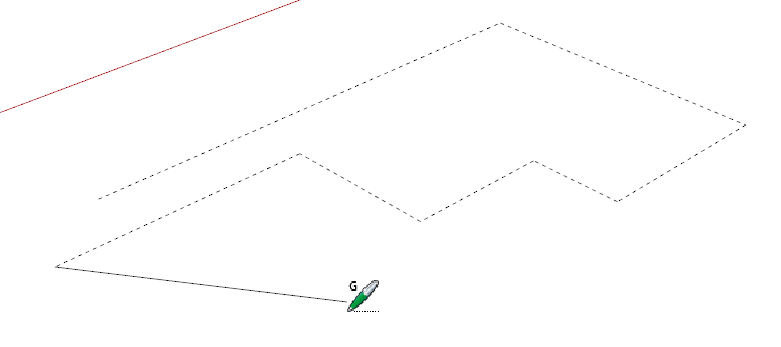
                        Screenshot - 7_30_2017 , 2_26_47 PM.png

                        TIG's 2D Tools has a tool that can draw "styled" lines. You might check that out.

                        Etaoin Shrdlu

                        %

                        (THERE'S NO PLACE LIKE)

                        G28 X0.0 Y0.0 Z0.0

                        M30

                        %

                        1 條回覆 最後回覆 回覆 引用 0
                        • Clayton49C 離線
                          Clayton49
                          最後由 編輯

                          @dave r said:

                          There is a tool for drawing guides that you might use as dashed lines but remember, they will be deleted if you hit Delete Guides.

                          [attachment=0:otl9wsk6]<!-- ia0 -->Screenshot - 7_30_2017 , 2_26_47 PM.png<!-- ia0 -->[/attachment:otl9wsk6]

                          TIG's 2D Tools has a tool that can draw "styled" lines. You might check that out.

                          Hi Dave-R,

                          Yes, the TIG'S-2D-TOOLS is what I'm after, but see it's not SU-PRO-2017 validated... grrr...I'll have to post something on that on the forum to see if it's o.k. to use.

                          Thanks,
                          Over & out,
                          CJT54

                          Over & out,
                          Clayton.

                          %(#008000)[Trotman & Taylor
                          Architectural Consultants]

                          1 條回覆 最後回覆 回覆 引用 0
                          • Rich O BrienR 離線
                            Rich O Brien Moderator
                            最後由 編輯

                            It's fine to use.

                            Just set your restriction policy in the extension manager to not be over zealous.

                            Download the free D'oh Book for SketchUp 📖

                            1 條回覆 最後回覆 回覆 引用 0
                            • Dave RD 離線
                              Dave R
                              最後由 編輯

                              It works just fine with SketchUp 2017. The fact that it shows as "unsigned" doesn't mean it won't work.


                              Etaoin Shrdlu

                              %

                              (THERE'S NO PLACE LIKE)

                              G28 X0.0 Y0.0 Z0.0

                              M30

                              %

                              1 條回覆 最後回覆 回覆 引用 0
                              • 1
                              • 2
                              • 3
                              • 4
                              • 5
                              • 6
                              • 7
                              • 6 / 7
                              • 第一個貼文
                                最後的貼文
                              Buy SketchPlus
                              Buy SUbD
                              Buy WrapR
                              Buy eBook
                              Buy Modelur
                              Buy Vertex Tools
                              Buy SketchCuisine
                              Buy FormFonts

                              Advertisement
