Dimensioning and arcs
-
Hello,
How is is possible, when indicating the dimensions of a piece, to indicate the radius of an arc?
Thanks, ocd
-
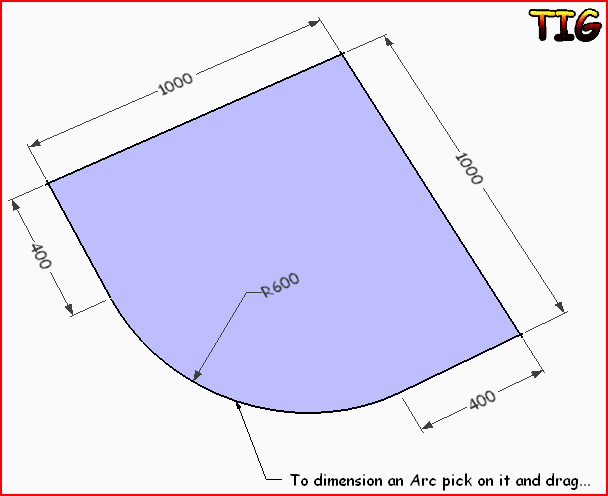 Like this with the Dimension tool ?
 -
Seems the normal tool Dimension makes that

Click the arc and you will write the arc radius dimension
Ah damned! Tig was the more speed this time -
The "gotcha" on this one is that you can't place the radius dimension if the arc is inside a component or group. You'll have to open the component or group for editing to you have direct access to the arc itself. I prefer not to have dimensions in components because the dimension will show up in every instance which may create redundancy. It also changes the dimensions of the bounding box resulting in inaccurate reporting in the cut list. For radius dimensions, the way I approach all this is to open the component for editing and place the radius dimension. Then I select the dimension, hit Ctrl+X (Edit>Cut), close the component for editing and then immediately hit Edit>Paste in Place. The radius dimension will only appear in the one place and will be outside the component.
-
Thanks, Dave.
That has been an issue that has been confounding me for years and I have not found a good work around. As always these little pearls of wisdom we glean from others really help improve work flow processes. So simple and intuitive but yet so elusive.
John



Hello! It looks like you're interested in this conversation, but you don't have an account yet.
Getting fed up of having to scroll through the same posts each visit? When you register for an account, you'll always come back to exactly where you were before, and choose to be notified of new replies (either via email, or push notification). You'll also be able to save bookmarks and upvote posts to show your appreciation to other community members.
With your input, this post could be even better 💗
Register Login


Advertisement