sketchucation logo sketchucation
    • Login
    Oops, your profile's looking a bit empty! To help us tailor your experience, please fill in key details like your SketchUp version, skill level, operating system, and more. Update and save your info on your profile page today!
    Mac User? | Join the Rayscaper Beta for Mac Learn More

    [Plugin] Sketchup Ivy

    Scheduled Pinned Locked Moved Plugins
    732 Posts 172 Posters 511.0k Views 172 Watching
    Loading More Posts
    • Oldest to Newest
    • Newest to Oldest
    • Most Votes
    Reply
    • Reply as topic
    Log in to reply
    This topic has been deleted. Only users with topic management privileges can see it.
    • OxerO
      Oxer
      last edited by

      On OS X 10.10.2 & SU2015 if you have Shift locked the plugin doesn't work, see if you have Shift unlocked because for me the plugin works fine.

      "The result is the end what is important is the process" by Oxer
      http://www.oxervision.blogspot.com/

      1 Reply Last reply
      Reply Quote 0
      • TIGT
        TIG Moderator
        last edited by

        Good tip Oxer. ☀
        If you have Shift locked you can't hold it + click to complete the Ivy ?
        Works for other MAC users, so please try Oxer's suggestion...

        TIG

        1 Reply Last reply
        Reply Quote 0
        • M
          maxosmedia
          last edited by

          Is this with the very latest version from yesterday ?
          —Y
          Have you tried it with the Ruby Console open ?
          —Y
          Does it show the magenta branches [Click] ?
          —Y
          Does it show the green X markers for the leaves [when Alt+Click MAC] ?
          —Y
          On Shift+Click what happens ?
          — Created only one branch. No leaves
          Any error messages ?
          —N

          1 Reply Last reply
          Reply Quote 0
          • cottyC
            cotty
            last edited by

            @tig said:

            Another great bug-report...
            Well spotted !
            It's now fixed.

            Fix confirmed. Thank you!

            my SketchUp gallery

            1 Reply Last reply
            Reply Quote 0
            • TIGT
              TIG Moderator
              last edited by

              @maxosmedia said:

              Is this with the very latest version from yesterday ?
              —Y
              Have you tried it with the Ruby Console open ?
              —Y
              Does it show the magenta branches [Click] ?
              —Y
              Does it show the green X markers for the leaves [when Alt+Click MAC] ?
              —Y
              On Shift+Click what happens ?
              — Created only one branch. No leaves
              Any error messages ?
              -N
              Have you followed Oxer's advice about [un]locking-shift_key ?
              You can also mess up some key-pressing if some aspects of the MAC's keyboard are mis-set !
              Many other MAC users [including me !] have no issues... so it must be solvable... 😒

              TIG

              1 Reply Last reply
              Reply Quote 0
              • M
                maxosmedia
                last edited by

                SU 2014 Sketchup Ivy works fine, SU 2015 — bugs. On the same machine, on the same system, at the same time. keyboard and the keys are not modified

                1 Reply Last reply
                Reply Quote 0
                • TIGT
                  TIG Moderator
                  last edited by

                  @maxosmedia said:

                  SU 2014 Sketchup Ivy works fine, SU 2015 — bugs. On the same machine, on the same system, at the same time. keyboard and the keys are not modified
                  This is very weird. 😕
                  There is no discernible difference between v2014 and v2015 Ruby, and the code is just the same on both !

                  TIG

                  1 Reply Last reply
                  Reply Quote 0
                  • M
                    maxosmedia
                    last edited by

                    Ruby console:

                    Error: #<TypeError: wrong argument type nil (expected Array)> /Users/myusername/Library/Application Support/SketchUp 2015/SketchUp/Plugins/LiveIvy/LiveIvy_tool.rb:340:inadd_face'
                    /Users/myusername/Library/Application Support/SketchUp 2015/SketchUp/Plugins/LiveIvy/LiveIvy_tool.rb:340:in block in birth_stem' /Users/myusername/Library/Application Support/SketchUp 2015/SketchUp/Plugins/LiveIvy/LiveIvy_tool.rb:323:in each'
                    /Users/myusername/Library/Application Support/SketchUp 2015/SketchUp/Plugins/LiveIvy/LiveIvy_tool.rb:323:in birth_stem' /Users/myusername/Library/Application Support/SketchUp 2015/SketchUp/Plugins/LiveIvy/LiveIvy_tool.rb:312:in birth'
                    /Users/myusername/Library/Application Support/SketchUp 2015/SketchUp/Plugins/LiveIvy/LiveIvy_tool.rb:180:in onLButtonUp'

                    1 Reply Last reply
                    Reply Quote 0
                    • olisheaO
                      olishea
                      last edited by

                      Do you have different plugins between 2014 and 2015? A conflict?

                      oli

                      1 Reply Last reply
                      Reply Quote 0
                      • TIGT
                        TIG Moderator
                        last edited by

                        Right now we are getting somewhere !

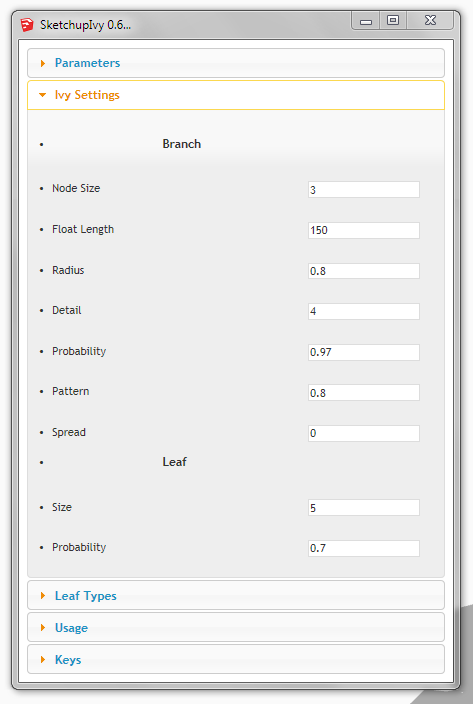
                        If you set the 'Branch Radius' to 0.0 you will get that error, because you can't have a zero width stem !
                        These screen shots show the default parameters/settings...
                        Try resetting back to those...
                        There are helpful tooltips if you hover over each item...
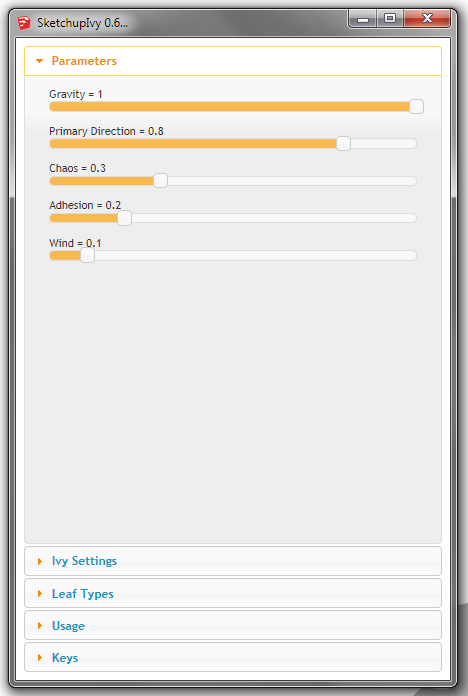

                        IvyParameters.PNG


                        IvySettings.PNG

                        TIG

                        1 Reply Last reply
                        Reply Quote 0
                        • M
                          maxosmedia
                          last edited by

                          TIG, thanks for you advice! All fine!
                          Perhaps you should make the default setting not "0"?

                          1 Reply Last reply
                          Reply Quote 0
                          • TIGT
                            TIG Moderator
                            last edited by

                            @maxosmedia said:

                            TIG, thanks for you advice! All fine!
                            Perhaps you should make the default setting not "0"?
                            I'm looking at it right now !

                            TIG

                            1 Reply Last reply
                            Reply Quote 0
                            • TIGT
                              TIG Moderator
                              last edited by

                              This updated version [0.6.8x] is "fool-proofed" !
                              It prevents you entering zero values etc as settings which could break the code [it usually defaults to 0.1 if < 0.1 etc ]
                              http://sketchucation.com/pluginstore?pln=SketchupIvy

                              TIG

                              1 Reply Last reply
                              Reply Quote 0
                              • M
                                maxosmedia
                                last edited by

                                Thanks, TIG! Works fine! 😄

                                1 Reply Last reply
                                Reply Quote 0
                                • KrisidiousK
                                  Krisidious
                                  last edited by

                                  @tig said:

                                  This updated version [0.6.8x] is "fool-proofed" !
                                  It prevents you entering zero values etc as settings which could break the code

                                  You meant Full-Proofed right? 🤣

                                  By: Kristoff Rand
                                  Home DesignerUnique House Plans

                                  1 Reply Last reply
                                  Reply Quote 0
                                  • J
                                    Jesgargo
                                    last edited by

                                    Hi!
                                    Thanks for that amazing plugintool.
                                    I have skp2015x64, i install de .rbz file with custom>extension..but when i open skp the subfolder menu doesn´t appear, only the Liveivy icon, but don´t work, don´t do anything. Does it works in skp2015?
                                    Thanks a lot!
                                    Jesus.

                                    1 Reply Last reply
                                    Reply Quote 0
                                    • TIGT
                                      TIG Moderator
                                      last edited by

                                      @jesgargo said:

                                      Hi!
                                      Thanks for that amazing plugintool.
                                      I have skp2015x64, i install de .rbz file with custom>extension..but when i open skp the subfolder menu doesn´t appear, only the Liveivy icon, but don´t work, don´t do anything. Does it works in skp2015?
                                      Thanks a lot!
                                      Jesus.
                                      Have you installed it properly from the RBZ using SketchUp's Window > Preferences > Extensions > Install... button ?
                                      Was the installation reported as successful ?
                                      Have you restarted SketchUp since then ?

                                      Note that it is NOT an Extension - it's just a Plugin - so it is NOT in the Preferences > Extensions list.

                                      It appears in 'Toolbars' list as 'LiveIvy' - activate it if necessary - launch the tool by clicking the one button on its toolbar.

                                      It also appears under the 'Draw' menu as 'Live Ivy Tool', that item also launches the tool...

                                      Follow the instructions in its dialog.

                                      It has different tabs which allow you to choose different Parameters, Ivy Settings, Leaf Types, and its last two tabs are the 'Help' section - guidance on Usage and the Key presses to modify the results.

                                      Although the latest version is now trapped to prevent you completely breaking it - for the avoidance of doubt, the original default settings screen-shots are reprised in this post: http://sketchucation.com/forums/viewtopic.php?p=556406#p556406

                                      TIG

                                      1 Reply Last reply
                                      Reply Quote 0
                                      • B
                                        blackdogsketch
                                        last edited by

                                        Wow. This is awesome. Thanks so much.
                                        Two questions:

                                        1. Maxing "Adhesion" still leaves a significant amount of branches moving away from a wall surface. Is there any way to make the branches stay in contact more? Or to have a may zone that the branches may occupy (say, 6" thick, like real ivy)
                                        2. Is it possible to add user-defined jpegs for leaves and bark textures?
                                        1 Reply Last reply
                                        Reply Quote 0
                                        • TIGT
                                          TIG Moderator
                                          last edited by

                                          @blackdogsketch said:

                                          Wow. This is awesome. Thanks so much.
                                          Two questions:

                                          1. Maxing "Adhesion" still leaves a significant amount of branches moving away from a wall surface. Is there any way to make the branches stay in contact more? Or to have a may zone that the branches may occupy (say, 6" thick, like real ivy)
                                          2. Is it possible to add user-defined jpegs for leaves and bark textures?
                                            I only made 'compatibility' revisions to the OP's code...
                                            If you a look at the code in the various files, then you can try adjust a few things and see what happens...
                                            You can add your own leaf component cutouts - based on your own image textures...
                                            Save them as SKP files in the subfolder ..Plugins//LiveIvy/Textures...
                                            They are available when the tool is first used.
                                            The 'stem.jpg' is used for the stalks' textures, so if you replace that with another it changes in your future ivies...

                                          TIG

                                          1 Reply Last reply
                                          Reply Quote 0
                                          • B
                                            blackdogsketch
                                            last edited by

                                            Thanks TIG
                                            Sounds like there's no clear method of getting more ivy to "stick" to the wall.
                                            Hey-While I'm here...thank you for all your incredible work for the SU community!
                                            You make my workflow and professional results better.

                                            1 Reply Last reply
                                            Reply Quote 0

                                            Hello! It looks like you're interested in this conversation, but you don't have an account yet.

                                            Getting fed up of having to scroll through the same posts each visit? When you register for an account, you'll always come back to exactly where you were before, and choose to be notified of new replies (either via email, or push notification). You'll also be able to save bookmarks and upvote posts to show your appreciation to other community members.

                                            With your input, this post could be even better 💗

                                            Register Login
                                            • 1
                                            • 2
                                            • 3
                                            • 4
                                            • 5
                                            • 36
                                            • 37
                                            • 2 / 37
                                            • First post
                                              Last post
                                            Buy SketchPlus
                                            Buy SUbD
                                            Buy WrapR
                                            Buy eBook
                                            Buy Modelur
                                            Buy Vertex Tools
                                            Buy SketchCuisine
                                            Buy FormFonts

                                            Advertisement