sketchucation logo sketchucation
    • 登入
    Oops, your profile's looking a bit empty! To help us tailor your experience, please fill in key details like your SketchUp version, skill level, operating system, and more. Update and save your info on your profile page today!
    🔌 Smart Spline | Fluid way to handle splines for furniture design and complex structures. Download

    [Plugin] Sketchup Ivy

    已排程 已置頂 已鎖定 已移動 Plugins
    732 貼文 172 Posters 314.8k 瀏覽 172 Watching
    正在載入更多貼文
    • 從舊到新
    • 從新到舊
    • 最多點贊
    回覆
    • 在新貼文中回覆
    登入後回覆
    此主題已被刪除。只有擁有主題管理權限的使用者可以查看。
    • massimoM 離線
      massimo Moderator
      最後由 編輯

      I don't have this plugin, but in the first post you can see that it should work fine in SU 8-2015 versions. Please don't past anything. Download the .rbz from the first post of this thread (the big button) instead and install it within SU by going to window-->preferences-->extensions-->install extension.

      1 條回覆 最後回覆 回覆 引用 0
      • TIGT 線上
        TIG Moderator
        最後由 編輯

        @nalibo007 said:

        please i need help..mine is not appearing under plugins and i have pasted it exactly in the plugins folder. iam currently using sketch up pro 2013.....a help wii be appreciated.

        You have v2013 of SketchUp...
        You do NOT 'paste' anything into the Plugins folder.
        Use Preferences > Extensions > Install.... button to extract the contents of the RBZ file into the correct Plugins folder - all done automatically.
        Since v8 this is the correct way to install RBZ archived plugins...
        Most plugins come in that format - there is no need to ever open you Plugins folder !
        Manually extracting and pasting files is a sure way of ruining your day...

        ALSO, please be aware that not all plugins appear in the Plugins menu [aka Extensions menu in v2015]
        In this case, the 'LiveIvy' tool appears under the Draw menu, and there is also a Toolbar of the same name too...

        TIG

        1 條回覆 最後回覆 回覆 引用 0
        • R 離線
          rhott311
          最後由 編輯

          Thanks! Great Work! Can confirm the plugin is working in OSX Yosemite in sketchup 8.
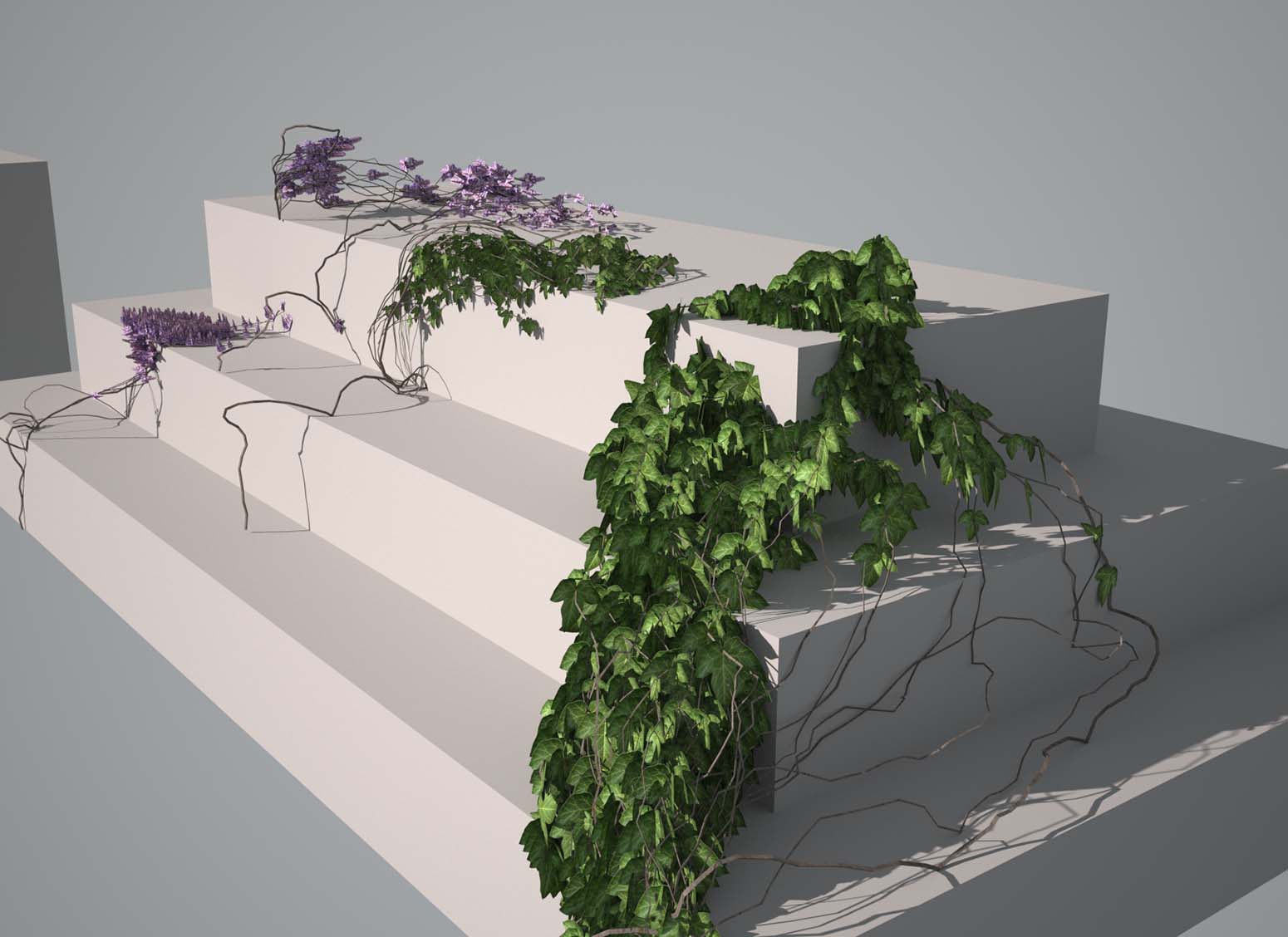

          IVY TEST.jpg

          1 條回覆 最後回覆 回覆 引用 0
          • TIGT 線上
            TIG Moderator
            最後由 編輯

            There's an update...
            http://sketchucation.com/pluginstore?pln=SketchupIvy
            It only affects a few users with older versions of SketchUp etc.
            It should now be glitch free in all versions from v8 to v2015...

            TIG

            1 條回覆 最後回覆 回覆 引用 0
            • KrisidiousK 離線
              Krisidious
              最後由 編輯

              Thanks TIG...

              By: Kristoff Rand
              Home DesignerUnique House Plans

              1 條回覆 最後回覆 回覆 引用 0
              • ChisainaC 離線
                Chisaina
                最後由 編輯

                TIG,thank you for the work, but in the 15 SU 64 prоblem with leaves, they are going one on one in one place. Although before generatsiey crosses marked as before, around the trunk.
                Change please as possible this bug. Thank U. And Prastio of language, the use of the machine.

                1 條回覆 最後回覆 回覆 引用 0
                • TIGT 線上
                  TIG Moderator
                  最後由 編輯

                  Thanks for the bug-report. 😕
                  It was an easy to find typo, although I can't see how it ever happened !
                  The latest version is available here http://sketchucation.com/pluginstore?pln=SketchupIvy I have checked it and it seems to work OK again...
                  😒

                  TIG

                  1 條回覆 最後回覆 回覆 引用 0
                  • ChisainaC 離線
                    Chisaina
                    最後由 編輯

                    TIG, Thanks for the speed

                    1 條回覆 最後回覆 回覆 引用 0
                    • cottyC 離線
                      cotty
                      最後由 編輯

                      For me, only the toolbar and not the draw menu entry is working.

                      my SketchUp gallery

                      1 條回覆 最後回覆 回覆 引用 0
                      • TIGT 線上
                        TIG Moderator
                        最後由 編輯

                        @cotty said:

                        For me, only the toolbar and not the draw menu entry is working.
                        Another great bug-report...
                        Well spotted !
                        It's now fixed.
                        Here's the update http://sketchucation.com/pluginstore?pln=SketchupIvy

                        TIG

                        1 條回覆 最後回覆 回覆 引用 0
                        • M 離線
                          maxosmedia
                          最後由 編輯

                          Bug. As before.
                          SHIFT+Click: Created only one branch. No leaves

                          Mac OS X 10.9.5, SU 2015

                          1 條回覆 最後回覆 回覆 引用 0
                          • TIGT 線上
                            TIG Moderator
                            最後由 編輯

                            @maxosmedia said:

                            Bug. As before.
                            SHIFT+Click: Created only one branch. No leaves

                            Mac OS X 10.9.5, SU 2015
                            Is this with the very latest version from yesterday ?
                            Have you tried it with the Ruby Console open ?
                            Does it show the magenta branches [Click] ?
                            Does it show the green X markers for the leaves [when Alt+Click MAC] ?
                            On Shift+Click what happens ?
                            Any error messages ?

                            TIG

                            1 條回覆 最後回覆 回覆 引用 0
                            • OxerO 離線
                              Oxer
                              最後由 編輯

                              On OS X 10.10.2 & SU2015 if you have Shift locked the plugin doesn't work, see if you have Shift unlocked because for me the plugin works fine.

                              "The result is the end what is important is the process" by Oxer
                              http://www.oxervision.blogspot.com/

                              1 條回覆 最後回覆 回覆 引用 0
                              • TIGT 線上
                                TIG Moderator
                                最後由 編輯

                                Good tip Oxer. ☀
                                If you have Shift locked you can't hold it + click to complete the Ivy ?
                                Works for other MAC users, so please try Oxer's suggestion...

                                TIG

                                1 條回覆 最後回覆 回覆 引用 0
                                • M 離線
                                  maxosmedia
                                  最後由 編輯

                                  Is this with the very latest version from yesterday ?
                                  —Y
                                  Have you tried it with the Ruby Console open ?
                                  —Y
                                  Does it show the magenta branches [Click] ?
                                  —Y
                                  Does it show the green X markers for the leaves [when Alt+Click MAC] ?
                                  —Y
                                  On Shift+Click what happens ?
                                  — Created only one branch. No leaves
                                  Any error messages ?
                                  —N

                                  1 條回覆 最後回覆 回覆 引用 0
                                  • cottyC 離線
                                    cotty
                                    最後由 編輯

                                    @tig said:

                                    Another great bug-report...
                                    Well spotted !
                                    It's now fixed.

                                    Fix confirmed. Thank you!

                                    my SketchUp gallery

                                    1 條回覆 最後回覆 回覆 引用 0
                                    • TIGT 線上
                                      TIG Moderator
                                      最後由 編輯

                                      @maxosmedia said:

                                      Is this with the very latest version from yesterday ?
                                      —Y
                                      Have you tried it with the Ruby Console open ?
                                      —Y
                                      Does it show the magenta branches [Click] ?
                                      —Y
                                      Does it show the green X markers for the leaves [when Alt+Click MAC] ?
                                      —Y
                                      On Shift+Click what happens ?
                                      — Created only one branch. No leaves
                                      Any error messages ?
                                      -N
                                      Have you followed Oxer's advice about [un]locking-shift_key ?
                                      You can also mess up some key-pressing if some aspects of the MAC's keyboard are mis-set !
                                      Many other MAC users [including me !] have no issues... so it must be solvable... 😒

                                      TIG

                                      1 條回覆 最後回覆 回覆 引用 0
                                      • M 離線
                                        maxosmedia
                                        最後由 編輯

                                        SU 2014 Sketchup Ivy works fine, SU 2015 — bugs. On the same machine, on the same system, at the same time. keyboard and the keys are not modified

                                        1 條回覆 最後回覆 回覆 引用 0
                                        • TIGT 線上
                                          TIG Moderator
                                          最後由 編輯

                                          @maxosmedia said:

                                          SU 2014 Sketchup Ivy works fine, SU 2015 — bugs. On the same machine, on the same system, at the same time. keyboard and the keys are not modified
                                          This is very weird. 😕
                                          There is no discernible difference between v2014 and v2015 Ruby, and the code is just the same on both !

                                          TIG

                                          1 條回覆 最後回覆 回覆 引用 0
                                          • M 離線
                                            maxosmedia
                                            最後由 編輯

                                            Ruby console:

                                            Error: #<TypeError: wrong argument type nil (expected Array)> /Users/myusername/Library/Application Support/SketchUp 2015/SketchUp/Plugins/LiveIvy/LiveIvy_tool.rb:340:inadd_face'
                                            /Users/myusername/Library/Application Support/SketchUp 2015/SketchUp/Plugins/LiveIvy/LiveIvy_tool.rb:340:in block in birth_stem' /Users/myusername/Library/Application Support/SketchUp 2015/SketchUp/Plugins/LiveIvy/LiveIvy_tool.rb:323:in each'
                                            /Users/myusername/Library/Application Support/SketchUp 2015/SketchUp/Plugins/LiveIvy/LiveIvy_tool.rb:323:in birth_stem' /Users/myusername/Library/Application Support/SketchUp 2015/SketchUp/Plugins/LiveIvy/LiveIvy_tool.rb:312:in birth'
                                            /Users/myusername/Library/Application Support/SketchUp 2015/SketchUp/Plugins/LiveIvy/LiveIvy_tool.rb:180:in onLButtonUp'

                                            1 條回覆 最後回覆 回覆 引用 0
                                            • 1
                                            • 2
                                            • 33
                                            • 34
                                            • 35
                                            • 36
                                            • 37
                                            • 37 / 37
                                            • 第一個貼文
                                              最後的貼文
                                            Buy SketchPlus
                                            Buy SUbD
                                            Buy WrapR
                                            Buy eBook
                                            Buy Modelur
                                            Buy Vertex Tools
                                            Buy SketchCuisine
                                            Buy FormFonts

                                            Advertisement