sketchucation logo sketchucation
    • 登入
    Oops, your profile's looking a bit empty! To help us tailor your experience, please fill in key details like your SketchUp version, skill level, operating system, and more. Update and save your info on your profile page today!
    🔌 Smart Spline | Fluid way to handle splines for furniture design and complex structures. Download

    [Plugin] Sketchup Ivy

    已排程 已置頂 已鎖定 已移動 Plugins
    732 貼文 172 Posters 315.2k 瀏覽 172 Watching
    正在載入更多貼文
    • 從舊到新
    • 從新到舊
    • 最多點贊
    回覆
    • 在新貼文中回覆
    登入後回覆
    此主題已被刪除。只有擁有主題管理權限的使用者可以查看。
    • S 離線
      saturne45
      最後由 編輯

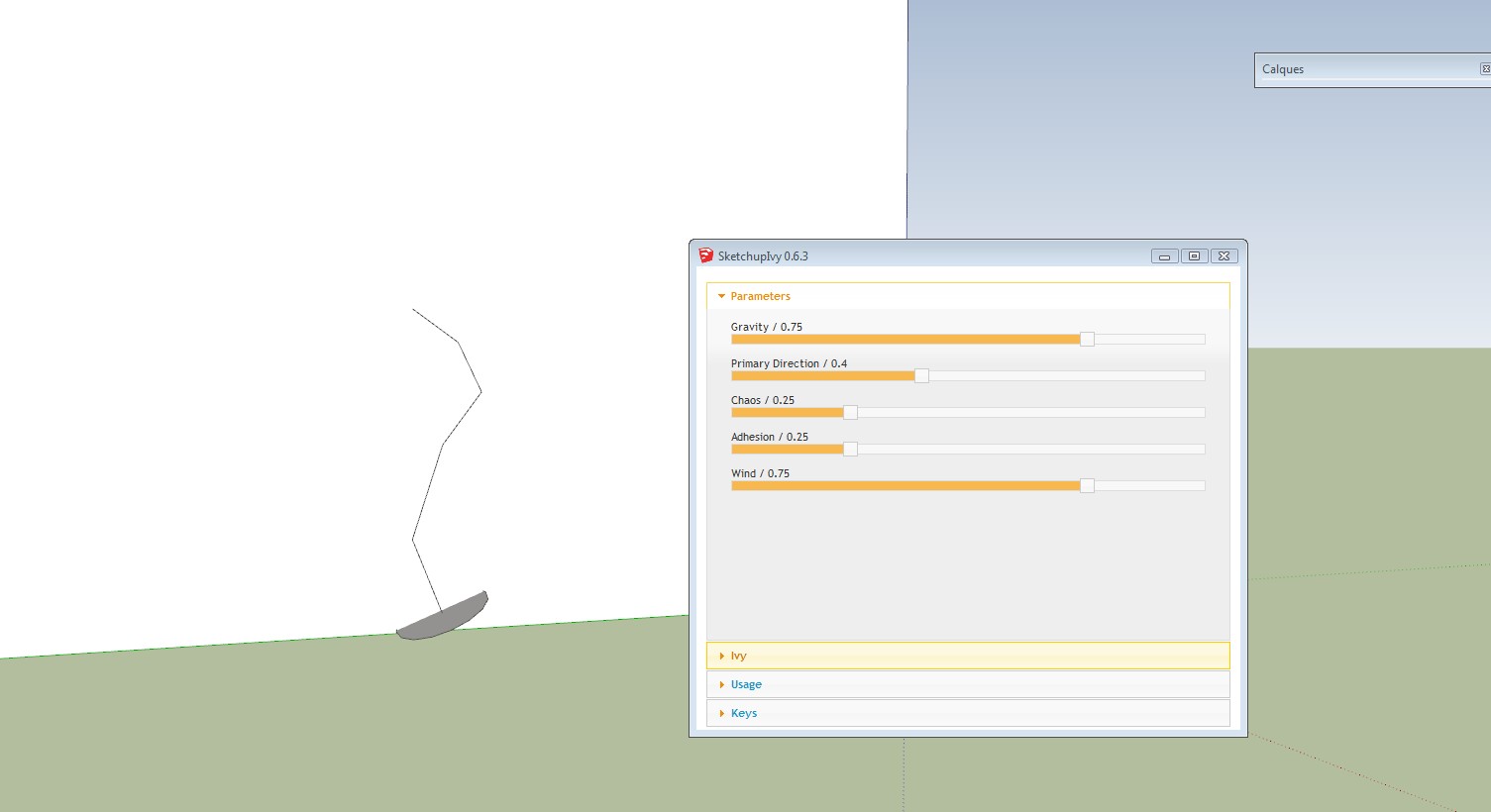
      Thank you for reply, when I start the plugin I can't get the reds lines ( branch) on my face,when I do ctrl left clic I get a littles crosses and shift clic I do that ? see on my screencapture. The plug installation is correct.
      right now; I'm looking for if there is a conflict with others plugins.Thank you.

      liveivi .jpg

      1 條回覆 最後回覆 回覆 引用 0
      • saberopusS 離線
        saberopus
        最後由 編輯

        just left click to continue the growing process, then use ctrl+click (as you know) to add leaves and shift+click to finish

        1 條回覆 最後回覆 回覆 引用 0
        • saberopusS 離線
          saberopus
          最後由 編輯

          @jbjdesigns said:

          The "branch" part worked okay; but when I applied the leaves, they all drooped (no matter what settings I used... and I really tried to make this work).

          I seem to be having this same issue... all the leaves point downward, generally, and so the overall appearance is 'droopy.' There's doesn't seem to be a parameter to adjust this, though? Any thoughts?

          1 條回覆 最後回覆 回覆 引用 0
          • KrisidiousK 離線
            Krisidious
            最後由 編輯

            Gravity might be your problem. Try setting it lower... Somewhere earlier in these posts there are default settings.

            By: Kristoff Rand
            Home DesignerUnique House Plans

            1 條回覆 最後回覆 回覆 引用 0
            • S 離線
              saturne45
              最後由 編輯

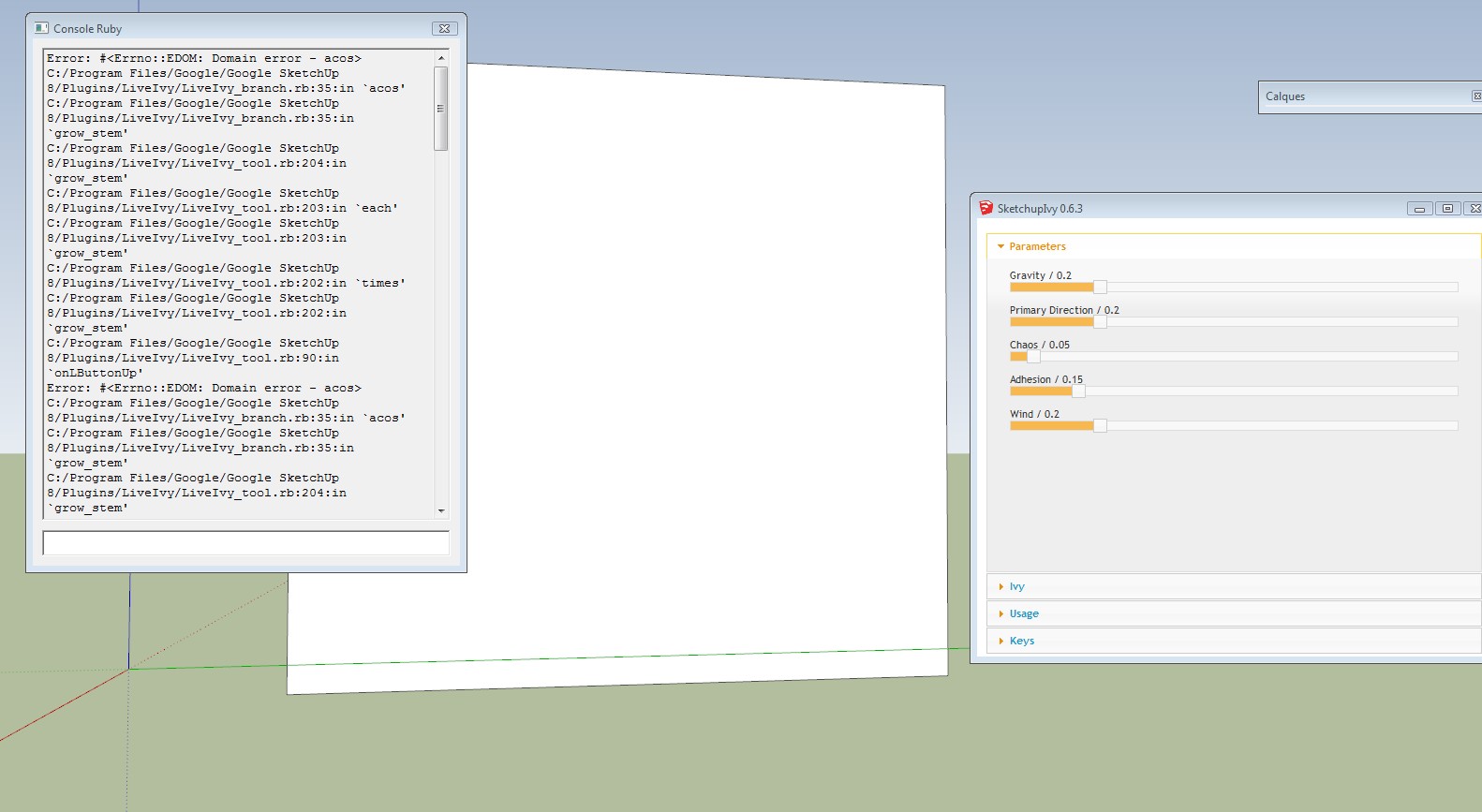
              Hello, Thank you for your reply, Still not find a solution. But can you explain to me this error message in the ruby consolle? look on screencapture. Thank you.

              IVI.jpg

              1 條回覆 最後回覆 回覆 引用 0
              • M 離線
                mechipo
                最後由 編輯

                Thanks for this !!

                1 條回覆 最後回覆 回覆 引用 0
                • L 離線
                  lomanzo78
                  最後由 編輯

                  Hi im also having probles in Mac. the pluggin dialog apears, but at the moment than I want to do an ivy it desnt do anything, can you help me
                  thanks

                  1 條回覆 最後回覆 回覆 引用 0
                  • OxerO 離線
                    Oxer
                    最後由 編輯

                    I'm having problems now too in OSX 10.9.1 and SU2013, before the Ivy version 0.6 worked fine on Mac, now when i call the plugin it appears this in Ruby Console:
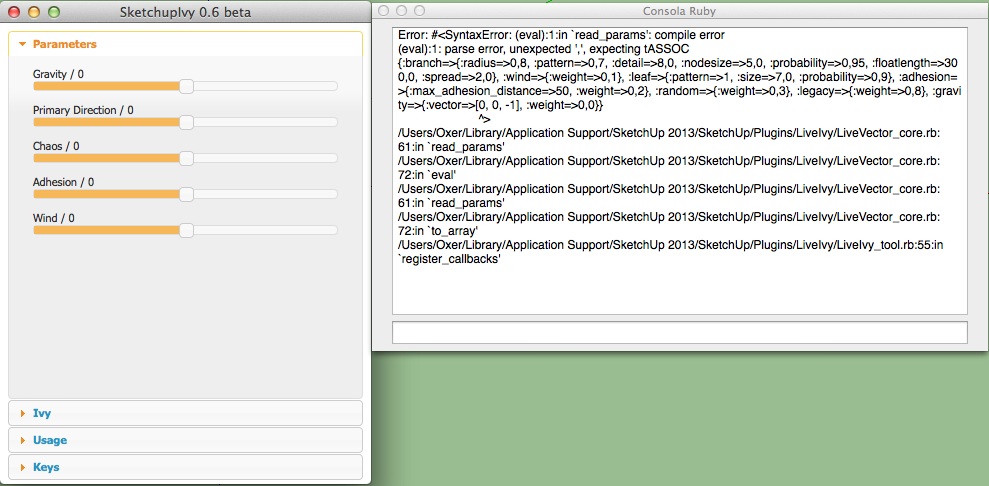
                    Ruby Console Error .jpg

                    PS: I have uninstalled all the plugins except Ivy and the problem persists.

                    "The result is the end what is important is the process" by Oxer
                    http://www.oxervision.blogspot.com/

                    1 條回覆 最後回覆 回覆 引用 0
                    • TIGT 離線
                      TIG Moderator
                      最後由 編輯

                      You have float values saved as 0,8 rather than 0.8 so the commas breaks the conversion of the read_defaults string back into the hash ! There are some commas it needs, and some that should be '.' !
                      You use a commas as your decimal separator rather than the '.', but Ruby uses '.' always...
                      It should be something like:
                      {:gravity=>{:vector=>[0, 0, -1], :weight=>1,0}, :branch=>{:radius=>0,8, :nodesize=>3, :detail=>4, :probability=>0,97, :floatlength=>150, :spread=>1,0, :pattern=>0,8}, :wind=>{:weight=>0,1}, :random=>{:weight=>0,3}, :adhesion=>{:weight=>0,2, :max_adhesion_distance=>50}, :legacy=>{:weight=>0,8}, :leaf=>{:probability=>0,75, :size=>5,0, :pattern=>1}}
                      but you have:
                      {:gravity=>{:vector=>[0, 0, -1], :weight=>1,0}, :branch=>{:radius=>0.8, :nodesize=>3, :detail=>4, :probability=>0.97, :floatlength=>150, :spread=>1,0, :pattern=>0.8}, :wind=>{:weight=>0.1}, :random=>{:weight=>0.3}, :adhesion=>{:weight=>0.2, :max_adhesion_distance=>50}, :legacy=>{:weight=>0.8}, :leaf=>{:probability=>0.75, :size=>5,0, :pattern=>1}}

                      If you edit the file 'LiveVector_core.rb' with a plain-text editor and find line #61 that says:
                      return eval(str)
                      and now insert these lines of code just in front of it, thus:
                      split=str.split('=>') split.dup.each_with_index{|e, i| next unless e=~/^[0-9]/; next unless e.count(',')==2; split[i]=e.sub(/,/, '.') } str=split.join('=>')
                      then
                      return eval(str)
                      This should change the ',' to '.' - but only in the numbers like 0,8 >>> 0.8 but vector arrays and simple integers are ignored.
                      The hash should now eval OK... 😒

                      TIG

                      1 條回覆 最後回覆 回覆 引用 0
                      • OxerO 離線
                        Oxer
                        最後由 編輯

                        Hi TIG,
                        I done that you say me but it continue with the same Ruby Console Error, after try all possibilities (uninstall all plugins, delete SU preferences, etc) and to see that the problem persisted I have opted for delete SU2013 folder, all preferences (SU preferences, all plugins preferences, hide files related) and reinstall SU and the plugins and voila! now all work fine.
                        I had time to try more things, perhaps it were a corrupt preference file or a conflict with other plugin, I don't know, mystery! ❓

                        "The result is the end what is important is the process" by Oxer
                        http://www.oxervision.blogspot.com/

                        1 條回覆 最後回覆 回覆 引用 0
                        • JBJDesignsJ 離線
                          JBJDesigns
                          最後由 編輯

                          @krisidious said:

                          Gravity might be your problem. Try setting it lower... Somewhere earlier in these posts there are default settings.

                          The gravity settings were set at various levels, i.e., low, mid and high values. The leaves still droop. Also, I haven't heard anything back about the leaves turning up in every new project I start as components. Although it is now easier to "delete" the leaved and purge from materials, it's still annoying. Great idea, but I'd love to see further refinements.

                          ...you send them to school, you give them books, and they eat the pages...

                          1 條回覆 最後回覆 回覆 引用 0
                          • A 離線
                            ayarriquitukis
                            最後由 編輯

                            i fix a problem with the alpha img i can use in sketchup 2014... if you want tell me ... "for search a way to upload my new files"excuse me for the bad english....

                            1 條回覆 最後回覆 回覆 引用 0
                            • J 離線
                              Jorgensen
                              最後由 編輯

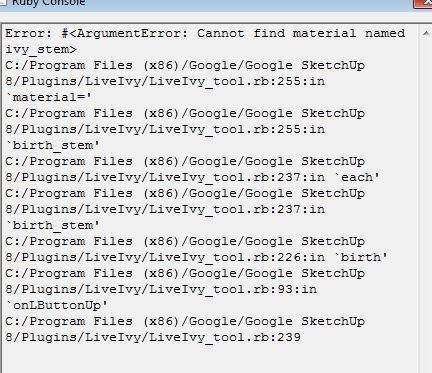
                              When I press SHIFT+CLICK, I get the attaced errors.

                              Does anyone know if I can fix this?

                              Thanks 😄
                              Jorgensen


                              Capture.JPG

                              sketchup pro 2016 16.1.1449 64 bit | windows 10 pro | i7-3770k @3.5 GHz | 16gb ram | gtx 780 ti / gtx 980 ti | nvidia driver 368.39

                              1 條回覆 最後回覆 回覆 引用 0
                              • J 離線
                                Jorgensen
                                最後由 編輯

                                I made second instance of Sketchup, copied my model to the new file, and then Ivy works.

                                Strange - my project file must miss someting that Ivy needs... does anyone have an idea to what that could be?

                                Thanks

                                sketchup pro 2016 16.1.1449 64 bit | windows 10 pro | i7-3770k @3.5 GHz | 16gb ram | gtx 780 ti / gtx 980 ti | nvidia driver 368.39

                                1 條回覆 最後回覆 回覆 引用 0
                                • cottyC 離線
                                  cotty
                                  最後由 編輯

                                  From your screenshot: material named "ivy_stem". I don't know that plugin, but maybe you purged it away?

                                  my SketchUp gallery

                                  1 條回覆 最後回覆 回覆 引用 0
                                  • J 離線
                                    Jorgensen
                                    最後由 編輯

                                    Hi cotty

                                    You are right about the matrials.

                                    If i create a new project, the materials seems to be created, but if I open an old one project, the materials are not created.

                                    sketchup pro 2016 16.1.1449 64 bit | windows 10 pro | i7-3770k @3.5 GHz | 16gb ram | gtx 780 ti / gtx 980 ti | nvidia driver 368.39

                                    1 條回覆 最後回覆 回覆 引用 0
                                    • M 離線
                                      mattao987
                                      最後由 編輯

                                      It's frustrating... It works on my "stagiaire" windows PC and not on my mac!!!

                                      What should I do?

                                      The Ivy window open but clicking on the object as no effect ( as if I was using no tools)

                                      Please help

                                      Mat

                                      1 條回覆 最後回覆 回覆 引用 0
                                      • OxerO 離線
                                        Oxer
                                        最後由 編輯

                                        For my experience, this may be due to haven't the ivy components when you open a new file, check in the Components Window to see if they are three when you open a new file, check the Materials window too.
                                        I fixed the problem opening a file with ivy already generated and then delete it and save the file like my main template, IMPORTANT: Don't Purge the file.
                                        PS: If you want to purge the model before save the template, do it before delete the ivy.

                                        "The result is the end what is important is the process" by Oxer
                                        http://www.oxervision.blogspot.com/

                                        1 條回覆 最後回覆 回覆 引用 0
                                        • M 離線
                                          mattao987
                                          最後由 編輯

                                          Thanks for your fast reply Oxer
                                          Unfortunately I got the components and the materials loaded in the "new file" and it do not work.

                                          Could you send me a file loaded with some ivy? I would try to use the tool in your file.

                                          1 條回覆 最後回覆 回覆 引用 0
                                          • OxerO 離線
                                            Oxer
                                            最後由 編輯

                                            This is the file with the Ivy included:

                                            Ivy Model

                                            If it works for you, delete the ivy and the square and save it like a template, remember DON'T PURGE the model.

                                            PS: I work on Mac and the unique version that works for me is 0.6 beta.
                                            SketchupIvy.0.6.beta

                                            "The result is the end what is important is the process" by Oxer
                                            http://www.oxervision.blogspot.com/

                                            1 條回覆 最後回覆 回覆 引用 0
                                            • 1
                                            • 2
                                            • 6
                                            • 7
                                            • 8
                                            • 9
                                            • 10
                                            • 36
                                            • 37
                                            • 8 / 37
                                            • 第一個貼文
                                              最後的貼文
                                            Buy SketchPlus
                                            Buy SUbD
                                            Buy WrapR
                                            Buy eBook
                                            Buy Modelur
                                            Buy Vertex Tools
                                            Buy SketchCuisine
                                            Buy FormFonts

                                            Advertisement