sketchucation logo sketchucation
    • 登入
    Oops, your profile's looking a bit empty! To help us tailor your experience, please fill in key details like your SketchUp version, skill level, operating system, and more. Update and save your info on your profile page today!
    🔌 Smart Spline | Fluid way to handle splines for furniture design and complex structures. Download

    [Plugin] Sketchup Ivy

    已排程 已置頂 已鎖定 已移動 Plugins
    732 貼文 172 Posters 314.8k 瀏覽 172 Watching
    正在載入更多貼文
    • 從舊到新
    • 從新到舊
    • 最多點贊
    回覆
    • 在新貼文中回覆
    登入後回覆
    此主題已被刪除。只有擁有主題管理權限的使用者可以查看。
    • M 離線
      matidami14
      最後由 編輯

      ok, thankyou!
      i will try.
      someone have one work finished to share? (skp file and jpg image)

      1 條回覆 最後回覆 回覆 引用 0
      • TIGT 線上
        TIG Moderator
        最後由 編輯

        Matidami14

        Why can't you edit the three files yourself they are inside the Plugin's subfolder ?

        TIG

        1 條回覆 最後回覆 回覆 引用 0
        • M 離線
          matidami14
          最後由 編輯

          i already do that, look this files:
          http://www.sendspace.com/file/7b8f80
          when i render the skb, the rectangles apears again! i guess its vray.. the ocult geometry shows in the process
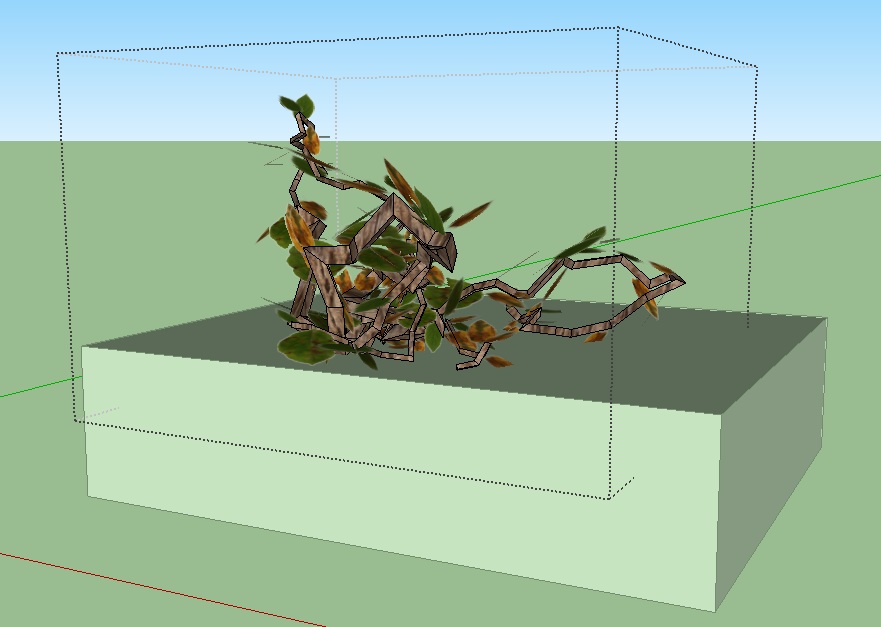

          1.jpg

          1 條回覆 最後回覆 回覆 引用 0
          • TIGT 線上
            TIG Moderator
            最後由 編輯

            Make sure that the texture's image file has a totally transparent background with ALL pixels completely transparent etc...

            TIG

            1 條回覆 最後回覆 回覆 引用 0
            • rodrigonotorR 離線
              rodrigonotor
              最後由 編輯

              matidami14, take a look of this, maybe work for you.

              http://img803.imageshack.us/img803/6654/20052011075532pm.jpg

              the files are in here:

              http://www.sketchando.net/descargas/ivy_leaf_enavas_ver6.0.rar

              Regards

              • Sketchando.net • www.arqcad.net •

              1 條回覆 最後回覆 回覆 引用 0
              • romboutR 離線
                rombout
                最後由 編輯

                o bad the script doesn't have rotation for the leaves. Something like a min and max, now it always looks really flat and evenly

                1 條回覆 最後回覆 回覆 引用 0
                • KrisidiousK 離線
                  Krisidious
                  最後由 編輯

                  following...

                  By: Kristoff Rand
                  Home DesignerUnique House Plans

                  1 條回覆 最後回覆 回覆 引用 0
                  • N 離線
                    neonro2003
                    最後由 編輯

                    It works fine
                    http://www.mypicx.com/06072011/Ivye/

                    1 條回覆 最後回覆 回覆 引用 0
                    • M 離線
                      matidami14
                      最後由 編輯

                      @unknownuser said:

                      matidami14, take a look of this, maybe work for you.

                      http://img803.imageshack.us/img803/6654/20052011075532pm.jpg

                      the files are in here:

                      http://www.sketchando.net/descargas/ivy_leaf_enavas_ver6.0.rar

                      Regards

                      ok.. this is frustrating 😞

                      i have check all the probabilities and nothing happens...

                      i think it's my SU (sketchup 8 pro)

                      any one can please tell me step by step (yes, i'm diot!) how to intall, run and render ivy?

                      i really need this..

                      1 條回覆 最後回覆 回覆 引用 0
                      • J 離線
                        jokewalker
                        最後由 編輯

                        Noobie to posting and to Ruby so I'm not sure if I'm missing something basic. I'm having similar issues to others in 0.6.3beta. The only error I see is:

                        "Error: #<ArgumentError: Cannot find material named ivy_stem>"

                        I've checked my Textures folder (the properly saved one for SU7.1) and all the filenames are consistent. Is this an issue that needs to be solved in the console???

                        Any insight will help...Thx

                        1 條回覆 最後回覆 回覆 引用 0
                        • TIGT 線上
                          TIG Moderator
                          最後由 編輯

                          Try making a new material called "ivy_stem" and rerunning it.........

                          TIG

                          1 條回覆 最後回覆 回覆 引用 0
                          • J 離線
                            jokewalker
                            最後由 編輯

                            TIG,

                            That fixed it! I figured it was something simple. Now to play around with this thing and see what it's made of.

                            1 條回覆 最後回覆 回覆 引用 0
                            • TIGT 線上
                              TIG Moderator
                              最後由 編輯

                              There's certainly an error in the tool's code that's NOT making the material named 'ivy_stem'... BUT if you make it before using the tool it will work...
                              Hopefully an update will fix this glitch...

                              TIG

                              1 條回覆 最後回覆 回覆 引用 0
                              • romboutR 離線
                                rombout
                                最後由 編輯

                                how come for a lot of peeps the 0.6.3 versiion does work?
                                on the mac i doesnt do anything, no feedback no nothing?! 😲

                                1 條回覆 最後回覆 回覆 引用 0
                                • TIGT 線上
                                  TIG Moderator
                                  最後由 編輯

                                  I don't know.
                                  The scripts form a complex web methods etc.
                                  There are clearly issues like some variables defaulting to 'nil' when they should be 1 or 0, and now this 'ivy_stem' material not getting made...
                                  It needs something of an overhaul... 😕

                                  TIG

                                  1 條回覆 最後回覆 回覆 引用 0
                                  • OxerO 離線
                                    Oxer
                                    最後由 編輯

                                    @rombout said:

                                    how come for a lot of peeps the 0.6.3 versiion does work?
                                    on the mac i doesnt do anything, no feedback no nothing?! 😲

                                    Hi Rombout,
                                    Try this version, works for me on Mac OSX 10.6.7 and SU 8.
                                    Keys on Mac:
                                    Click where you want the Ivy to start grow.
                                    Cmd+Click : Make the ivy grow towards the mouse position.
                                    Alt+Click : Grow Ivy leafs.
                                    SHIFT+Click : Finish Ivy.
                                    Keyboard 'i' : Start over.

                                    SU Ivy works on Mac

                                    "The result is the end what is important is the process" by Oxer
                                    http://www.oxervision.blogspot.com/

                                    1 條回覆 最後回覆 回覆 引用 0
                                    • romboutR 離線
                                      rombout
                                      最後由 編輯

                                      @oxer said:

                                      @rombout said:

                                      how come for a lot of peeps the 0.6.3 versiion does work?
                                      on the mac i doesnt do anything, no feedback no nothing?! 😲

                                      Hi Rombout,
                                      Try this version, works for me on Mac OSX 10.6.7 and SU 8.
                                      Keys on Mac:
                                      Click where you want the Ivy to start grow.
                                      Cmd+Click : Make the ivy grow towards the mouse position.
                                      Alt+Click : Grow Ivy leafs.
                                      SHIFT+Click : Finish Ivy.
                                      Keyboard 'i' : Start over.

                                      [attachment=0:3k2xek9g]<!-- ia0 -->SketchupIvy.0.6.beta.zip<!-- ia0 -->[/attachment:3k2xek9g]

                                      Hahaha you already gave it me! Thanks anyway this one does workl indeed.

                                      Petty that the last revision doesn't work and doesn't give any feedback in the ruby console. Think we simply need to be patience

                                      1 條回覆 最後回覆 回覆 引用 0
                                      • D 離線
                                        driven
                                        最後由 編輯

                                        @ Oxer and rombout,

                                        if you swap the html file out of 0.6.3 it's better formated for the mac [and shouldn't ruin anything]

                                        I only get one or 2 leaves with Oxers 0.6, and 0.6.3 has stopped working since I upgraded Safari to 5.0.6.

                                        what Safari versions are you both using?

                                        john

                                        learn from the mistakes of others, you may not live long enough to make them all yourself...

                                        1 條回覆 最後回覆 回覆 引用 0
                                        • TIGT 線上
                                          TIG Moderator
                                          最後由 編輯

                                          The latest version of Safari broke one of my commercial plugins dialogs on MAC!
                                          Now fixed... BUT it's very unforgiving of even minor syntax foibles that used to work anyway - unlike it's precursors and IE [dare I say!]... 🤓

                                          TIG

                                          1 條回覆 最後回覆 回覆 引用 0
                                          • romboutR 離線
                                            rombout
                                            最後由 編輯

                                            @driven said:

                                            @ Oxer and rombout,

                                            if you swap the html file out of 0.6.3 it's better formated for the mac [and shouldn't ruin anything]

                                            I only get one or 2 leaves with Oxers 0.6, and 0.6.3 has stopped working since I upgraded Safari to 5.0.6.

                                            what Safari versions are you both using?

                                            john

                                            oww...
                                            i fixed it myself by adjusting the dimensions of the popup window in SU. i edited one of the *.rb files.
                                            I also think it doesnt have something to do with safari i use firefox as a standard and a have edited it so that all files will be opened through FF


                                            1 條回覆 最後回覆 回覆 引用 0
                                            • 1
                                            • 2
                                            • 3
                                            • 4
                                            • 5
                                            • 6
                                            • 7
                                            • 36
                                            • 37
                                            • 5 / 37
                                            • 第一個貼文
                                              最後的貼文
                                            Buy SketchPlus
                                            Buy SUbD
                                            Buy WrapR
                                            Buy eBook
                                            Buy Modelur
                                            Buy Vertex Tools
                                            Buy SketchCuisine
                                            Buy FormFonts

                                            Advertisement

