sketchucation logo sketchucation
    • 登入
    Oops, your profile's looking a bit empty! To help us tailor your experience, please fill in key details like your SketchUp version, skill level, operating system, and more. Update and save your info on your profile page today!
    🔌 Smart Spline | Fluid way to handle splines for furniture design and complex structures. Download

    [Plugin] Sketchup Ivy

    已排程 已置頂 已鎖定 已移動 Plugins
    732 貼文 172 Posters 314.7k 瀏覽 172 Watching
    正在載入更多貼文
    • 從舊到新
    • 從新到舊
    • 最多點贊
    回覆
    • 在新貼文中回覆
    登入後回覆
    此主題已被刪除。只有擁有主題管理權限的使用者可以查看。
    • rodrigonotorR 離線
      rodrigonotor
      最後由 編輯

      @vidy said:

      @sadyo said:

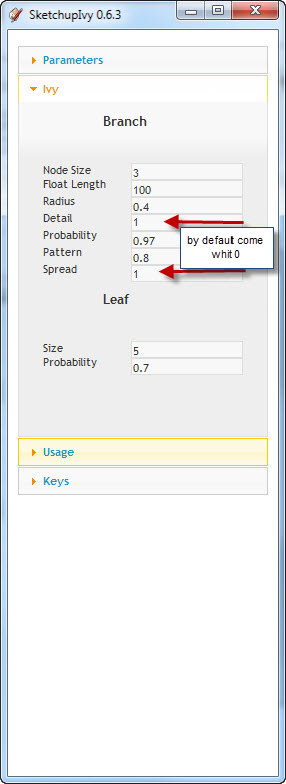
      I am following what TIG says, about better test if the variable is NOT 'nil', then i try to fill a variable on the Branch Detail,...and voilaaa.... the Ivy appearing like it should and the SketchUpIvy0.6.3 can work very well now.

      regards,

      Shame on me 😳 I don't understood what TIG says until now. The plugin works like charm.
      Thankyou guys.

      Sketchup 8.0.3117
      Sketchup Ivy 0.6.3
      Win 7 Ult
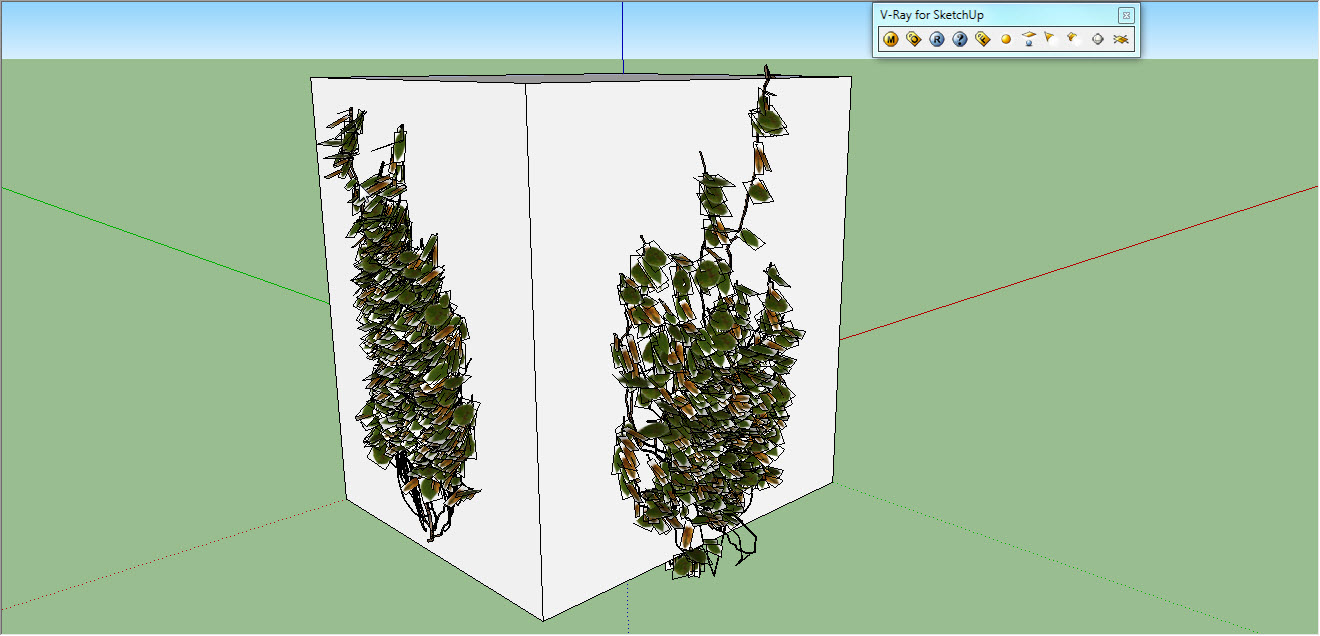
      01-06-2011 05-48-55 p.m..jpg

      01-06-2011 05-51-03 p.m..jpg

      • Sketchando.net • www.arqcad.net •

      1 條回覆 最後回覆 回覆 引用 0
      • romboutR 離線
        rombout
        最後由 編輯

        nothing in su8 mac...
        even nil change to 1 doesnt do anything, also no errors or feedback from the rubyconsole

        1 條回覆 最後回覆 回覆 引用 0
        • rodrigonotorR 離線
          rodrigonotor
          最後由 編輯

          Translation version 0.6.3 beta to spanish

          Traducción de la versión 0.6.3 beta al español

          SketchupIvy.0.6.3.esp_beta.rar

          • Sketchando.net • www.arqcad.net •

          1 條回覆 最後回覆 回覆 引用 0
          • sadyoS 離線
            sadyo
            最後由 編輯

            Perhaps this could be useful,

            http://photoserver.ws/images/3AOt4de66fdea6ebb.jpg

            I am following what TIG says, about better test if the variable is NOT 'nil', then i try to fill a variable on the Branch Detail,...and voilaaa.... the Ivy appearing like it should and the SketchUpIvy0.6.3 can work very well now .
            Thanks TIG...Thanks Piereden

            1 條回覆 最後回覆 回覆 引用 0
            • M 離線
              matidami14
              最後由 編輯

              i have the same problem. the leaf image its not right.
              it apears a rectangle in the limits of the image area, and someones have this white area.
              may be ther ins't some details in the instructions
              please answer me

              1 條回覆 最後回覆 回覆 引用 0
              • TIGT 線上
                TIG Moderator
                最後由 編輯

                There are some problems with the three ivy leaf skp files pre-provided...
                The files are quite large because tif images were used; smaller png images with transparent backgrounds would suffice - these could be edited to fix this.
                The other issue is that these skp files currently have the four sides of the rectangular face as regular edges, which will inevitably show up when imported as a component. If the original skp is edited and the four edges selected and made 'hidden' then the imported leaves will no longer shown them [unless of course view>hidden-geometry is 'on' when they'll look like dotted lines]... If you've already got some such leaves imported you can edit them in situ and make their edges hidden - as they are instances, editing one should edit all of its siblings...

                TIG

                1 條回覆 最後回覆 回覆 引用 0
                • M 離線
                  matidami14
                  最後由 編輯

                  ok, thankyou!
                  i will try.
                  someone have one work finished to share? (skp file and jpg image)

                  1 條回覆 最後回覆 回覆 引用 0
                  • TIGT 線上
                    TIG Moderator
                    最後由 編輯

                    Matidami14

                    Why can't you edit the three files yourself they are inside the Plugin's subfolder ?

                    TIG

                    1 條回覆 最後回覆 回覆 引用 0
                    • M 離線
                      matidami14
                      最後由 編輯

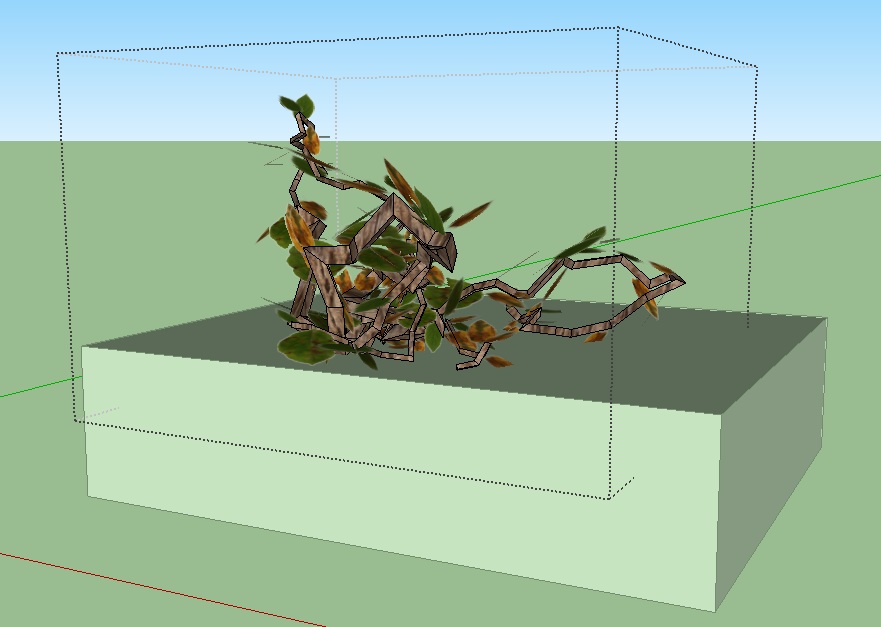
                      i already do that, look this files:
                      http://www.sendspace.com/file/7b8f80
                      when i render the skb, the rectangles apears again! i guess its vray.. the ocult geometry shows in the process

                      1.jpg

                      1 條回覆 最後回覆 回覆 引用 0
                      • TIGT 線上
                        TIG Moderator
                        最後由 編輯

                        Make sure that the texture's image file has a totally transparent background with ALL pixels completely transparent etc...

                        TIG

                        1 條回覆 最後回覆 回覆 引用 0
                        • rodrigonotorR 離線
                          rodrigonotor
                          最後由 編輯

                          matidami14, take a look of this, maybe work for you.

                          http://img803.imageshack.us/img803/6654/20052011075532pm.jpg

                          the files are in here:

                          http://www.sketchando.net/descargas/ivy_leaf_enavas_ver6.0.rar

                          Regards

                          • Sketchando.net • www.arqcad.net •

                          1 條回覆 最後回覆 回覆 引用 0
                          • romboutR 離線
                            rombout
                            最後由 編輯

                            o bad the script doesn't have rotation for the leaves. Something like a min and max, now it always looks really flat and evenly

                            1 條回覆 最後回覆 回覆 引用 0
                            • KrisidiousK 離線
                              Krisidious
                              最後由 編輯

                              following...

                              By: Kristoff Rand
                              Home DesignerUnique House Plans

                              1 條回覆 最後回覆 回覆 引用 0
                              • N 離線
                                neonro2003
                                最後由 編輯

                                It works fine
                                http://www.mypicx.com/06072011/Ivye/

                                1 條回覆 最後回覆 回覆 引用 0
                                • M 離線
                                  matidami14
                                  最後由 編輯

                                  @unknownuser said:

                                  matidami14, take a look of this, maybe work for you.

                                  http://img803.imageshack.us/img803/6654/20052011075532pm.jpg

                                  the files are in here:

                                  http://www.sketchando.net/descargas/ivy_leaf_enavas_ver6.0.rar

                                  Regards

                                  ok.. this is frustrating 😞

                                  i have check all the probabilities and nothing happens...

                                  i think it's my SU (sketchup 8 pro)

                                  any one can please tell me step by step (yes, i'm diot!) how to intall, run and render ivy?

                                  i really need this..

                                  1 條回覆 最後回覆 回覆 引用 0
                                  • J 離線
                                    jokewalker
                                    最後由 編輯

                                    Noobie to posting and to Ruby so I'm not sure if I'm missing something basic. I'm having similar issues to others in 0.6.3beta. The only error I see is:

                                    "Error: #<ArgumentError: Cannot find material named ivy_stem>"

                                    I've checked my Textures folder (the properly saved one for SU7.1) and all the filenames are consistent. Is this an issue that needs to be solved in the console???

                                    Any insight will help...Thx

                                    1 條回覆 最後回覆 回覆 引用 0
                                    • TIGT 線上
                                      TIG Moderator
                                      最後由 編輯

                                      Try making a new material called "ivy_stem" and rerunning it.........

                                      TIG

                                      1 條回覆 最後回覆 回覆 引用 0
                                      • J 離線
                                        jokewalker
                                        最後由 編輯

                                        TIG,

                                        That fixed it! I figured it was something simple. Now to play around with this thing and see what it's made of.

                                        1 條回覆 最後回覆 回覆 引用 0
                                        • TIGT 線上
                                          TIG Moderator
                                          最後由 編輯

                                          There's certainly an error in the tool's code that's NOT making the material named 'ivy_stem'... BUT if you make it before using the tool it will work...
                                          Hopefully an update will fix this glitch...

                                          TIG

                                          1 條回覆 最後回覆 回覆 引用 0
                                          • romboutR 離線
                                            rombout
                                            最後由 編輯

                                            how come for a lot of peeps the 0.6.3 versiion does work?
                                            on the mac i doesnt do anything, no feedback no nothing?! 😲

                                            1 條回覆 最後回覆 回覆 引用 0
                                            • 1
                                            • 2
                                            • 20
                                            • 21
                                            • 22
                                            • 23
                                            • 24
                                            • 36
                                            • 37
                                            • 22 / 37
                                            • 第一個貼文
                                              最後的貼文
                                            Buy SketchPlus
                                            Buy SUbD
                                            Buy WrapR
                                            Buy eBook
                                            Buy Modelur
                                            Buy Vertex Tools
                                            Buy SketchCuisine
                                            Buy FormFonts

                                            Advertisement