sketchucation logo sketchucation
    • 登入
    Oops, your profile's looking a bit empty! To help us tailor your experience, please fill in key details like your SketchUp version, skill level, operating system, and more. Update and save your info on your profile page today!
    🔌 Smart Spline | Fluid way to handle splines for furniture design and complex structures. Download

    [Plugin] Sketchup Ivy

    已排程 已置頂 已鎖定 已移動 Plugins
    732 貼文 172 Posters 314.9k 瀏覽 172 Watching
    正在載入更多貼文
    • 從舊到新
    • 從新到舊
    • 最多點贊
    回覆
    • 在新貼文中回覆
    登入後回覆
    此主題已被刪除。只有擁有主題管理權限的使用者可以查看。
    • Alan FraserA 離線
      Alan Fraser
      最後由 編輯

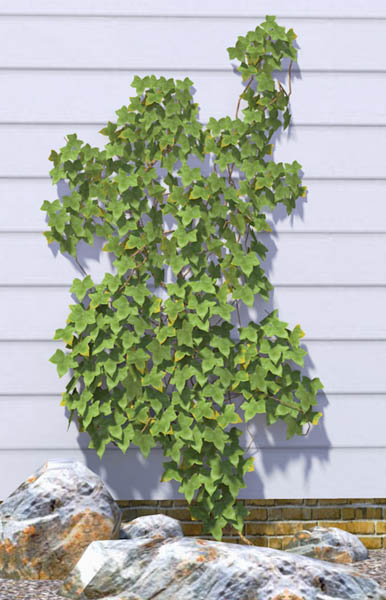
      Is there a way to change the parameters of the number of segments in the stems? To be honest, I don't think it's necessary to be using hexagonal stems metres off the ground. You could probably start with a square cross section and quickly move to triangular(as in earlier releases) without any visible difference...especially as most stems will be hidden behind leaves.
      This plugin is looking really good. 👍

      ivy.jpg

      3D Figures
      Were you required to walk 500 miles? Were you advised to walk 500 more?
      You could be entitled to compensation. Call the Pro Claimers now!

      1 條回覆 最後回覆 回覆 引用 0
      • J 離線
        justinplunkett
        最後由 編輯

        It looks like an awesome Plugin, unfortunately as previously mentioned it's not working on Mac Sketchup 8.
        Hope you resolve it as it would be fantastic to use on an upcoming project.
        Tx
        Justin

        1 條回覆 最後回覆 回覆 引用 0
        • D 離線
          driven
          最後由 編輯

          @justinplunkett said:

          It looks like an awesome Plugin, unfortunately as previously mentioned it's not working on Mac Sketchup 8.
          Hope you resolve it as it would be fantastic to use on an upcoming project.
          Tx
          Justin

          Hi Justin,

          it does work on Mac with SU version 8, but I need to load it after startup from ruby console, or with as_pluginloader.rb.

          to use with either method of loading, I would suggest the following-

          go to LiveIvy.rb (in your plugins folder) >> right click and color it green >> drag it into LiveIvy Folder >> start SU >> open Ruby Console >> type load "LiveIvy/LiveIvy.rb" hit return >> draw or select a surface/shape/group... >> last item in plugins menu should be Ivy.

          or use plugin loader to do the same, navigate to then select the green file... that's why I color it...

          the standard image files can be improved by editing the .skp's in the folder, and I haven't got my head around all the settings yet.

          but they do work.

          john

          learn from the mistakes of others, you may not live long enough to make them all yourself...

          1 條回覆 最後回覆 回覆 引用 0
          • rodrigonotorR 離線
            rodrigonotor
            最後由 編輯

            Just a quicky test with others leafs

            http://img215.imageshack.us/img215/3357/20052011070953pm.jpg

            http://img803.imageshack.us/img803/6654/20052011075532pm.jpg

            • Sketchando.net • www.arqcad.net •

            1 條回覆 最後回覆 回覆 引用 0
            • rodrigonotorR 離線
              rodrigonotor
              最後由 編輯

              Here are a spanish translate from version 0.5.4. I'm going to translate version 0.6.x when is more stable.

              LivIvy_0.5.4_ver_esp.rar

              • Sketchando.net • www.arqcad.net •

              1 條回覆 最後回覆 回覆 引用 0
              • J 離線
                j40
                最後由 編輯

                Thanks for the great Plugin!

                Top3D Studio

                1 條回覆 最後回覆 回覆 引用 0
                • A 離線
                  a4chitect
                  最後由 編輯

                  thanks for this magnificent plugin!!

                  1 條回覆 最後回覆 回覆 引用 0
                  • romboutR 離線
                    rombout
                    最後由 編輯

                    Hi all,

                    Is posted before that i could get either of the plugin and its revisions to work on a mac. So tonight itried on my (pc) laptop using su6 and su7. And... Some error as on the mac! Sorry cant type the complete code (commenting in my bb, sorry) its that error about birth_stem line 236 , something about 'birth' line 223 and so on. I tried all the tricks i saw here in this post. But i dont have su8 installed yet on my pc so i got one option left. Everything runs untill the shift+click... And that the error starts with TypeError: reference to deleted group .....

                    Hope some can resolve this one on both my machines. Ps on the mac i do have su6,7 and 8 running

                    1 條回覆 最後回覆 回覆 引用 0
                    • TIGT 離線
                      TIG Moderator
                      最後由 編輯

                      Rombout

                      Are you sure you have installed all of the zipped files correctly ?
                      When you extract files for a zip you must keep them in their respective subfolders...
                      Usually there's only one or two .rb files that go directly into the Plugins folder... all other related files stay inside their subfolder [or even subfolders within that]
                      It you have inadvertently put some files into the Plugins folder that ought to be inside a subfolder, then they can auto-load and cause issues; so reinstall all of the tool's files as outlined above. Then recheck the Plugins folder and remove any files you find in it that should actually be in the subfolder[s]... Restart Sketchup and see if it works now... 🤓

                      TIG

                      1 條回覆 最後回覆 回覆 引用 0
                      • OxerO 離線
                        Oxer
                        最後由 編輯

                        @rombout said:

                        Hope some can resolve this one on both my machines. Ps on the mac i do have su6,7 and 8 running

                        Hi Rombout, I use mac too and for me only works the 0.6 version, the Keys on Mac:
                        Cmd+Click : Make the ivy grow towards the mouse position.
                        Alt+Click : Grow Ivy leafs.
                        SHIFT+Click : Finish the Ivy.
                        Key 'i' : Start over.

                        The line 68 of Lively_tool.rb file is different for Pc and Mac.
                        For Pc: if key == 73 #i
                        For Mac: if key == 105 #i
                        This is the version works for me on Mac

                        Sketchup Ivy version works on Mac

                        Say me if this version works for you or not.

                        "The result is the end what is important is the process" by Oxer
                        http://www.oxervision.blogspot.com/

                        1 條回覆 最後回覆 回覆 引用 0
                        • romboutR 離線
                          rombout
                          最後由 編輯

                          @driven said:

                          @justinplunkett said:

                          It looks like an awesome Plugin, unfortunately as previously mentioned it's not working on Mac Sketchup 8.
                          Hope you resolve it as it would be fantastic to use on an upcoming project.
                          Tx
                          Justin

                          Hi Justin,

                          it does work on Mac with SU version 8, but I need to load it after startup from ruby console, or with as_pluginloader.rb.

                          to use with either method of loading, I would suggest the following-

                          go to LiveIvy.rb (in your plugins folder) >> right click and color it green >> drag it into LiveIvy Folder >> start SU >> open Ruby Console >> type load "LiveIvy/LiveIvy.rb" hit return >> draw or select a surface/shape/group... >> last item in plugins menu should be Ivy.

                          or use plugin loader to do the same, navigate to then select the green file... that's why I color it...

                          the standard image files can be improved by editing the .skp's in the folder, and I haven't got my head around all the settings yet.

                          but they do work.

                          john

                          still doesnt do any thing on the mac using this trick

                          > load "LiveIvy/LiveIvy.rb"
                          /Library/Application Support/Google SketchUp 8/SketchUp/Plugins/LiveIvy/LiveIvy_tool.rb;284; warning; parenthesize argument(s) for future version
                          true
                          

                          here the ruby output

                          1 條回覆 最後回覆 回覆 引用 0
                          • D 離線
                            driven
                            最後由 編輯

                            @rombout said:

                            load "LiveIvy/LiveIvy.rb"
                            /Library/Application Support/Google SketchUp 8/SketchUp/Plugins/LiveIvy/LiveIvy_tool.rb:284: warning: parenthesize argument(s) for future version
                            true

                            Hi,

                            It has worked, the TRUE means it works, the other bits just a warning about syntax...

                            So, to prove it works,

                            open SU >> open Components >> open Materials [select in Model view]>> open Ruby Console >> type load "LiveIvy/LiveIvy.rb"

                            you should see the components appear and the materials as well.

                            now draw a rectangle, then go to Plugins Menu and the LAST item should be SketchupIvy, click it and the WebDialog will appear.

                            let me know if it all works, or how far you can get... if you get this far there's one other trick to make it better on mac.

                            john

                            learn from the mistakes of others, you may not live long enough to make them all yourself...

                            1 條回覆 最後回覆 回覆 引用 0
                            • romboutR 離線
                              rombout
                              最後由 編輯

                              jep oke, suddenly version 0.5.4. is working in SU7 mac?! in 8 i dont see what im doing and the shift+click only gives me a small part off a branch
                              i will check the other download with the adjustment for the mac

                              1 條回覆 最後回覆 回覆 引用 0
                              • romboutR 離線
                                rombout
                                最後由 編輯

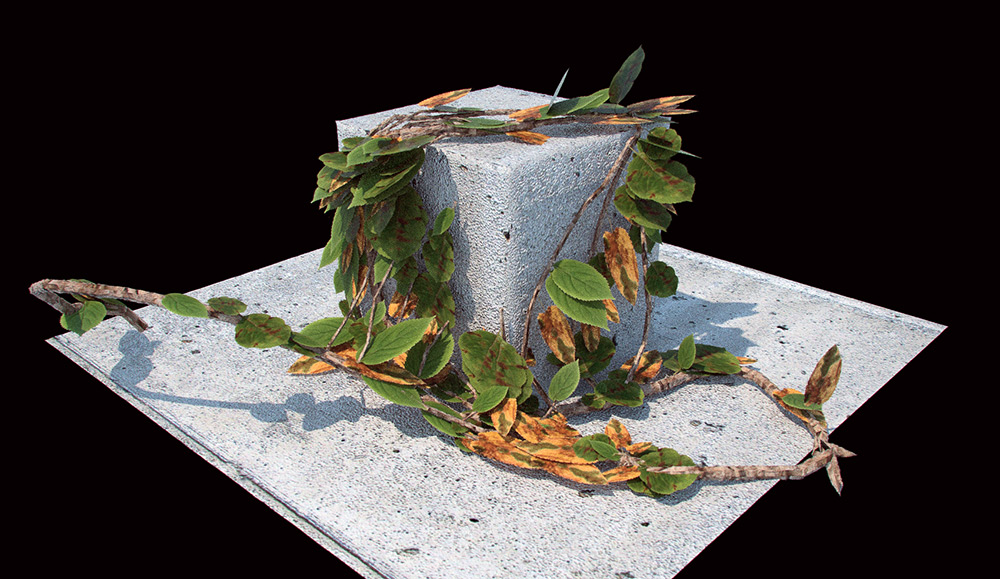
                                here my test shot from thea?! no i need to go play with it! a lot i think?! 😄
                                THink i need to modify those leaves, dont like that they are so flat
                                Ivy-test-thea_POSTPRO.jpg

                                1 條回覆 最後回覆 回覆 引用 0
                                • E 離線
                                  ergio3485
                                  最後由 編輯

                                  yes. the same thing happens to me. i've done all you said but in the end it's always the same thing, there's only this pointer with a blue cirlce but when i left-click, shift-click, alt-click, etc... it doesnt' do anything.

                                  It seems to be a very useful plugin!!! if only i could use it 😞

                                  1 條回覆 最後回覆 回覆 引用 0
                                  • V 離線
                                    vidy
                                    最後由 編輯

                                    @ergio3485 said:

                                    yes. the same thing happens to me. i've done all you said but in the end it's always the same thing, there's only this pointer with a blue cirlce but when i left-click, shift-click, alt-click, etc... it doesnt' do anything.

                                    It seems to be a very useful plugin!!! if only i could use it 😞

                                    im having that issue also here, but you can try to use ver 0.54 at least that still could work at mine 😉

                                    regards,

                                    still so much to learn..

                                    1 條回覆 最後回覆 回覆 引用 0
                                    • D 離線
                                      driven
                                      最後由 編輯

                                      @ergio3485 said:

                                      if only i could use it 😞

                                      It's well worth pursuing,

                                      some things to check...

                                      do the .skp files in the LiveIvy/Textures folder open on there own?

                                      have you removed all the other versions with different names?

                                      what version of osx are you on?

                                      john

                                      learn from the mistakes of others, you may not live long enough to make them all yourself...

                                      1 條回覆 最後回覆 回覆 引用 0
                                      • PixeroP 離線
                                        Pixero
                                        最後由 編輯

                                        Has anyone been able to get the 0.6.3 version to work?

                                        1 條回覆 最後回覆 回覆 引用 0
                                        • rodrigonotorR 離線
                                          rodrigonotor
                                          最後由 編輯

                                          @pixero said:

                                          Has anyone been able to get the 0.6.3 version to work?

                                          Nop, I still use 0.5.4 versión, work fine.

                                          Regards

                                          • Sketchando.net • www.arqcad.net •

                                          1 條回覆 最後回覆 回覆 引用 0
                                          • D 離線
                                            driven
                                            最後由 編輯

                                            @pixero said:

                                            Has anyone been able to get the 0.6.3 version to work?

                                            I got it working on the mac by separate loading,

                                            If you do a dif on the two files you can swop things over one at a time and see when it breaks,

                                            one thing to play with is commenting out the mac bit line 71 if key == 73 #|| key == 105 # i

                                            learn from the mistakes of others, you may not live long enough to make them all yourself...

                                            1 條回覆 最後回覆 回覆 引用 0
                                            • 1
                                            • 2
                                            • 33
                                            • 34
                                            • 35
                                            • 36
                                            • 37
                                            • 35 / 37
                                            • 第一個貼文
                                              最後的貼文
                                            Buy SketchPlus
                                            Buy SUbD
                                            Buy WrapR
                                            Buy eBook
                                            Buy Modelur
                                            Buy Vertex Tools
                                            Buy SketchCuisine
                                            Buy FormFonts

                                            Advertisement



