sketchucation logo sketchucation
    • Login
    Oops, your profile's looking a bit empty! To help us tailor your experience, please fill in key details like your SketchUp version, skill level, operating system, and more. Update and save your info on your profile page today!
    Mac User? | Join the Rayscaper Beta for Mac Learn More

    [Plugin] Grow

    Scheduled Pinned Locked Moved Plugins
    45 Posts 19 Posters 71.9k Views 19 Watching
    Loading More Posts
    • Oldest to Newest
    • Newest to Oldest
    • Most Votes
    Reply
    • Reply as topic
    Log in to reply
    This topic has been deleted. Only users with topic management privileges can see it.
    • TIGT
      TIG Moderator
      last edited by

      @nektares said:

      Hi TIG ๐Ÿ˜„ this looks like a very interesting plugin but when i try to use it i get this on the ruby console:

      @unknownuser said:

      for nil:NilClass>
      C:/Program Files (x86)/Google/Google SketchUp 8/Plugins/Grow.rb:339:in move' C:/Program Files (x86)/Google/Google SketchUp 8/Plugins/Grow.rb:336:in each'
      C:/Program Files (x86)/Google/Google SketchUp 8/Plugins/Grow.rb:336:in move' C:/Program Files (x86)/Google/Google SketchUp 8/Plugins/Grow.rb:554:in run'
      C:/Program Files (x86)/Google/Google SketchUp 8/Plugins/Grow.rb:86:in `onLButtonDown'

      ยฟAm i missing something?
      I suspect that you have some rogue script installed that is beyond this last fix... I'll look at an update... ๐Ÿ˜’

      TIG

      1 Reply Last reply
      Reply Quote 0
      • TIGT
        TIG Moderator
        last edited by

        Here's v2.3 http://forums.sketchucation.com/viewtopic.php?p=324331#p324331
        I hope that it finally addresses all of the issues cause by 3rd party rogue scripts that ill-advisedly overwrite base class/methods and/or with miscast observers for groups/selections...

        Sorry for today's confusion...
        The tool only failed for a few users who had this 3rd party script combo... BUT now ALL should work OK... ๐Ÿ˜•

        TIG

        1 Reply Last reply
        Reply Quote 0
        • N
          nektares
          last edited by

          Thanks a lot TIG ๐Ÿ˜„!!
          I found the guilty plugin, The problem was caused by SketchyPhysics3 i removed it and now my mirror plugin, my mshstick plugin and the grow plugin now work fine!
          Iยดm having a blast with your script, thank you!
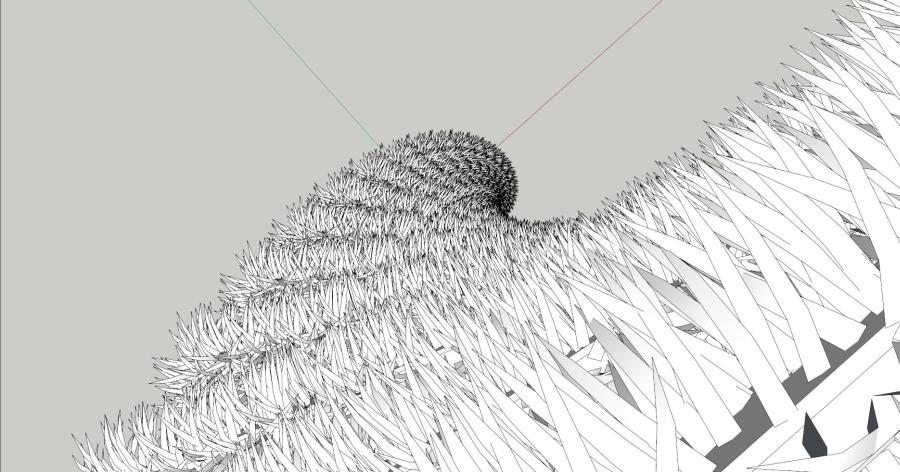
          grow

          1 Reply Last reply
          Reply Quote 0
          • 2
            258093521
            last edited by

            good job

            1 Reply Last reply
            Reply Quote 0
            • I
              ivreich
              last edited by

              Instant Bugsplat
              HI TIG

              I downloaded the latest version of grow but I'm still having instant bugsplats. No error messages.

              I used a simple box, and don't have SketchyPhysics installed...

              Joel

              1 Reply Last reply
              Reply Quote 0
              • TIGT
                TIG Moderator
                last edited by

                Joel

                If you have the Ruby Console open before you use it are there any messages ?

                Do you have DrivingDimensions, SunStudy, Matchbox, Podium installed - these can have similar issues as SketchyPhysica and break standard methods...

                Can you post the simple SKP that fails for you, with instructions on what you do to get a 'fail'...

                TIG

                1 Reply Last reply
                Reply Quote 0
                • J
                  joeyme
                  last edited by

                  very nice

                  1 Reply Last reply
                  Reply Quote 0
                  • TIGT
                    TIG Moderator
                    last edited by

                    Here's a new future-proofed update.
                    http://sketchucation.com/forums/viewtopic.php?p=324331#p324331

                    TIG

                    1 Reply Last reply
                    Reply Quote 0
                    • H
                      huckrorick
                      last edited by

                      Hi Tig,
                      I just tried your plugin. very cool. However, it seems like I can't get it to do what I want. I want to offset a component by a fixed amount (this works fine) and have each element be a fixed amount taller (e.g. 6"). I only seem to get a fixed increment with a scaling factor of 1.0 and then the increment in height is equal to the height of the component.
                      Can I accomplish what I want with your plugin?

                      1 Reply Last reply
                      Reply Quote 0
                      • pilouP
                        pilou
                        last edited by

                        Normally you can take any value on each axis, by move, by size, by rotation!

                        grow.jpg

                        Frenchy Pilou
                        Is beautiful that please without concept!
                        My Little site :)

                        1 Reply Last reply
                        Reply Quote 0
                        • Y
                          YDAVIDI
                          last edited by

                          HELLO
                          IT SEEM LIKE A GREAT PLUGIN BUT THE AXIS I CHOSE DOESNT WORK.. IT ALWAYS ROTATE IT AROUND SOME OTHER POINT..
                          CAN YOU PLEASE HELP
                          THANKS!

                          1 Reply Last reply
                          Reply Quote 0
                          • TIGT
                            TIG Moderator
                            last edited by

                            Make sure that your axes are reset to the default model-axes [right-click on an axis and choose reset if available].
                            It'd be sensible to locate the objects you want to 'grow' around the model's origin, then when prompted just snap to the origin [where the axes meet].
                            The XYZ [RGB] axes are what's used by the tool.

                            Also ensure that unit-snapping is OFF in Model Info > Units.

                            TIG

                            1 Reply Last reply
                            Reply Quote 0

                            Hello! It looks like you're interested in this conversation, but you don't have an account yet.

                            Getting fed up of having to scroll through the same posts each visit? When you register for an account, you'll always come back to exactly where you were before, and choose to be notified of new replies (either via email, or push notification). You'll also be able to save bookmarks and upvote posts to show your appreciation to other community members.

                            With your input, this post could be even better ๐Ÿ’—

                            Register Login
                            • 1
                            • 2
                            • 3
                            • 1 / 3
                            • First post
                              Last post
                            Buy SketchPlus
                            Buy SUbD
                            Buy WrapR
                            Buy eBook
                            Buy Modelur
                            Buy Vertex Tools
                            Buy SketchCuisine
                            Buy FormFonts

                            Advertisement