sketchucation logo sketchucation
    • 登入
    Oops, your profile's looking a bit empty! To help us tailor your experience, please fill in key details like your SketchUp version, skill level, operating system, and more. Update and save your info on your profile page today!
    🔌 Smart Spline | Fluid way to handle splines for furniture design and complex structures. Download

    [Plugin] CameraKeyMaker 1.0 (Update 2011-04-09)

    已排程 已置頂 已鎖定 已移動 Plugins
    118 貼文 53 Posters 143.9k 瀏覽 53 Watching
    正在載入更多貼文
    • 從舊到新
    • 從新到舊
    • 最多點贊
    回覆
    • 在新貼文中回覆
    登入後回覆
    此主題已被刪除。只有擁有主題管理權限的使用者可以查看。
    • M 離線
      macgile
      最後由 編輯

      @tig said:

      Excellent idea.
      My only suggestion is that you put it in the 'Camera' menu rather than the 'Plugins' [I've already edited my version...] 😄

      Of course it's obvious 😄

      Thank's TIG
      best regard.

      1 條回覆 最後回覆 回覆 引用 0
      • jarynzlesaJ 離線
        jarynzlesa
        最後由 編輯

        nice and smooth 👍 .

        http://www.vizualizaceschodiste.mypage.cz/

        1 條回覆 最後回覆 回覆 引用 0
        • D 離線
          dbalex
          最後由 編輯

          It's a great plugin! I'm testing it right now but I'm trying to edit the path (in top or front view in parallel and perspective) and I can't select and move the points.. Does anyone else have this problem? I'm using sketchup 8 on windows 7

          http://www.bocostudio.com

          1 條回覆 最後回覆 回覆 引用 0
          • M 離線
            macgile
            最後由 編輯

            @dbalex said:

            It's a great plugin! I'm testing it right now but I'm trying to edit the path (in top or front view in parallel and perspective) and I can't select and move the points.. Does anyone else have this problem? I'm using sketchup 8 on windows 7

            Thank's for your reply dbalex !

            Strange thing!
            Check your keyboard shortcuts if it already occupied by another tool (see above in the header of this post to shortcuts)
            Check if you have groups or layers in your model.
            sometimes when a key is published in conjunction with a group is selected that is problematic.

            1 條回覆 最後回覆 回覆 引用 0
            • D 離線
              dbalex
              最後由 編輯

              Is there a shortcut key for editing the points? because I can update the keyframes by putting the camera in the right spot and update the keyframe, but I can't select them and move them in the orthographic views.. non of the shortcut your plugin uses is used in my shortcuts so I don't think that's the problem, anyway even like this it's a great tool! thanks for the fast reply

              http://www.bocostudio.com

              1 條回覆 最後回覆 回覆 引用 0
              • D 離線
                dbalex
                最後由 編輯

                and I have no groups or layers in the scene, just a testscene with a simple cube.

                http://www.bocostudio.com

                1 條回覆 最後回覆 回覆 引用 0
                • M 離線
                  macgile
                  最後由 編輯

                  @dbalex said:

                  and I have no groups or layers in the scene, just a testscene with a simple cube.

                  Sorry for the inconvenience.
                  Check if you have the file bezier.rb
                  The plugin has been tested on Sketchup v.7 and v.8 (pro or not)

                  best regard

                  1 條回覆 最後回覆 回覆 引用 0
                  • D 離線
                    dbalex
                    最後由 編輯

                    yes I thought of that also so I installed bezier.rb again with no results.. will try it on my other computer when I have time and will let you know if it works on that one. Thanks!

                    http://www.bocostudio.com

                    1 條回覆 最後回覆 回覆 引用 0
                    • mitcorbM 離線
                      mitcorb
                      最後由 編輯

                      Would some other Bezier plugin work with this tool? If not, could this be causing the difficulty?

                      I take the slow, deliberate approach in my aimless wandering.

                      1 條回覆 最後回覆 回覆 引用 0
                      • M 離線
                        macgile
                        最後由 編輯

                        @mitcorb said:

                        Would some other Bezier plugin work with this tool? If not, could this be causing the difficulty?

                        thank's mitCorb for reply 😄

                        In the next major update (1.2) the file "bezier.rb" will no be required.

                        1 條回覆 最後回覆 回覆 引用 0
                        • urgenU 離線
                          urgen
                          最後由 編輯

                          ....o-o-o-excellent! 👍

                          --pupil forever...------

                          1 條回覆 最後回覆 回覆 引用 0
                          • OxerO 離線
                            Oxer
                            最後由 編輯

                            Hi,
                            Thanks for the plugin, it's very useful but i work on Mac, the plugin runs but there are problems:

                            1. On Mac the keys combination (Alt+Q, ...) and the arrow keys don't works so you can't create the Camera Keys.
                            2. The path to camera_path.html file is invalid and the file don't open when you push Enter key.
                              Only the first time that i ran the plugin i could create the camera keys (Ctrl+Q on Mac) but the next times no and when i pushed the Enter key this were the Console message:
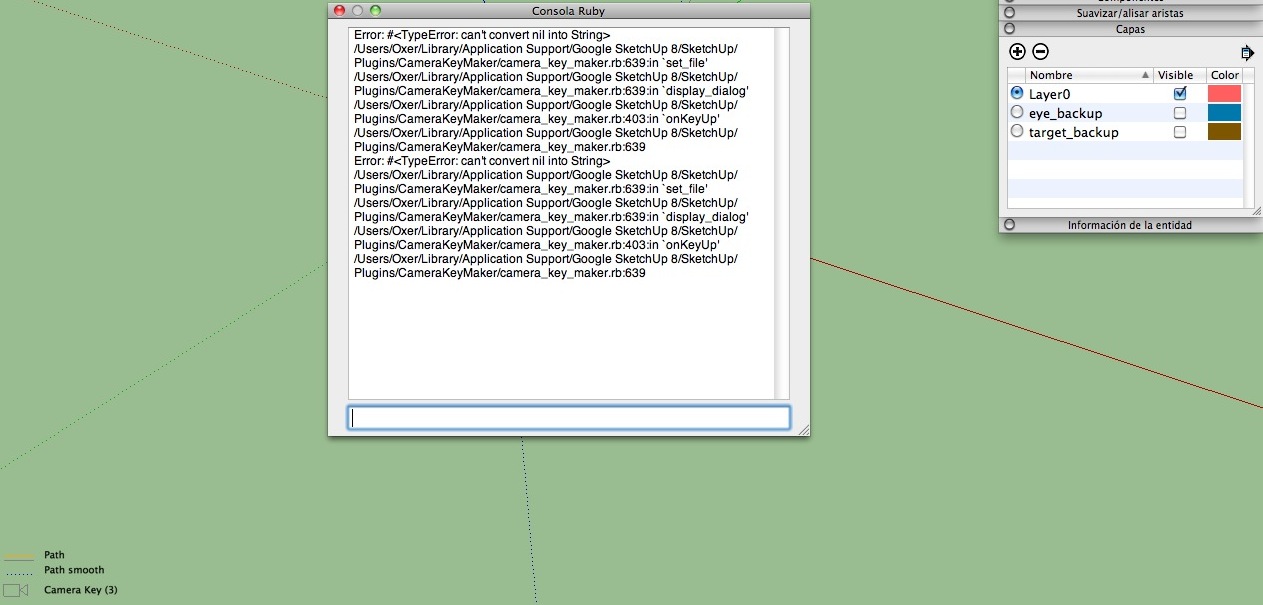
                            Console error message

                            I have translating the plugin to spanish language, when i finished it i'll upload it here.

                            Bye and i hope your help for fix these problems.

                            "The result is the end what is important is the process" by Oxer
                            http://www.oxervision.blogspot.com/

                            1 條回覆 最後回覆 回覆 引用 0
                            • TIGT 離線
                              TIG Moderator
                              最後由 編輯

                              Using keys that might be mapped by others to do stuff [I already use Alt+Q to orient-faces] is a bad idea... use just modifiers like Alt or Cmd or Shift etc that can't be used as shortcuts otherwise...

                              TIG

                              1 條回覆 最後回覆 回覆 引用 0
                              • M 離線
                                macgile
                                最後由 編輯

                                @oxer said:

                                Hi,
                                Thanks for the plugin, it's very useful but i work on Mac, the plugin runs but there are problems:

                                1. On Mac the keys combination (Alt+Q, ...) and the arrow keys don't works so you can't create the Camera Keys.
                                2. The path to camera_path.html file is invalid and the file don't open when you push Enter key.
                                  Only the first time that i ran the plugin i could create the camera keys (Ctrl+Q on Mac) but the next times no and when i pushed the Enter key this were the Console message:

                                [attachment=0:2pn7yb90]<!-- ia0 -->Captura de pantalla 2011-04-13 a las 04.12.36.JPG<!-- ia0 -->[/attachment:2pn7yb90]

                                I have translating the plugin to spanish language, when i finished it i'll upload it here.

                                Bye and i hope your help for fix these problems.

                                Thanks for reply Oxy

                                Sorry for Mac users.
                                I'll fix these bugs soon and contact you.

                                1 條回覆 最後回覆 回覆 引用 0
                                • M 離線
                                  macgile
                                  最後由 編輯

                                  @tig said:

                                  Using keys that might be mapped by others to do stuff [I already use Alt+Q to orient-faces] is a bad idea... use just modifiers like Alt or Cmd or Shift etc that can't be used as shortcuts otherwise...

                                  Thank you for your reply TIG
                                  Yes I do not know why I picked the keys complicated.

                                  1 條回覆 最後回覆 回覆 引用 0
                                  • T 離線
                                    Tiggz1
                                    最後由 編輯

                                    Awesome feature - Thankyou!!
                                    One question - forgive me if I missed it. How do I delete the Camera Key path so I can start from scratch?

                                    1 條回覆 最後回覆 回覆 引用 0
                                    • E 離線
                                      Ecuadorian
                                      最後由 編輯

                                      This looks like exactly what I need to smooth out the motion in my LightUp animations.

                                      Thank you! 😛

                                      -Miguel Lescano
                                      Subscribe to my house plans YouTube channel! (30K+ subs)

                                      1 條回覆 最後回覆 回覆 引用 0
                                      • M 離線
                                        macgile
                                        最後由 編輯

                                        @tiggz1 said:

                                        Awesome feature - Thankyou!!
                                        One question - forgive me if I missed it. How do I delete the Camera Key path so I can start from scratch?

                                        Thank for reply Tiggz1 😄

                                        just delete path in background layers.

                                        best regard 😄

                                        1 條回覆 最後回覆 回覆 引用 0
                                        • W 離線
                                          wwwyoose
                                          最後由 編輯

                                          hi

                                          I am trying this plugin and it dont work whit the short cut. alt+q.
                                          I have mac are ther some diffrent short cut?

                                          Best Achim

                                          1 條回覆 最後回覆 回覆 引用 0
                                          • M 離線
                                            macgile
                                            最後由 編輯

                                            @wwwyoose said:

                                            hi

                                            I am trying this plugin and it dont work whit the short cut. alt+q.
                                            I have mac are ther some diffrent short cut?

                                            Best Achim

                                            Thank's wwwyoose 😄

                                            This bug is fixed in the next version with many other improvements
                                            comming soon!

                                            best regard

                                            1 條回覆 最後回覆 回覆 引用 0
                                            • 1
                                            • 2
                                            • 3
                                            • 4
                                            • 5
                                            • 6
                                            • 4 / 6
                                            • 第一個貼文
                                              最後的貼文
                                            Buy SketchPlus
                                            Buy SUbD
                                            Buy WrapR
                                            Buy eBook
                                            Buy Modelur
                                            Buy Vertex Tools
                                            Buy SketchCuisine
                                            Buy FormFonts

                                            Advertisement




