Unexpected file format? Help!
-
Yes i have set up sketchup to auto-save every 5 minutes but when i locate this file in the documents folder it's a old file from 2014 which i don't need..
Also i have SKB files but here the same problem: unexpected file format!
I've tried to rename the SKB to a SKP but still not working.
Any1 got suggestions!? -
You must set the Windows Explorer > Tools > 'Folder options...' to NOT hide the file-type endings of ALL types.
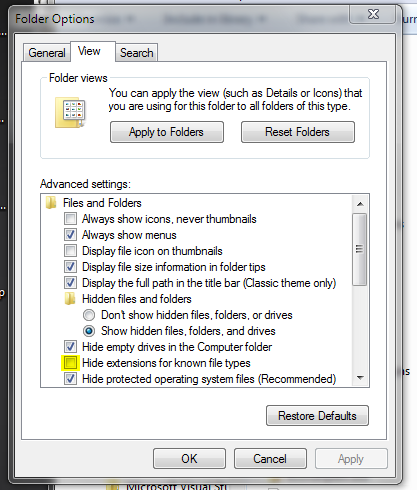
Otherwise the 'xxx.skb' file is displayed as 'xxx' and when you add '.skp' if becomes 'xxx.skp.skb'
Which is still NOT a SKP file.
You need to rename 'xxx.skb' to be 'xxx.skp', then SketchUp will open it because it IS a SKP file.It SketchUp won't even open that SKP file it's somehow corrupted...
-
Even if the file type is a true .skp file (like Tig said), you can always go into Explorer, right click on a .skb file and then click on the Open With link and point to SU 2015.
Windows 8.1 will not let me set up SU 2015 as the default for .skp files so that is how I have been opening SU 2015 .skb files.
-
I have already tried to change a SKB into a SKP or opening SKP directly with SU but this gives the same problem... I have saved my files always but I think the problem is that i had 0 battery and my computer 'glitched' the files..... can I upload the files?
-
The attached-file size limit is ~4Mb - so ZIP them if necessary.
Direct attachment of SKPs is allowed but if you upload a SKB it needs to be inside a ZIP anyway, as there are only certain types of files allowed for direct uploading...Zipping will optimize the file size uploaded...
I know you can't purge the SKP because you can't open it
 , but bear that in mind for the future.
A SKP can shrink considerably when purged in Model Info > Statistics...




Advertisement