sketchucation logo sketchucation
    • Login
    Oops, your profile's looking a bit empty! To help us tailor your experience, please fill in key details like your SketchUp version, skill level, operating system, and more. Update and save your info on your profile page today!
    Mac User? | Join the Rayscaper Beta for Mac Learn More

    Unexpected file format? Help!

    Scheduled Pinned Locked Moved Newbie Forum
    sketchup
    25 Posts 10 Posters 24.0k Views 10 Watching
    Loading More Posts
    • Oldest to Newest
    • Newest to Oldest
    • Most Votes
    Reply
    • Reply as topic
    Log in to reply
    This topic has been deleted. Only users with topic management privileges can see it.
    • Rich O BrienR
      Rich O Brien Moderator
      last edited by

      @TIG

      The first time you 'Save' a file in SU you can choose the version type. It afterwards you must use 'Save As' if you wish to change version type 🤓

      Download the free D'oh Book for SketchUp 📖

      1 Reply Last reply
      Reply Quote 0
      • D
        Dutch-RS
        last edited by

        Is there maybe a possibility to upload my file so you guys can check if it works and find out what's wrong?

        1 Reply Last reply
        Reply Quote 0
        • GaieusG
          Gaieus
          last edited by

          Hi Ruben,

          Under the text area where you are writing your post here, there is an attachment tab. You can upload a file there (up to some size I cannot remember now)

          Gai...

          1 Reply Last reply
          Reply Quote 0
          • Rich O BrienR
            Rich O Brien Moderator
            last edited by

            Up to 4mb is the limit.

            Download the free D'oh Book for SketchUp 📖

            1 Reply Last reply
            Reply Quote 0
            • TIGT
              TIG Moderator
              last edited by

              You can 'zip' files to reduce the size too...

              TIG

              1 Reply Last reply
              Reply Quote 0
              • D
                Dutch-RS
                last edited by

                Well, okay.
                I uploaded it now.
                Can you guys try to find out what the problem is and maybe solve it? 😄


                Goed CKV huis.skp

                1 Reply Last reply
                Reply Quote 0
                • GaieusG
                  Gaieus
                  last edited by

                  Hm. Interesting indeed. Gives an "Unexpected file format" to me as well although my system (32 bit XP) shows the model in the thumbnail.

                  Gai...

                  1 Reply Last reply
                  Reply Quote 0
                  • TIGT
                    TIG Moderator
                    last edited by

                    I've looked in the file and it is a SKP in the header... [v?]
                    BUT it won't open... 'unrecognized file format' - must be some corruption in the database... 😢
                    It's probably fatal - sorry...

                    TIG

                    1 Reply Last reply
                    Reply Quote 0
                    • Alan FraserA
                      Alan Fraser
                      last edited by

                      You could try contacting Google. If it's fixable, they may be able to do it for you. Obviously, they don't have time to do this on a regular basis, but it may be useful from their developmental point of view to perform a post-mortem on it, to see what went wrong. It would depend on whether the data corruption was the fault of the program or just a glitch on your home PC.

                      3D Figures
                      Were you required to walk 500 miles? Were you advised to walk 500 more?
                      You could be entitled to compensation. Call the Pro Claimers now!

                      1 Reply Last reply
                      Reply Quote 0
                      • W
                        wrielarchi
                        last edited by

                        Hola alguien ahí me puede ayudar, tengo el mismo problema con "unexpected file format" pero ya intente abrir el skb y me aparece el mismo viso, ya tenia un buen avance y necesito abrirlo ayuda!

                        1 Reply Last reply
                        Reply Quote 0
                        • J
                          JuanV.Soler
                          last edited by

                          Hola wrielarchi

                          Intenta mandarnos el archivo , vas a tu Panel de Control y pinchas en Upload attachment . Hay un límite que son 4 mb , si el tuyo es mayor intenta comprimirlo .


                          Hello anyone there who can help me, I have the same problem with "unexpected file format" I try to open the skb and I get the same , and I had a good progress and need help!


                          Try to send us the file ¡

                          ,))),

                          1 Reply Last reply
                          Reply Quote 0
                          • TIGT
                            TIG Moderator
                            last edited by

                            SketchUp files are named .SKP.
                            Backup files are named .SKB.
                            SketchUp opens .SKP files.
                            SketchUp does not open .SKB files.
                            If you rename a file with a .SKB suffix with a .SKP suffix it will open in SketchUp.
                            Otherwise, what is your problem?
                            Archivos de SketchUp se nombran .SKP.
                            Archivos de 'copia de seguridad' se nombran .SKB.
                            SketchUp abre archivos .SKP.
                            SketchUp no abra los archivos de .SKB.
                            Si cambia el nombre de un archivo de una sufijo '.SKB' con una sufijo '.SKP' que se abrirá en SketchUp.
                            ¿De lo contrario, cuál es tu problema?

                            TIG

                            1 Reply Last reply
                            Reply Quote 0
                            • N
                              Nelsonallen
                              last edited by

                              @tig said:

                              SketchUp files are named .SKP.
                              Backup files are named .SKB.
                              SketchUp opens .SKP files.
                              SketchUp does not open .SKB files.
                              If you rename a file with a .SKB suffix with a .SKP suffix it will open in SketchUp.
                              Otherwise, what is your problem?
                              Archivos de SketchUp se nombran .SKP.
                              Archivos de 'copia de seguridad' se nombran .SKB.
                              SketchUp abre archivos .SKP.
                              SketchUp no abra los archivos de .SKB.
                              Si cambia el nombre de un archivo de una sufijo '.SKB' con una sufijo '.SKP' que se abrirá en SketchUp.
                              ¿De lo contrario, cuál es tu problema?

                              I've uploaded another dreaded "UFF" fail. Any suggestions? Thx.


                              cindy.skp

                              1 Reply Last reply
                              Reply Quote 0
                              • TIGT
                                TIG Moderator
                                last edited by

                                Nelson
                                I can see it's a v8 SKP BUT there is an UFF error.
                                I can't recover it - perhaps someone at SketchUp itself could have a look, if the data is important...
                                It's also good to report such errors, in case it's something up with SketchUp, rather than with you processes/OS/PC etc...

                                TIG

                                1 Reply Last reply
                                Reply Quote 0
                                • S
                                  samhouthoofd
                                  last edited by

                                  Hello guys!

                                  I'm a Belgian architectural student and have been working for 1 week with a model on sketchup.
                                  Never had a problem saving it or restarting it since today!?
                                  unexpected file format is my problem... I've put the files underneath in the attachment!

                                  I realy HOPE someone can help me!

                                  Greets

                                  Sam

                                  1 Reply Last reply
                                  Reply Quote 0
                                  • TIGT
                                    TIG Moderator
                                    last edited by

                                    You can't add attachments until you have made a few posts.


                                    Before then... do you have SketchUp set to auto-save and/or to make automatic backups?
                                    If so you might find an AutoSave SKP with the model's SKP ?
                                    Or if you have backups then a SKB file.
                                    The SKB can be renamed as a SKP which will open in SketchUp once again.
                                    The SKB is one save behind the current SKP so you only loose work since the last save ??

                                    TIG

                                    1 Reply Last reply
                                    Reply Quote 0
                                    • S
                                      samhouthoofd
                                      last edited by

                                      Yes i have set up sketchup to auto-save every 5 minutes but when i locate this file in the documents folder it's a old file from 2014 which i don't need..
                                      Also i have SKB files but here the same problem: unexpected file format!
                                      I've tried to rename the SKB to a SKP but still not working.
                                      Any1 got suggestions!?

                                      1 Reply Last reply
                                      Reply Quote 0
                                      • TIGT
                                        TIG Moderator
                                        last edited by

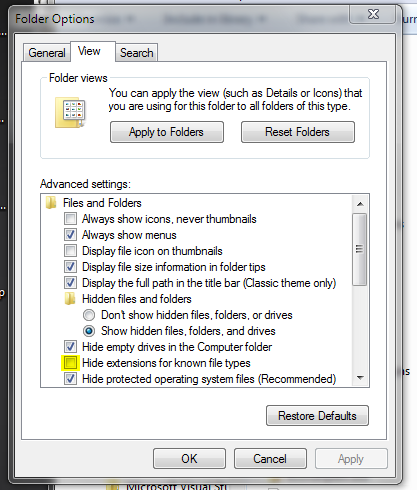
                                        You must set the Windows Explorer > Tools > 'Folder options...' to NOT hide the file-type endings of ALL types.Capture.PNG
                                        Otherwise the 'xxx.skb' file is displayed as 'xxx' and when you add '.skp' if becomes 'xxx.skp.skb'
                                        Which is still NOT a SKP file.
                                        You need to rename 'xxx.skb' to be 'xxx.skp', then SketchUp will open it because it IS a SKP file.

                                        It SketchUp won't even open that SKP file it's somehow corrupted...

                                        TIG

                                        1 Reply Last reply
                                        Reply Quote 0
                                        • ntxdaveN
                                          ntxdave
                                          last edited by

                                          Even if the file type is a true .skp file (like Tig said), you can always go into Explorer, right click on a .skb file and then click on the Open With link and point to SU 2015.

                                          Windows 8.1 will not let me set up SU 2015 as the default for .skp files so that is how I have been opening SU 2015 .skb files.

                                          Press F1...thank me later

                                          1 Reply Last reply
                                          Reply Quote 0
                                          • S
                                            samhouthoofd
                                            last edited by

                                            I have already tried to change a SKB into a SKP or opening SKP directly with SU but this gives the same problem... I have saved my files always but I think the problem is that i had 0 battery and my computer 'glitched' the files..... can I upload the files?

                                            1 Reply Last reply
                                            Reply Quote 0

                                            Hello! It looks like you're interested in this conversation, but you don't have an account yet.

                                            Getting fed up of having to scroll through the same posts each visit? When you register for an account, you'll always come back to exactly where you were before, and choose to be notified of new replies (either via email, or push notification). You'll also be able to save bookmarks and upvote posts to show your appreciation to other community members.

                                            With your input, this post could be even better 💗

                                            Register Login
                                            • 1
                                            • 2
                                            • 1 / 2
                                            • First post
                                              Last post
                                            Buy SketchPlus
                                            Buy SUbD
                                            Buy WrapR
                                            Buy eBook
                                            Buy Modelur
                                            Buy Vertex Tools
                                            Buy SketchCuisine
                                            Buy FormFonts

                                            Advertisement