sketchucation logo sketchucation
    • 登入
    Oops, your profile's looking a bit empty! To help us tailor your experience, please fill in key details like your SketchUp version, skill level, operating system, and more. Update and save your info on your profile page today!
    🔌 Smart Spline | Fluid way to handle splines for furniture design and complex structures. Download

    [Plugin]T2H_BuildingStructureTools2.2.4 in20141207

    已排程 已置頂 已鎖定 已移動 Plugins
    337 貼文 108 Posters 476.4k 瀏覽 108 Watching
    正在載入更多貼文
    • 從舊到新
    • 從新到舊
    • 最多點贊
    回覆
    • 在新貼文中回覆
    登入後回覆
    此主題已被刪除。只有擁有主題管理權限的使用者可以查看。
    • C 離線
      cadmunkey
      最後由 編輯

      Using the new SHAPE class, does the ALIGN function not work with this? No matter how I draw my shape it draws it with a justification of bottom right. Any workaround?

      1 條回覆 最後回覆 回覆 引用 0
      • T 離線
        tak2hata
        最後由 編輯

        Hi,ALL.
        I update this to v2.1.0 in 2014.11.01.
        Some Improves.

        Hi,Cadmunkey.
        "SHAPE" class not support ALIGN option.
        I will consider the method for Align of "SHAPE" in future.

        Thanks.


        by TAK2HATA

        1 條回覆 最後回覆 回覆 引用 0
        • C 離線
          cadmunkey
          最後由 編輯

          @tak2hata said:

          Hi,ALL.
          I update this to v2.1.0 in 2014.11.01.
          Some Improves.

          Hi,Cadmunkey.
          "SHAPE" class not support ALIGN option.
          I will consider the method for Align of "SHAPE" in future.

          Thanks.

          OK, thanks for considering it. Such a great plugin I couldn't live without now 😉

          1 條回覆 最後回覆 回覆 引用 0
          • facerF 離線
            facer
            最後由 編輯

            T2H,
            Great plugin, keep up the good work!

            V2.1.0 - Question ??
            I am using Skp 2014, W7, 32bit

            1. I note that I can only get the "Draw by click" to work in the SMALL - simple window of
              the Toggle_UI. I find in the SMALL UI it is hard to read the data due to the small text size.
              The LARGER UI is easier for me to read. Can this be achieved?

            2. Is the new STEEL BEAM (ref attachment) data saved for latter use?
              I can not find my new STEEL BEAM in the data.

            Thanks again,
            Ray
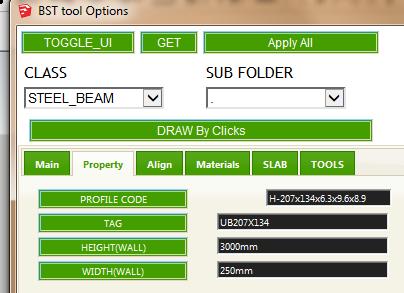

            UB207x134 data input

            1 條回覆 最後回覆 回覆 引用 0
            • C 離線
              cadmunkey
              最後由 編輯

              @facer said:

              1. Is the new STEEL BEAM (ref attachment) data saved for latter use?
                I can not find my new STEEL BEAM in the data.

              Thanks again,
              Ray

              Did you create that in the table editor? If so it seems to shift newly created elements to the bottom of your lists, not in order of actual section size.

              1 條回覆 最後回覆 回覆 引用 0
              • T 離線
                tak2hata
                最後由 編輯

                Hi,all.
                I update this to v2.2.0. in 2014.11.16.
                Apply IFC classification in sketchup2015.
                Thanks!


                by TAK2HATA

                1 條回覆 最後回覆 回覆 引用 0
                • G 離線
                  goga63
                  最後由 編輯

                  And again great work ! 👍 👍 👍
                  Only after carrying over of function of editing of a profile directly in the table, the button "Profile Schema Edit" shows an empty window.

                  Here new Russian translation to a plug-in.
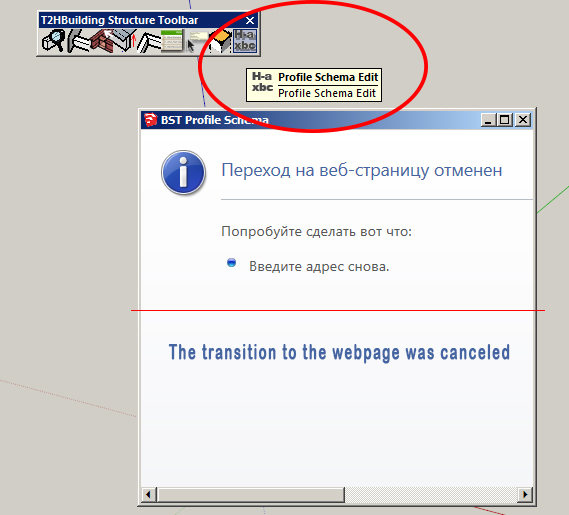

                  lang_ru.txt


                  BST.jpg

                  1 條回覆 最後回覆 回覆 引用 0
                  • C 離線
                    cadmunkey
                    最後由 編輯

                    @tak2hata said:

                    Hi,all.
                    I update this to v2.2.0. in 2014.11.16.
                    Apply IFC classification in sketchup2015.
                    Thanks!

                    Genius! Thank you so much for this update 😄 👍

                    1 條回覆 最後回覆 回覆 引用 0
                    • OxerO 離線
                      Oxer
                      最後由 編輯

                      Thanks for the update, the Profile Schema Edit window doesn't open because in the line 545 of main.rb file the path isn't correct:

                       line 548-> htmfile = File.join(File.dirname(__FILE__),'bst_profile_creator2.html')
                      

                      You need fix the path to:

                       line 548-> htmfile = File.join(File.dirname(__FILE__),'bst_profile_creator.html')
                      

                      "The result is the end what is important is the process" by Oxer
                      http://www.oxervision.blogspot.com/

                      1 條回覆 最後回覆 回覆 引用 0
                      • C 離線
                        cadmunkey
                        最後由 編輯

                        Strange, I'm using the new version and didn't have that issue Oxer.

                        1 條回覆 最後回覆 回覆 引用 0
                        • T 離線
                          tak2hata
                          最後由 編輯

                          Hi,All.
                          I update this to v2.2.1. in 2014.11.22.
                          Some bugs fixed.
                          and Change the sample profile files to have no extension name.
                          I found the point that oxer said.

                          Thanks!


                          by TAK2HATA

                          1 條回覆 最後回覆 回覆 引用 0
                          • OxerO 離線
                            Oxer
                            最後由 編輯

                            Hi tak2hata,
                            When I push Show tool icon it appears this warning window:
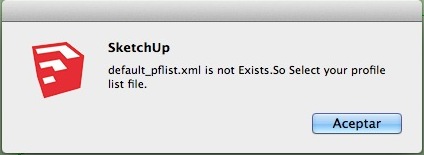
                            Warning Window.jpg

                            I suppose this is because default_pflist.xml file isn't included with the plugin. When I install the file by myself in the sample_pflist folder and then I select it through Change Profile-List File, on OSX & SU2015 the Shapes and Multiple Wall are empty in Tool Options window:
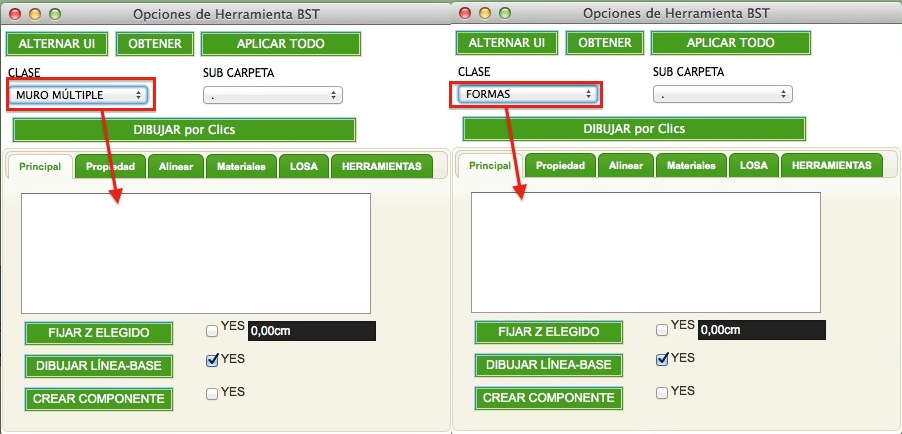
                            Empty Folders.jpg
                            but in SU2014 the content of these folders appears.

                            "The result is the end what is important is the process" by Oxer
                            http://www.oxervision.blogspot.com/

                            1 條回覆 最後回覆 回覆 引用 0
                            • T 離線
                              tak2hata
                              最後由 編輯

                              Hi,oxer.
                              This did not include the default_pflist.xml file in older version,too.
                              Only "sample_pflist_jis_japan.tsv" and "sample_pflist_northAmerica.tsv" and "sample_pflist_UK_AC.tsv" were included.
                              Now "sample_pflist_jis_japan" and "sample_pflist_northAmeric" and "sample_pflist_UK_AC" are included.
                              So I think missing "default_pflist.xml" file is not caused to new version.

                              About Empty when select "MWall" and "Shapes",
                              Does the folders exist in your plguin folder?


                              by TAK2HATA

                              1 條回覆 最後回覆 回覆 引用 0
                              • OxerO 離線
                                Oxer
                                最後由 編輯

                                Yes, the folders exist and they have content:
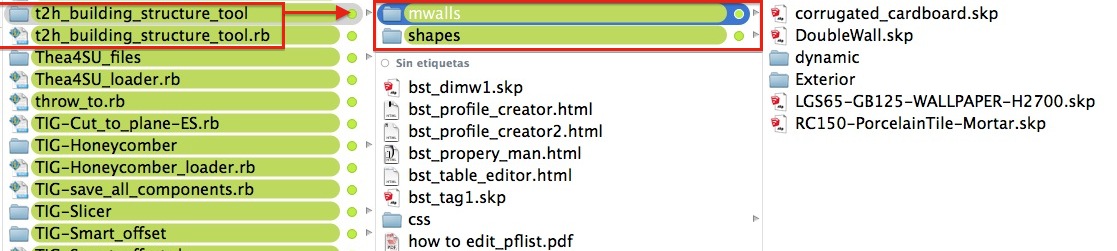
                                Folder content.jpg

                                This happens in SU2015 only, in SU 2014 the content of the folders appear in the Tool Options window correctly.

                                "The result is the end what is important is the process" by Oxer
                                http://www.oxervision.blogspot.com/

                                1 條回覆 最後回覆 回覆 引用 0
                                • T 離線
                                  tak2hata
                                  最後由 編輯

                                  Hi,all
                                  I update this to V2.2.4 in 2014-12-07.
                                  Some bugfix and Improve the profile selector.and "Mwall" Work well on MacOSX.

                                  Hi,Oxer.
                                  Please try this version.


                                  by TAK2HATA

                                  1 條回覆 最後回覆 回覆 引用 0
                                  • chialiang168C 離線
                                    chialiang168
                                    最後由 編輯

                                    https://dl.dropboxusercontent.com/u/108539326/001-Share/building_structure_tools/languages.JPG

                                    Chinese and Taiwanese language files
                                    中国と台湾の言語ファイル


                                    中国と台湾の言語ファイル

                                    1 條回覆 最後回覆 回覆 引用 0
                                    • OxerO 離線
                                      Oxer
                                      最後由 編輯

                                      I installed the v2.2.4 and all work fine now on OS X 10.10.1 👍
                                      Thanks tak2hata !!

                                      "The result is the end what is important is the process" by Oxer
                                      http://www.oxervision.blogspot.com/

                                      1 條回覆 最後回覆 回覆 引用 0
                                      • sumasterS 離線
                                        sumaster
                                        最後由 編輯

                                        Hello T2H Sir,

                                        CHK web dialog box its working perfect but not working like your previous version.

                                        Means when i draw wall and set parameters like wall height : 10' and width : 4" and start draw a wall and when i change the wall height : 2' and wall width : 1' and draw continue in view-port the tool not get new parameters . . . . . .

                                        plz chk.

                                        thanks for your advance tool . . . . 😄

                                        Thank you,
                                        SUmaster

                                        1 條回覆 最後回覆 回覆 引用 0
                                        • R 離線
                                          Ryucarlos
                                          最後由 編輯

                                          esta merda não estar completo com,o o da video aula

                                          1 條回覆 最後回覆 回覆 引用 0
                                          • E 離線
                                            Esense3d
                                            最後由 編輯

                                            Hello
                                            The Newest German Translation
                                            Roland F. Swiss

                                            and Thank you very much


                                            German Files Feb 2015

                                            1 條回覆 最後回覆 回覆 引用 0
                                            • 1
                                            • 2
                                            • 13
                                            • 14
                                            • 15
                                            • 16
                                            • 17
                                            • 16 / 17
                                            • 第一個貼文
                                              最後的貼文
                                            Buy SketchPlus
                                            Buy SUbD
                                            Buy WrapR
                                            Buy eBook
                                            Buy Modelur
                                            Buy Vertex Tools
                                            Buy SketchCuisine
                                            Buy FormFonts

                                            Advertisement