sketchucation logo sketchucation
    • 登入
    Oops, your profile's looking a bit empty! To help us tailor your experience, please fill in key details like your SketchUp version, skill level, operating system, and more. Update and save your info on your profile page today!
    🔌 Smart Spline | Fluid way to handle splines for furniture design and complex structures. Download

    [Plugin]T2H_BuildingStructureTools2.2.4 in20141207

    已排程 已置頂 已鎖定 已移動 Plugins
    337 貼文 108 Posters 476.7k 瀏覽 108 Watching
    正在載入更多貼文
    • 從舊到新
    • 從新到舊
    • 最多點贊
    回覆
    • 在新貼文中回覆
    登入後回覆
    此主題已被刪除。只有擁有主題管理權限的使用者可以查看。
    • sumasterS 離線
      sumaster
      最後由 編輯

      HI tak2hata,

      Please chk this . . . .

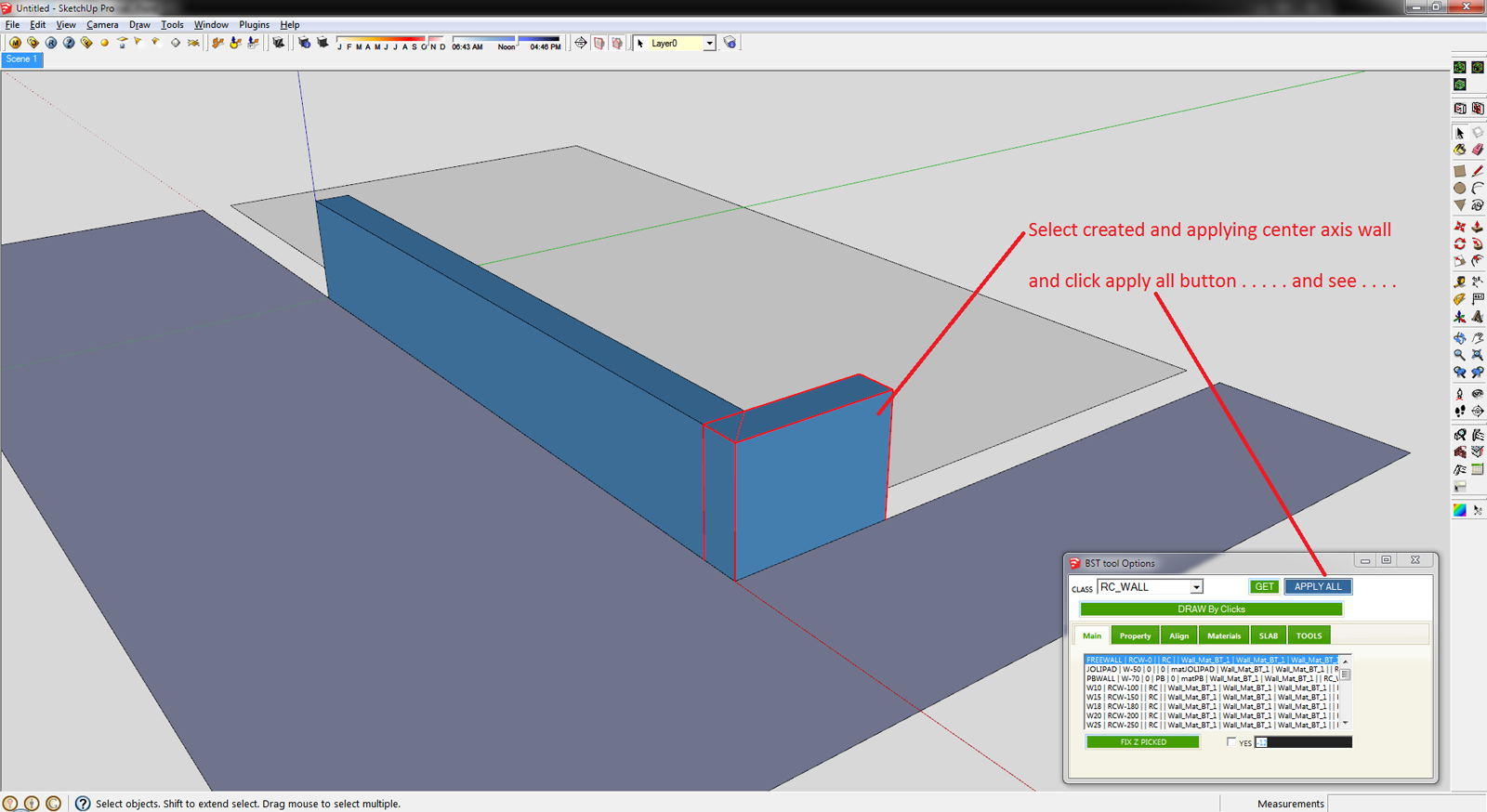
      1st create the L type wall and applying the Set Axis Point tool (thomthom Sir tool)
      http://sketchucation.com/forums/viewtopic.php?t=30508
      Align - 1.png

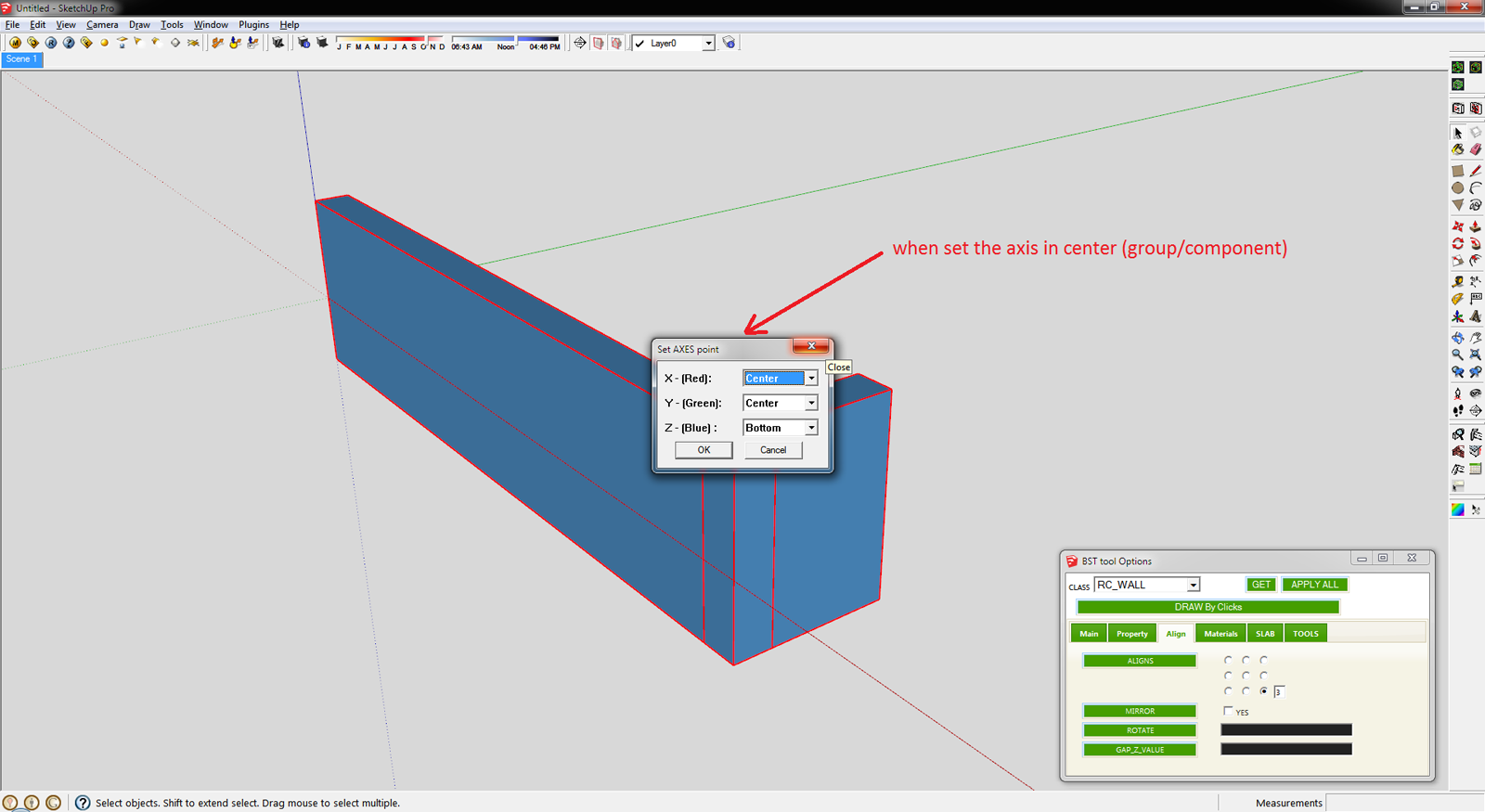
      and click APPLY ALL button . . . . .

      Align - 2.png

      This is the Final Result . . . .
      another way is you can create the mark button . . .
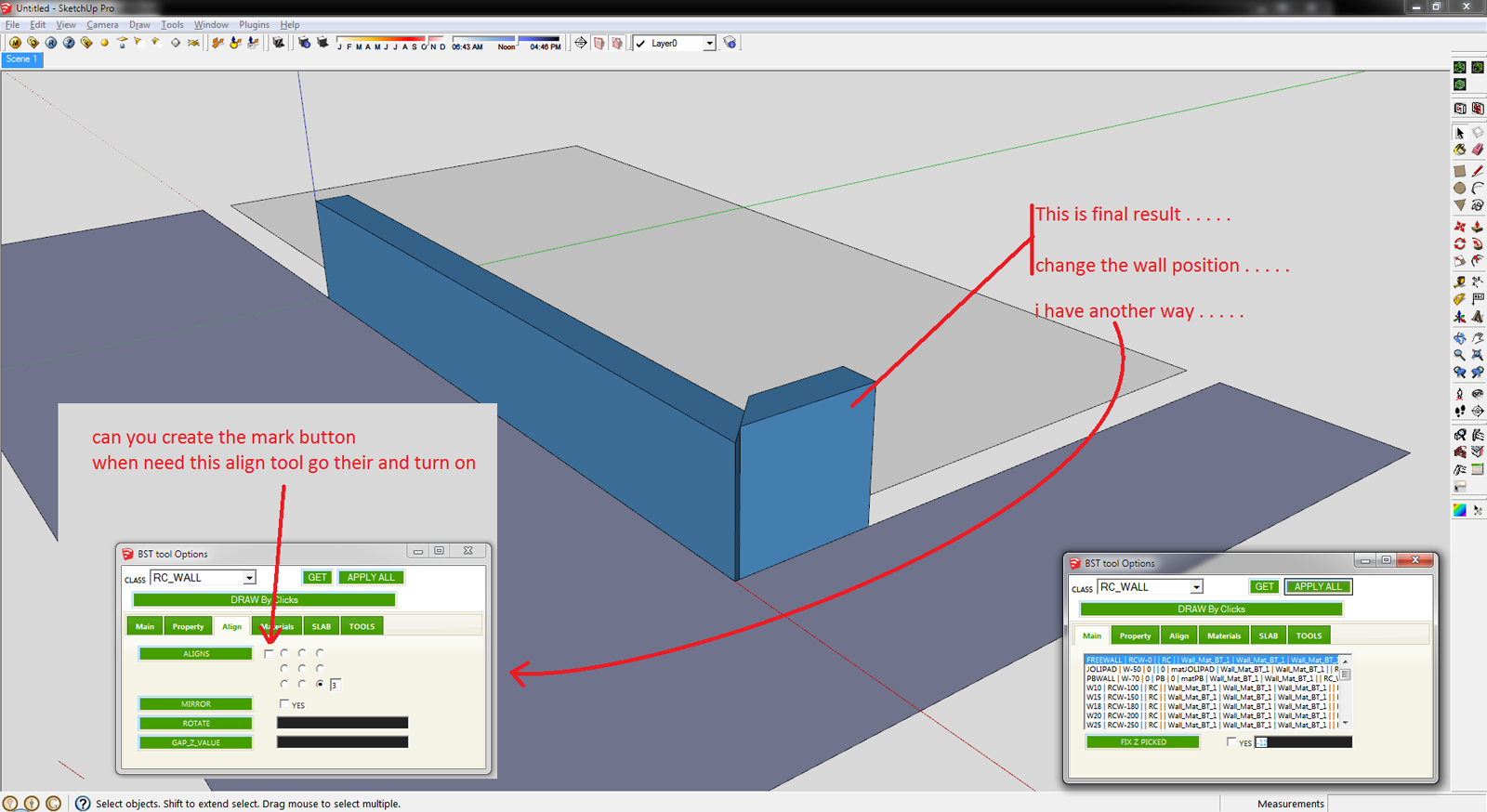
      Align - 3.png

      Sketchup File :
      Align SKP File.skp

      THanks 👍 👍

      Thank you,
      SUmaster

      1 條回覆 最後回覆 回覆 引用 0
      • T 離線
        tak2hata
        最後由 編輯

        Hi, Sumaster.

        @sumaster said:

        HI tak2hata,

        Please chk this . . . .

        1st create the L type wall and applying the Set Axis Point tool (thomthom Sir tool)
        http://sketchucation.com/forums/viewtopic.php?t=30508

        [attachment=3:22ix9rqt]<!-- ia3 -->Align - 1.png<!-- ia3 -->[/attachment:22ix9rqt]

        and click APPLY ALL button . . . . .

        [attachment=2:22ix9rqt]<!-- ia2 -->Align - 2.png<!-- ia2 -->[/attachment:22ix9rqt]

        This is the Final Result . . . .
        another way is you can create the mark button . . .

        [attachment=1:22ix9rqt]<!-- ia1 -->Align - 3.png<!-- ia1 -->[/attachment:22ix9rqt]

        Sketchup File :
        [attachment=0:22ix9rqt]<!-- ia0 -->Align SKP File.skp<!-- ia0 -->[/attachment:22ix9rqt]

        THanks 👍 👍

        Axis is very important for BST entity.
        So changing it as you like will not be control well by my tool.
        It is naturally phenomenon.

        Thanks.


        by TAK2HATA

        1 條回覆 最後回覆 回覆 引用 0
        • sumasterS 離線
          sumaster
          最後由 編輯

          Oh. . . . ok . . .

          can you tell me . . . .
          when i change wall width / height its re-create base face & push-pull ?

          Thank you,
          SUmaster

          1 條回覆 最後回覆 回覆 引用 0
          • sumasterS 離線
            sumaster
            最後由 編輯

            HI,

            CHK the Combine each tool not working . . . . .

            thanks

            Thank you,
            SUmaster

            1 條回覆 最後回覆 回覆 引用 0
            • T 離線
              tak2hata
              最後由 編輯

              @sumaster said:

              HI,

              CHK the Combine each tool not working . . . . .

              thanks

              I see it.
              I will correct it tonight(so means 12 hour later).

              @sumaster said:

              can you tell me . . . .
              when i change wall width / height its re-create base face & push-pull ?

              This plugin regenerate the Profile when modifyin profile.(the case of width and height and etc.)
              I will add notice about never modifying inner Axis of the BST entities.

              In your case ,I think modifying the "align" to Center and bottom will almost well.
              I can not know where you modified the inner axis of BST entity.
              So there is no best answer.

              Please do not blame me.


              by TAK2HATA

              1 條回覆 最後回覆 回覆 引用 0
              • T 離線
                tak2hata
                最後由 編輯

                Hi, I update to version1.5a in Nov 13,2012.

                Bugfix:Combine tool.

                Thanks...ZZZzzz...


                by TAK2HATA

                1 條回覆 最後回覆 回覆 引用 0
                • sumasterS 離線
                  sumaster
                  最後由 編輯

                  @tak2hata said:

                  @sumaster said:

                  HI,

                  CHK the Combine each tool not working . . . . .

                  thanks

                  I see it.
                  I will correct it tonight(so means 12 hour later).

                  Hi,

                  Thanks . . . . 👍

                  @tak2hata said:

                  @sumaster said:

                  can you tell me . . . .
                  when i change wall width / height its re-create base face & push-pull ?

                  This plugin regenerate the Profile when modifyin profile.(the case of width and height and etc.)
                  I will add notice about never modifying inner Axis of the BST entities.

                  In your case ,I think modifying the "align" to Center and bottom will almost well.
                  I can not know where you modified the inner axis of BST entity.
                  So there is no best answer.

                  OK . . . .

                  yes i CHK this "align" to bottom of center radio button 👍

                  @tak2hata said:

                  Please do not blame me.

                  No no no . . . .

                  Thanks

                  Thank you,
                  SUmaster

                  1 條回覆 最後回覆 回覆 引用 0
                  • V 離線
                    victor hugo
                    最後由 編輯

                    I updated the files to version 1.5 and when I check the version under the plugins menu it shows Version=1.4(Oct 14,2012. How do I know if it was updated?

                    Thanks.

                    1 條回覆 最後回覆 回覆 引用 0
                    • T 離線
                      tak2hata
                      最後由 編輯

                      @unknownuser said:

                      I updated the files to version 1.5 and when I check the version under the plugins menu it shows Version=1.4(Oct 14,2012. How do I know if it was updated?

                      Thanks.

                      Hi,Victor.
                      It is my mistake.

                      I will correct it strongly in next update. 👍

                      Thanks.


                      by TAK2HATA

                      1 條回覆 最後回覆 回覆 引用 0
                      • sumasterS 離線
                        sumaster
                        最後由 編輯

                        HI,

                        Please CHK the draw by clicks tool

                        its not work in group . . . .
                        (when draw on plan)

                        BST - 2.skp

                        Thank you,
                        SUmaster

                        1 條回覆 最後回覆 回覆 引用 0
                        • T 離線
                          tak2hata
                          最後由 編輯

                          Hi,All.

                          I update BTS version 1.5c in Dec.04,2012.

                          Add Showing "About this" and "About History".

                          Bug fix when Creating Walls in Group.

                          Thanks.


                          by TAK2HATA

                          1 條回覆 最後回覆 回覆 引用 0
                          • sumasterS 離線
                            sumaster
                            最後由 編輯

                            Hi,

                            now BST Tool working GOOD

                            Thanks Tak2hata . . . . . 😄 😉

                            Thank you,
                            SUmaster

                            1 條回覆 最後回覆 回覆 引用 0
                            • F 離線
                              faluchdeviaro
                              最後由 編輯

                              Hy tak2hata I translate the lang.txt file but the plugin remains without translate.

                              How can I translate it?

                              1 條回覆 最後回覆 回覆 引用 0
                              • T 離線
                                tak2hata
                                最後由 編輯

                                Happy New Year 😍
                                I update this script to v1.6 in Jan 01,2013.

                                Improve the parts of translater.

                                So Translate will work fine ,perhaps.

                                And I add new words to language file.

                                I create the support script for tranlate file.
                                This script aims at the creating the corrected language file from older,if you have already created the language file.

                                Thanks.


                                by TAK2HATA

                                1 條回覆 最後回覆 回覆 引用 0
                                • T 離線
                                  tak2hata
                                  最後由 編輯

                                  @hcltw1963 said:

                                  I have found that your BST script is very helpful and potential. It's the beginning of the BIM in SKP. I think it might be useful for wood structure either, so I omit 'RC' keyword in the script. Here's the language translation of the traditional Chinese.

                                  [attachment=0:3nwkabke]<!-- ia0 -->lang_zh_16.txt<!-- ia0 -->[/attachment:3nwkabke]

                                  Hi,hcltw1963.

                                  I'm glad to your translation! 😄

                                  I add the link to here from the top of thread.

                                  Thanks!


                                  by TAK2HATA

                                  1 條回覆 最後回覆 回覆 引用 0
                                  • OxerO 離線
                                    Oxer
                                    最後由 編輯

                                    Hi and thanks for the plugin!!
                                    Spanish translation file.
                                    lang_es.txt
                                    There are some phrases that I can't translate for example these:
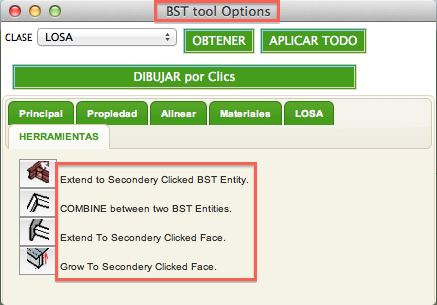
                                    No translate.png
                                    I have added some lines to the end of the lang_es.txt file with the phrases without translation.

                                    "The result is the end what is important is the process" by Oxer
                                    http://www.oxervision.blogspot.com/

                                    1 條回覆 最後回覆 回覆 引用 0
                                    • T 離線
                                      tak2hata
                                      最後由 編輯

                                      Hi,All.
                                      I update to v1.6a in Jan 05,2013.
                                      Add translation words to lang file.
                                      Add the menu about Athors of Translations.

                                      I add link to translations in top of thread.
                                      Thanks chon!
                                      Thanks oxer!

                                      I am very happy. 😄

                                      Thanks!


                                      by TAK2HATA

                                      1 條回覆 最後回覆 回覆 引用 0
                                      • H 離線
                                        hcltw1963
                                        最後由 編輯

                                        I have found that your BST script is very helpful and potential. It's the beginning of the BIM in SKP. I think it might be useful for wood structure either, so I omit 'RC' keyword in the script. Here's the language translation of the traditional Chinese.


                                        lang_zh_16.txt

                                        1 條回覆 最後回覆 回覆 引用 0
                                        • OxerO 離線
                                          Oxer
                                          最後由 編輯

                                          Thanks to you!! 👍

                                          "The result is the end what is important is the process" by Oxer
                                          http://www.oxervision.blogspot.com/

                                          1 條回覆 最後回覆 回覆 引用 0
                                          • H 離線
                                            hcltw1963
                                            最後由 編輯

                                            Dear Tak2hata,

                                            Is it possible to generalize the script to use for another kind of construction type like wood? I thought that if the class name "RC_GIRDER","RC_BEAM","RC_WALL","RC_SLAB" substituted by "GIRDER","BEAM","WALL", and "SLAB", they will not be represented as RC construction only.
                                            So, it will be useful for different kind of construction cause materials been assigned clearly.

                                            1 條回覆 最後回覆 回覆 引用 0
                                            • 1
                                            • 2
                                            • 8
                                            • 9
                                            • 10
                                            • 11
                                            • 12
                                            • 16
                                            • 17
                                            • 10 / 17
                                            • 第一個貼文
                                              最後的貼文
                                            Buy SketchPlus
                                            Buy SUbD
                                            Buy WrapR
                                            Buy eBook
                                            Buy Modelur
                                            Buy Vertex Tools
                                            Buy SketchCuisine
                                            Buy FormFonts

                                            Advertisement