sketchucation logo sketchucation
    • 登入
    Oops, your profile's looking a bit empty! To help us tailor your experience, please fill in key details like your SketchUp version, skill level, operating system, and more. Update and save your info on your profile page today!
    🔌 Smart Spline | Fluid way to handle splines for furniture design and complex structures. Download

    [Plugin]T2H_BuildingStructureTools2.2.4 in20141207

    已排程 已置頂 已鎖定 已移動 Plugins
    337 貼文 108 Posters 476.7k 瀏覽 108 Watching
    正在載入更多貼文
    • 從舊到新
    • 從新到舊
    • 最多點贊
    回覆
    • 在新貼文中回覆
    登入後回覆
    此主題已被刪除。只有擁有主題管理權限的使用者可以查看。
    • mitcorbM 離線
      mitcorb
      最後由 編輯

      I do not know for sure, but could there be a conflict between BST1.1e and 1001BitTools?

      I take the slow, deliberate approach in my aimless wandering.

      1 條回覆 最後回覆 回覆 引用 0
      • T 離線
        tak2hata
        最後由 編輯

        Hi,hugo , mitcorb and everybody.

        It is bug,and I fixed it.
        It happened according to sending double quotation in webdialog.
        The length is shown with double quotation.When sketchup "units" is "Architecture" or etc.

        And I re-add function "extending" multiple walls to face."growing" also.

        Thanks.


        by TAK2HATA

        1 條回覆 最後回覆 回覆 引用 0
        • J 離線
          juliogonz
          最後由 編輯

          tak2hata

          This is awesome! thank u!

          1 條回覆 最後回覆 回覆 引用 0
          • sumasterS 離線
            sumaster
            最後由 編輯

            Hi,

            First thank you for made this plugin . . . . ,

            how i add previous toolbar . . . . ?
            its very Helpful. . . .

            Thank you,
            SUmaster

            1 條回覆 最後回覆 回覆 引用 0
            • T 離線
              tak2hata
              最後由 編輯

              @sumaster said:

              Hi,

              First thank you for made this plugin . . . . ,

              how i add previous toolbar . . . . ?
              its very Helpful. . . .

              Hi,sumaster.

              I changed all dialogs to one webdialog in version1.0+.

              So I worried many icons in the toolbar become obstructive.

              And older dialogs is not valid now.

              I can create toolbar with many icons like older.
              It will open webdialog with specified class(ex. STEEL_COLUMN,RC_GIRDER,etc).

              Please wait.

              Thanks.


              by TAK2HATA

              1 條回覆 最後回覆 回覆 引用 0
              • C 離線
                CTMan
                最後由 編輯

                Hi Tak2hata

                Thanks for you Building Structures Tools - it's a very useful plug-in

                I'm putting the UK steel sections into the CSV file which works very well for UBs and UCs

                Channels ( [ ) have tapered flanges on your PROFILE NAME SCHEMA

                Is there a way to put PFC profiles into the database

                Thanks Again for your great Plugins

                CTMan
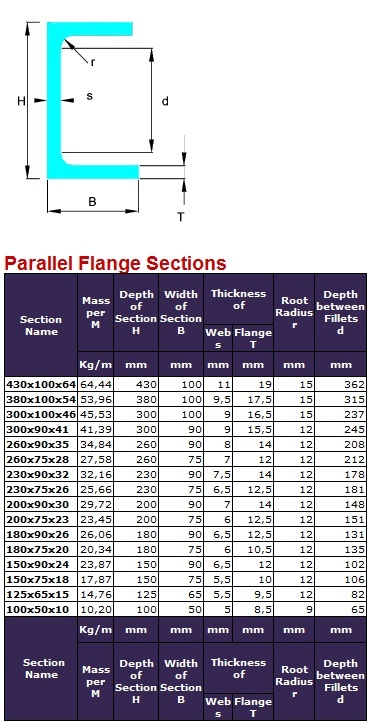

                Parallel Falnge Channels

                1 條回覆 最後回覆 回覆 引用 0
                • sumasterS 離線
                  sumaster
                  最後由 編輯

                  @tak2hata said:

                  @sumaster said:

                  Hi,

                  First thank you for made this plugin . . . . ,

                  how i add previous toolbar . . . . ?
                  its very Helpful. . . .

                  Hi,sumaster.

                  I changed all dialogs to one webdialog in version1.0+.

                  So I worried many icons in the toolbar become obstructive.

                  And older dialogs is not valid now.

                  I can create toolbar with many icons like older.
                  It will open webdialog with specified class(ex. STEEL_COLUMN,RC_GIRDER,etc).

                  Please wait.

                  Thanks.

                  yes its interesting . . . . 👍 😄

                  Thank you,
                  SUmaster

                  1 條回覆 最後回覆 回覆 引用 0
                  • sumasterS 離線
                    sumaster
                    最後由 編輯

                    HI,

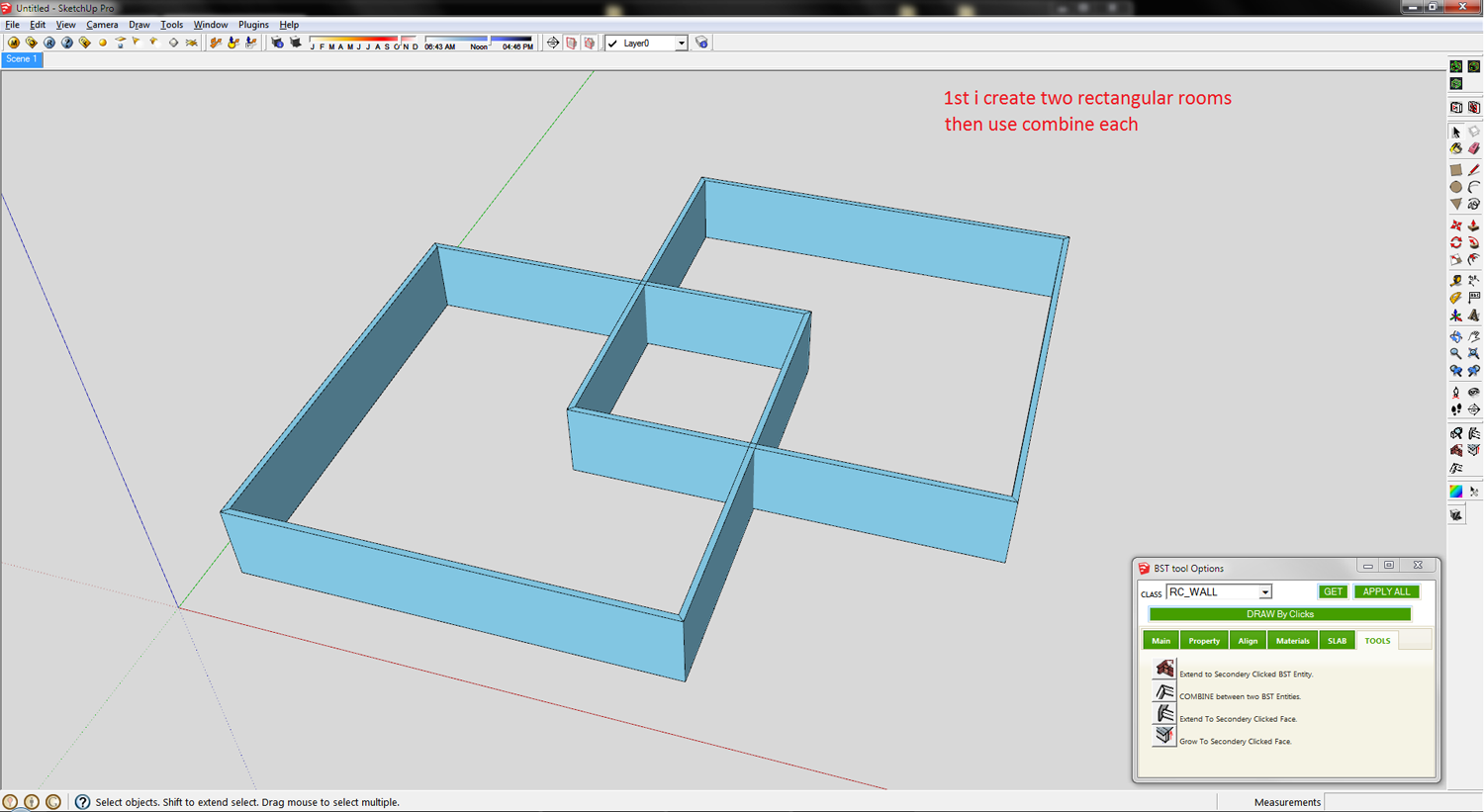
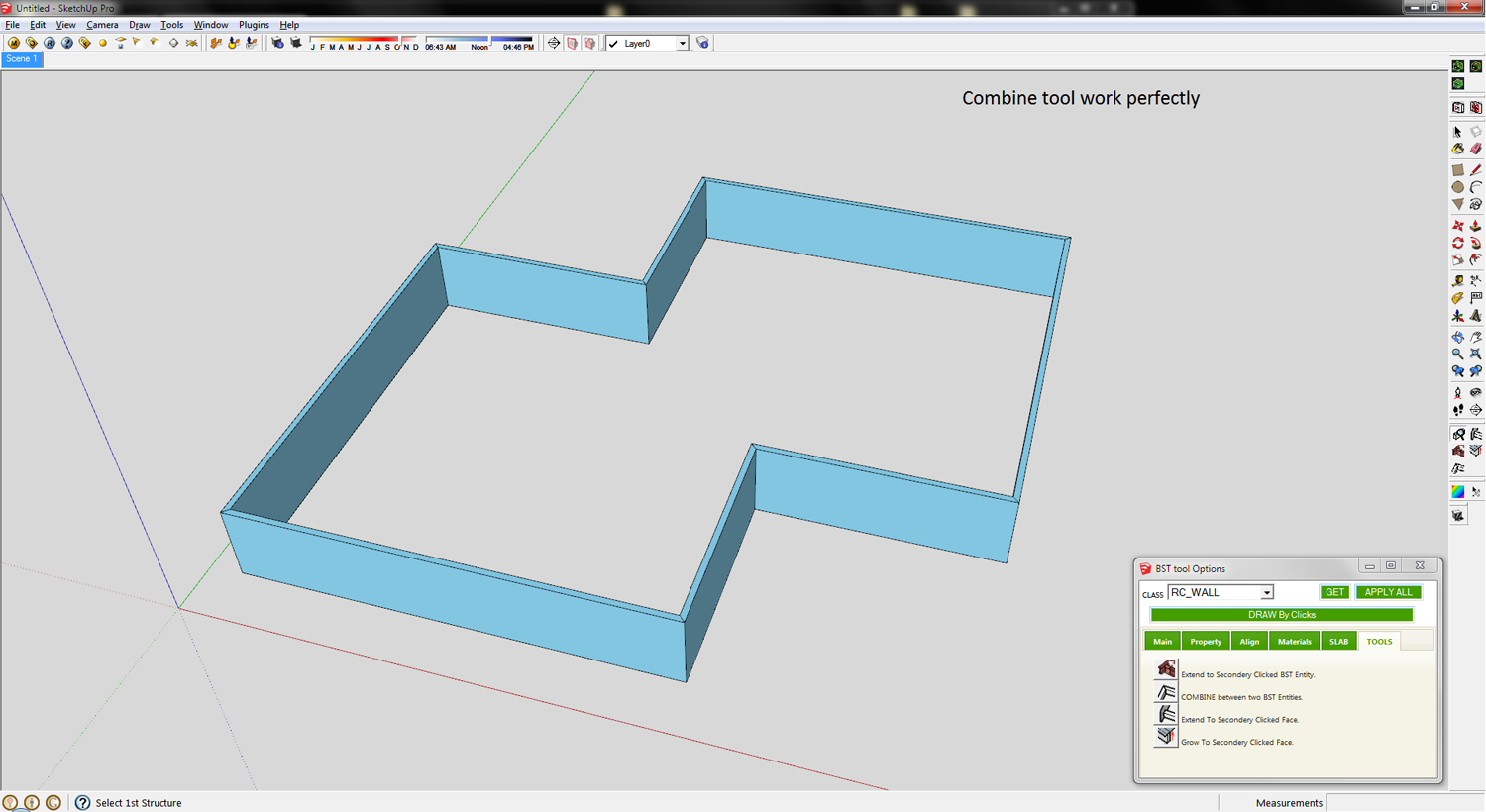
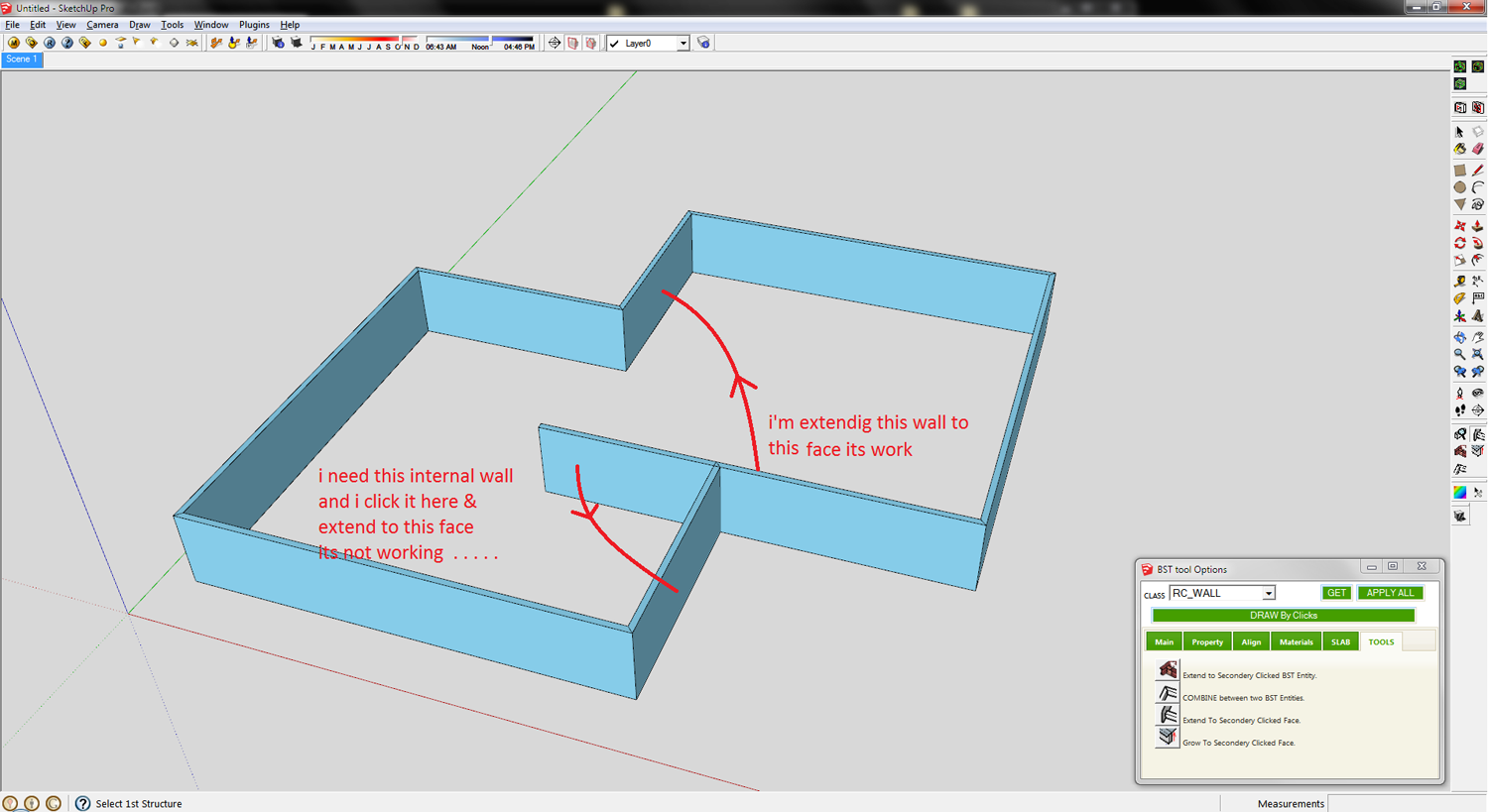
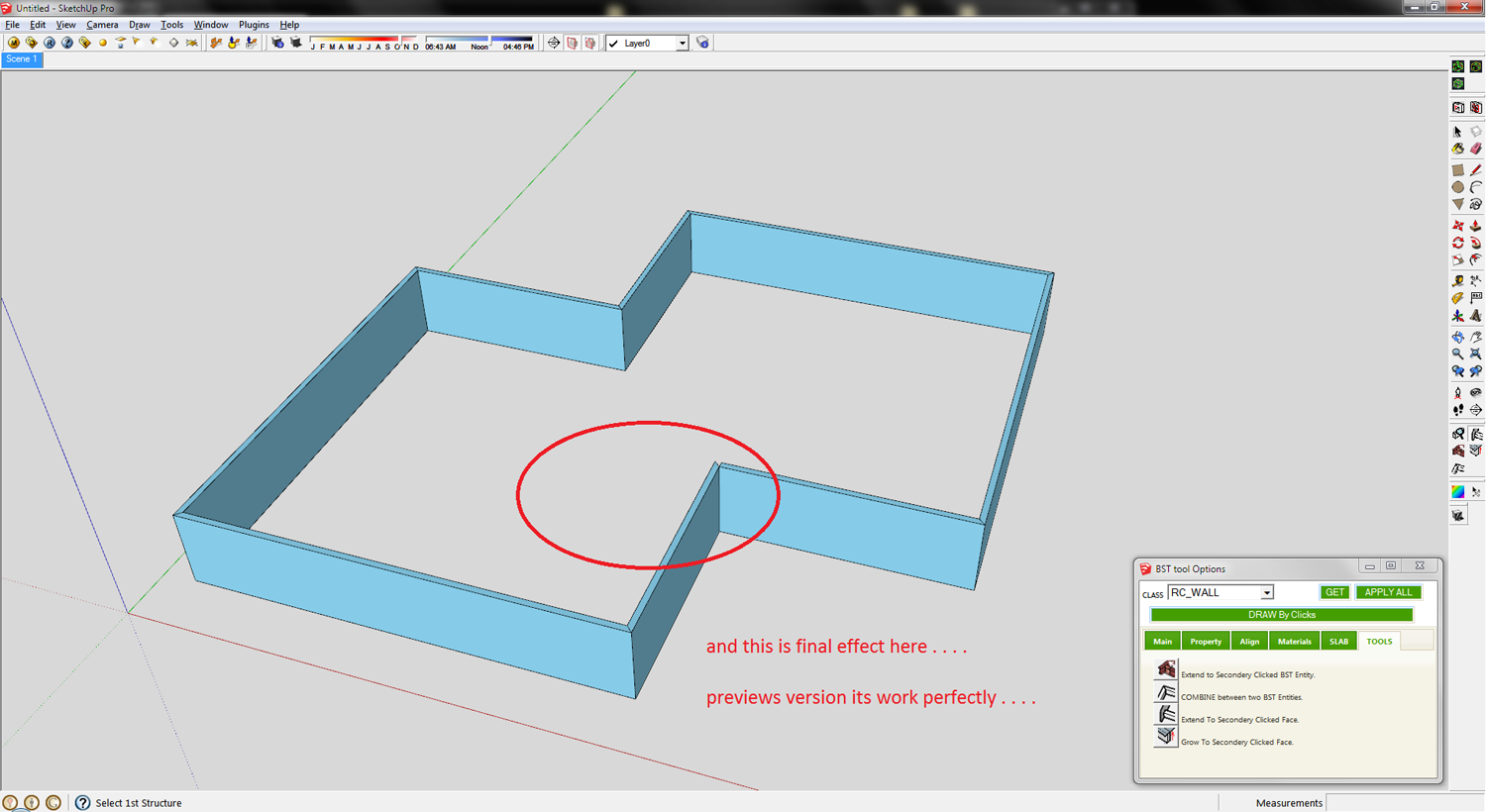
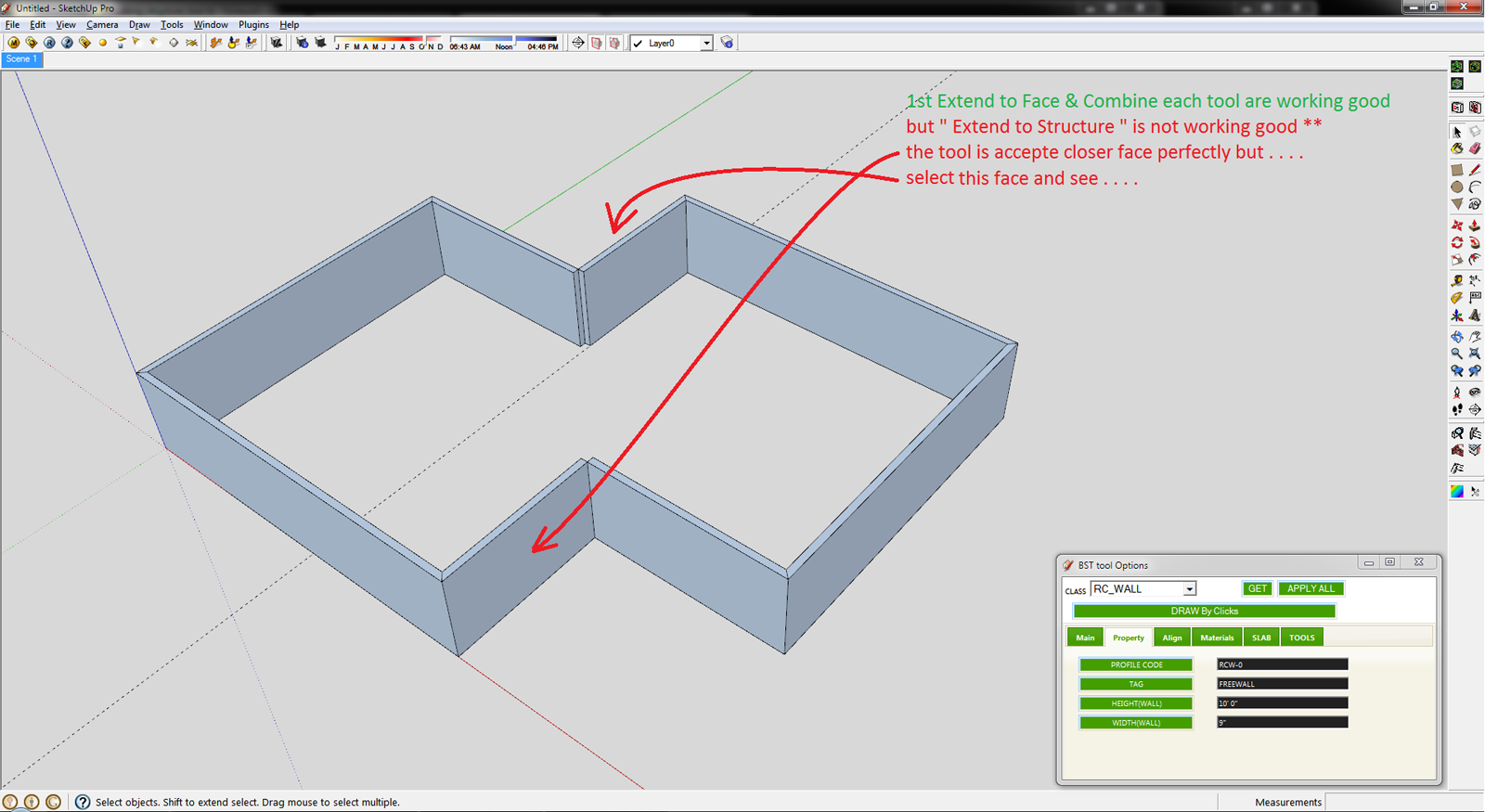
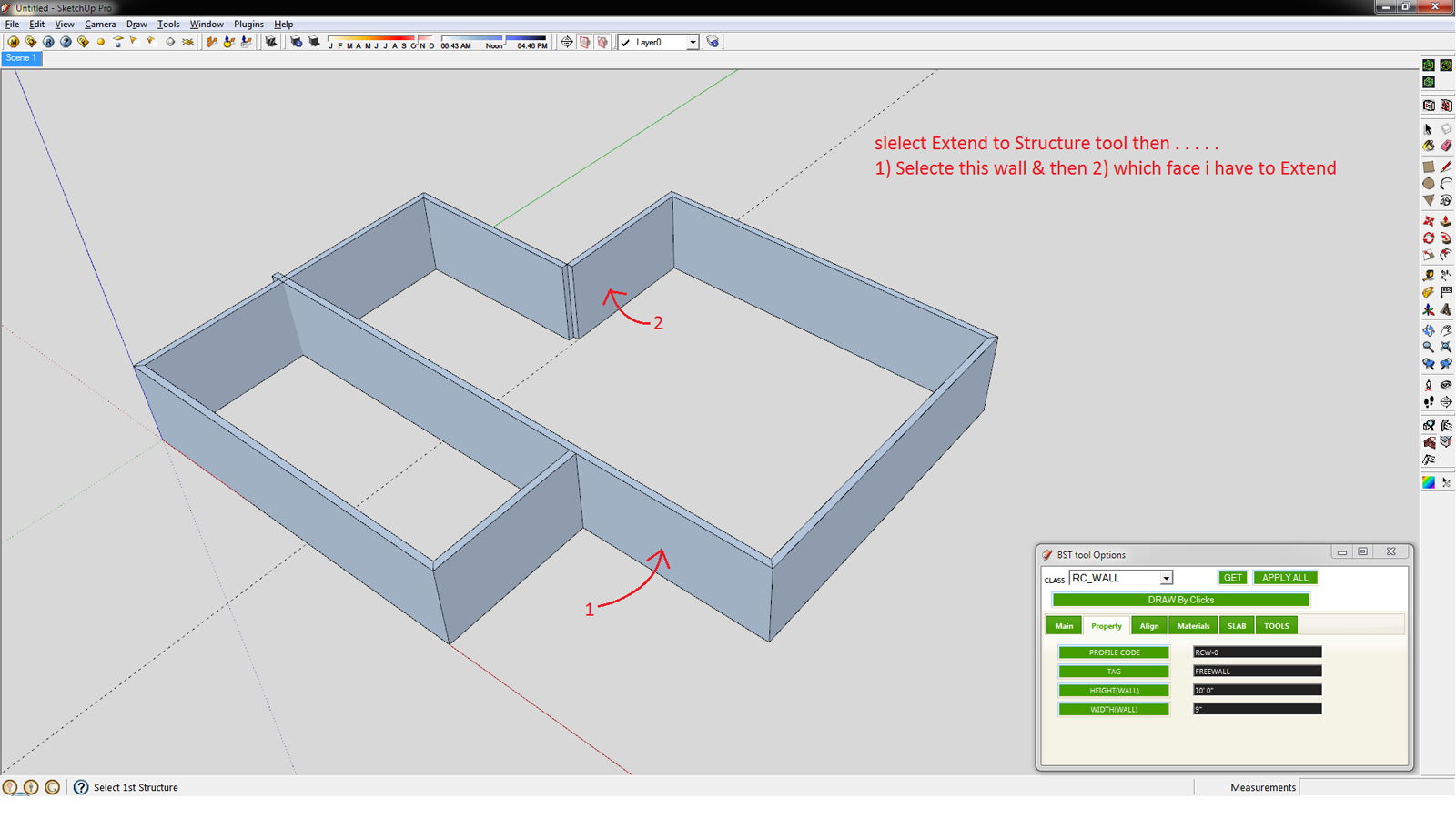
                    I try to add some shortcuts " extend to face, extend to structure, Grow to face, Combine each "

                    and extend to face & extend to structure not working good . . . .

                    Thank you,
                    SUmaster

                    1 條回覆 最後回覆 回覆 引用 0
                    • sumasterS 離線
                      sumaster
                      最後由 編輯

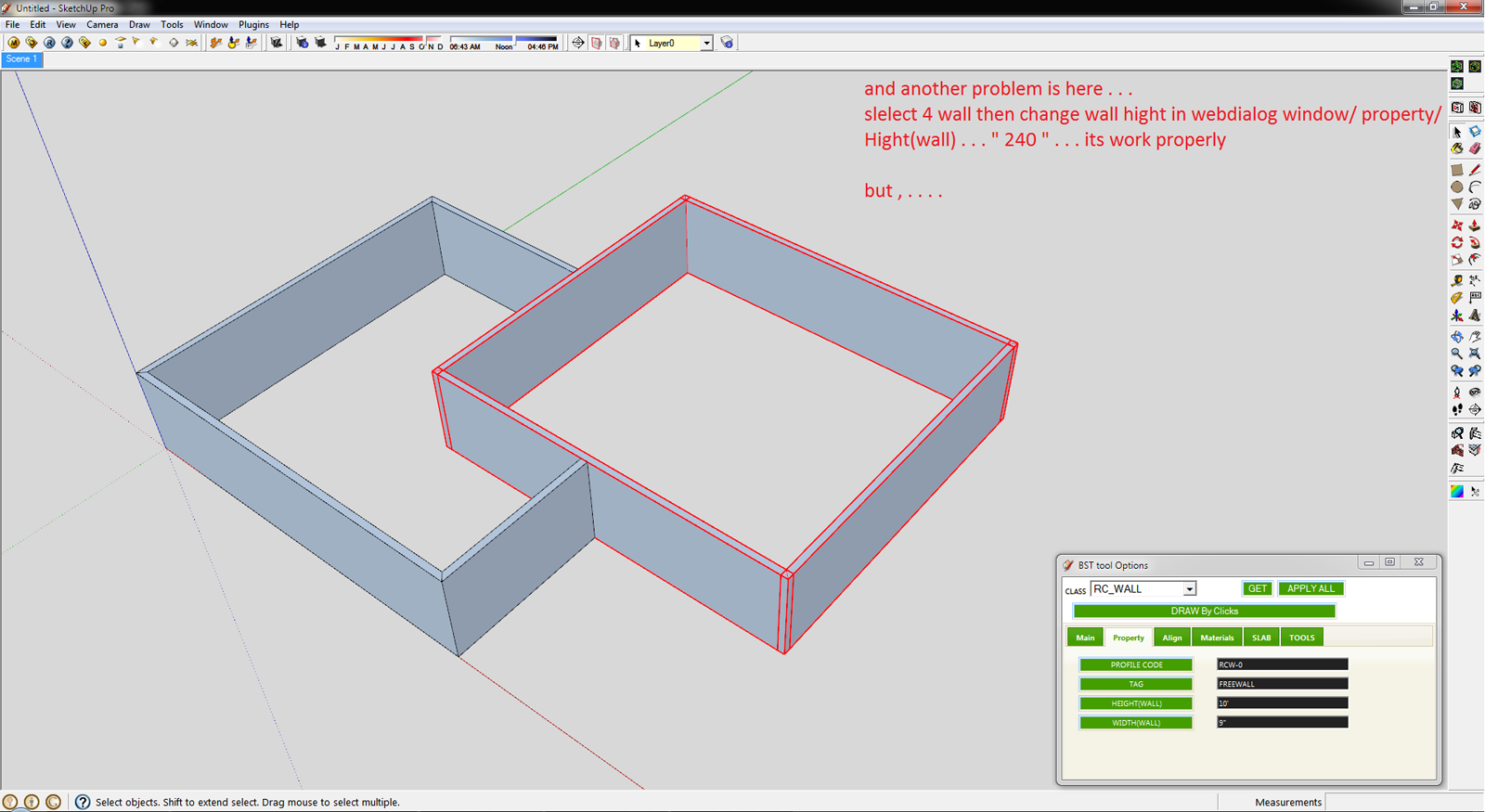
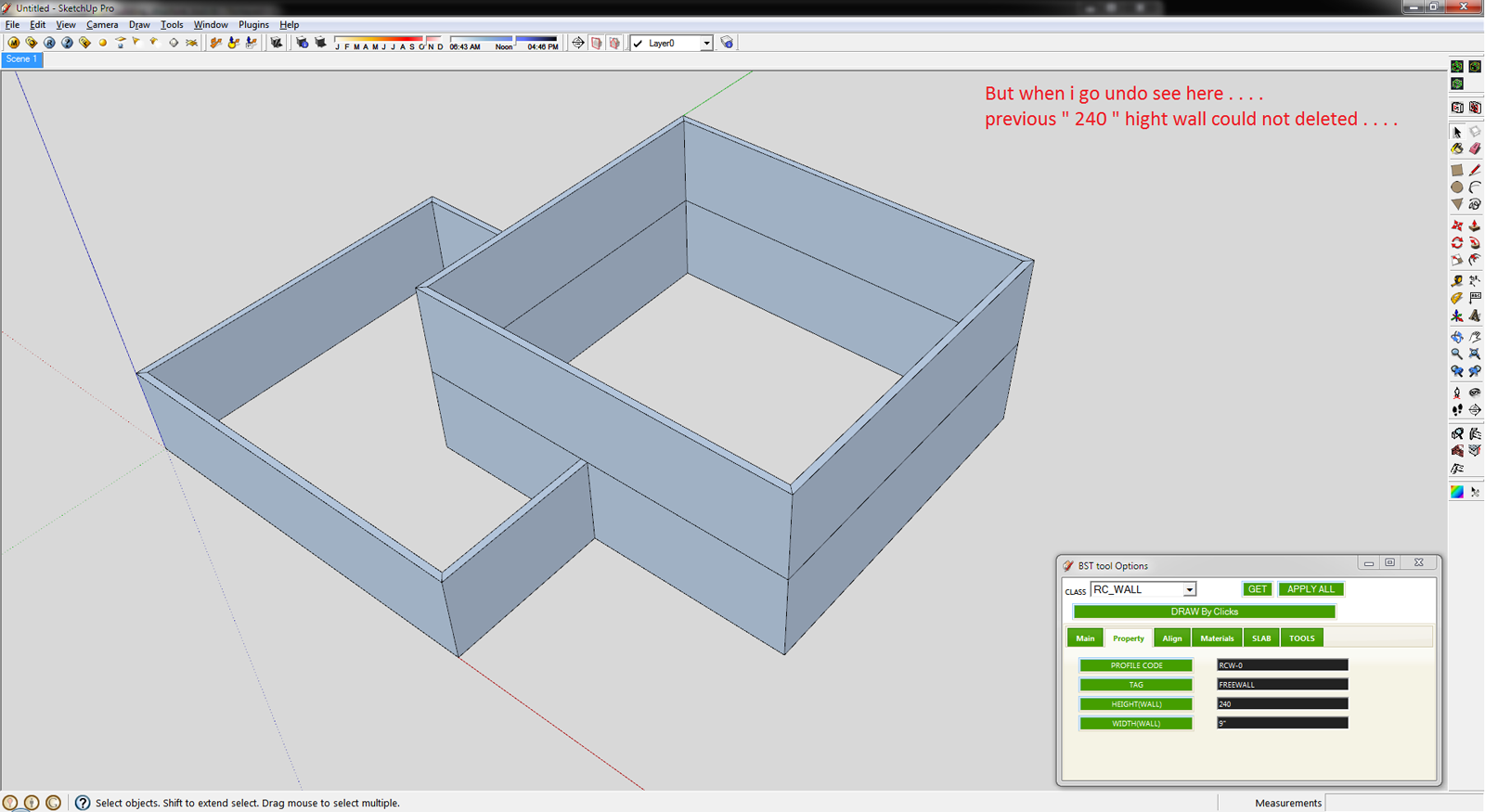
                      CHK


                      1.png


                      2.png


                      3.png


                      4.png

                      Thank you,
                      SUmaster

                      1 條回覆 最後回覆 回覆 引用 0
                      • T 離線
                        tak2hata
                        最後由 編輯

                        Hi,CTman.
                        You are welcome!
                        If you upload the PFC profile file here , I will create link to your post in top of thread.
                        Your PFC profile file will help users of BST!

                        Hi,Sumaster.
                        I also checked the bug.
                        I will fix the problem within several days.
                        And I will update here.

                        Thanks.


                        by TAK2HATA

                        1 條回覆 最後回覆 回覆 引用 0
                        • sumasterS 離線
                          sumaster
                          最後由 編輯

                          @tak2hata said:

                          Hi,Sumaster.
                          I also checked the bug.
                          I will fix the problem within several days.
                          And I will update here.

                          Thanks.

                          Yes WAiTING . . . .

                          THANK YOU . . . 😉

                          Thank you,
                          SUmaster

                          1 條回覆 最後回覆 回覆 引用 0
                          • D 離線
                            DavidATCW
                            最後由 編輯

                            Hi All,

                            New the SU but finding it very useful.

                            Thanks to Tak2hta for the BST plugin. I looks realy good.

                            I'm using SU8 Pro on Window 7 OS.

                            In the PlugIns menu under building structure tool I don't seem to have the 'Add New Profile'. The tutorial video seems to indicate it should be there??

                            Appreciate any help.

                            Thanks

                            1 條回覆 最後回覆 回覆 引用 0
                            • T 離線
                              tak2hata
                              最後由 編輯

                              Hi,
                              I update this in Sep 05,2012.
                              Bugfix about extending to face with selecting single bst entity.

                              Hi,Sumaster.
                              Adding toolbar like previous version has not done well yet.
                              I gave priority to correction of a bug and update.
                              wait while.

                              Hi,david.
                              "Add new profile" was disable since version1.0.
                              Because the adding to CSV with ruby script has problem.
                              The text code is defferent between languages.
                              So the character peculiar in the language included in csv will be modified strange when ruby overwrite the csv file.
                              Please edit CSV file with application like Excel or open office calc.

                              Thanks.


                              by TAK2HATA

                              1 條回覆 最後回覆 回覆 引用 0
                              • D 離線
                                DavidATCW
                                最後由 編輯

                                Hi TAK2HTA,

                                Thanks for the reply.

                                I presume modifying CSV file allows new sizes for existing profile to be added. This is not what I want to do.

                                Like CTMan I would like to add new profile shape for beams, similar to CTMan's PFC profiles. Instrucion on how to this would be apprecated. We need to be able to customise to get the most out of this realy useful plugin.

                                Thanks

                                1 條回覆 最後回覆 回覆 引用 0
                                • beginnerB 離線
                                  beginner
                                  最後由 編輯

                                  Hi Guys,
                                  I would like to draw your attention to the 'shapes' in tak2hata's plugin - look at the Class SHAPE and the profiles defined as *.SKP files.

                                  You can draw any complex shape as long is contained within single face - sample below.
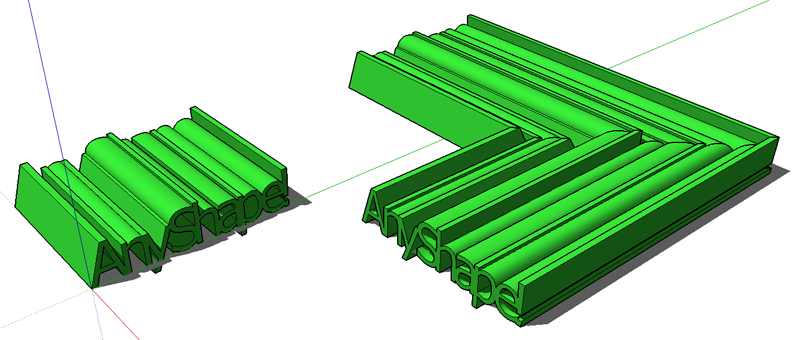

                                  20120905-Tak2HataShapes.png

                                  Regards, SU 'beginner'

                                  1 條回覆 最後回覆 回覆 引用 0
                                  • sumasterS 離線
                                    sumaster
                                    最後由 編輯

                                    @tak2hata said:

                                    Hi,Sumaster.
                                    Adding toolbar like previous version has not done well yet.
                                    I gave priority to correction of a bug and update.
                                    wait while.

                                    Hi Tak2hata,

                                    wow nice update . . . . 👍

                                    Extend to Face tool is working perfectly . . . . but
                                    Extend to Structure is not working properly . . .

                                    CHK

                                    1.png

                                    2.png

                                    3.png

                                    4.png

                                    5.png

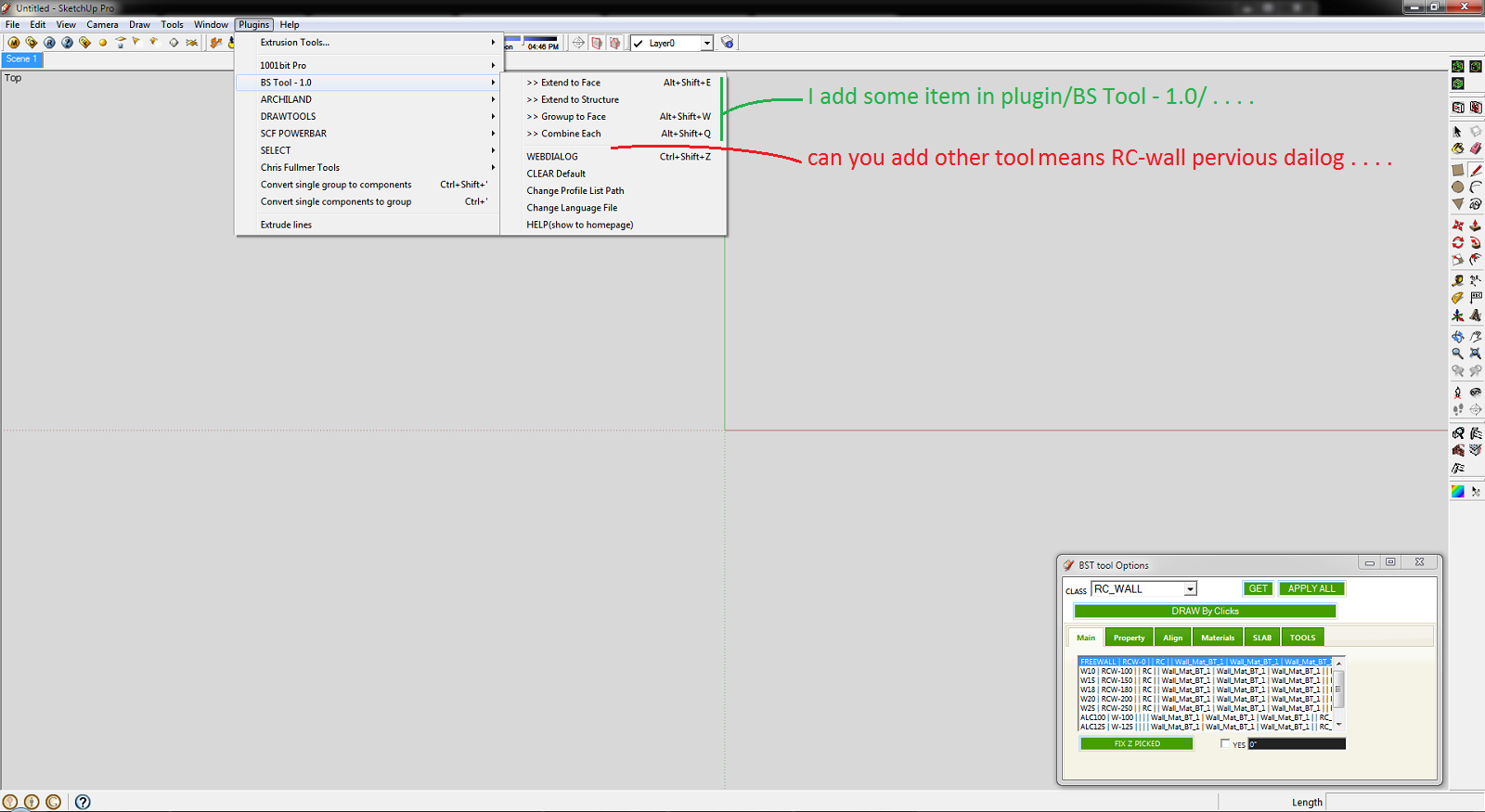
                                    I add some items in plugin menu . . . 😉
                                    please add all previous item in plugin menu

                                    
                                    tst_main_menu = UI.menu("Plugins").add_submenu("#{langconv( 'BS Tool - 1.0' )}")
                                    tst_main_menu.add_item("#{langconv('>> Extend to Face')}") { Sketchup.active_model.select_tool TST1_class_extend_face.new( false ) }
                                    tst_main_menu.add_item("#{langconv('>> Extend to Structure')}") { Sketchup.active_model.select_tool TST1_class_extend_str.new }
                                    tst_main_menu.add_item("#{langconv('>> Growup to Face')}") { Sketchup.active_model.select_tool TST1_class_grow_face.new( false ) }
                                    tst_main_menu.add_item("#{langconv('>> Combine Each')}") { Sketchup.active_model.select_tool TST1_class_chamfer.new }
                                    tst_main_menu.add_separator


                                    6.png

                                    And thank you so much for this plugin . . . . 😄
                                    i use your plugin daily . . . .
                                    its save my basic modeling time . . . too good . . . .

                                    Thank you,
                                    SUmaster

                                    1 條回覆 最後回覆 回覆 引用 0
                                    • V 離線
                                      victor hugo
                                      最後由 編輯

                                      Does anyone know where to find more RC_WALL options for the BST, when I installed it (which is very useful BTW) it only shows 4 options?

                                      Thanks.

                                      1 條回覆 最後回覆 回覆 引用 0
                                      • C 離線
                                        CTMan
                                        最後由 編輯

                                        @tak2hata said:

                                        Hi,CTman.
                                        You are welcome!
                                        If you upload the PFC profile file here , I will create link to your post in top of thread.
                                        Your PFC profile file will help users of BST!

                                        Hello Tak2hata - please find attached csv file for British Steel Beams and Columns

                                        Hi,Sumaster.
                                        I also checked the bug.
                                        I will fix the problem within several days.
                                        And I will update here.

                                        Thanks.


                                        British Steel Beams and Columns

                                        1 條回覆 最後回覆 回覆 引用 0
                                        • T 離線
                                          tak2hata
                                          最後由 編輯

                                          Hi,CTMan.
                                          I add link to your reply in the top of thread.
                                          Thanks a lot for uploading your profile list of UK STEEL.

                                          Channel([) have tapered flanges when the schema is like "[-100x50x5x7.5x8x4"
                                          Channel([) have not tapered flanges when the schema is like "[-100x50x5x7.5"
                                          So If you want to not tapered flange Channel,the schema is like "[-AxBxCxD".

                                          Hi,sumaster.
                                          "Extend to structure" tool works extending the structure to the other structure.not to face.
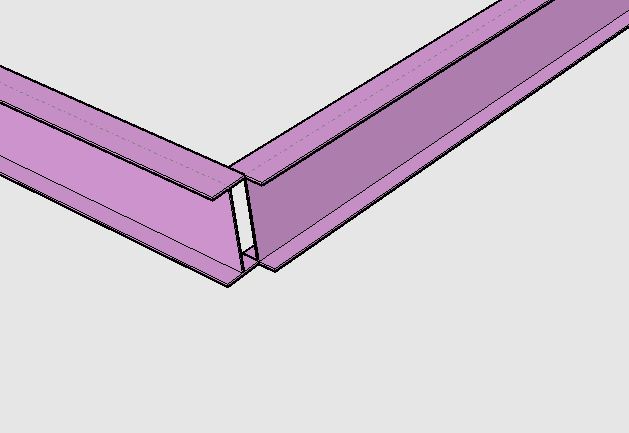
                                          extending to structure.
                                          Using "Extending to Face" to extend like this picture takes time and effort.
                                          So "Extend to Structure" exists for that purpose.

                                          I see the "undo" problem.
                                          I will fix it few days.

                                          Thanks.


                                          by TAK2HATA

                                          1 條回覆 最後回覆 回覆 引用 0
                                          • sumasterS 離線
                                            sumaster
                                            最後由 編輯

                                            @tak2hata said:

                                            Hi,CTMan.
                                            I add link to your reply in the top of thread.
                                            Thanks a lot for uploading your profile list of UK STEEL.

                                            Channel([) have tapered flanges when the schema is like "[-100x50x5x7.5x8x4"
                                            Channel([) have not tapered flanges when the schema is like "[-100x50x5x7.5"
                                            So If you want to not tapered flange Channel,the schema is like "[-AxBxCxD".

                                            Hi,sumaster.
                                            "Extend to structure" tool works extending the structure to the other structure.not to face.
                                            [attachment=0:165mbbk2]<!-- ia0 -->extending_to_structure.JPG<!-- ia0 -->[/attachment:165mbbk2]
                                            Using "Extending to Face" to extend like this picture takes time and effort.
                                            So "Extend to Structure" exists for that purpose.

                                            I see the "undo" problem.
                                            I will fix it few days.

                                            Thanks.

                                            yes

                                            and another problem facing here . . .
                                            i upgrade your new version but when i OPEN my OLD version file means (i was working your old BS tool) and exend to face and other 3 tools are not working good . . .

                                            Pleas CHK

                                            Thank you,
                                            SUmaster

                                            1 條回覆 最後回覆 回覆 引用 0
                                            • 1
                                            • 2
                                            • 11
                                            • 12
                                            • 13
                                            • 14
                                            • 15
                                            • 16
                                            • 17
                                            • 13 / 17
                                            • 第一個貼文
                                              最後的貼文
                                            Buy SketchPlus
                                            Buy SUbD
                                            Buy WrapR
                                            Buy eBook
                                            Buy Modelur
                                            Buy Vertex Tools
                                            Buy SketchCuisine
                                            Buy FormFonts

                                            Advertisement