sketchucation logo sketchucation
    • 登入
    Oops, your profile's looking a bit empty! To help us tailor your experience, please fill in key details like your SketchUp version, skill level, operating system, and more. Update and save your info on your profile page today!
    🔌 Smart Spline | Fluid way to handle splines for furniture design and complex structures. Download

    [Plugin]T2H_BuildingStructureTools2.2.4 in20141207

    已排程 已置頂 已鎖定 已移動 Plugins
    337 貼文 108 Posters 476.8k 瀏覽 108 Watching
    正在載入更多貼文
    • 從舊到新
    • 從新到舊
    • 最多點贊
    回覆
    • 在新貼文中回覆
    登入後回覆
    此主題已被刪除。只有擁有主題管理權限的使用者可以查看。
    • beginnerB 離線
      beginner
      最後由 編輯

      Hi There,
      The plugin is great.
      I have only one problem with the 'default_pflist.csv' file.
      The editing of the file doesn't take any effect in SketchUP.
      Is anybody successfully added any new 'sizes'?
      I would appreciate your comments.
      Regards

      Regards, SU 'beginner'

      1 條回覆 最後回覆 回覆 引用 0
      • S 離線
        SUFractal
        最後由 編輯

        @beginner said:

        Hi There,
        The plugin is great.
        I have only one problem with the 'default_pflist.csv' file.
        The editing of the file doesn't take any effect in SketchUP.
        Is anybody successfully added any new 'sizes'?
        I would appreciate your comments.
        Regards

        Did you change the contents (sizes) within that file?

        1 條回覆 最後回覆 回覆 引用 0
        • beginnerB 離線
          beginner
          最後由 編輯

          @sufractal said:

          Did you change the contents (sizes) within that file?

          Hi There,
          I have seen the tutorial http://www.youtube.com/watch?v=oSVrbJMSSB0&feature=player_embedded and I have noticed that you can change the path to the *.csv file.
          I have created a new file, located on My Desktop and changed the path - it works! but... when I change to the plugins path it doesn't.
          Never mind, I like the fact that you can link own *.csv file and it can seat in my preferred location.
          Thank you
          Regards

          Regards, SU 'beginner'

          1 條回覆 最後回覆 回覆 引用 0
          • S 離線
            SUFractal
            最後由 編輯

            @beginner said:

            @sufractal said:

            Did you change the contents (sizes) within that file?

            Hi There,
            I have seen the tutorial http://www.youtube.com/watch?v=oSVrbJMSSB0&feature=player_embedded and I have noticed that you can change the path to the *.csv file.
            I have created a new file, located on My Desktop and changed the path - it works! but... when I change to the plugins path it doesn't.
            Never mind, I like the fact that you can link own *.csv file and it can seat in my preferred location.
            Thank you
            Regards

            I don't know this to be 100% true, but I suspect that file does not belong on your desktop, but probably within the "building_structure_tool" folder located inside your plugins folder. Give it a try and see if that corrects the problem.

            1 條回覆 最後回覆 回覆 引用 0
            • beginnerB 離線
              beginner
              最後由 編輯

              @sufractal said:

              @beginner said:

              @sufractal said:

              Did you change the contents (sizes) within that file?

              I don't know this to be 100% true, but I suspect that file does not belong on your desktop, but probably within the "building_structure_tool" folder located inside your plugins folder. Give it a try and see if that corrects the problem.

              Hi There,
              You are right the file does not belong to the Desktop - it is my copy of the file from ...\Plugins\building_structure_tool folder to play with.
              As I said - When I edit the file in the plugins folder I don't see any changes in SketchUP but...
              When I edit the file on my desktop (outside the plugin folder - you can keep the copy of the file anywhere you like) and change the path in SketchUP I can see the changes (picture attached).
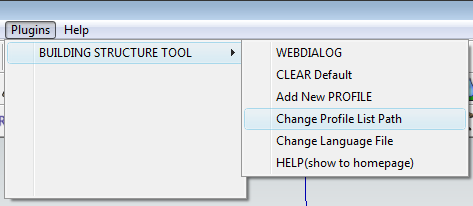

              Path to the default_pflist.csv - now I will change to my Desktop copy and I will see my new steel, walls etc. types

              Regards, SU 'beginner'

              1 條回覆 最後回覆 回覆 引用 0
              • G 離線
                go45454
                最後由 編輯

                thankkkkkkkk

                1 條回覆 最後回覆 回覆 引用 0
                • brookefoxB 離線
                  brookefox
                  最後由 編輯

                  tak2hata, Thanks very much for this promising set of tools. I hope you find the time to make the videos larger and maybe more complete.

                  I tried copying and slightly altering the wall to have a baseboard on both sides but this seems to 'break' the proper corner corrections you have made the program perform. I see all your multi-walls are one sided; do they have to be? Could the standard application methods be adapted to trimming around window or door openings?

                  ~ Brooke

                  1 條回覆 最後回覆 回覆 引用 0
                  • S 離線
                    sags
                    最後由 編輯

                    thanks... 👍

                    1 條回覆 最後回覆 回覆 引用 0
                    • J 離線
                      josephcase
                      最後由 編輯

                      I apologize if this is not correct area,
                      I need help.. I'm tasked to create two different
                      size CORRUGATED MULTI-PLATE pipes. The first has dia
                      of 9'6" IS using total 6 plates @5 gage to complete 1 ring. The
                      second is 16' IS using 8 plates @5 gage. It appears that your
                      toolkit allows making FLAT roofing products EXCELLENT! Can
                      it make the sections I need for circular multi plate corrugated pipe?
                      The holes and length/width are no issue but curved as opposed to
                      flat is. Please advise or point to tutorial for topic. Thanks Joe

                      1 條回覆 最後回覆 回覆 引用 0
                      • T 離線
                        tak2hata
                        最後由 編輯

                        @unknownuser said:

                        I apologize if this is not correct area,
                        I need help.. I'm tasked to create two different
                        size CORRUGATED MULTI-PLATE pipes. The first has dia
                        of 9'6" IS using total 6 plates @5 gage to complete 1 ring. The
                        second is 16' IS using 8 plates @5 gage. It appears that your
                        toolkit allows making FLAT roofing products EXCELLENT! Can
                        it make the sections I need for circular multi plate corrugated pipe?
                        The holes and length/width are no issue but curved as opposed to
                        flat is. Please advise or point to tutorial for topic. Thanks Joe

                        Hi,Joe.
                        I think that your proposal is difficult in this plugin.
                        I think Chris Fullmer's Shape Bender is help you.
                        http://forums.sketchucation.com/viewtopic.php?t=18210#p147395

                        Hi,SU Fractal and Beginer.
                        The File System of ruby in sketchup(windows) can not work well with path include the original characters of the language.
                        I tried the many method ,but I could not find good solution.
                        So the csv file about profile list locate the suitable folder whitch do not include the special characters.

                        This is as hard as possible.

                        Thanks.


                        by TAK2HATA

                        1 條回覆 最後回覆 回覆 引用 0
                        • S 離線
                          SUFractal
                          最後由 編輯

                          tak2hata:

                          Today (all of a sudden) the "steel column" tool stopped working. All of the other tools appear to be working fine. I have not changed any of the scripts or files associated with this plugin for quite a while.

                          When I click on the steel column icon, a window for selecting member sizes does not appear.

                          Thanks

                          1 條回覆 最後回覆 回覆 引用 0
                          • T 離線
                            tak2hata
                            最後由 編輯

                            @sufractal said:

                            tak2hata:

                            Today (all of a sudden) the "steel column" tool stopped working. All of the other tools appear to be working fine. I have not changed any of the scripts or files associated with this plugin for quite a while.

                            When I click on the steel column icon, a window for selecting member sizes does not appear.

                            Thanks

                            Hi,SUFractal.

                            well,I do not have a point to which it occurs.

                            So I want to see the ruby console on your sketchup.

                            Show "Ruby console" from "Window" menu.
                            Start Building structure tool"Steel Column".

                            Copy the message shown in ruby console.

                            And post it.

                            I will see and consider the problem.

                            Thanks


                            by TAK2HATA

                            1 條回覆 最後回覆 回覆 引用 0
                            • kenK 離線
                              ken
                              最後由 編輯

                              @sufractal said:

                              tak2hata:

                              Today (all of a sudden) the "steel column" tool stopped working. All of the other tools appear to be working fine. I have not changed any of the scripts or files associated with this plugin for quite a while.

                              When I click on the steel column icon, a window for selecting member sizes does not appear.

                              Thanks

                              This has happen to me also. I found that if you go to the plugin menu and clear defaults it will start working again. At least on my computer that works.

                              Ken

                              Fight like your the third monkey on Noah's Ark gangway.

                              1 條回覆 最後回覆 回覆 引用 0
                              • S 離線
                                SUFractal
                                最後由 編輯

                                @unknownuser said:

                                @sufractal said:

                                tak2hata:

                                Today (all of a sudden) the "steel column" tool stopped working. All of the other tools appear to be working fine. I have not changed any of the scripts or files associated with this plugin for quite a while.

                                When I click on the steel column icon, a window for selecting member sizes does not appear.

                                Thanks

                                This has happen to me also. I found that if you go to the plugin menu and clear defaults it will start working again. At least on my computer that works.

                                Ken

                                Genius! Thank you Ken, it worked.

                                1 條回覆 最後回覆 回覆 引用 0
                                • K 離線
                                  kob42823
                                  最後由 編輯

                                  Excellent 👍

                                  1 條回覆 最後回覆 回覆 引用 0
                                  • A 離線
                                    andyomis
                                    最後由 編輯

                                    I am working with Sketchup 8 pro on a mac. The .rb file and the folder are in the right place and the tool bar is there. However when I open to select a tool the tool window is blank. All the appropriate file paperer to be in the folder. Any suggestions?

                                    1 條回覆 最後回覆 回覆 引用 0
                                    • A 離線
                                      andyomis
                                      最後由 編輯

                                      Further to my earlier post today I now have toolbar icons etc. However I cannot select next point. Help!

                                      1 條回覆 最後回覆 回覆 引用 0
                                      • T 離線
                                        tak2hata
                                        最後由 編輯

                                        Hi,Everybody.
                                        I update this "Building structure tool" to version 1.0a.

                                        Many improves added.

                                        Hi,andyomis.
                                        I want to know ruby console error message in your problem.
                                        So you open ruby console window and use Building structure tool.
                                        There will be messages.
                                        Copy the massge and reply here.
                                        I will see.

                                        Or,Install new version with RBZ file.
                                        In SKetchup Preferences menu.Click "Install Extention".
                                        And select RBZ file.
                                        That need profile list file ,too.
                                        Download each files.

                                        Thanks.


                                        by TAK2HATA

                                        1 條回覆 最後回覆 回覆 引用 0
                                        • Z 離線
                                          ZFRPS
                                          最後由 編輯

                                          Dear tak2hata:

                                          Your this plugin very very useful for **BIM**,I will always support you!
                                          But...Why to remove will general model transformation into your unique model functions?
                                          you now allow the section type is not very rich![q01.jpg](/uploads/imported_attachments/rGQI_q01.jpg)
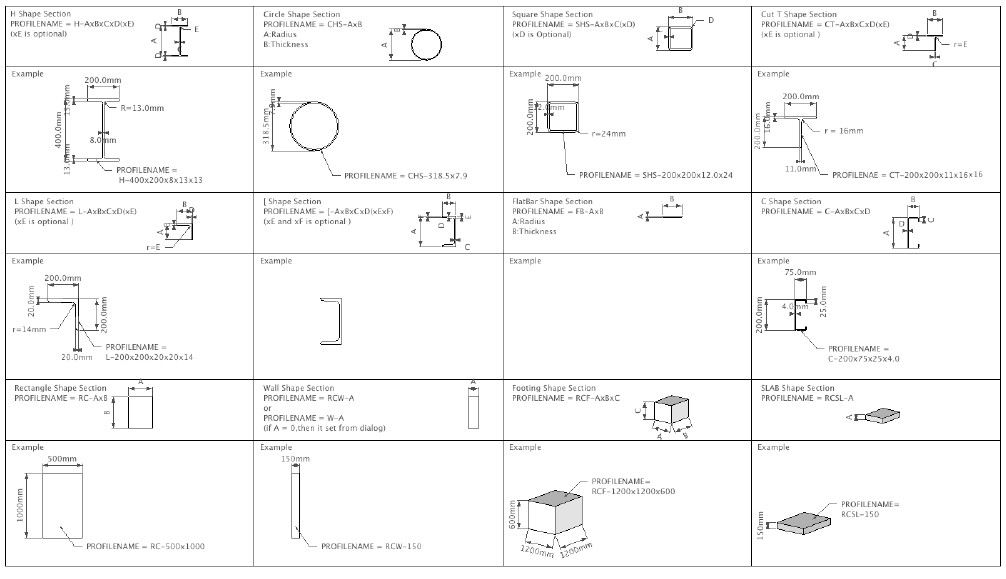
                                          Or if you can tell how we can increase the section type!
                                          
                                          Undeniable, you are doing now is a profound things for **BIM**.
                                          
                                          THANKS AGAIN!
                                          

                                          sketchup is bim

                                          1 條回覆 最後回覆 回覆 引用 0
                                          • Z 離線
                                            ZFRPS
                                            最後由 編輯

                                            Depressed!
                                            Early versions of the dot, line automatically created according to the function also is gone!!

                                            sketchup is bim

                                            1 條回覆 最後回覆 回覆 引用 0
                                            • 1
                                            • 2
                                            • 3
                                            • 4
                                            • 5
                                            • 6
                                            • 7
                                            • 8
                                            • 16
                                            • 17
                                            • 6 / 17
                                            • 第一個貼文
                                              最後的貼文
                                            Buy SketchPlus
                                            Buy SUbD
                                            Buy WrapR
                                            Buy eBook
                                            Buy Modelur
                                            Buy Vertex Tools
                                            Buy SketchCuisine
                                            Buy FormFonts

                                            Advertisement

