sketchucation logo sketchucation
    • Login
    Oops, your profile's looking a bit empty! To help us tailor your experience, please fill in key details like your SketchUp version, skill level, operating system, and more. Update and save your info on your profile page today!
    ⚠️ Important | Libfredo 15.6b introduces important bugfixes for Fredo's Extensions Update

    Toolbar toggle Fredo, Fullmer, TT, etc.

    Scheduled Pinned Locked Moved Plugins
    11 Posts 4 Posters 1.6k Views 4 Watching
    Loading More Posts
    • Oldest to Newest
    • Newest to Oldest
    • Most Votes
    Reply
    • Reply as topic
    Log in to reply
    This topic has been deleted. Only users with topic management privileges can see it.
    • Chris FullmerC Offline
      Chris Fullmer
      last edited by

      Hi Wind-born. Sorry, I don't follow the toolbar conversations very closely. I'm not exactly sure what you're asking here. My understanding is that you used to set up shortcuts to toggle on and off toolbars (somethingI've never done or never even tried to do). Does the script need to be writtenly in a specific way to make that work? What exaclty was wrong with my scripts and how did you change them so they worked? Are there any of my scripts that you still need help to fix?

      Thanks,

      Chris

      Lately you've been tan, suspicious for the winter.
      All my Plugins I've written

      1 Reply Last reply Reply Quote 0
      • thomthomT Offline
        thomthom
        last edited by

        I'm also not sure if I understand the issue in question either... πŸ˜•

        Thomas Thomassen β€” SketchUp Monkey & Coding addict
        List of my plugins and link to the CookieWare fund

        1 Reply Last reply Reply Quote 0
        • wind-borneW Offline
          wind-borne
          last edited by

          Hi Chris,
          Don't know what changed to cause problem but this solved.
          I just deleted the space between Extended Standard in the toolbar line, now toggles toolbar with that spelling in shortcut. Adjusted your others as shown in screenshot previous post.

          Thanks

          clf_extended_views = $clf_tools_menu.add_submenu("Extended Standard Views")

          	toolbar = UI::Toolbar.new "ExtendedStandard Views"
          

          "To read between the lines was easier than to follow the text."OSX 10.11.6

          %(#BF80BF)[SU 8 pro

          1 Reply Last reply Reply Quote 0
          • wind-borneW Offline
            wind-borne
            last edited by

            @thomthom said:

            I'm also not sure if I understand the issue in question either... πŸ˜•

            Hi,

            Selection Toys toolbar toggled for ages, recently the shortcut heads to the tool menu shown on right instead of tool palette in view menu left.
            Never used to show up as shortcut in tool menu before. Don't know if caused by upgrading to Snow Leopard or SU maintenance release as did both almost simultaneously. If there was a slight variation as I did in Chris' problem would be solved but I am lost when looking inside your plugins.

            Here is an example why I can't do within SU, choosing one chooses all but only toggles one
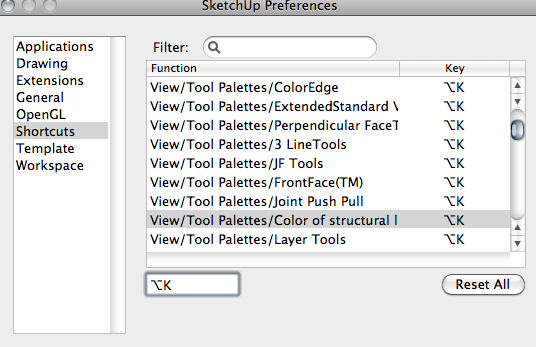

            SketchUp.png

            "To read between the lines was easier than to follow the text."OSX 10.11.6

            %(#BF80BF)[SU 8 pro

            1 Reply Last reply Reply Quote 0
            • thomthomT Offline
              thomthom
              last edited by

              What? you can assign the same shortcut key to multiple items?
              Under Windows it doesn't let you do that - it overrides.

              Thomas Thomassen β€” SketchUp Monkey & Coding addict
              List of my plugins and link to the CookieWare fund

              1 Reply Last reply Reply Quote 0
              • wind-borneW Offline
                wind-borne
                last edited by

                More like a bug, only one palette will toggle, you can't select individual within SU πŸ‘Š

                "To read between the lines was easier than to follow the text."OSX 10.11.6

                %(#BF80BF)[SU 8 pro

                1 Reply Last reply Reply Quote 0
                • thomthomT Offline
                  thomthom
                  last edited by

                  But I don't understand why you need to rename the menu names, SU identifies the correct menu by it's parent menus...

                  Thomas Thomassen β€” SketchUp Monkey & Coding addict
                  List of my plugins and link to the CookieWare fund

                  1 Reply Last reply Reply Quote 0
                  • wind-borneW Offline
                    wind-borne
                    last edited by

                    @thomthom said:

                    But I don't understand why you need to rename the menu names, SU identifies the correct menu by it's parent menus...

                    I don't know why but this shows how shortcut aims at Tool menu rather than View menu, Tool flashes each time I tap control C.
                    Screenshot on opening post shows shortcut on both menus.
                    http://www.youtube.com/watch?v=Auz6rSXoZG8

                    "To read between the lines was easier than to follow the text."OSX 10.11.6

                    %(#BF80BF)[SU 8 pro

                    1 Reply Last reply Reply Quote 0
                    • fredo6F Offline
                      fredo6
                      last edited by

                      Wind-borne,

                      I don't know exactly waht is the issue you try to address, but, for information, you can change the name of the toolbar for all my plugins using LibFredo6.
                      Just go to the menu "Default Options".

                      Fredo

                      1 Reply Last reply Reply Quote 0
                      • wind-borneW Offline
                        wind-borne
                        last edited by

                        Fredo,

                        Thanks for the heads up on the ones in your collection.
                        Inside the Joint Push Pull folder I found the line to modify so that one is working again also.

                        On my Mac have never been able to set shortcuts for toolbars inside SU.
                        I usually work with only one row of toolbars down side and toggle on and off as needed.
                        I assume the problem began when I installed Snow Leopard as was problem free in this regards beforehand.

                        Many thanks for your tools.

                        "To read between the lines was easier than to follow the text."OSX 10.11.6

                        %(#BF80BF)[SU 8 pro

                        1 Reply Last reply Reply Quote 0
                        • 1 / 1
                        • First post
                          Last post
                        Buy SketchPlus
                        Buy SUbD
                        Buy WrapR
                        Buy eBook
                        Buy Modelur
                        Buy Vertex Tools
                        Buy SketchCuisine
                        Buy FormFonts

                        Advertisement



