3DS vs. DAE - Import from Blender
-
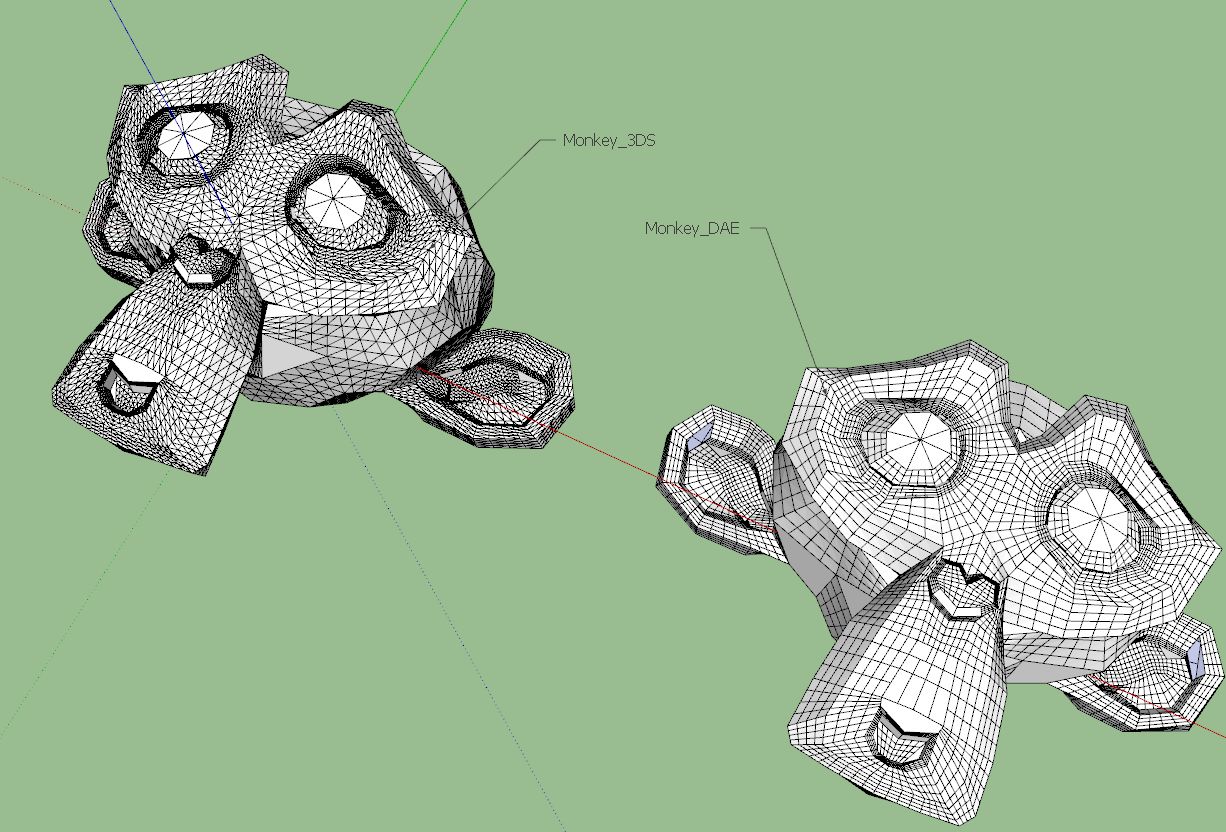
I tried importing 3DS and Dae exported from Blender. The mesh topology is different - quads vs. triangles. What do You think - pros and cons?
-
For each import types, in the options (bottom right of the import window) there is a "Merge coplanar faces" checkbox. It is checked for collada (like dae) by default but I think it is not for the 3ds type. Try to play around with those settings - I think you could get the same results.
Now as for tris vs quads - it really depends on what you wish to achieve. Sometimes quads are better (easier to UV map, better to subdivide and such) while some external applications may prefer tris.
-
In both cases I used "Merge coplanar faces". Seems Blender exports differently each format or it is maybe a format specific thing.
-
Ah, OK, I see, that may happen. In this case those triangles are not coplanar I guess (which means that the surface, after smoothing, may look smoother).
-
The DAE import - is that exactly how it came into SketchUp from Blender?
The quads are all triangles, but for some reason the dividing edge is hidden instead of soft - which would be a better solution. -
If you compare the two types with View > Hidden Geometry ON you'll see that in the DAE version there are a few true quads [and even some multi-sided facets] but where what looks like a 'quad' face needs to be split to work in 3d there's a smoothed [hidden] diagonal divider across it - so what looks like a quad is actually two non-coplanar triangles. You will see that the 3DS version has ALL of its faces triangulated, so there are no faces with more than 3 sides at all - and there's no automatic-smoothing.
-
I suspect it's because the 3ds version doesn't save out the soft property of the edges.
Certainly useful to know what formats preserve quads when transferring into SketchUp. Think I'll add a routine into Quad Tools to convert triangulated quads separated by a hidden edge into soft edges. Seems it would be a operation often required if people want to take quad meshes from other applications into SketchUp.



Hello! It looks like you're interested in this conversation, but you don't have an account yet.
Getting fed up of having to scroll through the same posts each visit? When you register for an account, you'll always come back to exactly where you were before, and choose to be notified of new replies (either via email, or push notification). You'll also be able to save bookmarks and upvote posts to show your appreciation to other community members.
With your input, this post could be even better 💗
Register Login


Advertisement