Crashing animation
-
Need help from any roving Google SketchUp people. On one of my office machine, every attempt to export an animation crashes since a month into installing v8. The maintenance release makes no difference. If it helps, attached are the bugspat generated files reported by the bugspat window.
I have already attempted to uninstall (from control panel) and reinstall without success. In order to clear Sketchup out of my system, don't I have to manually clean the register? Is it OK just to to delete the SketchUp labeled register items? Any other ideas are appreciated.
-
Have you tried Revo Uninstaller? I have found it to be very useful in removing the troublesome crap (like registry entries) that many apps leave behind (and there is a freeware version, which I linked to).
-
Does it also crash when you export image sequences (not an avi file)?
-
Thanks for the link. 2d graphics export OK, it only splats when exporting avi animations.
-
I mean animation exported as image sequence. I would suspect either some memory issue then or something with the codecs or other system problems on that computer (but I am really dumb when it comes to technical stuff)
-
If it's an AVI crash it sounds like codecs - check a working PC's and the failing PC's codecs.
Reinstall all codecs.
Try AVI export on the problem PC without any codec set under Options - it'll make an enormous AVI made but at least we are then pretty sure it's a codec issue if there's no crash... -
I tried "full frame uncompressed", and it crashed.>_<
-
@honoluludesktop said:
I tried "full frame uncompressed", and it crashed.>_<
How much memory does that PC have ?
-
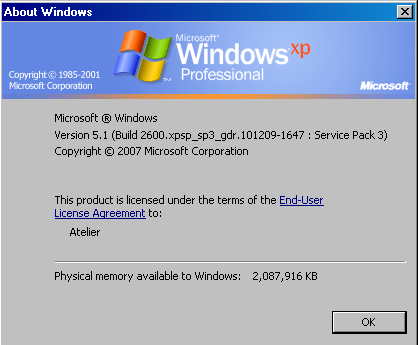
Shouldn't matter as SU animates the reference file on another machine:-( with less memory. Btw, not that it matters in my situation, but is there a easy way to reinstall the Coda? -
Weird!
Have you tried a full fresh install of v8 ? -
Yes, Unfortunately I did not think to "restore" when the problem first surfaced. At this point, unless some Google tech comes up with a suggestion, as a last resort I am going to uninstall SU v8, delete the SU v8 register items, then reinstall. Lots of hesitation on my part, having never had to mess with the register before.
-
If you do a complete uninstall with the option to remove everything, SU can do a pretty clean job (I had to do it a couple of times in Summer when playing with different versions).
-
Gai, Aside from using Windows uninstall, how do I do this?
-
Windows Control Panel > Programs and Features > Select Sketchup 8 > Uninstall [or similar names in XP]...
Try 'repair' first that if [when] that fails 'uninstall'... then reinstall - need to have license codes etc at hand - don't you have an IT guy to do this drudgery [or is it you ]
] 
-
Repair, and uninstall then install v8, failed to correct situation. I also cleaned registry, and btw, SU v7 can export animations OK.
-
Hmm......As a last resort, removed all plugins, and animation ran. Who would think that a rogue plugin could cause animation problems.
-
Here it is. It installs OK when bezier.rb is installed first.
-
I don't get it. Reinstalled the plugins in bunches, and SketchUp animation continues to run OK. It never fails to amaze me when a "kick the tires" solution works:-)
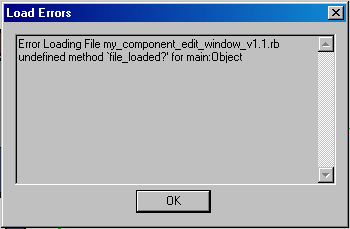
Funny thing, one of my_plugins initially failed to install, but OK when added later. This plugin didn't exist in my system when the animation first failed. I didn't save the error message, something about "run".
-
The load order of scripts can occasionally cause problems.
Try renaming the problem one with a leading 'zzz' so it loads last [scripts load in alphanumeric order # & ! first, the 0/1/2.. and a/b/c.. etc]. See if that works and then if it does examine the code to see what might be flaky. -
I think that the '
file_loaded?' method is made by 'sketchup.rb' - that's why therequire 'sketchup.rb'is advisable at the start of your scripts.
Note that this file should be in the 'Tools' folder and NOT in the 'Plugins' folder - check for duplication/mistakes.
To ensure 'sketchup.rb' is loaded before other scripts you could make a short script called '!!!!!!!!.rb' containing the one linerequire 'sketchup.rb'. That way you can be sure it's loaded, even if you have a script that 'requires' it later, as it is only needed to be loaded once...




Hello! It looks like you're interested in this conversation, but you don't have an account yet.
Getting fed up of having to scroll through the same posts each visit? When you register for an account, you'll always come back to exactly where you were before, and choose to be notified of new replies (either via email, or push notification). You'll also be able to save bookmarks and upvote posts to show your appreciation to other community members.
With your input, this post could be even better 💗
Register Login


Advertisement