Drawing Polygons by Apothem?
-
Just to be clear:
I indicated that I do not know of such a tool.
That is not to say that it does not exist.
Someone may see this thread who does know.EDIT: Oh, and thank you for teaching me a new word. I read more about it on several sites.

-
I don't know of a plugin for this, either but I can see that it could have its uses. When I need a polygon and I know the distance between flats but not the radius, I end up setting out two guidelines to help me draw it. It would be nice to be able to skip the guidelines, though.
-
The apothem obviously would represent the radius of a circle inscribed within and tangent to the edges of the polygon. A line from polygon center to one of the vertices would be the radius of a circumscribed circle.
Autocad, I believe allows the construction either way, and probably some other cad programs.
Now, this makes me wonder if TIG's 2D tools or TIG's True Tangents could be helpful to you Catmando? -
You can already draw it using three similar Polygons and the built-in inferencing - see this example...
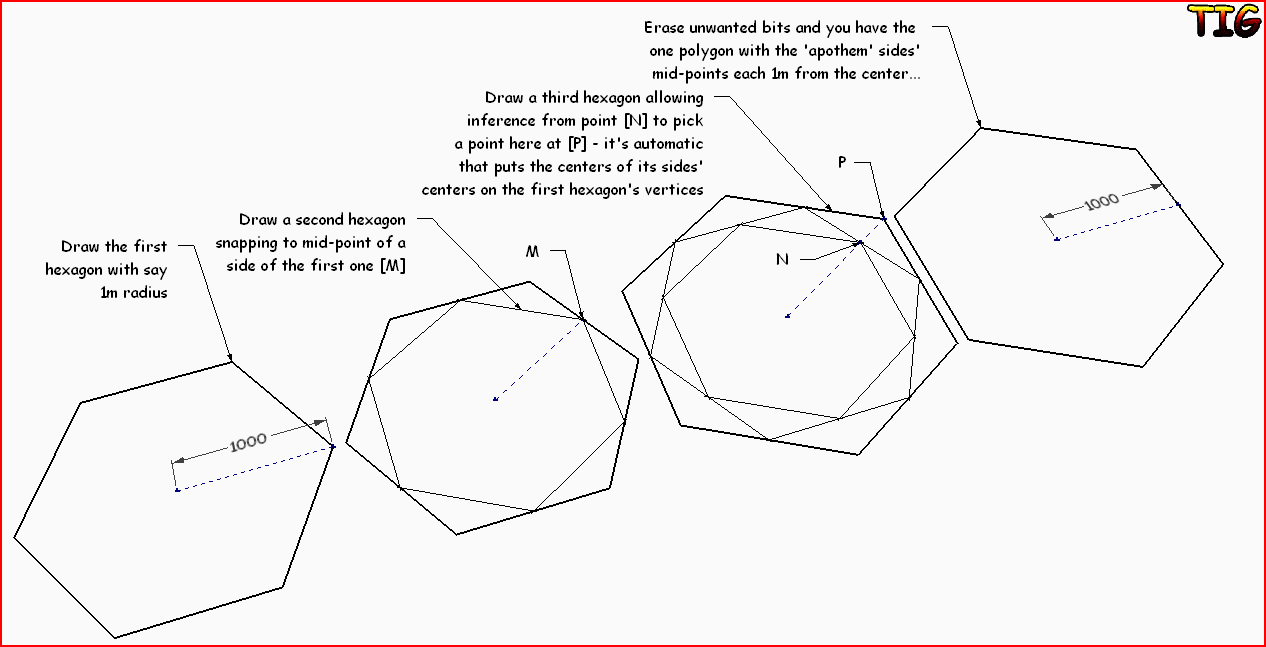
-
@tig said:
You can already draw it using three similar Polygons and the built-in inferencing - see this example...[attachment=0:2d3mez6r]<!-- ia0 -->PolyApothemExample.PNG<!-- ia0 -->[/attachment:2d3mez6r]
Wow! Clever trick there. I'll try that later. Thank you.
-
I think several of the built-in tools could use some enhancements. It would be nice if the circle tool could be dragged to set the normal, for example. The line tool could use a double-line, and line-from-center modes. Rectangle too could be made to create rotated rectangles, etc. There's plenty of room for improvement. I had the thought to re-implement all the basic tools in Ruby adding some of these enhancements, but it's a big job.
-
-
@tig said:
You can already draw it using three similar Polygons and the built-in inferencing - see this example...[attachment=0:2r6hvnb8]<!-- ia0 -->PolyApothemExample.PNG<!-- ia0 -->[/attachment:2r6hvnb8]
I just tried this trick and it is very quick and easy to do.
Thanks!
-
Simple when drawing the geometry hit the ctrl key and it will switch to the circumscribed or Apothem method.
-
@hburns said:
Simple when drawing the geometry hit the ctrl key and it will switch to the circumscribed or Apothem method.
Yes. It is simple since SketchUp 2015 was released. Prior to that and when this thread was active, SketchUp didn't have this option as a native feature.




Hello! It looks like you're interested in this conversation, but you don't have an account yet.
Getting fed up of having to scroll through the same posts each visit? When you register for an account, you'll always come back to exactly where you were before, and choose to be notified of new replies (either via email, or push notification). You'll also be able to save bookmarks and upvote posts to show your appreciation to other community members.
With your input, this post could be even better 💗
Register Login


Advertisement