sketchucation logo sketchucation
    • 登入
    Oops, your profile's looking a bit empty! To help us tailor your experience, please fill in key details like your SketchUp version, skill level, operating system, and more. Update and save your info on your profile page today!
    🔌 Smart Spline | Fluid way to handle splines for furniture design and complex structures. Download

    [Plugin] Component Edit Window v1.3 12072011

    已排程 已置頂 已鎖定 已移動 Plugins
    46 貼文 18 Posters 55.1k 瀏覽 18 Watching
    正在載入更多貼文
    • 從舊到新
    • 從新到舊
    • 最多點贊
    回覆
    • 在新貼文中回覆
    登入後回覆
    此主題已被刪除。只有擁有主題管理權限的使用者可以查看。
    • honoluludesktopH 離線
      honoluludesktop
      最後由 honoluludesktop 編輯

      Fixed "open component file" bug.
      TIG: Edit.
      Freely use, and abuse at your own risk. Fitness of use is not warranty implied.
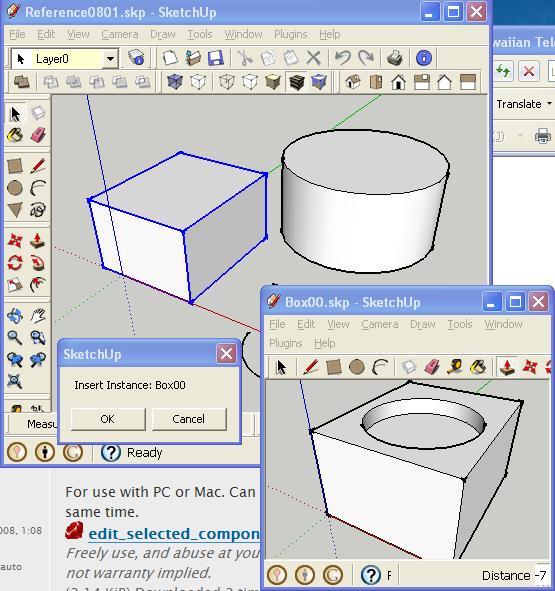
      The tool opens a selected component in a temporary [new] window for easy editing; avoiding problems with clipping planes etc.
      Select a component then right-click and use the context-menu item Component Edit Window.
      The selected component will now open in a new temporary edit window.
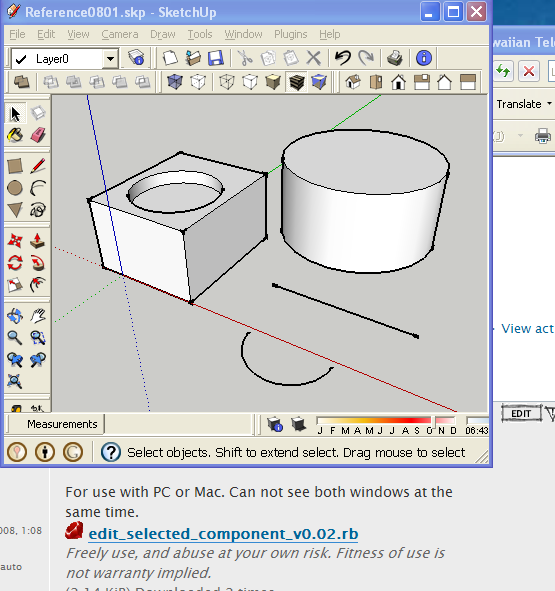
      Edit the component's geometry etc, and then Save to Close the temporary edit window and to return to the original model: a dialog then asks if you want to Update that component, OK to update all instances of it, Cancel to skip.
      Closing the temporary edit window without Saving returns to the original model without any changes.
      All temporary edit files [stored in the User's Temp folder] are removed as the temporary edit window closes.
      A selected group also can be converted to a component... and then edited in a new window by using the alternative context-menu item.
      The original model's window remains is under the second temporary edit one.
      If you need to refer to the original while editing, move the second instance to the side as illustrated below, or toggle between wndows...
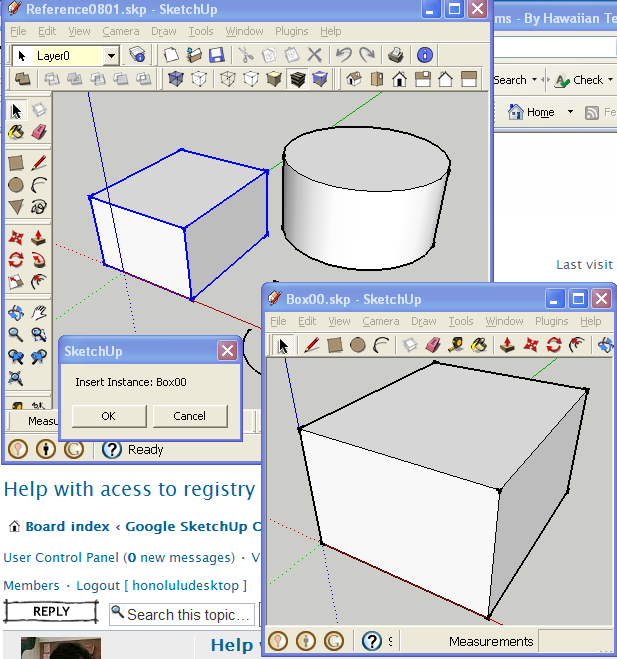

      Sketchup window with model, and second sketchup instance with selected component.

      1 條回覆 最後回覆 回覆 引用 0
      • Didier BurD 離線
        Didier Bur
        最後由 編輯

        Hi,

        system "C;\\Program Files\\Google\\Google SketchUp 8\\SketchUp.exe "+name+".skp"
        

        I think this won't work on a Mac, and possibly won't work on a PC if SU is installed elsewhere than this default location.
        I suggest you use the registry key to find where SU is installed on the user PC, or the 'Sketchup.find_support_file' method.
        Best regards and happy new year,

        DB

        1 條回覆 最後回覆 回覆 引用 0
        • honoluludesktopH 離線
          honoluludesktop
          最後由 編輯

          Yes, thanks. Its currently written as:

          name=cnt_instance.definition.name dir_name=File.dirname(model.path) comp_name=dir_name+"\\"+name+".skp" UI.openURL(comp_name)

          If I stay with system:

          file_path_name = Sketchup.find_support_file("plugins") file_path_name=File.dirname(file_path_name)+"/SketchUp " system file_path_name+name+".skp"

          1 條回覆 最後回覆 回覆 引用 0
          • honoluludesktopH 離線
            honoluludesktop
            最後由 編輯

            Unless some compelling reason is deduced, in order to avoid confusion, and make the plugin easier to support, I will remove one of the version posted.

            1 條回覆 最後回覆 回覆 引用 0
            • honoluludesktopH 離線
              honoluludesktop
              最後由 編輯

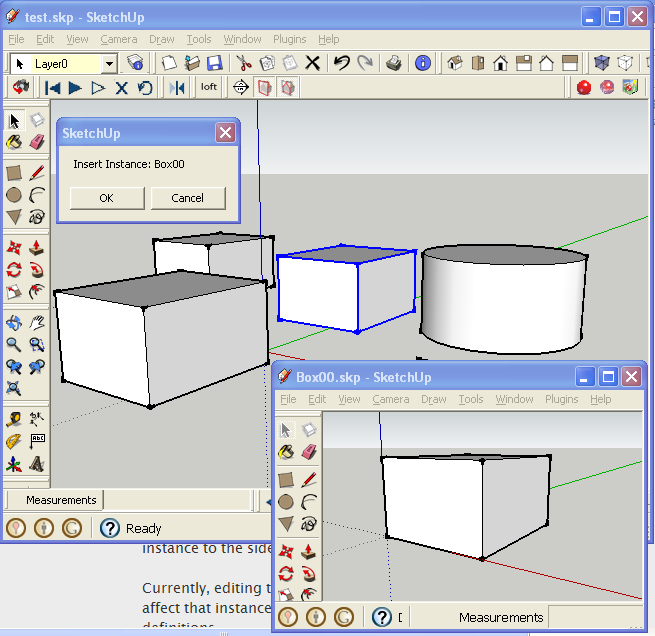
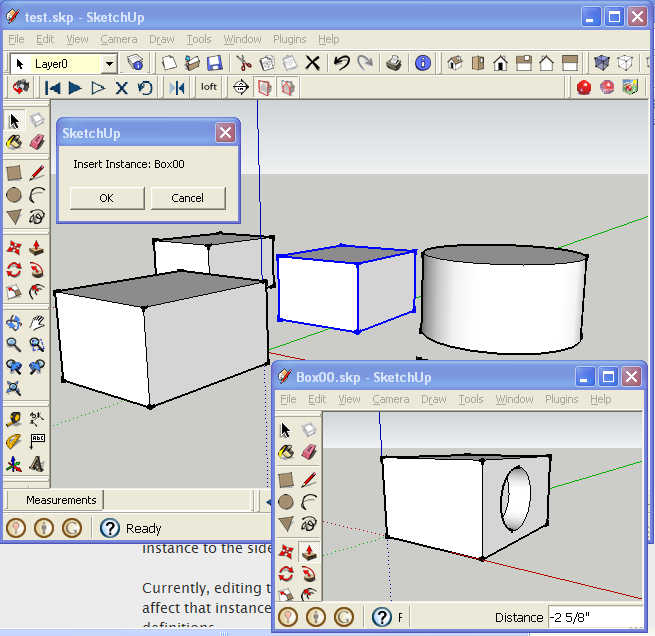
              This update will change all instances of the selected component.


              Select component, and open in new SketchUp window.


              Edit component in new window.


              Save, and replace all instances in the original model.

              1 條回覆 最後回覆 回覆 引用 0
              • honoluludesktopH 離線
                honoluludesktop
                最後由 編輯

                Pc only version posted above.


                Edited component.


                Saving closes second window, and update is applied to the model.

                1 條回覆 最後回覆 回覆 引用 0
                • honoluludesktopH 離線
                  honoluludesktop
                  最後由 編輯

                  Fixed "open component file" bug.

                  1 條回覆 最後回覆 回覆 引用 0
                  • dereiD 離線
                    derei
                    最後由 編輯

                    I noticed different toolbars in Component Editing Window. Is that a feature included in plugin? will have just custom selected toolbars in new opened window?

                    DESIGNER AND ARTIST [DEREI.UK](http://derei.uk/l)

                    1 條回覆 最後回覆 回覆 引用 0
                    • honoluludesktopH 離線
                      honoluludesktop
                      最後由 編輯

                      The component window will inherit the menus from the parent. I changed the menus in my presentation of the edit window to illustrate how the plugin functioned, in a small picture.

                      1 條回覆 最後回覆 回覆 引用 0
                      • EdsonE 離線
                        Edson
                        最後由 編輯

                        for your information, the makers of Podium have released a commercial plugin called EditinPlace that does exactly what yours does.

                        edson mahfuz, architect| porto alegre • brasil
                        http://www.mahfuz.arq.br

                        1 條回覆 最後回覆 回覆 引用 0
                        • EarthMoverE 離線
                          EarthMover
                          最後由 編輯

                          Great idea! I always keep a 2nd SU open for this reason. This should streamline it quite a bit. Thanks! 👍

                          3D Artist at Clearstory 3D Imaging
                          Guide Tool at Winning With Sketchup
                          Content Creator at Skapeup

                          1 條回覆 最後回覆 回覆 引用 0
                          • G 離線
                            Ghalko
                            最後由 編輯

                            Definitely dabbling in the code to use existing components, or make them if they don't exist. First foray into ruby, I already dislike that it doesn't do much with curly braces and semicolons. I usually program C and PERL. 💚

                            I just thought that it could be setup to save in a tree of folders, might make the code quite a bit longer, but might make saving components easy and finding them individually. Now to figure out how to only save the geometry in the components file and still load it into the trunk of the tree. 😲 My ideas are getting far beyond my grasp of ruby and the API. I should keep it simple for a bit.

                            When I get somewhere with it would you like me to post it or send you the code for perusal/editing?

                            Arrrggghhh! Why won't it make a face!!! Stupid, no good piece of... Oh look! The line went to the wrong point. Whew... moving on. (My fights with sketchup.)

                            1 條回覆 最後回覆 回覆 引用 0
                            • honoluludesktopH 離線
                              honoluludesktop
                              最後由 編輯

                              Post it in the Developers section, there you can get help from those who are truly gifted in SketchUp ruby, and the Api. Everything I have written, was with their help.

                              1 條回覆 最後回覆 回覆 引用 0
                              • A 離線
                                artofseeing
                                最後由 編輯

                                hi,

                                the plugin is missing in my index menu.

                                also, when i try to load the plugin via ruby console,

                                my ruby console puts the following:

                                load component_edit_window_v1.0.rb
                                Error; #<SyntaxError; (eval);48; compile error
                                (eval);48; no .<digit> floating literal anymore; put 0 before dot
                                load component_edit_window_v1.0.rb
                                                              ^
                                (eval);48; syntax error, unexpected tINTEGER
                                load component_edit_window_v1.0.rb
                                                               ^>
                                (eval);48


                                i have su8 installed in the default location.
                                and i put the plugin into Plugins.

                                thanks for any help.
                                👍

                                as long as there is a voyage away, there's always a journey back...

                                http://artofseeing.carbonmade.com

                                1 條回覆 最後回覆 回覆 引用 0
                                • TIGT 離線
                                  TIG Moderator
                                  最後由 編輯

                                  You need to pass a string to 'load' 🤓
                                  It's NOT load component_edit_window_v1.0.rb
                                  BUT load 'component_edit_window_v1.0.rb'
                                  😒

                                  To check the file really exists use this in the Ruby Console
                                  File.exist?(File.join(Sketchup.find_support_file('Plugins'),'component_edit_window_v1.0.rb')) if 'false' then 'there's a rabbit away'!

                                  If you have Vista or Win7 and don't have full permission to the subfolders within the Sketchup folder weird things can happen - you think you've added a file but the OS has actually put it into a side-folder - the 'Compatibility Files' issue... If this is the case look to see if there's a button of that name in the top window bars... Fix your permissions for all folders within the Sketchup folder so it doesn't recur...

                                  TIG

                                  1 條回覆 最後回覆 回覆 引用 0
                                  • A 離線
                                    artofseeing
                                    最後由 編輯

                                    twas indeed the permission issue.

                                    both code snippets (load and file exist) put TRUE,
                                    so now it works.😄
                                    thanks alot!

                                    thats what i too call STREAMLINING!!

                                    thanks a lot

                                    as long as there is a voyage away, there's always a journey back...

                                    http://artofseeing.carbonmade.com

                                    1 條回覆 最後回覆 回覆 引用 0
                                    • pilouP 離線
                                      pilou
                                      最後由 編輯

                                      you can now use this cool plugin by Sdmitch
                                      Replace randomly components 😉
                                      (or not random if there is only one as source 😉

                                      Frenchy Pilou
                                      Is beautiful that please without concept!
                                      My Little site :)

                                      1 條回覆 最後回覆 回覆 引用 0
                                      • P 離線
                                        pitrak
                                        最後由 編輯

                                        I've just tested the plugin on SU8 (win7 32bit) and it only works for groups, not components - the new SU window just doesn't load.
                                        Any suggestions?

                                        1 條回覆 最後回覆 回覆 引用 0
                                        • dereiD 離線
                                          derei
                                          最後由 編輯

                                          It doesn't work for me 😞
                                          I tried to use it, but I get this error in console:

                                          Error: #<NoMethodError: undefined methoddefinition' for #Sketchup::Group:0xe7a4c58>
                                          C:/Program Files (x86)/Google/Google SketchUp 8/Plugins/component_edit_window_v1.0.rb:61:in atelier_edit_instance' C:/Program Files (x86)/Google/Google SketchUp 8/Plugins/component_edit_window_v1.0.rb:60:in each'
                                          C:/Program Files (x86)/Google/Google SketchUp 8/Plugins/component_edit_window_v1.0.rb:60:in atelier_edit_instance' C:/Program Files (x86)/Google/Google SketchUp 8/Plugins/component_edit_window_v1.0.rb:124 (eval):3:in call'
                                          (eval):3:in call' (eval):1:in get_New_Commands'
                                          C:/Program Files (x86)/Google/Google SketchUp 8/Plugins/component_edit_window_v1.0.rb:61:in call' C:/Program Files (x86)/Google/Google SketchUp 8/Plugins/component_edit_window_v1.0.rb:61

                                          DESIGNER AND ARTIST [DEREI.UK](http://derei.uk/l)

                                          1 條回覆 最後回覆 回覆 引用 0
                                          • TIGT 離線
                                            TIG Moderator
                                            最後由 編輯

                                            dereeei

                                            Edit the .rb file at lines #55-56 using Notepad or similar plain text editor
                                            Change

                                            all_instances=componentdefinition.instances if all_instances[0]==nil

                                            to read

                                            all_instances=**cnt_instance.definition**.instances if all_instances**.length==1**

                                            this will avoid the potential glitch, which wrongly looks at the "model.defintions[0]" instances rather than the selected instance's definition's instances - and which might inadvertently throw up a 'group', which then won't have a ".definition" method in the API...

                                            TIG

                                            1 條回覆 最後回覆 回覆 引用 0
                                            • 1
                                            • 2
                                            • 3
                                            • 1 / 3
                                            • 第一個貼文
                                              最後的貼文
                                            Buy SketchPlus
                                            Buy SUbD
                                            Buy WrapR
                                            Buy eBook
                                            Buy Modelur
                                            Buy Vertex Tools
                                            Buy SketchCuisine
                                            Buy FormFonts

                                            Advertisement