[plugin] realSection v0.6 Béta (Updated 9/8/2014)
-
@unknownuser said:
But i didn't test it on v7.
I just did a test on v7 and it give some errors. I try to fix this errors.
-
OK, history first. I have just installed Windows 7 professional from Vista Home Premium. I had to do a complete install as one can not go from Vista Home Premium to Windows 7 Professional by the upgrade route.
Now to today. I installed the plugin realSectionV0.3, just to see what it would do. I decided to remove the program. And here where I have the problem. I have removed all the files that were in the zip file, however, when I open Sketchup, and do a context menu selection, I still have, although greyed out, the menu option of define RealSection material. I cannot find where this program is being installed from. I have restarted the computer, searched the plugin directory and no luck.
So what is happening? I am new to Windows 7. So any help would be appreciated. Another question, has anyone else trying uninstalling this plugin.
Thank you in advance for any help or direction.
Ken
-
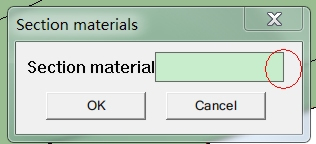
Can't Choose Materials...
-
@unclex said:
Can't Choose Materials...
[attachment=0:8p34gdfc]<!-- ia0 -->webqq_app.jpg<!-- ia0 -->[/attachment:8p34gdfc]Did you use the demo file?
The name of the materials that you will use for the section need to start with '_' like '_concrete'
The materials are the standard SketchUp materials that are active in the model.I see you work with SU 7, at this moment realSection won't work with v7. I hope I can fix the problem with SU 7 very soon.
-
Hi,
@unknownuser said:
do a context menu selection, I still have, although greyed out, the menu option of define RealSection material
A registry key left by the script ? GWydouw, any hint ?
-
@unknownuser said:
Now to today. I installed the plugin realSectionV0.3, just to see what it would do. I decided to remove the program. And here where I have the problem. I have removed all the files that were in the zip file, however, when I open Sketchup, and do a context menu selection, I still have, although greyed out, the menu option of define RealSection material. I cannot find where this program is being installed from. I have restarted the computer, searched the plugin directory and no luck.
Do you have the Windows UAC enabled, or run as a User?
When you have the plugins folder open in Explorer, do you see a Compatibility Files button in your toolbar? It's possible some files have ended up there. -
thomthom
Well, thomthom, that was it. The compatibility folder had the files stored there. When I removed these files, the plugin is gone. And of course the compatibility folder does not show up in the regular Windows Explorer view.
It was my understanding that the "compatibility" of Windows 7 was for program installation. It never dream on me it would hide extracted zip files.
However, that explains to me why extracting the files did not seem to work. I couldn't find the files after the first extraction, but the during the second extraction, the process ask if it could write over the files. To get the files showing up in the plugin folder, I had to copy the files. So Windows 7 was giving me a hint, but I just didn't understand what was happening.
Hope, this helps other.
thomthom, again thank you.
Ken
-
Good to hear it worked out.

-
@unknownuser said:
@unclex said:
Can't Choose Materials...
[attachment=0:ysvaku3o]<!-- ia0 -->webqq_app.jpg<!-- ia0 -->[/attachment:ysvaku3o]Did you use the demo file?
The name of the materials that you will use for the section need to start with '_' like '_concrete'
The materials are the standard SketchUp materials that are active in the model.I see you work with SU 7, at this moment realSection won't work with v7. I hope I can fix the problem with SU 7 very soon.
thank u replied
i use SU8Pro
i can see the demo's section, but can't use it
and ur plugin can't work with thearender4su plugin
-
@unclex said:
@unknownuser said:
@unclex said:
Can't Choose Materials...
[attachment=0:gu9cegbn]<!-- ia0 -->webqq_app.jpg<!-- ia0 -->[/attachment:gu9cegbn]Did you use the demo file?
The name of the materials that you will use for the section need to start with '_' like '_concrete'
The materials are the standard SketchUp materials that are active in the model.I see you work with SU 7, at this moment realSection won't work with v7. I hope I can fix the problem with SU 7 very soon.
thank u replied
i use SU8Pro
i can see the demo's section, but can't use it
and ur plugin can't work with thearender4su plugin
What do you mean with 'can't use it'?
What do you mean with 'can't work with thearender4su plugin'? -
@unknownuser said:
@unclex said:
@unknownuser said:
@unclex said:
Can't Choose Materials...
[attachment=0:26db8ugb]<!-- ia0 -->webqq_app.jpg<!-- ia0 -->[/attachment:26db8ugb]Did you use the demo file?
The name of the materials that you will use for the section need to start with '_' like '_concrete'
The materials are the standard SketchUp materials that are active in the model.I see you work with SU 7, at this moment realSection won't work with v7. I hope I can fix the problem with SU 7 very soon.
thank u replied
i use SU8Pro
i can see the demo's section, but can't use it
and ur plugin can't work with thearender4su plugin
What do you mean with 'can't use it'?
What do you mean with 'can't work with thearender4su plugin'?Perhaps thearender4su plugin is not the reason
sometimes " Define real.... ", it's grey, "can't work", i mean it
sometimes " define real..." is grey, sometimes isn't, it's joking me?but i don't know, how to make section plug worked , i mean show the materials on the section.
-
Perhaps thearender4su plugin is not the reason
sometimes " Define real.... ", it's grey, "can't work", i mean it
sometimes " define real..." is grey, sometimes isn't, it's joking me?but i don't know, how to make section plug worked , i mean show the materials on the section.
Can you send me the model and some screenshots of the problem?
-
I can't seem to get it to work right myself with the materials. Do you have to type in the name of the material that you want to use? A demo video would help to enjoy this plugin a whole lot more since I have been needing such a plugin for a while now! Thanks anyway, I guess I will figure it out one day?
-
hello,
I'm trying to test this great plugin, but I'm having some dificulties:
1- I created a group (a simple solid object)
2- Then I created a texture that started with "_"
3- I assigned the material to the object using "Define realSection material"
4- I created a section plane
5- pressed "Make realSection" and gave it a namebut nothing happens... and no new layers are created?!
I'm using SketchUp 8 (free) on a windows machine (XP)
-
@errror404 said:
hello,
I'm trying to test this great plugin, but I'm having some dificulties:
1- I created a group (a simple solid object)
2- Then I created a texture that started with "_"
3- I assigned the material to the object using "Define realSection material"
4- I created a section plane
5- pressed "Make realSection" and gave it a namebut nothing happens... and no new layers are created?!
I'm using SketchUp 8 (free) on a windows machine (XP)
Can you send me the model?
-
I made a little movie to show how realSection works:
-
I really like this plugs,however,it can't work at 7or8,waiting for its rebirth...

-
@ladcwei said:
I really like this plugs,however,it can't work at 7or8,waiting for its rebirth...
please give me some feedback why it's not working? It should work a SketchUp 8 english.
-
@unknownuser said:
@errror404 said:
hello,
I'm trying to test this great plugin, but I'm having some dificulties:
1- I created a group (a simple solid object)
2- Then I created a texture that started with "_"
3- I assigned the material to the object using "Define realSection material"
4- I created a section plane
5- pressed "Make realSection" and gave it a namebut nothing happens... and no new layers are created?!
I'm using SketchUp 8 (free) on a windows machine (XP)
Can you send me the model?
It was just a box...
It didn't work on your example model either (if I tried to make a new section)
I would try later at my home computer (SketchUp Pro)Now, after looking at the video I did notice something diferent... when I make a section my model shows up hallow inside (before and after I pressed "Make realSection" )

do I need to change some type of option in sketchup?
thanks!
-
Any chance you could actually tell us what you are doing in the video. It's difficult to read the menu items and so on due to the compression of the video.
I'm trying to follow your PDF instructions. When I choose Make realSection, I can give the section a name but there's no new layer created as stated in the instructions. I think there are enough folks having difficulty getting this to work that there must be a defect that needs to be fixed.








Advertisement