sketchucation logo sketchucation
    • 登入
    Oops, your profile's looking a bit empty! To help us tailor your experience, please fill in key details like your SketchUp version, skill level, operating system, and more. Update and save your info on your profile page today!
    🔌 Smart Spline | Fluid way to handle splines for furniture design and complex structures. Download

    [Plugin] Update Links Manager

    已排程 已置頂 已鎖定 已移動 Plugins
    31 貼文 16 Posters 27.8k 瀏覽 16 Watching
    正在載入更多貼文
    • 從舊到新
    • 從新到舊
    • 最多點贊
    回覆
    • 在新貼文中回覆
    登入後回覆
    此主題已被刪除。只有擁有主題管理權限的使用者可以查看。
    • Didier BurD 離線
      Didier Bur
      最後由 Didier Bur 編輯

      Hi all,
      Here is an update of my very old script "Links manager". You can link URLs or files to any SU object, delete links, open links, display links. Pdf Doc included.

      sulinks.gif
      What's new: toobar, cursors, tooltips, webdialogs.
      Also available on RLD.
      Regards,

      Please get the latest version from the PluginStore http://sketchucation.com/pluginstore?pln=Links_Manager

      Edit 27.12.10: fixed glitch (no dialog was shown).
      English version. Unzip in Plugins folder.Version française. Dezipper dans le dossier Plugins.

      DB

      1 條回覆 最後回覆 回覆 引用 0
      • W 離線
        watkins
        最後由 編輯

        Dear Didier,

        Thank you for the updated plugin. Would one use the plugin to reference downloaded models (shower units, furniture etc) to their origin/manufacturer?

        Have a good Christmas.

        Kind regards,
        Bob

        1 條回覆 最後回覆 回覆 引用 0
        • B 離線
          Ben Ritter
          最後由 編輯

          Thank you Didier.

          1 條回覆 最後回覆 回覆 引用 0
          • simon le bonS 離線
            simon le bon
            最後由 編輯

            Thank you Didier,
            surely useful in many cases.

            best wishes for 2011

            *simon

            1 條回覆 最後回覆 回覆 引用 0
            • F 離線
              fountainhead
              最後由 編輯

              I've updated, but am having a problem viewing the dialog window... see below.

              http://img840.imageshack.us/img840/3912/printscreenw.jpg

              1 條回覆 最後回覆 回覆 引用 0
              • Didier BurD 離線
                Didier Bur
                最後由 編輯

                Hi,

                What does the console say ? I suppose it cannot find the html file to load it in the dialog.
                Please copy-paste-post the error message in the console.
                Try with the RBS file below, extract it and move it to the 'Links Manager' folder. Tell me if it works so I can release the patch.
                Regards,


                linkToolsPatch.zip

                DB

                1 條回覆 最後回覆 回覆 引用 0
                • F 離線
                  fountainhead
                  最後由 編輯

                  Hi Didier,

                  Thanks for getting back to me.

                  I tried the updated .rbs file you sent, and got this:

                  Windows Internet Explorer error message: Cannot find 'file:///Links%20Manager/linkTools.html'.

                  The syntax is exactly as shown, including the triple backslash. When I close the error window, the Links Dialog Window opens, but it is completely blank now.

                  If I download and install the french version it works perfectly. I also tried using fr_sulinks.rb, with fr_linkTools.rbs in the Links Manager folder, but I left in the english version of linkTools.html. This also worked perfectly, with the exception that the Links Dialog Window was titled Liens instead of Links.

                  Since I am no code guy, I am of little help in determining the problem. I am unsure how to get the Ruby Console to report the error you requested that I copy and paste, but would be glad to comply with some instruction on how this is accomplished.

                  Thanks again.

                  1 條回覆 最後回覆 回覆 引用 0
                  • F 離線
                    fountainhead
                    最後由 編輯

                    I need to be a little clearer on one item...when I loaded the french version and everything worked great, I replaced the fr_linkTools.html file with the linkTools.html file from the english version, and simply renamed it from linkTools.html to fr_linkTools.html. As I mentioned before, this got me everything in English except the title of the dialog window, which remained 'Liens'.

                    Sorry if my previous explanation on using the linkTools.html was a bit confusing, or misleading.

                    1 條回覆 最後回覆 回覆 引用 0
                    • Didier BurD 離線
                      Didier Bur
                      最後由 編輯

                      I think I see where the issue is.
                      Please wait for a correct patch...

                      DB

                      1 條回覆 最後回覆 回覆 引用 0
                      • GeorgeG 離線
                        George
                        最後由 編輯

                        Hello Didier,

                        Another user and I are experiencing the same problem with Links Manager as fountainhead describes.
                        Here’s the topic in the SU Help forum:
                        https://productforums.google.com/forum/#!category-topic/sketchup/sketchup-pro/tvCz8dHb5OY

                        I click on the Links Manager toolbar to launch the script.
                        Then, click on a Component to set URL.
                        IE8 then displays the message pictured below.
                        I tried this with SU’s Ruby Console open. The console remained blank.

                        The previous version "Links" works fine.
                        http://rld.crai.archi.fr/rld/plugin_details.php?id=229

                        Yours,

                        George

                        https://lh3.googleusercontent.com/-JXI3pdyhXFA/T70OCH4VuUI/AAAAAAAAFoM/olbc0biUQFM/s601/Links%2520Manager%2520Error.PNG

                        "Everyone is entitled to his own opinions, but not to his own facts." ~Patrick Moynihan

                        1 條回覆 最後回覆 回覆 引用 0
                        • Didier BurD 離線
                          Didier Bur
                          最後由 編輯

                          Hi,
                          Here is another version for Links Manager (english version) that should work. The scrambler does not his job properly IMHO...


                          Put this file in your Plugins/Links Manager folder, and delete the previous linkTools.rbs

                          DB

                          1 條回覆 最後回覆 回覆 引用 0
                          • GeorgeG 離線
                            George
                            最後由 編輯

                            Thank you Didier 😄

                            Success !

                            "Everyone is entitled to his own opinions, but not to his own facts." ~Patrick Moynihan

                            1 條回覆 最後回覆 回覆 引用 0
                            • goatboyG 離線
                              goatboy
                              最後由 編輯

                              Hmmm.

                              SU Pro V8.0.15158 - ASUS - Windows 7 - Core i7 - NVIDIA Geforce GTX - Chrome

                              I have spent the afternoon trying to get this to work in all the various forms (english and french). I get this over and over:

                              Message from 000_AdditionalPluginFolders

                              1 ERROR(S): The following plugins had errors and may not be fully loaded:

                              PLUGIN: sulinks.rb
                              Folder:/program files (x86)/Google/Google SketchUp 8/Plugins
                              ERROR: undefined method 'file_loaded?' for main:Object

                              Really, Really, want to do links in SU.
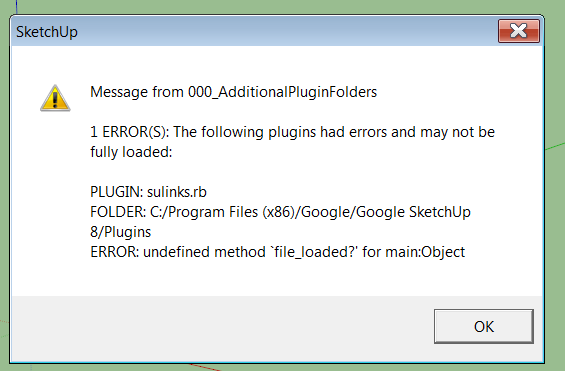

                              error.png

                              1 條回覆 最後回覆 回覆 引用 0
                              • goatboyG 離線
                                goatboy
                                最後由 編輯

                                😄

                                TIG helped me with a corrupt SU8 install (my doing) and 'links' now works as advertised.

                                I think it will really help out with my project.

                                Thanks to all.

                                1 條回覆 最後回覆 回覆 引用 0
                                • goatboyG 離線
                                  goatboy
                                  最後由 編輯

                                  Follow-up:

                                  With this ruby, I can attach a url to an object so that it is displayed (see attached image), but the viewer can't do anything with it (me, in this test).

                                  I am wanting the object to display a link to another file (which this does, but you can only copy it from the dialog box and then cut and paste in a browser).

                                  I am looking for the link tp be displayed and clickable active in the SU file...possible?

                                  What am I missing (aside from a brain!)?
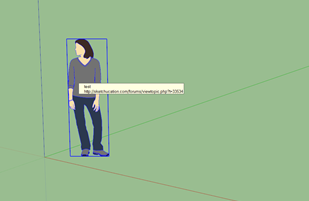

                                  Link example.png

                                  1 條回覆 最後回覆 回覆 引用 0
                                  • GeorgeG 離線
                                    George
                                    最後由 編輯

                                    @goatboy said:

                                    Follow-up:

                                    I am wanting the object to display a link to another file (which this does, but you can only copy it from the dialog box and then cut and paste in a browser).

                                    I am looking for the link tp be displayed and clickable active in the SU file... What am I missing ?

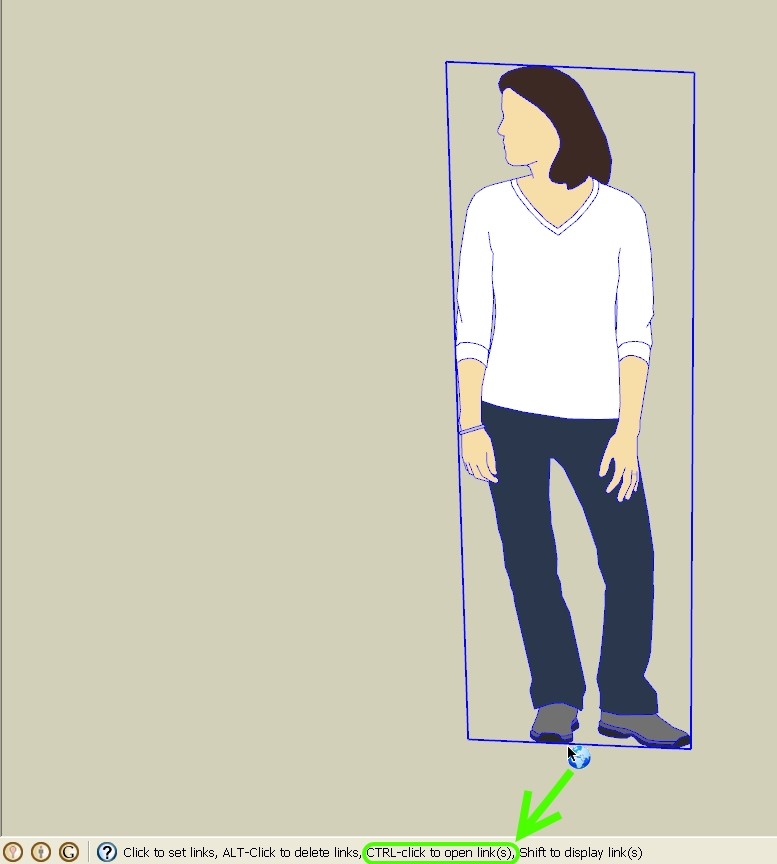
                                    When you activate the tool; note the message in the Status Bar at the bottom-left of the screen.
                                    Ctrl-Click to Open Links

                                    -Geo

                                    Links-rb Status Bar Message.jpg

                                    "Everyone is entitled to his own opinions, but not to his own facts." ~Patrick Moynihan

                                    1 條回覆 最後回覆 回覆 引用 0
                                    • goatboyG 離線
                                      goatboy
                                      最後由 編輯

                                      OMG!

                                      THX!

                                      1 條回覆 最後回覆 回覆 引用 0
                                      • goatboyG 離線
                                        goatboy
                                        最後由 編輯

                                        An opportunity:

                                        Multiple links to same object.

                                        What I am trying to do: link several different types of information to the same object, like spec sheet, color selections, delivery schedules, maps, etc...
                                        I would like them to display in the pop-up that the current 'links' ruby provides and then give the user the choice of which to select.

                                        ArcView (GIS) and AutoCad have such functionality with their 'link' option, but I do not seem to be able to do the same with SU at this time.

                                        Any idea on what I can do?

                                        1 條回覆 最後回覆 回覆 引用 0
                                        • Chris FullmerC 離線
                                          Chris Fullmer
                                          最後由 編輯

                                          It would be fairly straightforward to do this as a plugin, you just need to find someone who needs a plugin to write. Maybe we should develop a plugin request list for authors looking for some fun challenges 😄

                                          Lately you've been tan, suspicious for the winter.
                                          All my Plugins I've written

                                          1 條回覆 最後回覆 回覆 引用 0
                                          • N 離線
                                            nomeradona
                                            最後由 編輯

                                            as someone in the field of education, this pluggin is very useful especially when you are using your sketchup model as educational tool. I loveeeeeeeeeeeeeeeeee it.. thank you ... 👍 👍 👍

                                            visit my blog: http://www.nomeradona.blogspot.com

                                            1 條回覆 最後回覆 回覆 引用 0
                                            • 1
                                            • 2
                                            • 1 / 2
                                            • 第一個貼文
                                              最後的貼文
                                            Buy SketchPlus
                                            Buy SUbD
                                            Buy WrapR
                                            Buy eBook
                                            Buy Modelur
                                            Buy Vertex Tools
                                            Buy SketchCuisine
                                            Buy FormFonts

                                            Advertisement