sketchucation logo sketchucation
    • Login
    Oops, your profile's looking a bit empty! To help us tailor your experience, please fill in key details like your SketchUp version, skill level, operating system, and more. Update and save your info on your profile page today!
    Mac User? | Join the Rayscaper Beta for Mac Learn More

    [Plugin] Update Links Manager

    Scheduled Pinned Locked Moved Plugins
    31 Posts 16 Posters 30.8k Views 16 Watching
    Loading More Posts
    • Oldest to Newest
    • Newest to Oldest
    • Most Votes
    Reply
    • Reply as topic
    Log in to reply
    This topic has been deleted. Only users with topic management privileges can see it.
    • F
      fountainhead
      last edited by

      I need to be a little clearer on one item...when I loaded the french version and everything worked great, I replaced the fr_linkTools.html file with the linkTools.html file from the english version, and simply renamed it from linkTools.html to fr_linkTools.html. As I mentioned before, this got me everything in English except the title of the dialog window, which remained 'Liens'.

      Sorry if my previous explanation on using the linkTools.html was a bit confusing, or misleading.

      1 Reply Last reply
      Reply Quote 0
      • Didier BurD
        Didier Bur
        last edited by

        I think I see where the issue is.
        Please wait for a correct patch...

        DB

        1 Reply Last reply
        Reply Quote 0
        • GeorgeG
          George
          last edited by

          Hello Didier,

          Another user and I are experiencing the same problem with Links Manager as fountainhead describes.
          Here’s the topic in the SU Help forum:
          https://productforums.google.com/forum/#!category-topic/sketchup/sketchup-pro/tvCz8dHb5OY

          I click on the Links Manager toolbar to launch the script.
          Then, click on a Component to set URL.
          IE8 then displays the message pictured below.
          I tried this with SU’s Ruby Console open. The console remained blank.

          The previous version "Links" works fine.
          http://rld.crai.archi.fr/rld/plugin_details.php?id=229

          Yours,

          George

          https://lh3.googleusercontent.com/-JXI3pdyhXFA/T70OCH4VuUI/AAAAAAAAFoM/olbc0biUQFM/s601/Links%2520Manager%2520Error.PNG

          "Everyone is entitled to his own opinions, but not to his own facts." ~Patrick Moynihan

          1 Reply Last reply
          Reply Quote 0
          • Didier BurD
            Didier Bur
            last edited by

            Hi,
            Here is another version for Links Manager (english version) that should work. The scrambler does not his job properly IMHO...


            Put this file in your Plugins/Links Manager folder, and delete the previous linkTools.rbs

            DB

            1 Reply Last reply
            Reply Quote 0
            • GeorgeG
              George
              last edited by

              Thank you Didier 😄

              Success !

              "Everyone is entitled to his own opinions, but not to his own facts." ~Patrick Moynihan

              1 Reply Last reply
              Reply Quote 0
              • goatboyG
                goatboy
                last edited by

                Hmmm.

                SU Pro V8.0.15158 - ASUS - Windows 7 - Core i7 - NVIDIA Geforce GTX - Chrome

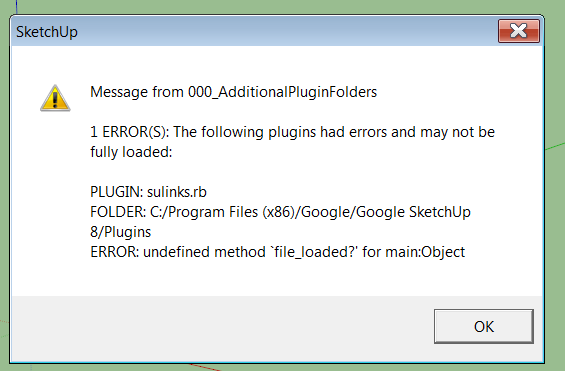
                I have spent the afternoon trying to get this to work in all the various forms (english and french). I get this over and over:

                Message from 000_AdditionalPluginFolders

                1 ERROR(S): The following plugins had errors and may not be fully loaded:

                PLUGIN: sulinks.rb
                Folder:/program files (x86)/Google/Google SketchUp 8/Plugins
                ERROR: undefined method 'file_loaded?' for main:Object

                Really, Really, want to do links in SU.

                error.png

                1 Reply Last reply
                Reply Quote 0
                • goatboyG
                  goatboy
                  last edited by

                  😄

                  TIG helped me with a corrupt SU8 install (my doing) and 'links' now works as advertised.

                  I think it will really help out with my project.

                  Thanks to all.

                  1 Reply Last reply
                  Reply Quote 0
                  • goatboyG
                    goatboy
                    last edited by

                    Follow-up:

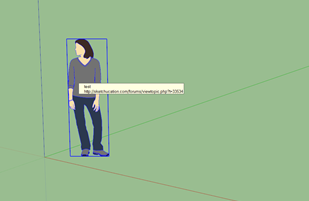
                    With this ruby, I can attach a url to an object so that it is displayed (see attached image), but the viewer can't do anything with it (me, in this test).

                    I am wanting the object to display a link to another file (which this does, but you can only copy it from the dialog box and then cut and paste in a browser).

                    I am looking for the link tp be displayed and clickable active in the SU file...possible?

                    What am I missing (aside from a brain!)?

                    Link example.png

                    1 Reply Last reply
                    Reply Quote 0
                    • GeorgeG
                      George
                      last edited by

                      @goatboy said:

                      Follow-up:

                      I am wanting the object to display a link to another file (which this does, but you can only copy it from the dialog box and then cut and paste in a browser).

                      I am looking for the link tp be displayed and clickable active in the SU file... What am I missing ?

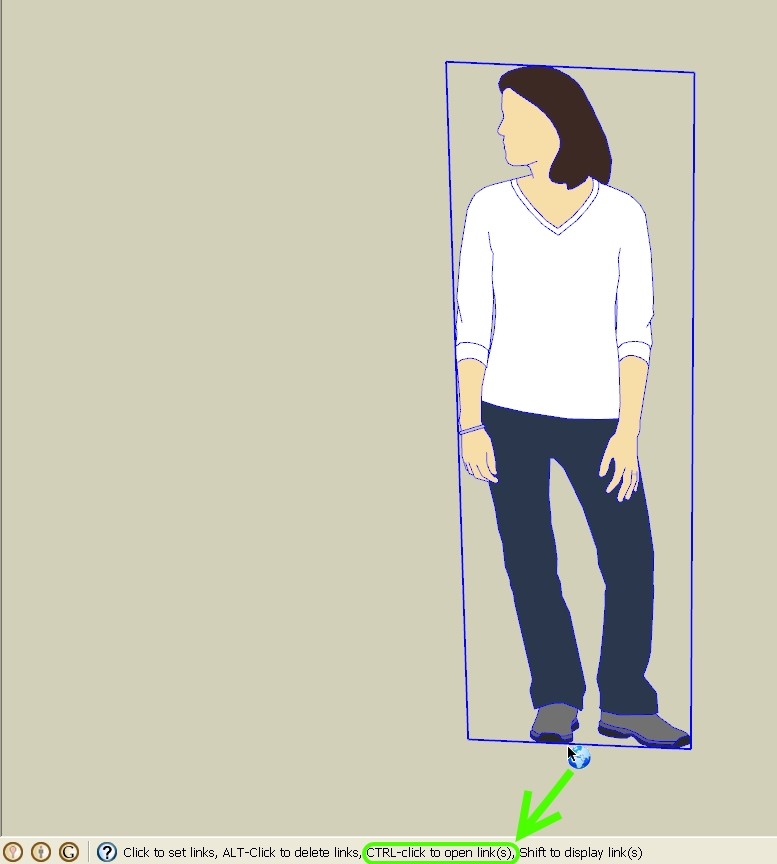
                      When you activate the tool; note the message in the Status Bar at the bottom-left of the screen.
                      Ctrl-Click to Open Links

                      -Geo

                      Links-rb Status Bar Message.jpg

                      "Everyone is entitled to his own opinions, but not to his own facts." ~Patrick Moynihan

                      1 Reply Last reply
                      Reply Quote 0
                      • goatboyG
                        goatboy
                        last edited by

                        OMG!

                        THX!

                        1 Reply Last reply
                        Reply Quote 0
                        • goatboyG
                          goatboy
                          last edited by

                          An opportunity:

                          Multiple links to same object.

                          What I am trying to do: link several different types of information to the same object, like spec sheet, color selections, delivery schedules, maps, etc...
                          I would like them to display in the pop-up that the current 'links' ruby provides and then give the user the choice of which to select.

                          ArcView (GIS) and AutoCad have such functionality with their 'link' option, but I do not seem to be able to do the same with SU at this time.

                          Any idea on what I can do?

                          1 Reply Last reply
                          Reply Quote 0
                          • Chris FullmerC
                            Chris Fullmer
                            last edited by

                            It would be fairly straightforward to do this as a plugin, you just need to find someone who needs a plugin to write. Maybe we should develop a plugin request list for authors looking for some fun challenges 😄

                            Lately you've been tan, suspicious for the winter.
                            All my Plugins I've written

                            1 Reply Last reply
                            Reply Quote 0
                            • N
                              nomeradona
                              last edited by

                              as someone in the field of education, this pluggin is very useful especially when you are using your sketchup model as educational tool. I loveeeeeeeeeeeeeeeeee it.. thank you ... 👍 👍 👍

                              visit my blog: http://www.nomeradona.blogspot.com

                              1 Reply Last reply
                              Reply Quote 0
                              • N
                                nomeradona
                                last edited by

                                i have the same message as the others, the icon that you are saying on the tutorial doesnot appear eventhough i put the patches.

                                visit my blog: http://www.nomeradona.blogspot.com

                                1 Reply Last reply
                                Reply Quote 0
                                • goatboyG
                                  goatboy
                                  last edited by

                                  Chris:

                                  Creating a 'plug-in request site' would be an excellent addition.

                                  Let's start with the 'multiple links to a single object' display!

                                  1 Reply Last reply
                                  Reply Quote 0
                                  • N
                                    nomeradona
                                    last edited by

                                    until now, i cant make it work. in the end i relied on the old version...

                                    visit my blog: http://www.nomeradona.blogspot.com

                                    1 Reply Last reply
                                    Reply Quote 0
                                    • G
                                      glro
                                      last edited by

                                      It works as described, it is light and efficient

                                      but

                                      you have to press the control key while you click to execute the link
                                      and
                                      only click to set the link

                                      would it be possible to do it the other way?

                                      just click to execute the link and ctrl+click to set the ling

                                      to make it more simple for the final user, who is more likely to simply click on an object in the model

                                      pressing the control key suits better to the one who is setting the link, because it is more complicated and he is the one who is supposed to know

                                      1 Reply Last reply
                                      Reply Quote 0
                                      • ashscottA
                                        ashscott
                                        last edited by

                                        Awesome plugin,surprised I haven't come across this earlier. Will be using this to refer to componentry manuals used in SU models. IE: if I have a particular electric motor in a drawing I can link to the motor's manual to see any additional specifications.

                                        Great work!

                                        Just some stuff I do with Sketchup.

                                        1 Reply Last reply
                                        Reply Quote 0
                                        • TIGT
                                          TIG Moderator
                                          last edited by

                                          Didier has agreed that I might update some of his tools in the PluginStrore to be compatible with v2014/2015...
                                          Please get the latest version of 'Links Manager' from the PluginStore http://sketchucation.com/pluginstore?pln=Links_Manager

                                          TIG

                                          1 Reply Last reply
                                          Reply Quote 0
                                          • majidM
                                            majid
                                            last edited by

                                            This is fan tas tic! awesome ,.... Thank you for all your time and efforts. 👍 😲

                                            My inspiring A, B, Sketches book: https://sketchucation.com/shop/books/intermediate/2612-alphabet-inspired-sketches--inspiring-drills-for-architects--3d-artists-and-designers-

                                            1 Reply Last reply
                                            Reply Quote 0

                                            Hello! It looks like you're interested in this conversation, but you don't have an account yet.

                                            Getting fed up of having to scroll through the same posts each visit? When you register for an account, you'll always come back to exactly where you were before, and choose to be notified of new replies (either via email, or push notification). You'll also be able to save bookmarks and upvote posts to show your appreciation to other community members.

                                            With your input, this post could be even better 💗

                                            Register Login
                                            • 1
                                            • 2
                                            • 1 / 2
                                            • First post
                                              Last post
                                            Buy SketchPlus
                                            Buy SUbD
                                            Buy WrapR
                                            Buy eBook
                                            Buy Modelur
                                            Buy Vertex Tools
                                            Buy SketchCuisine
                                            Buy FormFonts

                                            Advertisement