Follow Me and Dangling Line in Component
-
I noticed that the Follow Me tool, when used to edit a component and create a rounded edge in Edit Component mode leaves a dangling line. This line prohibits the component from being a Solid Component. It seems to me this dangling line is not intended and should have been cleaned up by the Follow Me engine. See the attached .skp model for a demo.
-
Yes, it makes sense. Especially that all the other edges of the initial face have been cleaned up so why not this one?

-
This happens in v7 and v8 ! It seems associated with the extruded face having edges used by other faces and therefore not being removed - even when it's no longer needed!
There is a work around - other than Xray-mode + Erase dangler! Use a 'diagonal' bottom edge...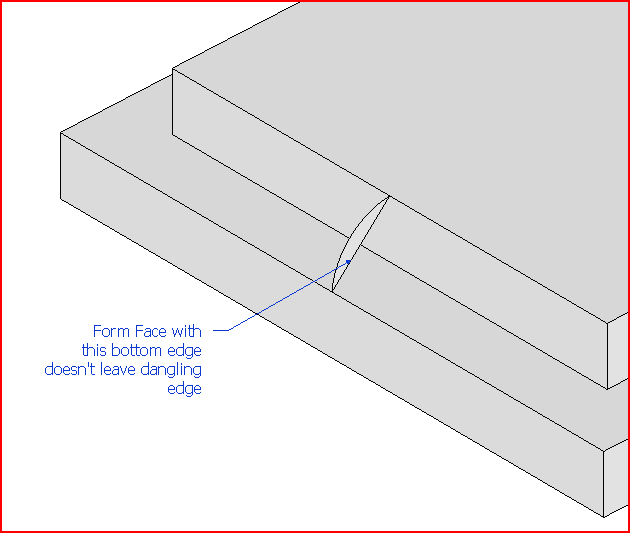
-
Tig, that is not really a work around because it does not produce a Solid Component, simply component. The real problem here is that the Follow Me tool degrades a Solid Component to Component. In order to subsequently operate on these components with Solids tools in the Pro version they need to be Solid Components. With this bug you have to hunt around to find the extra pieces and correct them before you can use Solids tools.
The method you propose makes matters worse. It leaves extra lines and faces which keep the part from being a Solid Component.
-
After making the arced-face you would of course remove the 'inner edges' [forming the 'rebate'] to leave the loose top rectangle separated from the joined sides/bottom... before doing the followme on the arced-face which would then form a 'solid'.
It agreed that it would simply be better if followme worked properly i the first place... but there are work around that avoid erasing spare bits afterwards
-
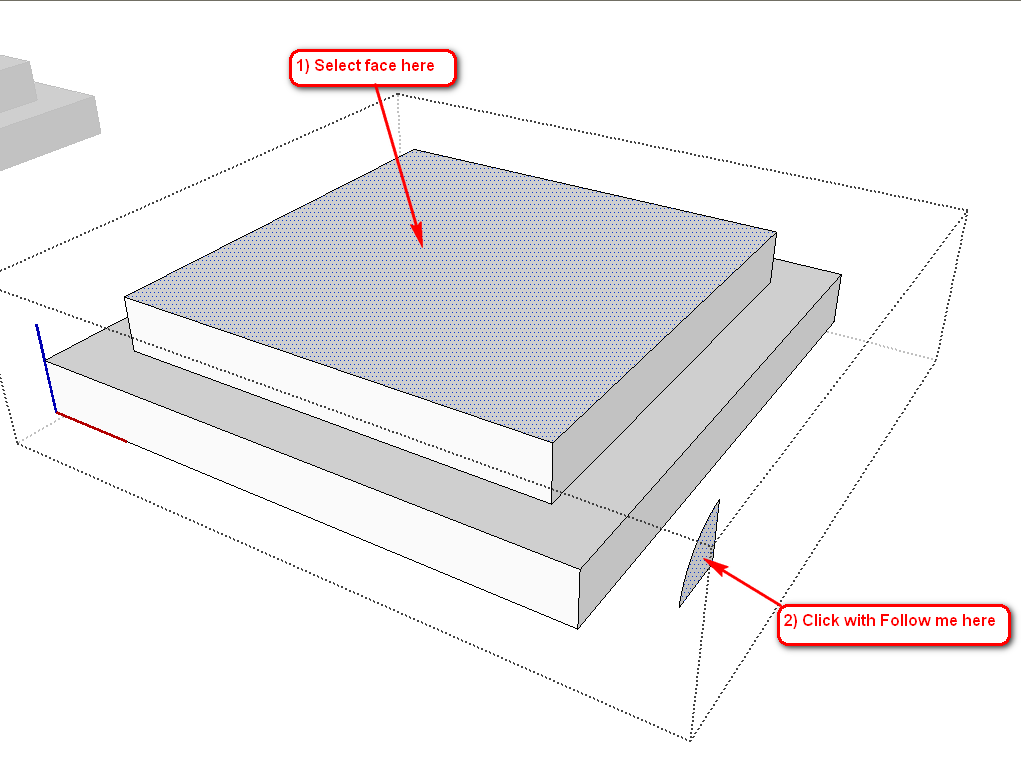
Or separate the follow me face from the rest of the model (component itself) by moving it away a bit (see attached file; the modified component in the scene window).
Simply select the top face then click on the face. No matter it is not on the path, the follow me works perfectly, leaving you with a solid component (and the face also "disappears")
-
Gaieus,
Thanks, I like that work around better. Leaves a clean solid component.
By the way, is this the official SU bug report site? Does Google monitor this site and are these kinds of bugs likely to get fixed?
-
I often do te Follow me operation this way even without the solid requirement (especially with more complex models where faces like that gen stick to all sorts of places).
Well, a more "official" bug report form would be here:
http://sketchup.google.com/support/bin/request.py?contact_type=bug
however most confirmed bugs sooner or later get through to Google via various channels. This one (more exactly the one this is also part of) was reported back with SU 7 by me particularly.

-
Thanks Gai,
Actually, I have been doing it that way for some time because of other anomalies with Follow Me i.e.separating the shape from the selected path or face of the part. But I just noticed this anomaly in the last few days and its implication for Solids. Sounds like it may not get fixed real quick, but thanks for the work around.
-
This is a little practiced, but just an idea.

-
Jim,
That works too, though I don't know if you can always judiciously find the right place to anchor the shape to avoid leaving dangling lines. But it does have the advantage of aiding you in forming the shape. Gai's solution may be more general but does require creating the shape away from the part. On the other hand, it is always good to have several workarounds.
-
There's as many different ways as there are people doing it.
This method did however produce a solid without any cleanup. But only 6 segments from the the 1/4 circle,as opposed to the default 12 an Arc would have used.
You're right if the corners weren't square it wouldn't work so neatly.
-
@chiefwoodworker said:
Gai's solution may be more general but does require creating the shape away from the part. On the other hand, it is always good to have several workarounds.
Well what I did was to temporarily group your face (until I moved away) then exploded it. So you can actually make the profile "in situ" initially.



Hello! It looks like you're interested in this conversation, but you don't have an account yet.
Getting fed up of having to scroll through the same posts each visit? When you register for an account, you'll always come back to exactly where you were before, and choose to be notified of new replies (either via email, or push notification). You'll also be able to save bookmarks and upvote posts to show your appreciation to other community members.
With your input, this post could be even better 💗
Register Login


Advertisement