sketchucation logo sketchucation
    • Anmelden
    Oops, your profile's looking a bit empty! To help us tailor your experience, please fill in key details like your SketchUp version, skill level, operating system, and more. Update and save your info on your profile page today!
    ⚠️ Important | Libfredo 15.6b introduces important bugfixes for Fredo's Extensions Update

    Lumion - Test drive

    Geplant Angeheftet Gesperrt Verschoben Extensions & Applications Discussions
    extensions
    209 Beiträge 31 Kommentatoren 61.4k Aufrufe 31 Watching
    Lade mehr Beiträge
    • Älteste zuerst
    • Neuste zuerst
    • Meiste Stimmen
    Antworten
    • In einem neuen Thema antworten
    Anmelden zum Antworten
    Dieses Thema wurde gelöscht. Nur Nutzer mit entsprechenden Rechten können es sehen.
    • GaieusG Offline
      Gaieus
      zuletzt editiert von

      Read the FAQ:
      http://lumion3d.com/forum/index.php?topic=638.0
      😉
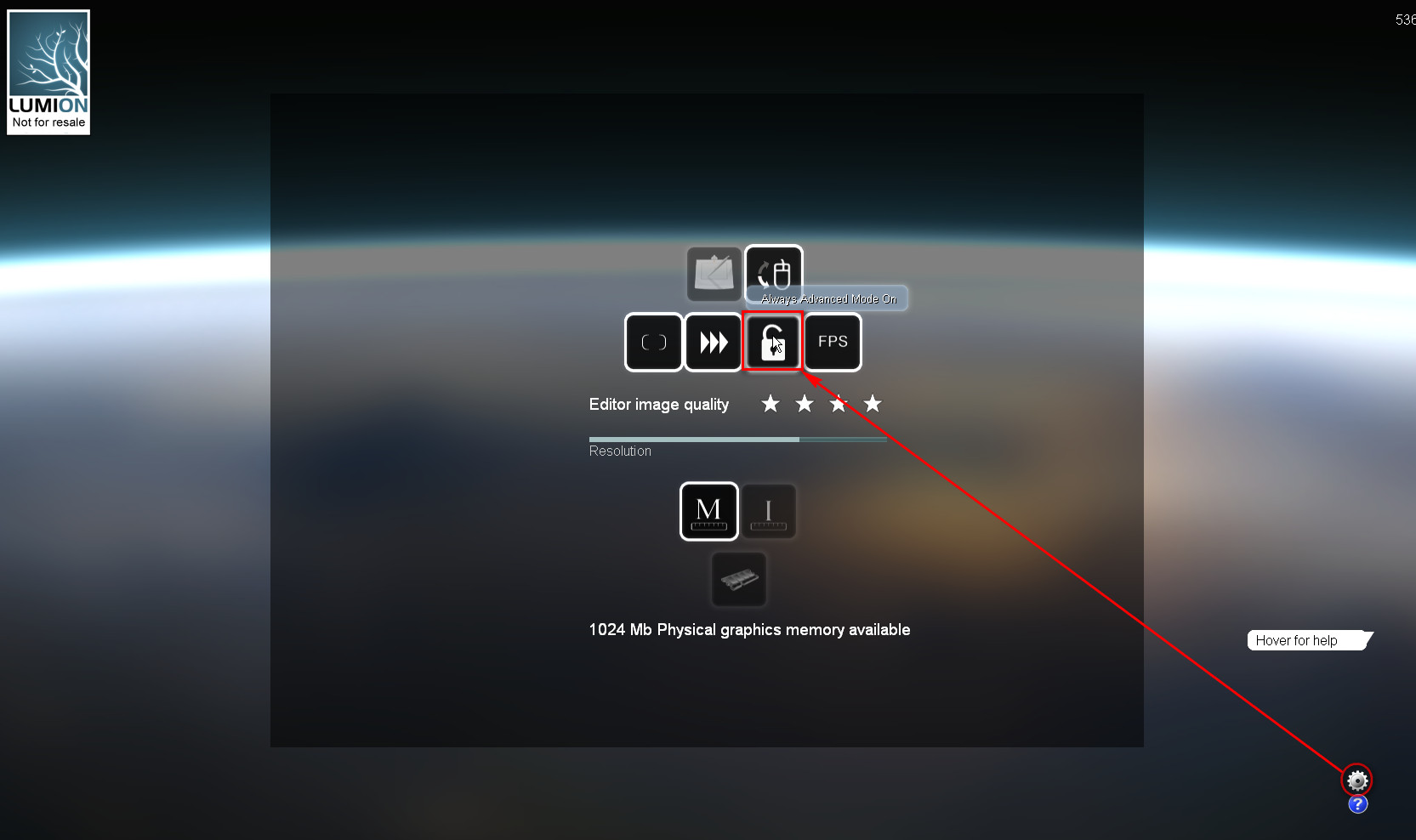
      and here is the screenshot:


      settings.jpg

      Gai...

      1 Antwort Letzte Antwort Antworten Zitieren 0
      • marvins_dadM Offline
        marvins_dad
        zuletzt editiert von

        Thanks!
        I found the setting, not sure in the demo it changes anything though.

        My Gallery

        1 Antwort Letzte Antwort Antworten Zitieren 0
        • marvins_dadM Offline
          marvins_dad
          zuletzt editiert von

          A couple questions - think we are close to getting the software.
          BTW - they have it on sale right now until May 8th for those that are on the fence.

          If someone knows - I'd appreciate if they can help me out with these...otherwise I can search their forums.
          1 - Can you adjust the sun per location/time/day similar to SketchUp? My initial investigation leads me to think not.
          2 - Can you change the sun angle during your move around the model in an animation? Basically so you can light the northern side a little more so it isn't being rendered in shadow.

          Thanks

          My Gallery

          1 Antwort Letzte Antwort Antworten Zitieren 0
          • GaieusG Offline
            Gaieus
            zuletzt editiert von

            Hi Antoine

            1. No (at least I have not found anything).
            2. Yes, you can animate the Sun

            And thanks for the heads-up with the spring sale! Wrote an "urging post" in The Daily CatchUp:
            Permalink: http://news.sketchucation.com/lumion3d-sale/ ‎Edit lumion3d-sale

            Gai...

            1 Antwort Letzte Antwort Antworten Zitieren 0
            • E Offline
              Ecuadorian
              zuletzt editiert von

              It's a scene effect. You can set the sun per clip.

              -Miguel Lescano
              Subscribe to my house plans YouTube channel! (30K+ subs)

              1 Antwort Letzte Antwort Antworten Zitieren 0
              • GaieusG Offline
                Gaieus
                zuletzt editiert von

                Yes, I should have been more informative. Here is the screenshot.
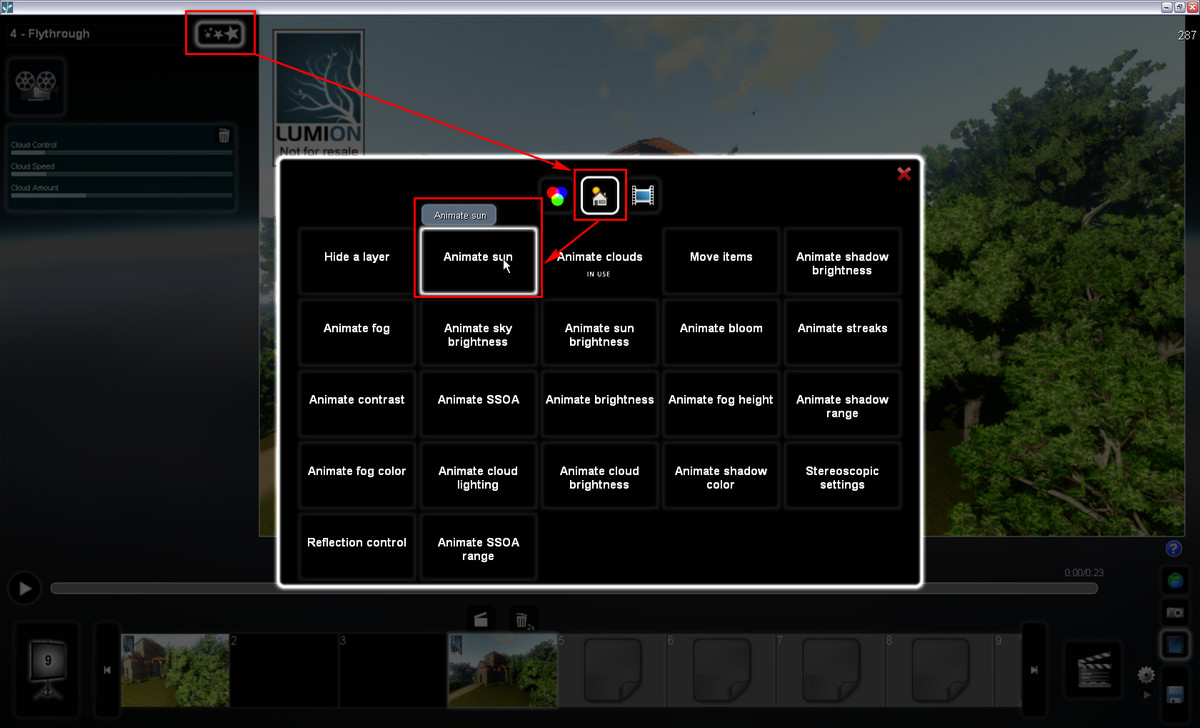
                AnimateSun.jpg

                @ecuadorian said:

                You can set the sun per clip.

                You can add these effects to the whole movie (if you select that when adding) however, not only per scene.

                I guess if you have animated clouds for instance, that could/should go whole movie level while animated sun could only go for one scene where you want to show something related.

                Gai...

                1 Antwort Letzte Antwort Antworten Zitieren 0
                • E Offline
                  Ecuadorian
                  zuletzt editiert von

                  Actually I have had problems with animated sun: If you set it in one clip, you need to reset it in the next clip. Otherwise, it will stay as it was at the end of the previous clip. I wish the clips without the effect just kept the setting you used while in build mode, but no... Even the build mode setting is lost once you use this effect in one clip, visit that clip and then return to build mode.

                  Too much words. I better post a video I finished on saturday for an architecture student. This is his final project:
                  [flash=853,505:29pcvn6a]http://www.youtube.com/v/XJf9z0V-4w8&fs=1[/flash:29pcvn6a]
                  Link to HD video:
                  http://youtu.be/XJf9z0V-4w8?hd=1
                  As Gaieus noted, you can set the animated clouds for the whole movie. I did just that.

                  Hey, this thread is pretty long. How about opening a part 2?

                  -Miguel Lescano
                  Subscribe to my house plans YouTube channel! (30K+ subs)

                  1 Antwort Letzte Antwort Antworten Zitieren 0
                  • GaieusG Offline
                    Gaieus
                    zuletzt editiert von

                    Yes, these settings override build mode (and the settings here are not the most intuitive either IMO - that is; you never now how accurately you are setting...).

                    Now if in an initial clip I set the sun as somewhat rising (and maybe even the fog slowly disappearing/rising), I have no problem with the sun staying where it reached in the previous clip in the next clip - at least for a project I am working on ATM.

                    Gai...

                    1 Antwort Letzte Antwort Antworten Zitieren 0
                    • marvins_dadM Offline
                      marvins_dad
                      zuletzt editiert von

                      Thanks.

                      I did find a thread where they are wanting to emplement location and time lighting controls in the future....timeline is months, not years to add this feature.

                      My Gallery

                      1 Antwort Letzte Antwort Antworten Zitieren 0
                      • marvins_dadM Offline
                        marvins_dad
                        zuletzt editiert von

                        Ecuadorian - thanks for the video as well.
                        (didn't see this page when I posted).
                        Thanks for the screenshot Gai - that helps when you can see where to find it. The learning curve for this program is odd because some things are really easy and intuitive, but others are hidden and take some time to find all the settings.

                        I think we are pretty close to purchasing...we are currently using it on 3 projects to evaluate the software this week and so far have had a really good response from the powers that be.

                        My Gallery

                        1 Antwort Letzte Antwort Antworten Zitieren 0
                        • GaieusG Offline
                          Gaieus
                          zuletzt editiert von

                          Fine then. Some more purchases and I will claim a free copy.
                          😄

                          Joking aside; yes, together with the pro's and con's AND provided one can justify the costs, this is a good software. If some further features are implemented, it will be a fine product.

                          You can also import SU terrain BTW although I have discovered some funny things (I will write some notes here).

                          Gai...

                          1 Antwort Letzte Antwort Antworten Zitieren 0
                          • boofredlayB Offline
                            boofredlay
                            zuletzt editiert von

                            I really have to check into Lumion. I like this Bruce.

                            http://www.coroflot.com/boofredlay

                            1 Antwort Letzte Antwort Antworten Zitieren 0
                            • E Offline
                              Ecuadorian
                              zuletzt editiert von

                              I was about to ask you about the grass edges...

                              You have inspired me to try some desaturation on my future videos. 👍

                              And yeah, I'm also using it for stills, as it's bloody fast to populate the scene with vegetation, vehicles, people, buildings, etc:
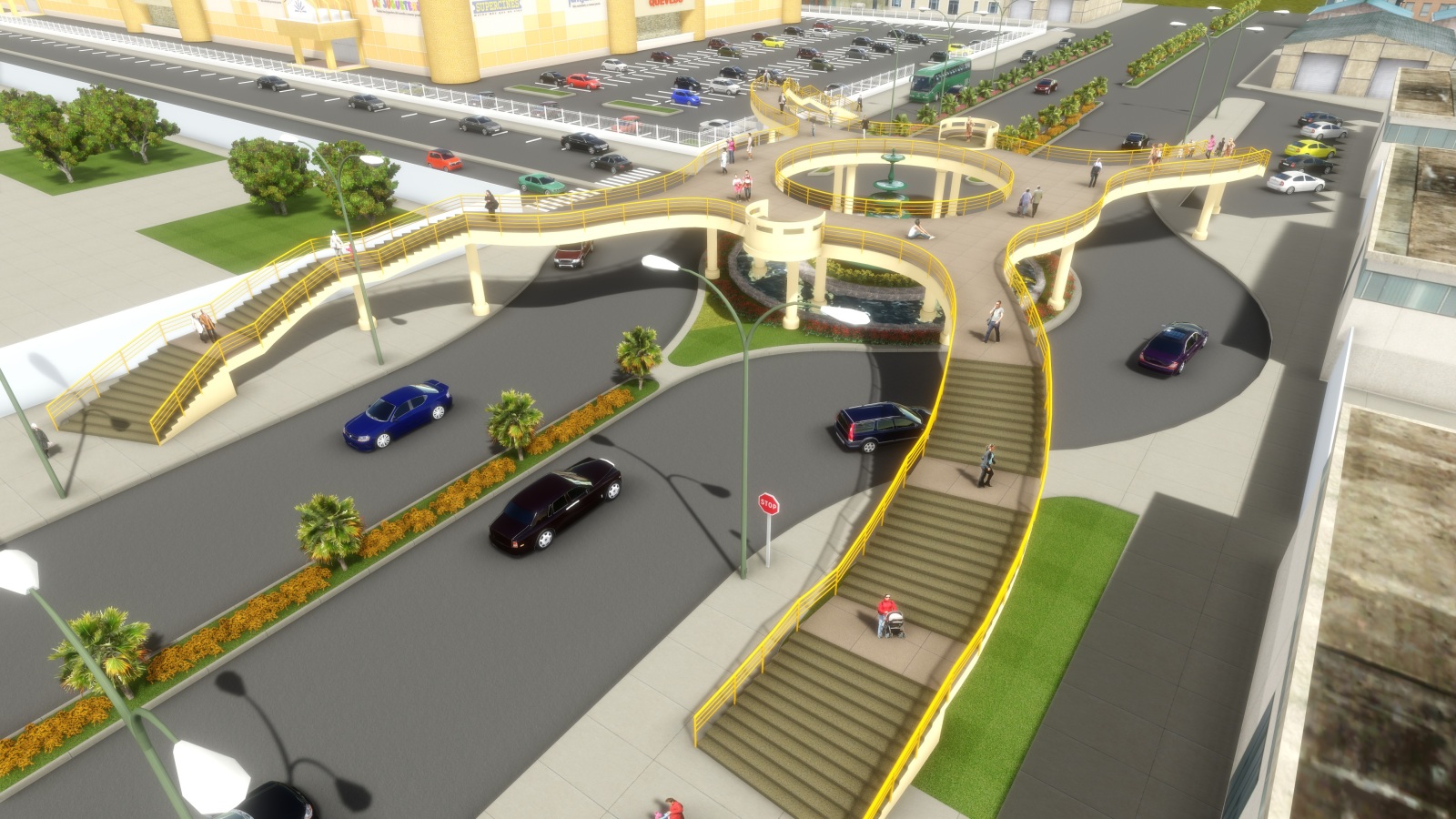

                              Plaza Elevada - sin techo010.jpg

                              -Miguel Lescano
                              Subscribe to my house plans YouTube channel! (30K+ subs)

                              1 Antwort Letzte Antwort Antworten Zitieren 0
                              • R Offline
                                Rico91
                                zuletzt editiert von

                                [flash=800,470:31hus8gm]http://www.youtube.com/v/b8-YKrLrngk?fs=1&hl=en_US[/flash:31hus8gm]

                                [img:y90a5vdg]http://lh5.ggpht.com/_rMc47FEl0fA/Sro-DozMGPI/AAAAAAAABwU/zZsLbdpwWAs/forum_onderschrift_r3d_30pxh.jpg[/img:y90a5vdg] [url:y90a5vdg]http://www.R3Design.nl[/url:y90a5vdg]

                                1 Antwort Letzte Antwort Antworten Zitieren 0
                                • GaieusG Offline
                                  Gaieus
                                  zuletzt editiert von

                                  Hi Ricardo,

                                  Nice video, however some observations:

                                  • At around 0:40.0:50, we can see a pool from the side. To me it seems that you somehow managed to paint the side of the pool with that water material, too - that looks a bit funny from here.
                                  • You have vast areas with grass - the original grass material you exported from SU I presume. You can turn this into Lumion "grass" - the same material it uses for its terrain (see an example video below).
                                    This would make it sure that you exported terrain blends perfectly with the surrounding Lumion terrain and since the Lumion materials (for terrain at least) are procedural, it would not even be so apparently repeating pattern that you have now. On top of all, if you switch that material to Lumion terrain material, you can also "paint" on it with the Lumion terrain edit > Paint tools (alwys do this in a TOP view however as there is a glitch which is mora apparent with very sloping terrains or terrains quite high above the "real" Lumion terrain).
                                  • In some of the interior shots, where there are those very white materials, they seem to bloom too much. I do not know what colour you used there but as a general rule of thumb, pure white should never be used - something around 80-90% of whiteness (i.e. some light grey) might be better - but I do not know how this would work with Lumion...

                                  See this video on how to blend your imported terrain with Lumion terrain. It's mostly at the beginning of the tutorial, from around 0:45/50 on...

                                  [flash=600,400:1ea2lw9e]http://vimeo.com/moogaloop.swf?clip_id=17529494&server=vimeo.com&show_title=1&show_byline=1&show_portrait=0&color=&fullscreen=1" type="application/x-shockwave-flash" allowfullscreen="true" allowscriptaccess="always" width="400" height="225"[/flash:1ea2lw9e]

                                  But again, cool video and nice presentation (I have not really played around with interiors too much yet)

                                  Gai...

                                  1 Antwort Letzte Antwort Antworten Zitieren 0
                                  • boofredlayB Offline
                                    boofredlay
                                    zuletzt editiert von

                                    Ok so seeing all the great results I got the demo and installed it. Upon starting up I selected the mountain range scene and started to move around and crap, it is so slow it is unusable. Just to move one arrow key left or right takes 3 or 4 seconds. Panning the view right took at least 20 seconds and hovering over the landscape or weather controls takes 5 seconds just to show the tooltip window. I fear the video card our office has chosen will not allow us to use this program.
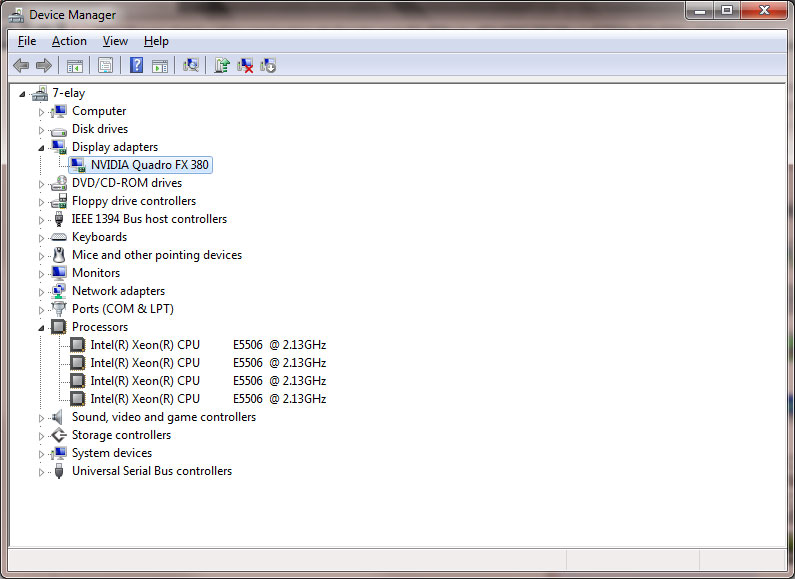

                                    ComputerSpec.jpg

                                    http://www.coroflot.com/boofredlay

                                    1 Antwort Letzte Antwort Antworten Zitieren 0
                                    • E Offline
                                      Ecuadorian
                                      zuletzt editiert von

                                      They recommend GeForce cards for Lumion. They're cheaper than Quadro cards.

                                      Just get the coolest GeForce you can find/afford and you're all set.

                                      -Miguel Lescano
                                      Subscribe to my house plans YouTube channel! (30K+ subs)

                                      1 Antwort Letzte Antwort Antworten Zitieren 0
                                      • boofredlayB Offline
                                        boofredlay
                                        zuletzt editiert von

                                        That is the problem, I don't have a say in what hardware we get at the office. In fact this computer is not even 2 months old so changing cards would be like pulling teeth. Sigh.

                                        http://www.coroflot.com/boofredlay

                                        1 Antwort Letzte Antwort Antworten Zitieren 0
                                        • boofredlayB Offline
                                          boofredlay
                                          zuletzt editiert von

                                          Well some good news, I updated the driver and saw that I could change the quality level in Lumion and it is somewhat manageable now. Hopefully I can get some nice results like you guys have produced.

                                          http://www.coroflot.com/boofredlay

                                          1 Antwort Letzte Antwort Antworten Zitieren 0
                                          • GaieusG Offline
                                            Gaieus
                                            zuletzt editiert von

                                            What's the memory of that card?

                                            I have a GeForce 9600 GT with 1 Gb memory and it performs pretty well.

                                            Also, when navigating (and not the card is the issue), pressing the Shift key speeds movement up (a bit at least).

                                            Gai...

                                            1 Antwort Letzte Antwort Antworten Zitieren 0
                                            • 1
                                            • 2
                                            • 5
                                            • 6
                                            • 7
                                            • 8
                                            • 9
                                            • 10
                                            • 11
                                            • 7 / 11
                                            • Erster Beitrag
                                              Letzter Beitrag
                                            Buy SketchPlus
                                            Buy SUbD
                                            Buy WrapR
                                            Buy eBook
                                            Buy Modelur
                                            Buy Vertex Tools
                                            Buy SketchCuisine
                                            Buy FormFonts

                                            Advertisement