sketchucation logo sketchucation
    • 登入
    Oops, your profile's looking a bit empty! To help us tailor your experience, please fill in key details like your SketchUp version, skill level, operating system, and more. Update and save your info on your profile page today!
    🔌 Smart Spline | Fluid way to handle splines for furniture design and complex structures. Download

    Lumion - Test drive

    已排程 已置頂 已鎖定 已移動 Extensions & Applications Discussions
    extensions
    209 貼文 31 Posters 67.1k 瀏覽 31 Watching
    正在載入更多貼文
    • 從舊到新
    • 從新到舊
    • 最多點贊
    回覆
    • 在新貼文中回覆
    登入後回覆
    此主題已被刪除。只有擁有主題管理權限的使用者可以查看。
    • R 離線
      Rico91
      最後由 編輯

      testing..

      [flash=600,360:2095k3gy]http://www.youtube.com/v/irzMWqfetvI[/flash:2095k3gy]

      [img:y90a5vdg]http://lh5.ggpht.com/_rMc47FEl0fA/Sro-DozMGPI/AAAAAAAABwU/zZsLbdpwWAs/forum_onderschrift_r3d_30pxh.jpg[/img:y90a5vdg] [url:y90a5vdg]http://www.R3Design.nl[/url:y90a5vdg]

      1 條回覆 最後回覆 回覆 引用 0
      • GaieusG 離線
        Gaieus
        最後由 編輯

        Cool, indeed. Even with the limited demo version you can make stunning scenes. 👍

        Gai...

        1 條回覆 最後回覆 回覆 引用 0
        • pilouP 離線
          pilou
          最後由 編輯

          Cool Lumion tests! ☀

          Why the video embeded on the site are not clickable for arrive on the original Youtube ?

          Frenchy Pilou
          Is beautiful that please without concept!
          My Little site :)

          1 條回覆 最後回覆 回覆 引用 0
          • HieruH 離線
            Hieru
            最後由 編輯

            Really informative thread!

            I've got a quick question. Does all of the output feature the heavy bloom effect, or is it something you can control or even turn off?

            www.davidhier.co.uk

            1 條回覆 最後回覆 回覆 引用 0
            • GaieusG 離線
              Gaieus
              最後由 編輯

              Bloom comes with the fog. So if no fog, no bloom. Besides, there is a couple of global settings for camera, light and brightness and such.

              I was kind of overdoing the fog (it nicely represents DOF) but of course, especially with the 3D animation, you can live without it (or turn it down to something very subtle).

              Gai...

              1 條回覆 最後回覆 回覆 引用 0
              • HieruH 離線
                Hieru
                最後由 編輯

                Thanks for the explanation 👍

                www.davidhier.co.uk

                1 條回覆 最後回覆 回覆 引用 0
                • GaieusG 離線
                  Gaieus
                  最後由 編輯

                  That's some crazy amount of wind on those poor plants, Bruce!
                  😄

                  Cool video though. I see you figured out how to animate (move) things like that train (true that you'd done with the ship earlier, stupid me...)

                  Gai...

                  1 條回覆 最後回覆 回覆 引用 0
                  • marvins_dadM 離線
                    marvins_dad
                    最後由 編輯

                    How does it work for interiors...not too bad.
                    Seems there is ambient light and anything white really glows and adds more light (kinda).
                    I believe they have a light material, but I didn't try it out.

                    [flash=640,390:3jisf6f2]http://www.youtube.com/v/CdqepN8mD-U[/flash:3jisf6f2]

                    My Gallery

                    1 條回覆 最後回覆 回覆 引用 0
                    • jason_marantoJ 離線
                      jason_maranto
                      最後由 編輯

                      I'm finding all these videos fascinating -- does the software have a Angle of View/Field of View/Focal Length modifier for the camera? The reason I ask is I find the perspective distortion to be too extreme when rotating the camera (the strong fisheye effect at the corners makes me a bit dizzy).

                      Best,
                      Jason.

                      I create video tutorial series about several 2D & 3D graphics programs.

                      1 條回覆 最後回覆 回覆 引用 0
                      • marvins_dadM 離線
                        marvins_dad
                        最後由 編輯

                        There is an Exposure and Focal Length setting (in mm). The default setting is ISO 400 15mm.
                        I hadn't looked at that yet - did notice the fisheying with the interior...figured I would check that out next time around.

                        @jason_maranto said:

                        I'm finding all these videos fascinating -- does the software have a Angle of View/Field of View/Focal Length modifier for the camera? The reason I ask is I find the perspective distortion to be too extreme when rotating the camera (the strong fisheye effect at the corners makes me a bit dizzy).

                        Best,
                        Jason.

                        My Gallery

                        1 條回覆 最後回覆 回覆 引用 0
                        • jason_marantoJ 離線
                          jason_maranto
                          最後由 編輯

                          Yeah 15mm would do it 🤢 -- something along the lines of 50mm would be much easier to enjoy the cool stuff in these videos ☀

                          Best,
                          Jason.

                          I create video tutorial series about several 2D & 3D graphics programs.

                          1 條回覆 最後回覆 回覆 引用 0
                          • GaieusG 離線
                            Gaieus
                            最後由 編輯

                            Yes, there is a focal length setting (with some other generic camera settings). It really needs some playing around to get my favourite settings (and you would probably use something different for outdoors and for tight spaces like indoors, too).
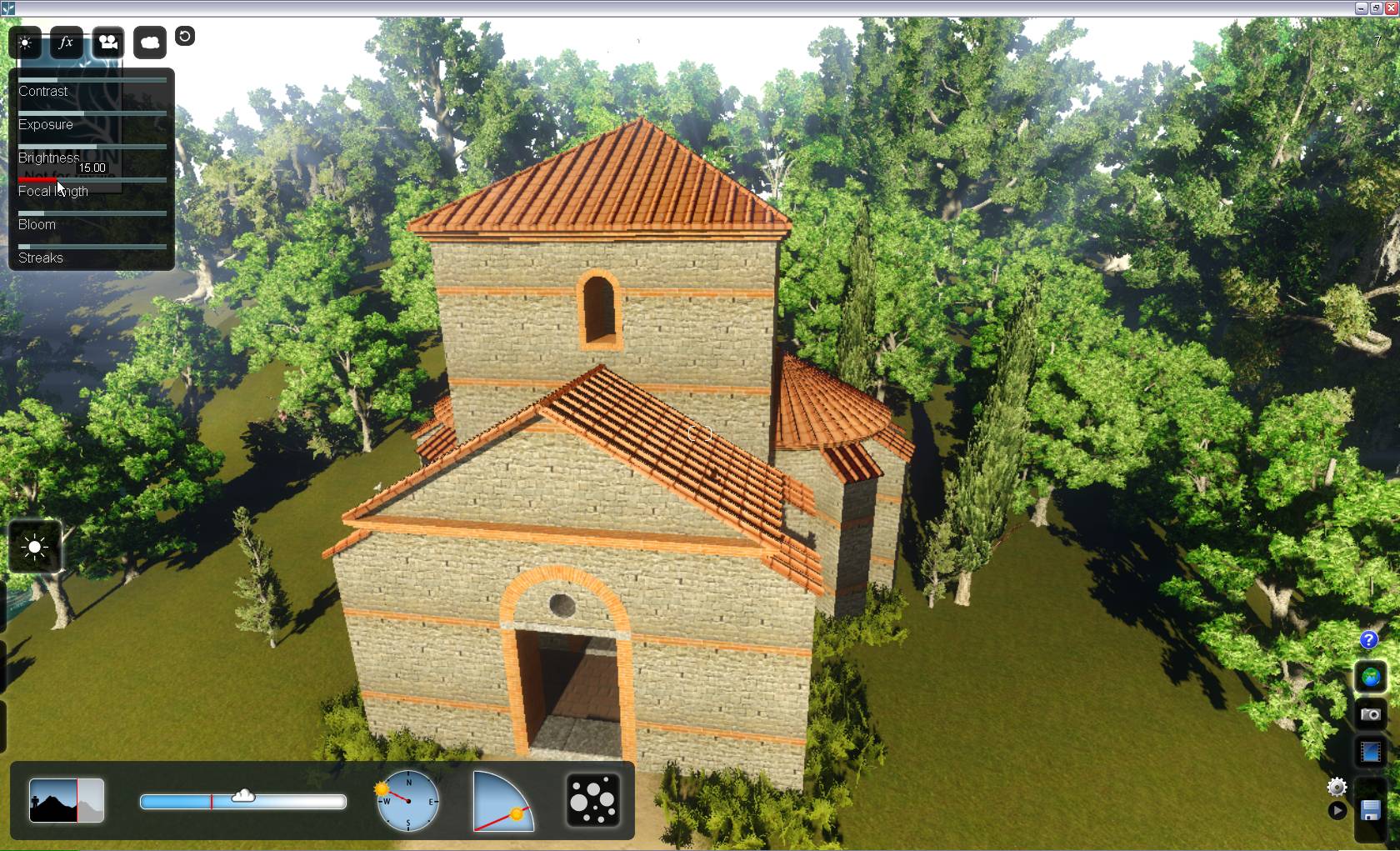
                            FocalLength.jpg
                            As for the very white; any rendering engine would be sensitive to that. As a general rule of thumb; never use pure white on anything as there is no such thing in real life.

                            I have not tried it indoors yet. The projects I am experimenting with are quite narrow spaces... And what's Lumion is good at is its environment (plants, dynamic atmosphere/water etc.), quick terrain editing tools (sculpting and painting - although the ease of accuracy still nee some fine tuning IMO).

                            Gai...

                            1 條回覆 最後回覆 回覆 引用 0
                            • marvins_dadM 離線
                              marvins_dad
                              最後由 編輯

                              @gaieus said:

                              [attachment=0:olwbszh9]<!-- ia0 -->FocalLength.jpg<!-- ia0 -->[/attachment:olwbszh9]

                              Wow - looks like you found more settings than I have. Maybe it is a difference from the demo to a full version. Promising that there are more adjustments. 👍

                              My Gallery

                              1 條回覆 最後回覆 回覆 引用 0
                              • GaieusG 離線
                                Gaieus
                                最後由 編輯

                                Read the FAQ:
                                http://lumion3d.com/forum/index.php?topic=638.0
                                😉
                                and here is the screenshot:


                                settings.jpg

                                Gai...

                                1 條回覆 最後回覆 回覆 引用 0
                                • marvins_dadM 離線
                                  marvins_dad
                                  最後由 編輯

                                  Thanks!
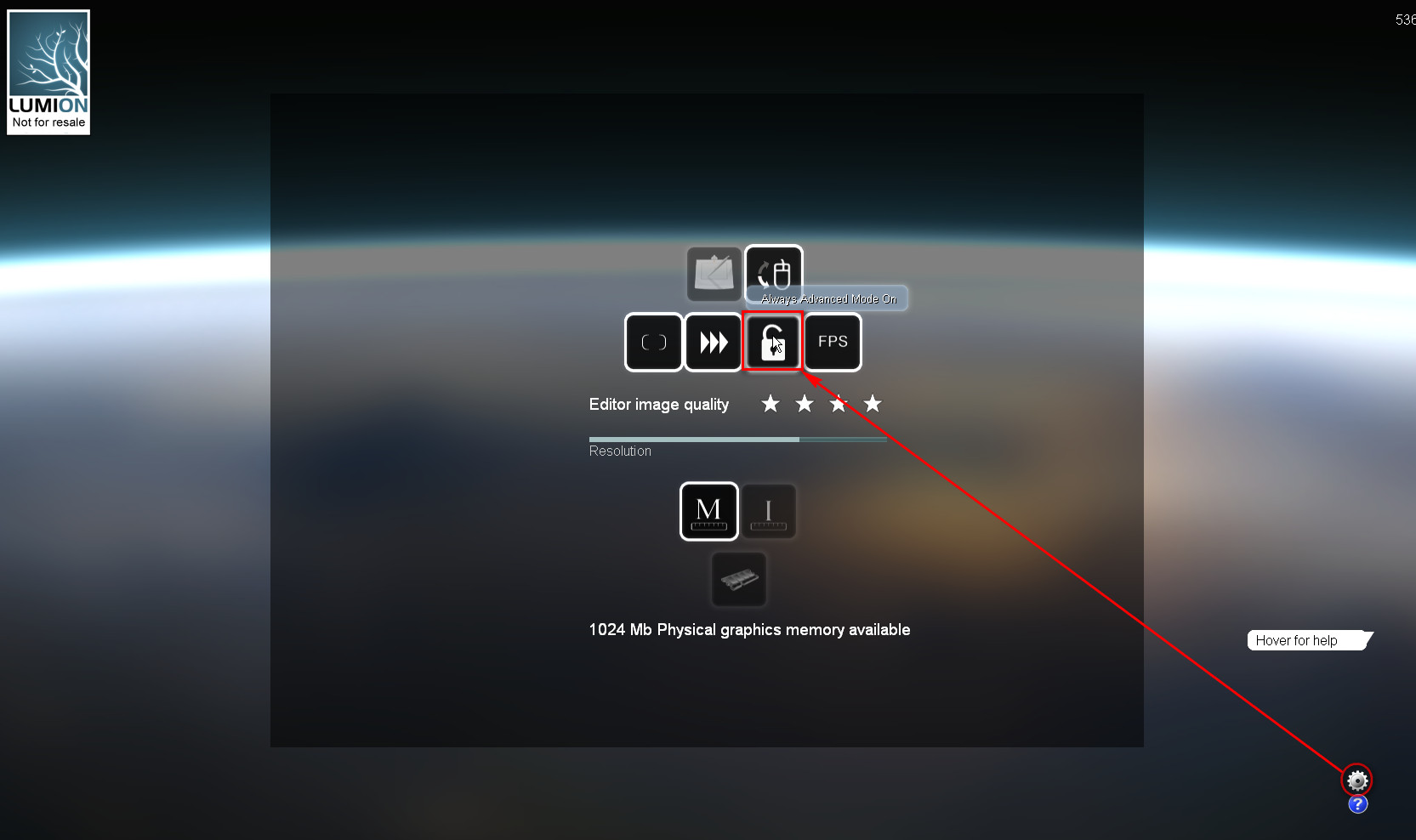
                                  I found the setting, not sure in the demo it changes anything though.

                                  My Gallery

                                  1 條回覆 最後回覆 回覆 引用 0
                                  • marvins_dadM 離線
                                    marvins_dad
                                    最後由 編輯

                                    A couple questions - think we are close to getting the software.
                                    BTW - they have it on sale right now until May 8th for those that are on the fence.

                                    If someone knows - I'd appreciate if they can help me out with these...otherwise I can search their forums.
                                    1 - Can you adjust the sun per location/time/day similar to SketchUp? My initial investigation leads me to think not.
                                    2 - Can you change the sun angle during your move around the model in an animation? Basically so you can light the northern side a little more so it isn't being rendered in shadow.

                                    Thanks

                                    My Gallery

                                    1 條回覆 最後回覆 回覆 引用 0
                                    • GaieusG 離線
                                      Gaieus
                                      最後由 編輯

                                      Hi Antoine

                                      1. No (at least I have not found anything).
                                      2. Yes, you can animate the Sun

                                      And thanks for the heads-up with the spring sale! Wrote an "urging post" in The Daily CatchUp:
                                      Permalink: http://news.sketchucation.com/lumion3d-sale/ ‎Edit lumion3d-sale

                                      Gai...

                                      1 條回覆 最後回覆 回覆 引用 0
                                      • E 離線
                                        Ecuadorian
                                        最後由 編輯

                                        It's a scene effect. You can set the sun per clip.

                                        -Miguel Lescano
                                        Subscribe to my house plans YouTube channel! (30K+ subs)

                                        1 條回覆 最後回覆 回覆 引用 0
                                        • GaieusG 離線
                                          Gaieus
                                          最後由 編輯

                                          Yes, I should have been more informative. Here is the screenshot.
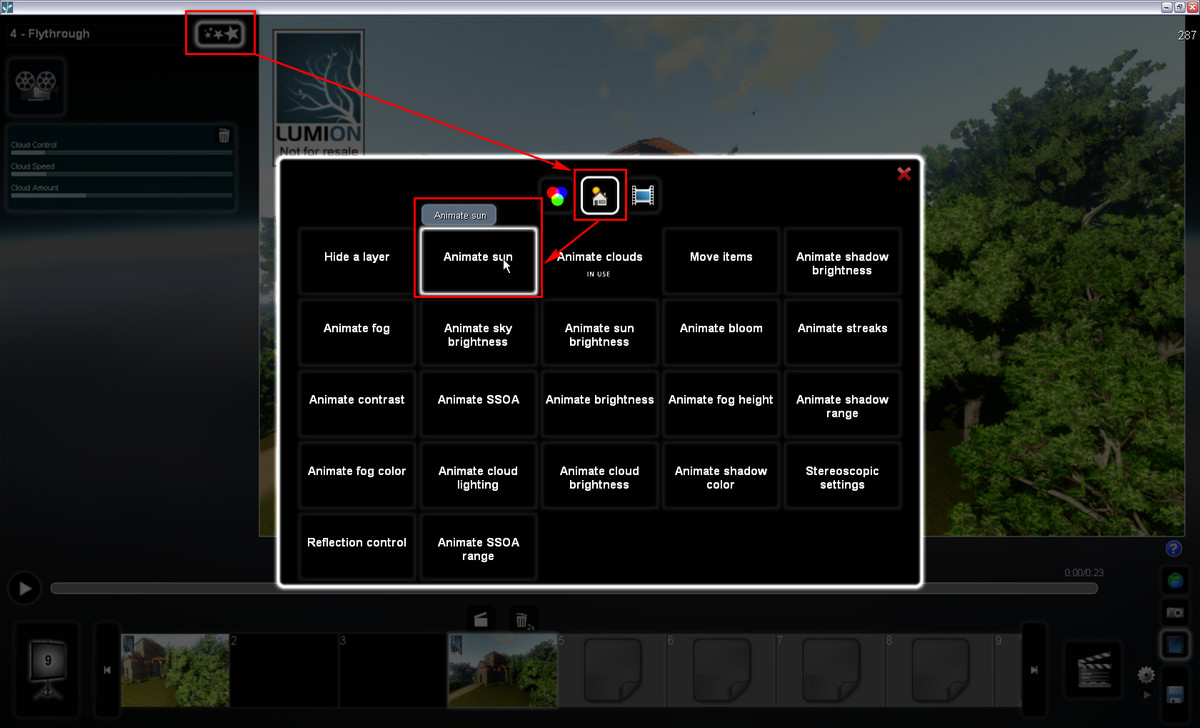
                                          AnimateSun.jpg

                                          @ecuadorian said:

                                          You can set the sun per clip.

                                          You can add these effects to the whole movie (if you select that when adding) however, not only per scene.

                                          I guess if you have animated clouds for instance, that could/should go whole movie level while animated sun could only go for one scene where you want to show something related.

                                          Gai...

                                          1 條回覆 最後回覆 回覆 引用 0
                                          • E 離線
                                            Ecuadorian
                                            最後由 編輯

                                            Actually I have had problems with animated sun: If you set it in one clip, you need to reset it in the next clip. Otherwise, it will stay as it was at the end of the previous clip. I wish the clips without the effect just kept the setting you used while in build mode, but no... Even the build mode setting is lost once you use this effect in one clip, visit that clip and then return to build mode.

                                            Too much words. I better post a video I finished on saturday for an architecture student. This is his final project:
                                            [flash=853,505:29pcvn6a]http://www.youtube.com/v/XJf9z0V-4w8&fs=1[/flash:29pcvn6a]
                                            Link to HD video:
                                            http://youtu.be/XJf9z0V-4w8?hd=1
                                            As Gaieus noted, you can set the animated clouds for the whole movie. I did just that.

                                            Hey, this thread is pretty long. How about opening a part 2?

                                            -Miguel Lescano
                                            Subscribe to my house plans YouTube channel! (30K+ subs)

                                            1 條回覆 最後回覆 回覆 引用 0
                                            • 1
                                            • 2
                                            • 3
                                            • 4
                                            • 5
                                            • 10
                                            • 11
                                            • 1 / 11
                                            • 第一個貼文
                                              最後的貼文
                                            Buy SketchPlus
                                            Buy SUbD
                                            Buy WrapR
                                            Buy eBook
                                            Buy Modelur
                                            Buy Vertex Tools
                                            Buy SketchCuisine
                                            Buy FormFonts

                                            Advertisement