sketchucation logo sketchucation
    • 登入
    Oops, your profile's looking a bit empty! To help us tailor your experience, please fill in key details like your SketchUp version, skill level, operating system, and more. Update and save your info on your profile page today!
    🔌 Smart Spline | Fluid way to handle splines for furniture design and complex structures. Download

    [Plugin] OBJexporter v3.0 20130131

    已排程 已置頂 已鎖定 已移動 Plugins
    304 貼文 96 Posters 483.0k 瀏覽 96 Watching
    正在載入更多貼文
    • 從舊到新
    • 從新到舊
    • 最多點贊
    回覆
    • 在新貼文中回覆
    登入後回覆
    此主題已被刪除。只有擁有主題管理權限的使用者可以查看。
    • M 離線
      mommykathy
      最後由 編輯

      Thank You, Thank You, Thank You! Been going nuts trying to find something to do this and this is PERFECT. Have a great day!

      1 條回覆 最後回覆 回覆 引用 0
      • McGyverM 離線
        McGyver
        最後由 編輯

        Hi! I'd like to thank TIG once again for this truly awesome plugin as well as all the subsequent updates.
        I frequently recommend this plugin for people who are new to SketchUp, showing them that their modeling efforts can be used in other programs besides SketchUp.
        A lot of people tend to believe that SketchUp is very limited, has no export options for the free version and are not aware of all the amazing plugins that extend SU's capabilities and give it greater power.
        I was just writing a short "How to" for people who wish to use their models in Poser/DAZ studio, but it occurred to me that while I giving instructions on how to install a ruby script such as "OBJexporter" I was not sure if there were any other plugins that needed to be installed for OBJexporter to work properly... I have quite a few and the thought came to me when I was describing the progress bar and "Model exported in X# of seconds" features... so I figured I'd ask-

        Does OBJexporter require any other plugins such as Progressbar.rb to function properly?

        Thats probably a pretty stupid question, but before I tell someone how something works, I figured I should probably include any relevant additional information.

        Thanks in advance for any information any of you can provide!

        Visit My ShareCG Freebie Gallery

        1 條回覆 最後回覆 回覆 引用 0
        • TIGT 離線
          TIG Moderator
          最後由 編輯

          My OBJexporter code is 'self-contained'.
          It only 'requires' sketchup.rb, and that is installed by SketchUp itself in the Tools folder...
          The progress reporting etc is built-in to my code and needs no 3rd party helpers...

          TIG

          1 條回覆 最後回覆 回覆 引用 0
          • McGyverM 離線
            McGyver
            最後由 編輯

            Thank you once again!

            Visit My ShareCG Freebie Gallery

            1 條回覆 最後回覆 回覆 引用 0
            • T 離線
              the_bored_gamer
              最後由 編輯

              Hi, I press the OBJexporter button... then it ask to "convert all to png?".
              Wether I press Yes or No, I get nothing, it just close. Please help!

              1 條回覆 最後回覆 回覆 引用 0
              • TIGT 離線
                TIG Moderator
                最後由 編輯

                Run with the Ruby Console open: this will report progress etc...
                Tell us any error messages.
                If you are working with a Selection it must contain Faces...

                Are no files [OBJ/MTL] or textures' folder made at all ?
                Do you have permissions to make files in the destination folder etc??

                TIG

                1 條回覆 最後回覆 回覆 引用 0
                • F 離線
                  FantasyZone
                  最後由 編輯

                  OMG TIG!!!!!!!
                  I searched for a month a obj exporter for SketchUp and now I found your Obj Exporter an made an extra account on sketchucation just to download it and at last it worked!!!!!!!!!!!!! I am so happy now thank you for this FREE(!) ObjExporter

                  FantasyZone 😍
                  PS. TAHNK YOU!

                  1 條回覆 最後回覆 回覆 引用 0
                  • A 離線
                    anar
                    最後由 編輯

                    Thanks TIG for this plugin.

                    It seems that groups are not exported with their SKP names.
                    For example if my group is named "Cylinder" the exported group name is "test-GRP-Cylinder-566-Color_A01" which is a bit annoying because I have to rename all my groups after exporting.

                    Also if I make a group with name "Level1" that contains 2 groups with names "Level2_A" and "Level2_B" without any other geometry, the group "Level1" won't export in the OBJ file.
                    Therefore ther is only one level of hierarchy exported...
                    Can it be a limitation of the OBJ format by itself ?

                    Cheers !

                    1 條回覆 最後回覆 回覆 引用 0
                    • TIGT 離線
                      TIG Moderator
                      最後由 編輯

                      Anar

                      The 'grouping' in the OBJexporter file format is effectively 'by material'.
                      Each facet has a assigned a group based on:

                      ModelName-ContainerType-Name-ID-MaterialName

                      As Group names are no unique and Components can have multiple instances the ID is needed.

                      So for your:

                      test-GRP-Cylinder-566-Color_A01

                      Working right to left the geometry is thus...

                      MaterialName = Color_A01 [the Material's name, adjusted so its characters are OBJ compliant]
                      ID = 566 [assigned by SketchUp for the container's definition, during that session]
                      Name = Cylinder [the Container's name, adjusted so its characters are OBJ compliant]
                      ContainerType = GRP [Group]
                      ModelName = test [the Model's name, adjusted so its characters are OBJ compliant]

                      Note that if you had say 'Black' end facets then they would grouped separately as:

                      test-GRP-Cylinder-566-**Black**

                      TIG

                      1 條回覆 最後回覆 回覆 引用 0
                      • A 離線
                        anar
                        最後由 編輯

                        Thanks TIG for such a complete explanation !

                        But I still think it would be very useful if the groups could be exported with just their names as we can see them in the Outliner.
                        Then if the name isn't unique the exporter could automatically add a "_1", "_2", "_3", etc. at the end of it (for example).
                        I don't know if you see the need for it but when I export a scene with a lot of groups it takes me a lot of time to rename them back manually with the name I originally gave them in SU.

                        Maybe it could be an export option ?
                        I understand it would be more work on your side as the exporter doesn't have any "export option" window...

                        Still it's a good plugin that I use all the time ! Thanks !

                        Anar
                        http://www.reppersdelight.spacymen.com

                        1 條回覆 最後回覆 回覆 引用 0
                        • R 離線
                          rangel96
                          最後由 編輯

                          @tig said:

                          Run with the Ruby Console open: this will report progress etc...
                          Tell us any error messages.
                          If you are working with a Selection it must contain Faces...

                          Are no files [OBJ/MTL] or textures' folder made at all ?
                          Do you have permissions to make files in the destination folder etc??

                          I have the same problem 😢
                          Everything is ok and i gave a normal name to may new file. I even ended it with .obj ...
                          And I have administrator rights...
                          that´s what loks like in the Ruby console:
                          OBJExporter:
                          C:/Users/André/Desktop/Untitled.obj
                          Error: #<Errno::ENOENT: No such file or directory - C:\Users\André\Desktop/Untitled.obj>
                          C:/Program Files (x86)/Google/Google SketchUp 8/Plugins/OBJexporter.rb:266:in initialize' C:/Program Files (x86)/Google/Google SketchUp 8/Plugins/OBJexporter.rb:266:in new'
                          C:/Program Files (x86)/Google/Google SketchUp 8/Plugins/OBJexporter.rb:266:in export_start' C:/Program Files (x86)/Google/Google SketchUp 8/Plugins/OBJexporter.rb:245:in export'
                          C:/Program Files (x86)/Google/Google SketchUp 8/Plugins/OBJexporter.rb:223:in initialize' C:/Program Files (x86)/Google/Google SketchUp 8/Plugins/OBJexporter.rb:1093:in new'
                          C:/Program Files (x86)/Google/Google SketchUp 8/Plugins/OBJexporter.rb:1093

                          1 條回覆 最後回覆 回覆 引用 0
                          • A 離線
                            anar
                            最後由 編輯

                            May be you should avoid the "é" in your path.
                            I suggest you use only UTF8 characters.

                            1 條回覆 最後回覆 回覆 引用 0
                            • TIGT 離線
                              TIG Moderator
                              最後由 編輯

                              @anar said:

                              May be you should avoid the "é" in your path.
                              I suggest you use only UTF8 characters.
                              Precisely!
                              Précisément! 😒

                              TIG

                              1 條回覆 最後回覆 回覆 引用 0
                              • R 離線
                                rangel96
                                最後由 編輯

                                Thanks! I will try do save in other place!

                                1 條回覆 最後回覆 回覆 引用 0
                                • I 離線
                                  Ibo
                                  最後由 編輯

                                  Hello,

                                  I downloaded the plugin. Installed it in the plugin folder of sketchup8 but when I start the program I can't find it.
                                  Does anyone know what to do ?

                                  thanks

                                  Ibo

                                  1 條回覆 最後回覆 回覆 引用 0
                                  • TIGT 離線
                                    TIG Moderator
                                    最後由 編輯

                                    Under the File menu - like many other Exporters ?
                                    and like it says in the instructions...
                                    @unknownuser said:

                                    Usage: menu File > 'OBJexporter...'

                                    TIG

                                    1 條回覆 最後回覆 回覆 引用 0
                                    • N 離線
                                      nightwasp
                                      最後由 編輯

                                      Help.

                                      I put the RB file in the SU 2013 (free) Plug-Ins folder. I restarted but still only have the option to export as DAE or Google Earth. Please advise.

                                      Thanks so much for your help!
                                      -Keith

                                      1 條回覆 最後回覆 回覆 引用 0
                                      • BoxB 離線
                                        Box
                                        最後由 編輯

                                        Look at the post above yours and look at this image.
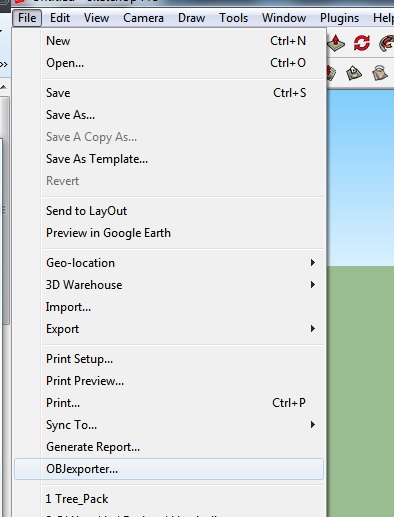

                                        OBJEx.jpg

                                        1 條回覆 最後回覆 回覆 引用 0
                                        • N 離線
                                          nightwasp
                                          最後由 編輯

                                          Thanks for the quick reply! On the Mac, I only have this for that menu, and Export 3D Untitled-1.jpghas just the two free options.
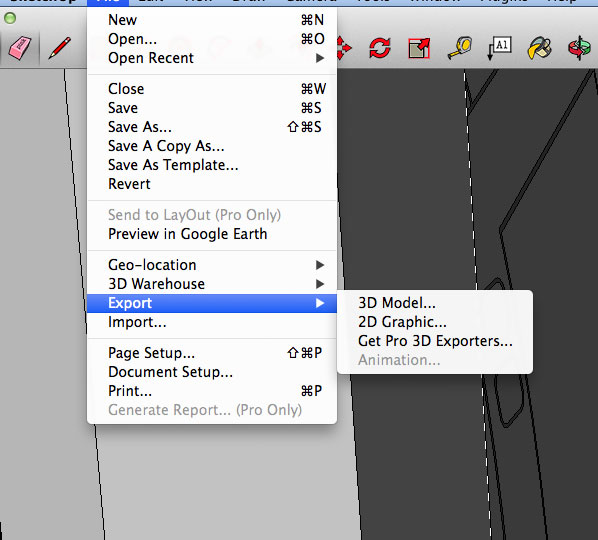
                                          Best. K

                                          1 條回覆 最後回覆 回覆 引用 0
                                          • BoxB 離線
                                            Box
                                            最後由 編輯

                                            If it isn't there it suggests it hasn't installed properly, it might be the security permissions or the folder location.
                                            Have a look here and see if that helps.
                                            http://sketchucation.com/forums/viewtopic.php?f=323%26amp;t=56005

                                            Installing the Sketchucation Plugin lets you find, install and manage plugin easily, so you might be better off getting that installed instead.


                                            1 條回覆 最後回覆 回覆 引用 0
                                            • 1
                                            • 2
                                            • 11
                                            • 12
                                            • 13
                                            • 14
                                            • 15
                                            • 16
                                            • 13 / 16
                                            • 第一個貼文
                                              最後的貼文
                                            Buy SketchPlus
                                            Buy SUbD
                                            Buy WrapR
                                            Buy eBook
                                            Buy Modelur
                                            Buy Vertex Tools
                                            Buy SketchCuisine
                                            Buy FormFonts

                                            Advertisement
