sketchucation logo sketchucation
    • Login
    Oops, your profile's looking a bit empty! To help us tailor your experience, please fill in key details like your SketchUp version, skill level, operating system, and more. Update and save your info on your profile page today!
    Mac User? | Join the Rayscaper Beta for Mac Learn More

    [Plugin] OBJexporter v3.0 20130131

    Scheduled Pinned Locked Moved Plugins
    304 Posts 96 Posters 658.0k Views 96 Watching
    Loading More Posts
    • Oldest to Newest
    • Newest to Oldest
    • Most Votes
    Reply
    • Reply as topic
    Log in to reply
    This topic has been deleted. Only users with topic management privileges can see it.
    • StilTegS
      StilTeg
      last edited by

      Hello Tig ... Great tool thanks, I only have one problem, some files do not work, especially one quite complicated design file. Problem is sketchup crashes during the export and I get an incomplete file ...

      @alain said:

      Older versions with Sketchup 7 worked perfect.
      But since I use the latest version of the OBJ exporter with Sketchup 8, then Sketchup always freezes while the exportprocess.
      Tested it on Window XP 32 Bit and Win 7 64 Bit.

      Then when I kill the Sketchupprocess in the Windows Taskmanager then a (sometimes) usable but incomplete new created OBJ-File is created anyway.

      Does anybody know what could be wrong ?

      Kind regards
      Alain

      doing technical engineering on SketchUp ... without plugins

      1 Reply Last reply
      Reply Quote 0
      • TIGT
        TIG Moderator
        last edited by

        When you say 'crash' do you mean a 'bugsplat'?
        If so this is unexpected!
        If you mean that the screen goes white and Sketchup becomes 'unresponsive' then it is probably still processing [use the Task Manager to see that Sketchup is still chugging away].
        Under intensive processing it's a known issue that Sketchup becomes 'unresponsive' - left for long enough it should finish the task.
        OBJ format is usually limited to specific objects or rooms, or buildings.
        What are you trying to export? PM me the [zipped] SKP file if you can ?
        To help the exporter please remember that only visible 'faces' [or images] are exported, so you can switch off layers containing unneeded objects like text/dims, also hide any other objects you are not interested in...
        Many thousands of facets can be exported, the more nested objects the longer the export, the files get very very large...

        TIG

        1 Reply Last reply
        Reply Quote 0
        • M
          mattgame96
          last edited by

          I am new to Google Sketchup 8.

          What do I do after I download so that it could work on Google Sketchup 8?

          If you can help me, thanks : )

          -MG

          P.S.- Thanks for setting the download πŸ‘

          1 Reply Last reply
          Reply Quote 0
          • TIGT
            TIG Moderator
            last edited by

            @mattgame96 said:

            I am new to Google Sketchup 8.

            What do I do after I download so that it could work on Google Sketchup 8?

            If you can help me, thanks : )

            -MG

            P.S.- Thanks for setting the download πŸ‘
            You really need to read the Help files, there are also several useful threads on this forum about downloading and installing scripts...
            In this case it's very simple - as it says under the download link - place the .rb file that you've downloaded into the Sketchup v8 'Plugins' folder, restart Sketchup... and as explained on the download page the tool now appears in the Sketchup > File menu...

            TIG

            1 Reply Last reply
            Reply Quote 0
            • pugz1983P
              pugz1983
              last edited by

              Hi TIG,

              I've been reading this thread after beeingdirected here. I asked a question about export formats in the sketchup discussion part of the forum.

              My question is if there is any way to export from SU with Ngons. When rendering in C4D my mesh gives strange results in the geometry around the area where I used Round corners plugin. I think it's because of the triangulation. Any suggestions?

              greetz Twan

              1 Reply Last reply
              Reply Quote 0
              • TIGT
                TIG Moderator
                last edited by

                Your profile says you have 'Pro', so its built in OBJexporter has several Options [button on export save_as dialog] which are not available with mine... like you can switch off triangulation and keep ngons ???

                TIG

                1 Reply Last reply
                Reply Quote 0
                • michaliszissiouM
                  michaliszissiou
                  last edited by

                  @unknownuser said:

                  When rendering in C4D my mesh gives strange results in the geometry around the area where I used Round corners plugin. I think it's because of the triangulation. Any suggestions?

                  I'm a poor blender user. However, in C4d, try to weld vertices. SU does insist to export non welded vertices. If C4d has some option like tris to quads or similar, give it a try. In C4d, select all the mesh and ask for something like recalculate normals, or normals outside or similar.
                  I know nothing about C4d but I'm sure, these functions exist, maybe under a different name.

                  1 Reply Last reply
                  Reply Quote 0
                  • J
                    Jakerlund
                    last edited by

                    Tig, thanks for a great tool to enable us to use the free SketchUp to export models to obj's to be used in Blender.

                    Is there a way to get the models to have all faces connected?
                    As of now i can't apply a subsurf modifier since all faces are disconnected.
                    I can load the obj in Mesh Lab and connect the faces, but is this the only way

                    Thanks again for your addon!

                    Cheers

                    1 Reply Last reply
                    Reply Quote 0
                    • TIGT
                      TIG Moderator
                      last edited by

                      Faces that form part of a smoothed Surface are exported somewhat differently from un-smoothed ones - with different #vertex normal# definitions for applied textures etc to appear smoothed etc ?
                      As far as I know the Pro tool does nothing more that that either.
                      What do you mean exactly by 'connected' faces ?
                      Can't this be done effectively in the receiving apps ?

                      TIG

                      1 Reply Last reply
                      Reply Quote 0
                      • J
                        Jakerlund
                        last edited by

                        Yes, seemed like removing all doubles solved the problem in Blender.
                        Now i can apply subsurf and smooth objects. πŸ‘

                        1 Reply Last reply
                        Reply Quote 0
                        • L
                          Lol Limewire
                          last edited by

                          Hey Tig,
                          When I put this in the 'Plugins' folder, it doesn't appear.
                          I have tried everything you said in other posts that have the same problem, but it didn't work.
                          I have Sketchup 8 and Windows 7.
                          Please help!

                          1 Reply Last reply
                          Reply Quote 0
                          • Rich O BrienR
                            Rich O Brien Moderator
                            last edited by

                            @unknownuser said:

                            Usage: menu File > 'OBJexporter...'

                            Are you saying it does not appear in the file menu?

                            Download the free D'oh Book for SketchUp πŸ“–

                            1 Reply Last reply
                            Reply Quote 0
                            • L
                              Lol Limewire
                              last edited by

                              @rich o brien said:

                              @unknownuser said:

                              Usage: menu File > 'OBJexporter...'

                              Are you saying it does not appear in the file menu?

                              Mine doesn't appear in the file menu.

                              1 Reply Last reply
                              Reply Quote 0
                              • Rich O BrienR
                                Rich O Brien Moderator
                                last edited by

                                Have you administration rights on your plugins folder?

                                Can you post a screenshot of your plugins folder?
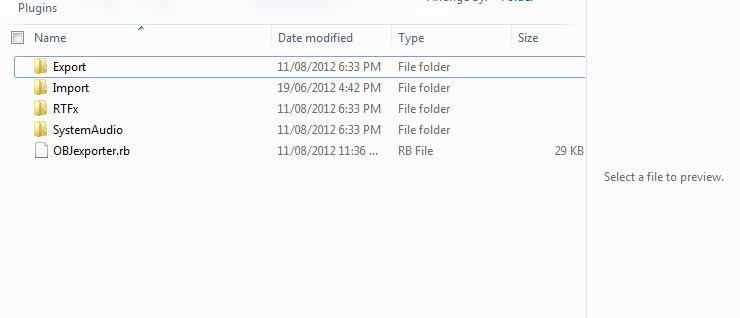
                                Download the free D'oh Book for SketchUp πŸ“–

                                1 Reply Last reply
                                Reply Quote 0
                                • L
                                  Lol Limewire
                                  last edited by

                                  @rich o brien said:

                                  Have you administration rights on your plugins folder?

                                  Can you post a screenshot of your plugins folder?

                                  Pic1.png
                                  And yes, I do have admin rights.

                                  1 Reply Last reply
                                  Reply Quote 0
                                  • Dave RD
                                    Dave R
                                    last edited by

                                    What Plugins folder is that? It isn't the one that belongs to SketchUp. You have to put the .rb file into the Plugins folder under SketchUp and not just the first folder you come across labeled Plugins.

                                    Etaoin Shrdlu

                                    %

                                    (THERE'S NO PLACE LIKE)

                                    G28 X0.0 Y0.0 Z0.0

                                    M30

                                    %

                                    1 Reply Last reply
                                    Reply Quote 0
                                    • Rich O BrienR
                                      Rich O Brien Moderator
                                      last edited by

                                      C;\Program Files (x86)\Google\Google SketchUp 8\Plugins
                                      

                                      Your plugins path should be as above

                                      Download the free D'oh Book for SketchUp πŸ“–

                                      1 Reply Last reply
                                      Reply Quote 0
                                      • L
                                        Lol Limewire
                                        last edited by

                                        @rich o brien said:

                                        C;\Program Files (x86)\Google\Google SketchUp 8\Plugins
                                        

                                        Your plugins path should be as above

                                        Thank you guys! My friend was at my house and he told me the folder in my pic was the right one πŸ˜• (I had 2 plugin folders in that location and one was hidden)

                                        1 Reply Last reply
                                        Reply Quote 0
                                        • Dave RD
                                          Dave R
                                          last edited by

                                          You shouldn't have two Plugins folders under Google SketchUp 8.

                                          Etaoin Shrdlu

                                          %

                                          (THERE'S NO PLACE LIKE)

                                          G28 X0.0 Y0.0 Z0.0

                                          M30

                                          %

                                          1 Reply Last reply
                                          Reply Quote 0
                                          • pilouP
                                            pilou
                                            last edited by

                                            There is no option inside the plugin for "weld" the commun edges between faces ?

                                            And if exist in another plugin, the fact to export with the present plugin will not "unweld" them ?


                                            Frenchy Pilou
                                            Is beautiful that please without concept!
                                            My Little site :)

                                            1 Reply Last reply
                                            Reply Quote 0

                                            Hello! It looks like you're interested in this conversation, but you don't have an account yet.

                                            Getting fed up of having to scroll through the same posts each visit? When you register for an account, you'll always come back to exactly where you were before, and choose to be notified of new replies (either via email, or push notification). You'll also be able to save bookmarks and upvote posts to show your appreciation to other community members.

                                            With your input, this post could be even better πŸ’—

                                            Register Login
                                            • 1
                                            • 2
                                            • 7
                                            • 8
                                            • 9
                                            • 10
                                            • 11
                                            • 15
                                            • 16
                                            • 9 / 16
                                            • First post
                                              Last post
                                            Buy SketchPlus
                                            Buy SUbD
                                            Buy WrapR
                                            Buy eBook
                                            Buy Modelur
                                            Buy Vertex Tools
                                            Buy SketchCuisine
                                            Buy FormFonts

                                            Advertisement