[Plugin] ImageTrimmer
-
With big png's just gives me bugsplat,can it be because of my pc(2.8ghz 1gb ram 1gb graphic card) ?
-
@ely862me said:
With big png's just gives me bugsplat, can it be because of my pc (2.8ghz 1gb ram 1gb graphic card) ?
The banana_tree at that size has ~3.5 million pixels that would need processing into viable edges !
At 1/2 the size [scaled in Gimp] it's 1/4 of the pixels and although it's still too many to be sensible it probably won't splat - but it just doesn't do miracles, it just takes time... !
You have a lot of semi-transparent bleeding edges that also up the processing time dramatically - edit those out too - they're probably the biggest processing time killer, as it might have to find all sorts of small loops from the small semi-transparent 'islands' before discarding them.
You also have a lot of other small areas of pixels that will be ignored as edges as they are too thin [<2px] BUT these still need to be examined which slows things down too - so pre-edit the image a bit to simplify it!
[but you probably need 3Gb+ RAM too!]
Here's a result at about 1/2 size - original image, then as trimmed unsimplified and simplified x2.0...banana_tree.skp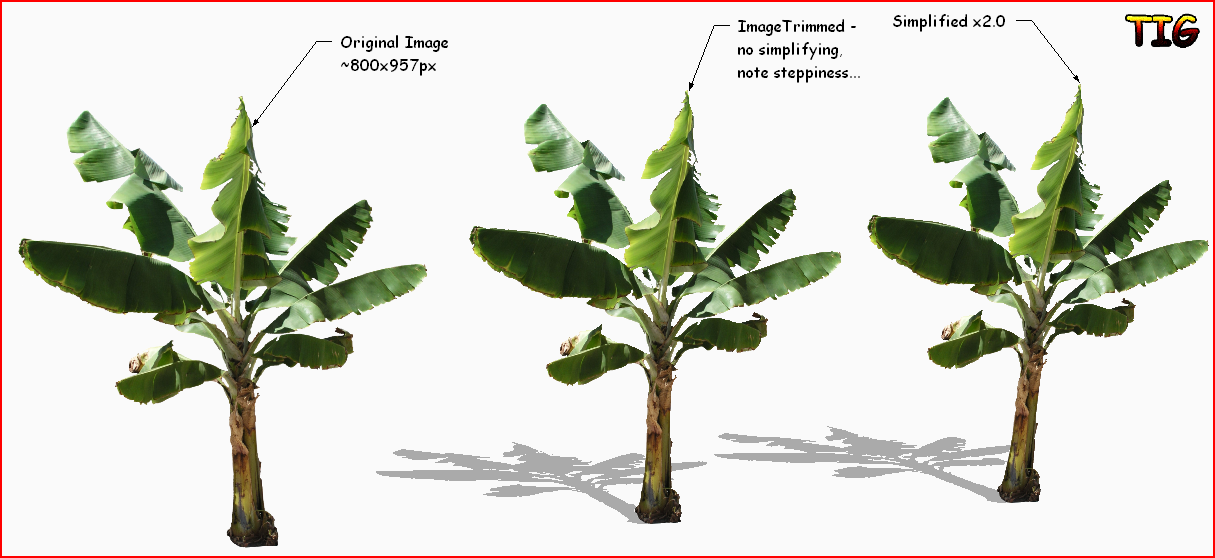
-
Thank you very much for heads up and for a nice plugin !!
-
Here's v2.2 http://forums.sketchucation.com/viewtopic.php?p=294815#p294815 - follow the links to the 'download' page in SKMtools......
The MAC jar file execution has at last been addressed
[My thanks to Dave R for helping with the MAC testing etc ]
]
On a MAC you might find you are asked if you want to run a particular jar file - if so answer 'yes' - it's a one off prompt per jar-type so it should stop after the first run.Feedback please...
-
Flawless !!!
It now runs without Interruptions. Prefect results - especially with the ImageTrimmer-Simplifier afterwards.
Thanks a lot TIG et al !
If it is not too complicated I would be interested, what the problem was running the scripts on the mac.
Thanks again -
@krath said:
Flawless !!!
It now runs without Interruptions. Prefect results - especially with the ImageTrimmer-Simplifier afterwards.
Thanks a lot TIG et al !
If it is not too complicated I would be interested, what the problem was running the scripts on the mac.
Thanks againIt was a bit obscure!
The commandUI.openURL('file:/'+path_to_jar)works fine on all PCs AND on MACs where the path doesn't start with a '/' - e.g. PC's 'C:/Program.../...'.
BUT some MAC users install their Plugins in an alternative location which starts with a '/' therefore'file:/'+path_to_jarfails as it doubles up the '/' to '//' and the file isn't then 'found'

So I added an additional test: if 'path_to_jar' starts with a '/' thenjar='file:'+path_to_jarelsejar='file:/'+path_to_jar.So in the end a simple problem was masked by lots of other issues - but at least it's fixed [at last]
[Actually Oxer HAD spotted the nature of the problem a few weeks ago, BUT "the penny hadn't dropped"... ] -
Hi TIG,
Finally the problem have been resolved, sometimes you have the solution in front to your eyes but the forest don't let you see it.
Thanks TIG for you perseverance. -
TIG,
on a MAC, the pathname always starts with a '/' because that's the root directory. Volumes follow behind that slash.
Oxer stated two alternative Pathnames on his Mac earlier in this thread, the second of which started with "Library/...".
It should really read "**/**Library/...".
Hope I don't come across as beeing pedantic; maybe it helps avoiding similar problems in the future.
-
@krath said:
TIG,
on a MAC, the pathname always starts with a '/' because that's the root directory. Volumes follow behind that slash.
Oxer stated two alternative Pathnames on his Mac earlier in this thread, the second of which started with "Library/...".
It should really read "**/**Library/...".
Hope I don't come across as being pedantic; maybe it helps avoiding similar problems in the future.OK - but it works now as the PC and MAC versions are differentiated by the inclusion or not of a trailing '/' after 'file:'
-
Yes, it does!
Thanks to your persistence in solving the problem. -
cheers Tig

finally I got it to work on 10.5.8, and just incase it saves others some time searching.
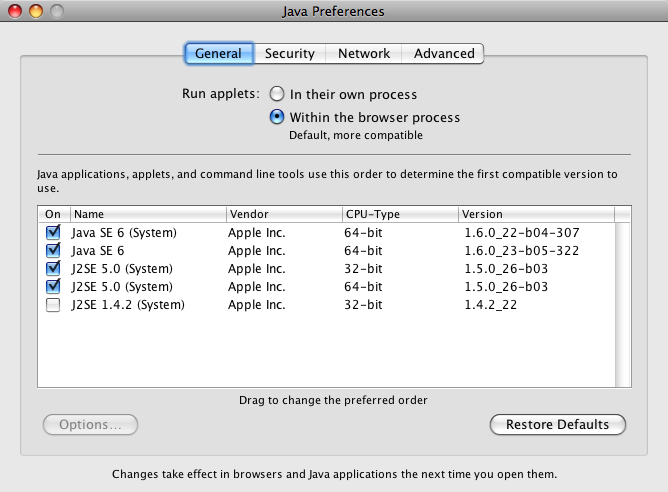
john
-
Hi TIG
I have migrated my version of skp to a new pc running windows 7 (former pc running winxp) and my image trimmer is not working at all.
The tool does appear to start to run on an imported png file (as image) but won't progress to the first prompt to stand up the component etc. It simply stops and allows you to go back to using the skp tools.
Ruby console report is below:
Error: #<Errno::ENOENT: No such file or directory - C:\Users\Apache\Documents\TrimmedImages\Untitled-1[Edges].dat>
C:/Program Files (x86)/Google/Google SketchUp 8/Plugins/SKMtools/ImageTrimmer.rb:232:inreadlines' C:/Program Files (x86)/Google/Google SketchUp 8/Plugins/SKMtools/ImageTrimmer.rb:232:inmake_edges'
C:/Program Files (x86)/Google/Google SketchUp 8/Plugins/SKMtools/ImageTrimmer.rb:185:inprocess_image' C:/Program Files (x86)/Google/Google SketchUp 8/Plugins/SKMtools/ImageTrimmer.rb:162:ininitialize'
C:/Program Files (x86)/Google/Google SketchUp 8/Plugins/SKMtools/ImageTrimmer.rb:759:in `new'
C:/Program Files (x86)/Google/Google SketchUp 8/Plugins/SKMtools/ImageTrimmer.rb:759This is a strange error about not being able to find a file...
This runs just fine on my laptop with xp using the same file so i'm guessing that this is operating system based?
Also when migrating the plugins, i did a simple copy and paste into the skp directory on the new machine... don'tknow if any files should be elsewhere given that you use a bit of java on this one.Any help will be much appreciated....
ThanksDave
-
David
This indicates that on your new PC either there is not a suitable version of Java installed, or it's not properly enabled, or if it is it does not have its options set correctly to allow 'jar' files to execute. There are several posts about what Java settings to have to allow all of this family of tools working - they all use 'jar' - Java executable applets - that you setting must allow to run in 'Java options'...
Also please check access-rights to the Plugins folder and the SKMtools subfolder and its contents, which must allow read/write/execute etc for everything and everyone... This could cause problems to as some temporary files are written here.
Please come back either with your fix or continuing problems...
-
TIG
Forgive me but i am no expert in these matters.
I have checked and got the latest java and it is enabled so far as I can see.
As far as permissions are concerned, I have little experience in setting specific tags for particular apps but as i mentioned before, the other installed plugin in winxp worked straight out the 'box' and required no additional changes so i'm not sure where to even start switching things in the new windows 7 OS....Is there anyone out there who has got this working on win7 pro 64bit and skp 8? Did you have to do anything fancy to get it to work?
Maybe they can help point me in the right direction.Java is currently installed in the x86 directory so as far as i know this is the 32bit version... might it help to get the 64bit version?
Dave
-
Dave, one of the big changes between XP and 7 is that in 7, you'll have to set permissions to make changes to folders. At least the ones that are in the Program folder. As TIG mentioned, make sure you have permissions set to allow changes to the folders he indicated. I did a little thing here about installing zipped plugins and have a paragraph about setting those permissions. Maybe it will help.
-
@davidlouis said:
TIG
Forgive me but i am no expert in these matters.
I have checked and got the latest java and it is enabled so far as I can see.
As far as permissions are concerned, I have little experience in setting specific tags for particular apps but as i mentioned before, the other installed plugin in winxp worked straight out the 'box' and required no additional changes so i'm not sure where to even start switching things in the new windows 7 OS....Is there anyone out there who has got this working on win7 pro 64bit and skp 8? Did you have to do anything fancy to get it to work?
Maybe they can help point me in the right direction.Java is currently installed in the x86 directory so as far as i know this is the 32bit version... might it help to get the 64bit version?
Dave
I had problems running the plugin in Windows 7 and SU 8 Pro, although all permissions were set right for my user account and Java was updated. I solved the problem running SU from the master administrator account and I still switch user accounts in order to use the plugin. Probably that is not the best thing to do but it works.
-
It is recommended that you as a 'user' have 'administrator rights'.
If you do not / cannot, then at least have the rights to the SKMtools folder and it's contents' permissions set so 'users' can read/write/execute files from that folder...
A automatic Windows [Vista & 7] 'Program Files' set up is often too draconian in limiting your permissions for any program folders/files in it... -
unclebim
You are indeed correct. This works fine from the master administrator account but for some reason, not from my account in which I am in fact specified as an administrator... ?
I am also listed as having full control of the SKMtools folder.For some reason the 'full' rights are not being given to me.
There are a number of write ups about this on the net... I have followed a few tips on gain full ownership of the OS but no success as yet...If anyone has any bright ideas on how to solve this please step up.... I am not sure that I would be able to live with having to switch users to have to use a plugin...
Dave
-
David
Have you tried running 'Sketchup as Administrator' [right-click icon menu item] ?
Does that change anything ?
If so change the Sketchup exe [shortcut icon on your desktop will do] to 'run as administrator' permanently.
Then after running it, change it back to be 'ordinary' - this may well kick things into allowing you to run it as expected.
Have you also looked down the Java options for your account?
I have a similar setup to you, without any problems.
Here are my setting that work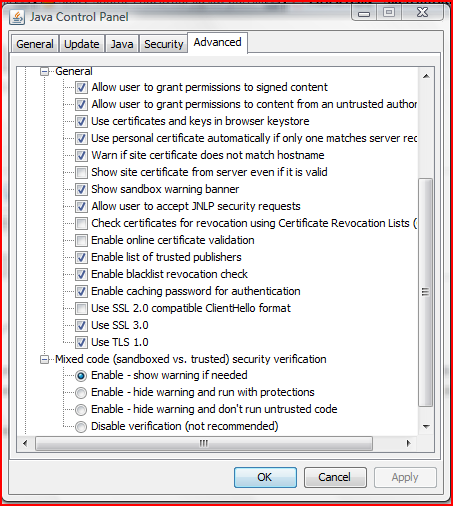
-
TIG...
That's it... working just fine now... !
Incidently, my java settings were the same as yours so i don't think that is to blame. And...before I read your post, as a further test to using the main admin account, I created a new user (with administrator rights)and logged in and everything worked just fine.
So i'm guessing that somewhere in my normal account some access rights are messed up preventing the writing of temp files and it would just be a matter of finding out where to switch things... but i haven't got the time or patience for that.If i follow your advice about setting the shortcut to run as an admistrator, things trim just fine...
I had to reactivate my 1001bit tools but that was easy... so i think i'm just going to leave it running as such for now and one day if i ever to an OS reinstall I'll correct the problem properly.unclebim, you may have success using the same 'patch'... at least it will be an end to your switching users...
Thanks again... have a good weekend
Dave







Advertisement