sketchucation logo sketchucation
    • Login
    Oops, your profile's looking a bit empty! To help us tailor your experience, please fill in key details like your SketchUp version, skill level, operating system, and more. Update and save your info on your profile page today!
    Mac User? | Join the Rayscaper Beta for Mac Learn More

    [Plugin] Save Copy As Previous Version

    Scheduled Pinned Locked Moved Plugins
    60 Posts 22 Posters 72.1k Views 22 Watching
    Loading More Posts
    • Oldest to Newest
    • Newest to Oldest
    • Most Votes
    Reply
    • Reply as topic
    Log in to reply
    This topic has been deleted. Only users with topic management privileges can see it.
    • J
      Jim
      last edited by

      @unknownuser said:

      s there anyway to add the date, or a version #,

      Yes, I will make the format customizable.

      Hi

      1 Reply Last reply
      Reply Quote 0
      • S
        sstuchfield
        last edited by

        Hi Jim,

        Do you have an estimate of when you will be able to repost it?

        Cheers,
        Sandy

        1 Reply Last reply
        Reply Quote 0
        • J
          Jim
          last edited by

          Thanks for the reminder. With SU being a hobby for me and not something i do for a living, I tend to spend time on things that interest me at the moment. I will get this plugin updated this weekend.

          Hi

          1 Reply Last reply
          Reply Quote 0
          • S
            sstuchfield
            last edited by

            Awesome, Thanks

            1 Reply Last reply
            Reply Quote 0
            • J
              Jim
              last edited by

              Updated, see first post.

              Hi

              1 Reply Last reply
              Reply Quote 0
              • S
                stagelight
                last edited by

                Great plugin !! Thank you.

                1 Reply Last reply
                Reply Quote 0
                • D
                  dirtypr
                  last edited by

                  This is wonderful!! thanks!

                  1 Reply Last reply
                  Reply Quote 0
                  • R
                    rv1974
                    last edited by

                    Would it be possible to make the 'silent' version of this script:

                    1. no confirmation windows
                    2. no additions to the file name
                    3. background autosave as prev. version
                      ?
                      This script would help to solve the problem of crashing windows explorer (v.2015) and open skp files in other applications (Xnview renders skp thumbnails (up to v.2013) and 3ds Max\Lumion open only older skp versions).

                    Thanks.

                    1 Reply Last reply
                    Reply Quote 0
                    • S
                      stagelight
                      last edited by

                      Maybe this is new for 2015? But this code, will save as version 7, no confirmation needed. Just run in the ruby console...
                      model = Sketchup.active_model
                      status = model.save("", Sketchup::Model::VERSION_7)

                      1 Reply Last reply
                      Reply Quote 0
                      • thomthomT
                        thomthom
                        last edited by

                        @stagelight said:

                        Maybe this is new for 2015? But this code, will save as version 7, no confirmation needed. Just run in the ruby console...
                        model = Sketchup.active_model
                        status = model.save("", Sketchup::Model::VERSION_7)

                        That's new to SU2014.
                        http://www.sketchup.com/intl/en/developer/docs/ourdoc/model#save
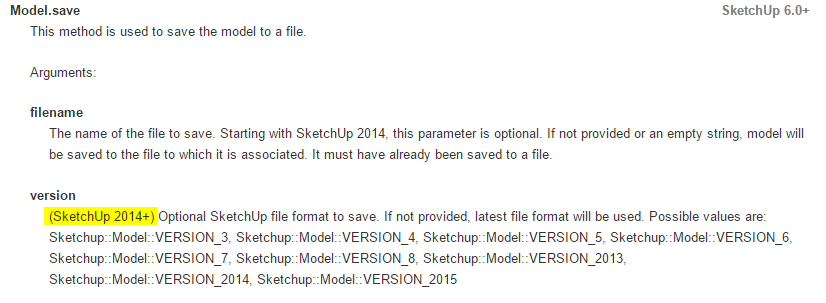
                        Version.png

                        Thomas Thomassen β€” SketchUp Monkey & Coding addict
                        List of my plugins and link to the CookieWare fund

                        1 Reply Last reply
                        Reply Quote 0
                        • J
                          Jim
                          last edited by

                          @stagelight said:

                          Maybe this is new for 2015? But this code, will save as version 7, no confirmation needed. Just run in the ruby console...
                          model = Sketchup.active_model
                          status = model.save("", Sketchup::Model::VERSION_7)

                          Oh that's interesting. It only works if the model has already been saved. I may have made things more difficult than they are.

                          So what you want is to be able to choose a version to use as the default one time, then just use a shortcut or menu item to save the model?

                          Hi

                          1 Reply Last reply
                          Reply Quote 0
                          • D
                            driven
                            last edited by

                            @jim said:

                            Oh that's interesting. It only works if the model has already been saved.

                            model = Sketchup.active_model
                            status = model.save((File.expand_path("~/Desktop/test_v7")), Sketchup;;Model;;VERSION_7)
                            

                            if you give it a valid path it works with unsaved models...

                            In my mac version I grab the incoming path from the header and spit that back out on save...

                            but to do so automatically as per the request, needs an Observer, and I loathe all of them...

                            john

                            learn from the mistakes of others, you may not live long enough to make them all yourself...

                            1 Reply Last reply
                            Reply Quote 0
                            • U
                              unsuns
                              last edited by

                              Hello Everyone !

                              Today, I finally decided to start using Sketchup 2016 instead of Sketchup 8, and I discovered this WONDERFUL plugin.

                              However, it's not working with SU 2016.

                              Thank you for updating it, we'll be really grateful !

                              Cheers !

                              1 Reply Last reply
                              Reply Quote 0
                              • J
                                Jim
                                last edited by

                                I'll take a look.

                                Hi

                                1 Reply Last reply
                                Reply Quote 0
                                • J
                                  Jim
                                  last edited by

                                  @unsuns said:

                                  Hello Everyone !

                                  However, it's not working with SU 2016.

                                  It is working for me - what is not working for you?

                                  Hi

                                  1 Reply Last reply
                                  Reply Quote 0
                                  • U
                                    unsuns
                                    last edited by

                                    @jim said:

                                    @unsuns said:

                                    Hello Everyone !

                                    However, it's not working with SU 2016.

                                    It is working for me - what is not working for you?

                                    When I use it, the plugin changes the file's version number back to 8.0.1 and I can open it correctly in Sketchup 8.

                                    However, I use Lumion, and he cannot read the file until I save it manually as version 8.

                                    Moreover, when I use the plugin, it seems to change only the version number, and not re-saving the file completely, which takes much more time when I test that manually on heavy files.

                                    1 Reply Last reply
                                    Reply Quote 0
                                    • U
                                      unsuns
                                      last edited by

                                      Did you check the issue and found a solution for that problem ?

                                      1 Reply Last reply
                                      Reply Quote 0
                                      • D
                                        driven
                                        last edited by

                                        I suspect your Lumion plugin needs you to re-save so it can 'tag' all your materials.
                                        if the plugin isn't in v16 it would not have done that for you...

                                        does Lumion have a v16 version?

                                        john

                                        learn from the mistakes of others, you may not live long enough to make them all yourself...

                                        1 Reply Last reply
                                        Reply Quote 0
                                        • U
                                          unsuns
                                          last edited by

                                          @driven said:

                                          I suspect your Lumion plugin needs you to re-save so it can 'tag' all your materials.
                                          if the plugin isn't in v16 it would not have done that for you...

                                          does Lumion have a v16 version?

                                          john

                                          The latest Lumion version is 6.0, and shows the same issue. The SKP file must be saved as v8.
                                          When I save it from Sketchup 2016 manually, it works perfectly.
                                          However, I thought that this plugin would make me save some time, using a simple shortcut.

                                          I'd be really glad if this finally works ! πŸ˜„

                                          Edit : Lumion reads the sketchup file directly.

                                          1 Reply Last reply
                                          Reply Quote 0
                                          • U
                                            unsuns
                                            last edited by

                                            I did a few more tests and I figured out what the problem is :

                                            I used to try to overwrite the active file from v2016 to save it as v8 through the plugin-> Same name (Format : %model).

                                            However, when I added some other character (Format: %model_V8), meaning that it saves as another file, this works perfectly, and Lumion reads the file flawlessly.

                                            So, the real issue is : Can we FORCE the plugin to overwrite the current and active SKP v16 file in order to make it v8 ?

                                            Thank you.

                                            EDIT : Indeed, I just had to change the "Sketchup.active_model.save_copy" to "Sketchup.active_model.save". Now it works PERFECTLY !
                                            PROBLEM SOLVED ! THANKSSS ! πŸ˜„

                                            1 Reply Last reply
                                            Reply Quote 0

                                            Hello! It looks like you're interested in this conversation, but you don't have an account yet.

                                            Getting fed up of having to scroll through the same posts each visit? When you register for an account, you'll always come back to exactly where you were before, and choose to be notified of new replies (either via email, or push notification). You'll also be able to save bookmarks and upvote posts to show your appreciation to other community members.

                                            With your input, this post could be even better πŸ’—

                                            Register Login
                                            • 1
                                            • 2
                                            • 3
                                            • 3 / 3
                                            • First post
                                              Last post
                                            Buy SketchPlus
                                            Buy SUbD
                                            Buy WrapR
                                            Buy eBook
                                            Buy Modelur
                                            Buy Vertex Tools
                                            Buy SketchCuisine
                                            Buy FormFonts

                                            Advertisement