sketchucation logo sketchucation
    • Login
    Oops, your profile's looking a bit empty! To help us tailor your experience, please fill in key details like your SketchUp version, skill level, operating system, and more. Update and save your info on your profile page today!
    ⚠️ Update | Sketchucation Tools 5.0.8 released with licensing improvements and bugfixes Download

    How to Get Rid of Leaks in Floorplans

    Scheduled Pinned Locked Moved SketchUp Discussions
    sketchup
    14 Posts 4 Posters 1.1k Views 4 Watching
    Loading More Posts
    • Oldest to Newest
    • Newest to Oldest
    • Most Votes
    Reply
    • Reply as topic
    Log in to reply
    This topic has been deleted. Only users with topic management privileges can see it.
    • C
      cmartin
      last edited by

      here's a screenshot.

      The floorplan on the left cannot be selected. It selects the floorplan and the outside area.
      The rectangle on the left is normal, it can be selected.

      Its like there is a hole in the floorplan, even though, i just created it and there is not.
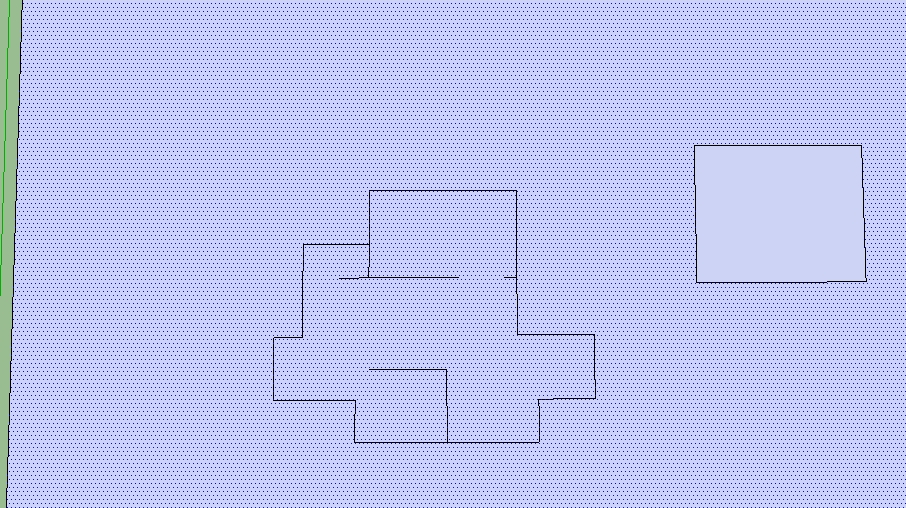

      sketchup.JPG

      1 Reply Last reply
      Reply Quote 0
      • thomthomT
        thomthom
        last edited by

        Try selecting the face and the edges, Right-Click and Intersect with Selection

        Thomas Thomassen — SketchUp Monkey & Coding addict
        List of my plugins and link to the CookieWare fund

        1 Reply Last reply
        Reply Quote 0
        • C
          cmartin
          last edited by

          I selected all the lines in the floorplan and selected the face (which included the outside area...because it will not allow me to select just the floorplan face)
          and I right clicked and selected "Intersect Faces | With Selection"....

          it did not seem to do anything. When I select the floorplan face, it still selects the outside area as well.

          Are these leaks common?

          1 Reply Last reply
          Reply Quote 0
          • thomthomT
            thomthom
            last edited by

            Can you post that sample model?

            Thomas Thomassen — SketchUp Monkey & Coding addict
            List of my plugins and link to the CookieWare fund

            1 Reply Last reply
            Reply Quote 0
            • C
              cmartin
              last edited by

              @thomthom said:

              Can you post that sample model?

              I've attached it.


              floorplan.skp

              1 Reply Last reply
              Reply Quote 0
              • thomthomT
                thomthom
                last edited by

                It seems that the non-border edges of your shape prevents SU from splitting that large square. Cut the internal edges, then Intersect, and then Paste In Place to restore the internal edges.

                Thomas Thomassen — SketchUp Monkey & Coding addict
                List of my plugins and link to the CookieWare fund

                1 Reply Last reply
                Reply Quote 0
                • jeff hammondJ
                  jeff hammond
                  last edited by

                  The lines to nowhere inside the perimeter are causing it. If they were walls instead of just line then it will seal. Otherwise, make temporary rectangles using those lines then erase later.

                  (edit- I like thom's method 👍

                  dotdotdot

                  1 Reply Last reply
                  Reply Quote 0
                  • C
                    cmartin
                    last edited by

                    @thomthom said:

                    It seems that the non-border edges of your shape prevents SU from splitting that large square. Cut the internal edges, then Intersect, and then Paste In Place to restore the internal edges.

                    Wow....it worked...thank you guys.

                    Is there anything I can do to prevent this from happening again? Perhaps build the outside perimeter first and make sure it is sealed, then start on the walls inside?

                    Also, when I cut the lines and then try to paste them, it is almost impossible to line then up exactly where they were before. I can only imagine if this happened on a more complex floorplan it would be that much harder. is there any easy way to paste them to exactly where they were before? lining them up seems very difficult.

                    1 Reply Last reply
                    Reply Quote 0
                    • thomthomT
                      thomthom
                      last edited by

                      @cmartin said:

                      Is there anything I can do to prevent this from happening again? Perhaps build the outside perimeter first and make sure it is sealed, then start on the walls inside?

                      Yes.

                      @cmartin said:

                      Also, when I cut the lines and then try to paste them, it is almost impossible to line then up exactly where they were before. I can only imagine if this happened on a more complex floorplan it would be that much harder. is there any easy way to paste them to exactly where they were before?

                      Yes, use "Paste In Place" as oppose to just "Paste".

                      Thomas Thomassen — SketchUp Monkey & Coding addict
                      List of my plugins and link to the CookieWare fund

                      1 Reply Last reply
                      Reply Quote 0
                      • C
                        cmartin
                        last edited by

                        @unknownuser said:

                        Yes, use "Paste In Place" as oppose to just "Paste".

                        oh my goodness that was easy....

                        thank you so much!

                        1 Reply Last reply
                        Reply Quote 0
                        • thomthomT
                          thomthom
                          last edited by

                          😉 👍

                          Thomas Thomassen — SketchUp Monkey & Coding addict
                          List of my plugins and link to the CookieWare fund

                          1 Reply Last reply
                          Reply Quote 0
                          • D
                            d12dozr
                            last edited by

                            Good to know, I often have struggled with this

                            3D Printing with SketchUp Book
                            http://goo.gl/f7ooYh

                            1 Reply Last reply
                            Reply Quote 0

                            Hello! It looks like you're interested in this conversation, but you don't have an account yet.

                            Getting fed up of having to scroll through the same posts each visit? When you register for an account, you'll always come back to exactly where you were before, and choose to be notified of new replies (either via email, or push notification). You'll also be able to save bookmarks and upvote posts to show your appreciation to other community members.

                            With your input, this post could be even better 💗

                            Register Login
                            • 1 / 1
                            • First post
                              Last post
                            Buy SketchPlus
                            Buy SUbD
                            Buy WrapR
                            Buy eBook
                            Buy Modelur
                            Buy Vertex Tools
                            Buy SketchCuisine
                            Buy FormFonts

                            Advertisement
