How to Get Rid of Leaks in Floorplans
-
I have students who create floorplans in google sketchup, nothing super accurate, just a basic layout, and there are many instances where the entire floorplan looks fine, I don't see any holes in the floor plan, but when you try and select the floorplan, it leaks out into the large rectangle they are building the floorplan on.
As far as I can tell, the entire shape of the floorplan is connected, there are no holes.
Why does this happen? -
Got a screenshot?
I wonder if what you are seeing is overlapping faces, faces the occupy the same space and cause Z-fighting flickering.
-
here's a screenshot.
The floorplan on the left cannot be selected. It selects the floorplan and the outside area.
The rectangle on the left is normal, it can be selected.Its like there is a hole in the floorplan, even though, i just created it and there is not.
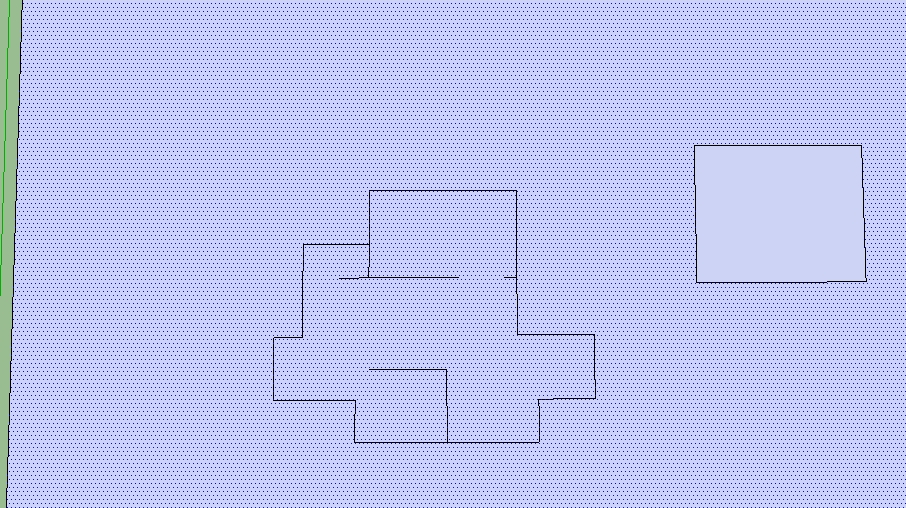
-
Try selecting the face and the edges, Right-Click and Intersect with Selection
-
I selected all the lines in the floorplan and selected the face (which included the outside area...because it will not allow me to select just the floorplan face)
and I right clicked and selected "Intersect Faces | With Selection"....it did not seem to do anything. When I select the floorplan face, it still selects the outside area as well.
Are these leaks common?
-
Can you post that sample model?
-
-
It seems that the non-border edges of your shape prevents SU from splitting that large square. Cut the internal edges, then Intersect, and then Paste In Place to restore the internal edges.
-
The lines to nowhere inside the perimeter are causing it. If they were walls instead of just line then it will seal. Otherwise, make temporary rectangles using those lines then erase later.
(edit- I like thom's method

-
@thomthom said:
It seems that the non-border edges of your shape prevents SU from splitting that large square. Cut the internal edges, then Intersect, and then Paste In Place to restore the internal edges.
Wow....it worked...thank you guys.
Is there anything I can do to prevent this from happening again? Perhaps build the outside perimeter first and make sure it is sealed, then start on the walls inside?
Also, when I cut the lines and then try to paste them, it is almost impossible to line then up exactly where they were before. I can only imagine if this happened on a more complex floorplan it would be that much harder. is there any easy way to paste them to exactly where they were before? lining them up seems very difficult.
-
@cmartin said:
Is there anything I can do to prevent this from happening again? Perhaps build the outside perimeter first and make sure it is sealed, then start on the walls inside?
Yes.
@cmartin said:
Also, when I cut the lines and then try to paste them, it is almost impossible to line then up exactly where they were before. I can only imagine if this happened on a more complex floorplan it would be that much harder. is there any easy way to paste them to exactly where they were before?
Yes, use "Paste In Place" as oppose to just "Paste".
-
@unknownuser said:
Yes, use "Paste In Place" as oppose to just "Paste".
oh my goodness that was easy....
thank you so much!
-

-
Good to know, I often have struggled with this


Hello! It looks like you're interested in this conversation, but you don't have an account yet.
Getting fed up of having to scroll through the same posts each visit? When you register for an account, you'll always come back to exactly where you were before, and choose to be notified of new replies (either via email, or push notification). You'll also be able to save bookmarks and upvote posts to show your appreciation to other community members.
With your input, this post could be even better 💗
Register Login


Advertisement