sketchucation logo sketchucation
    • Login
    Oops, your profile's looking a bit empty! To help us tailor your experience, please fill in key details like your SketchUp version, skill level, operating system, and more. Update and save your info on your profile page today!
    Mac User? | Join the Rayscaper Beta for Mac Learn More

    [Plugin] Caleidos4D Ribbon Pubblic Beta 1.1 (29 oct 2010)

    Scheduled Pinned Locked Moved Plugins
    50 Posts 21 Posters 40.8k Views 21 Watching
    Loading More Posts
    • Oldest to Newest
    • Newest to Oldest
    • Most Votes
    Reply
    • Reply as topic
    Log in to reply
    This topic has been deleted. Only users with topic management privileges can see it.
    • C
      caleidos4d
      last edited by

      @krisidious said:

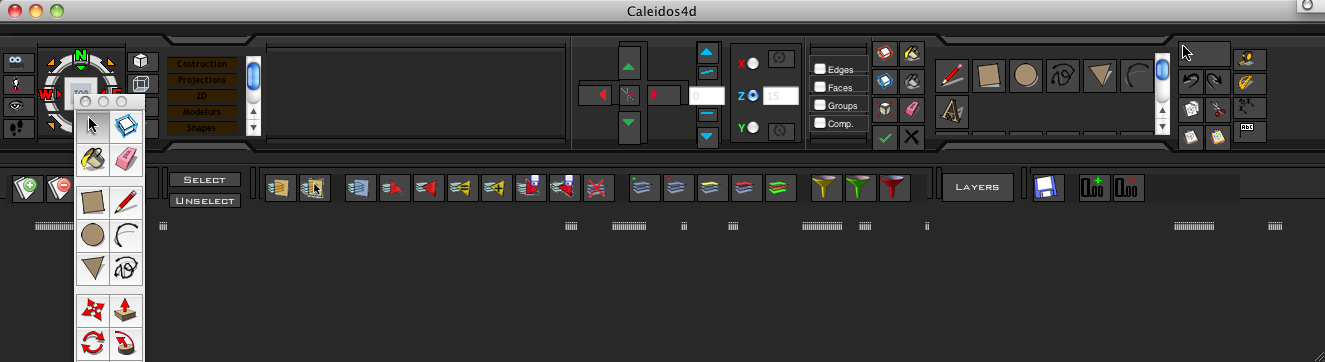
      the hover tips are in Italian? French?

      is there a way to change the resolution size of the ribbon? mine doesn't fit inside of 1024?

      is there a way to make your own ribbon preset?

      Italian πŸ˜„ in the next release, all tooltips in English πŸ˜„

      http://www.caleidos4d.it

      1 Reply Last reply
      Reply Quote 0
      • D
        dizain
        last edited by

        Ciao Caleidos4D,
        Ti ringrazio per il tuo lavoro,
        ho istallato il plugin ma non riesco a farlo funzionare come dovrebbe.
        Puoi aiutarmi?
        Allego immagine della schermata dove non si vede l'area del disegno.
        Ciao e di nuovo grazie.
        David

        Hello Caleidos4D,
        Thank you for your work,
        I installed the plugin but I can not get it working as it should.
        Can you help?
        I attach a screen shot where you see the drawing area.
        Hello and thanks again.
        David
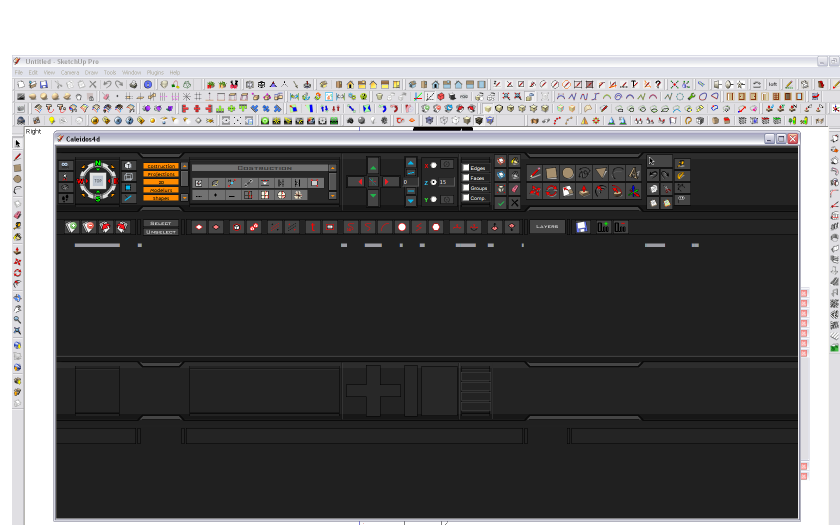

        Ribbon.png

        1 Reply Last reply
        Reply Quote 0
        • thomthomT
          thomthom
          last edited by

          Did you resize the window?

          Thomas Thomassen β€” SketchUp Monkey & Coding addict
          List of my plugins and link to the CookieWare fund

          1 Reply Last reply
          Reply Quote 0
          • C
            caleidos4d
            last edited by

            @dizain said:

            Ciao Caleidos4D,
            Ti ringrazio per il tuo lavoro,
            ho istallato il plugin ma non riesco a farlo funzionare come dovrebbe.
            Puoi aiutarmi?
            Allego immagine della schermata dove non si vede l'area del disegno.
            Ciao e di nuovo grazie.
            David

            Hello Caleidos4D,
            Thank you for your work,
            I installed the plugin but I can not get it working as it should.
            Can you help?
            I attach a screen shot where you see the drawing area.
            Hello and thanks again.
            David

            Hi πŸ˜„
            you have to resize the ribbon and the SketchUp window, to match your monitor πŸ˜‰
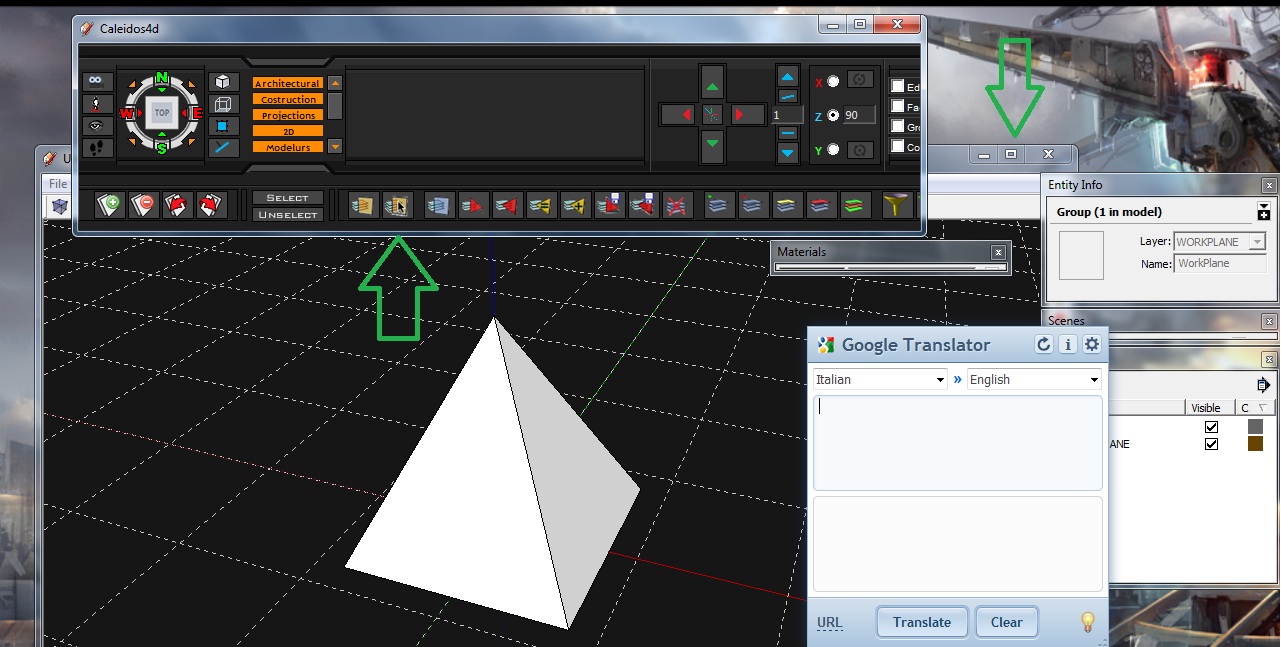
            Immagine.jpg

            http://www.caleidos4d.it

            1 Reply Last reply
            Reply Quote 0
            • C
              caleidos4d
              last edited by

              Work in progress:
              in next release I will fix it the size of monitors in 1024 and the iframe, They will also be floating πŸ˜‰
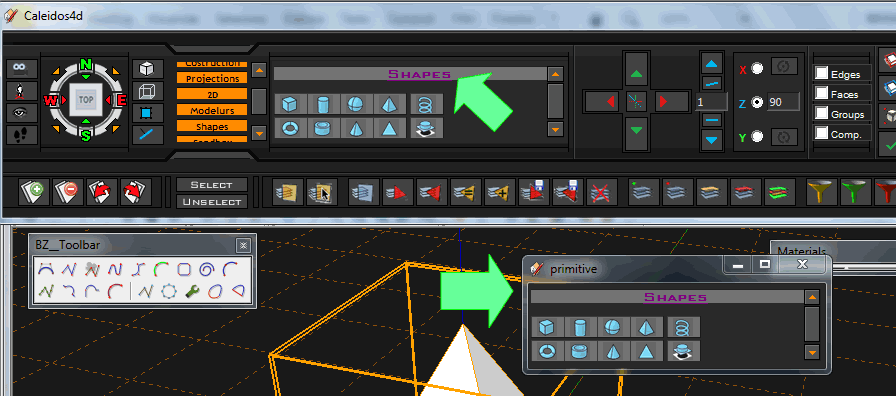
              Senza nome-1.gif

              http://www.caleidos4d.it

              1 Reply Last reply
              Reply Quote 0
              • charly2008C
                charly2008
                last edited by

                Hi,

                I wanted to try out as a precaution in Sketchup 8. But can not find this plugin. Am I doing something wrong?

                Charly

                He who makes no mistakes, makes nothing

                1 Reply Last reply
                Reply Quote 0
                • charly2008C
                  charly2008
                  last edited by

                  Hi,

                  Solved, found it in the plugin menu. It is very interesting extension. Many thanks to Caleidos4D.

                  Charly

                  He who makes no mistakes, makes nothing

                  1 Reply Last reply
                  Reply Quote 0
                  • C
                    caleidos4d
                    last edited by

                    @charly2008 said:

                    Hi,

                    Solved, found it in the plugin menu. It is very interesting extension. Many thanks to Caleidos4D.

                    Charly
                    πŸ‘ πŸ˜„

                    http://www.caleidos4d.it

                    1 Reply Last reply
                    Reply Quote 0
                    • T
                      tfdesign
                      last edited by

                      @solo said:

                      @unknownuser said:

                      One reason I'll never switch to Windows is

                      .... You like shiny things? πŸ’š

                      Like this?

                      http://www.cytechstore.com/images/THERMALTAKE Soprano VB1000SWS.jpg

                      πŸ˜›

                      Is that a handle on the front, to remove the beer? 😲

                      My book "Let's SketchUp!" Download from here

                      1 Reply Last reply
                      Reply Quote 0
                      • T
                        tfdesign
                        last edited by

                        But hey, so far, so good! 😎


                        eureka.png

                        My book "Let's SketchUp!" Download from here

                        1 Reply Last reply
                        Reply Quote 0
                        • BurkhardB
                          Burkhard
                          last edited by

                          Just a question. The whole thing does not make really sense when there is no way to stop starting the toolbars while starting Sketchup.
                          When I disabled the tools in the preferences, the toolbars in the ribbon does'nt work. If they are enabled the toolbars floating my window again ( on Mac ) so I have to enable all Toolbars manually.
                          Is there a way to force the Toolbars to disappear/quit at once?

                          http://www.ia-plus.de

                          1 Reply Last reply
                          Reply Quote 0
                          • majidM
                            majid
                            last edited by

                            thanx for your job, but still nothing is happenig at my side!!! plz help
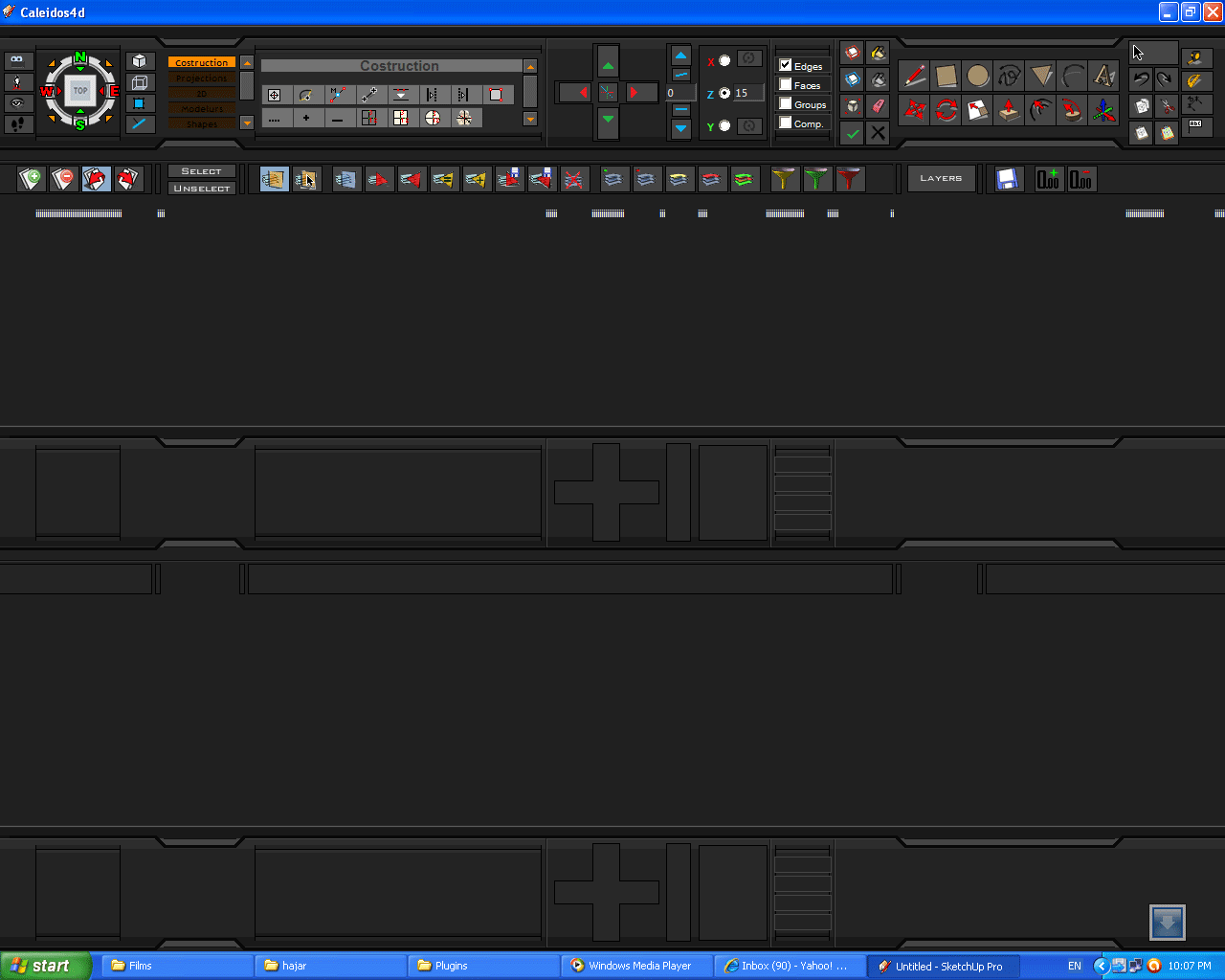

                            full screen view

                            My inspiring A, B, Sketches book: https://sketchucation.com/shop/books/intermediate/2612-alphabet-inspired-sketches--inspiring-drills-for-architects--3d-artists-and-designers-

                            1 Reply Last reply
                            Reply Quote 0
                            • KrisidiousK
                              Krisidious
                              last edited by

                              what seems to be the issue Majid?

                              By: Kristoff Rand
                              Home DesignerUnique House Plans

                              1 Reply Last reply
                              Reply Quote 0
                              • thomthomT
                                thomthom
                                last edited by

                                Majid: it looks as though you have maximized the toolbar window - just resize to back to a fitting size.

                                Thomas Thomassen β€” SketchUp Monkey & Coding addict
                                List of my plugins and link to the CookieWare fund

                                1 Reply Last reply
                                Reply Quote 0
                                • majidM
                                  majid
                                  last edited by

                                  almost nothing is working for me:)... cant create shapes...etc..etc..and nothing is displayed... this is the issue πŸ˜„

                                  My inspiring A, B, Sketches book: https://sketchucation.com/shop/books/intermediate/2612-alphabet-inspired-sketches--inspiring-drills-for-architects--3d-artists-and-designers-

                                  1 Reply Last reply
                                  Reply Quote 0
                                  • KrisidiousK
                                    Krisidious
                                    last edited by

                                    Majid,

                                    the plugins only work if you have that particular plugin already installed. these are shortcuts to other author's plugins. so if one is not working, you should check to see that you have that plugin. there is a rtf file or readme within the zip that lists the plugins that are used by the bar.

                                    let's see which one's you have that are not working?

                                    By: Kristoff Rand
                                    Home DesignerUnique House Plans

                                    1 Reply Last reply
                                    Reply Quote 0
                                    • KrisidiousK
                                      Krisidious
                                      last edited by

                                      hmmm... so you have the plugins installed that you're trying to use in the ribbon and it's not working?

                                      do you have organizer.rb running?

                                      have you checked to see that you have the

                                      /caleidos4d
                                      Caleidos4D_Ribbon.rb

                                      in the plugins folder?

                                      By: Kristoff Rand
                                      Home DesignerUnique House Plans

                                      1 Reply Last reply
                                      Reply Quote 0
                                      • I
                                        iwanwidjaja
                                        last edited by

                                        Hi Caleidos4D,

                                        Its a great plug in, thanks for share it

                                        Just a little curiosity, will it possible to make some option to choose between portrait and landscape configuration of the ribbon? As many of us use wide screen monitor, the modeling space begin to shrink in a very wide proportion when the ribbon is active πŸ˜†

                                        Regards'
                                        Iwan

                                        1 Reply Last reply
                                        Reply Quote 0
                                        • majidM
                                          majid
                                          last edited by

                                          thanxs mates for your kind helps πŸ˜„ .the question is that it doesn't display anything ( I mean that I have installed the plugs..etc... and also created a simple qube) ... I can't see anything...any red-green-blue axes ...etc...

                                          My inspiring A, B, Sketches book: https://sketchucation.com/shop/books/intermediate/2612-alphabet-inspired-sketches--inspiring-drills-for-architects--3d-artists-and-designers-

                                          1 Reply Last reply
                                          Reply Quote 0
                                          • EarthMoverE
                                            EarthMover
                                            last edited by

                                            Majid, I believe you Caleidos4D Ribbon is covering your Sketchup window. You have to minimize it and then resize both the Sketchup window and the Ribbon to fit on the screen together. You can put the Ribbon above the Sketchup window or below, or on a second monitor, but the ribbon does not dock within Sketchup. It is a floating web dialog that overlaps Sketchup, so some resizing is necessary for it to all fit in your monitor.


                                            3D Artist at Clearstory 3D Imaging
                                            Guide Tool at Winning With Sketchup
                                            Content Creator at Skapeup

                                            1 Reply Last reply
                                            Reply Quote 0

                                            Hello! It looks like you're interested in this conversation, but you don't have an account yet.

                                            Getting fed up of having to scroll through the same posts each visit? When you register for an account, you'll always come back to exactly where you were before, and choose to be notified of new replies (either via email, or push notification). You'll also be able to save bookmarks and upvote posts to show your appreciation to other community members.

                                            With your input, this post could be even better πŸ’—

                                            Register Login
                                            • 1
                                            • 2
                                            • 3
                                            • 2 / 3
                                            • First post
                                              Last post
                                            Buy SketchPlus
                                            Buy SUbD
                                            Buy WrapR
                                            Buy eBook
                                            Buy Modelur
                                            Buy Vertex Tools
                                            Buy SketchCuisine
                                            Buy FormFonts

                                            Advertisement