[REQ] urgent maple
-
I read that and installed it accordingly, however it goes on to say you can select that in the plugin menu...where is that in CS5? I do not have anything there called plugins, I have filters and effects but no plugins.
-
Filter > Richard Rosenman > tiler
-
Pete the noobie (
 ) I have Ps CS5 64-bit now, so that plugin doesn't work. I've installed it in XN-view: just put it in a folder called "8bf" and find it under "filters"-->"adobe photoshop plugin". If you have PS 32 bit I assume you can put that in the plugin-->filter folder and find it under "filter" menu.
 -
So where is the plugin menu?
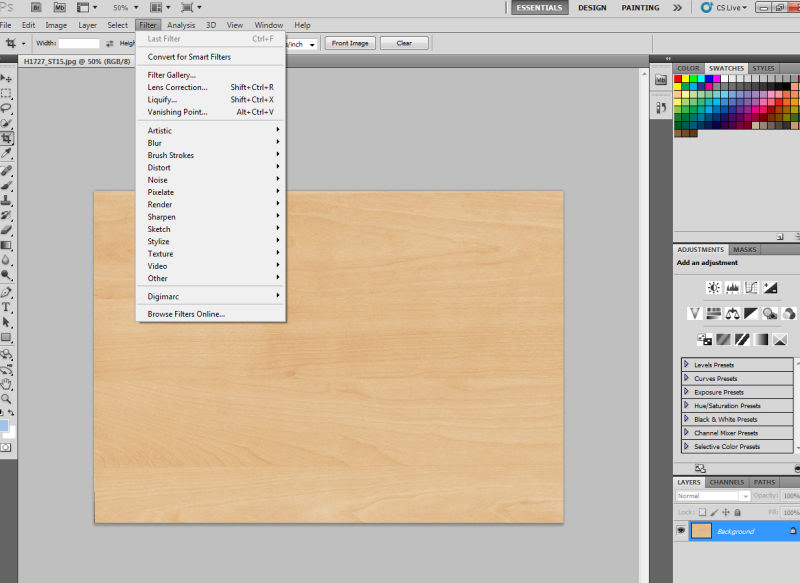
-
AHA!! so I'm not going mad.
-
As I said I don't have it in PS, sorry, but could you try under "filter-->other" maybe?
-
Just fyi, those filters work just fine in Irfanview.
-
Pete, install it here:
C:\Program Files\Adobe\Photoshop 7.0\Plug-Ins\Filters
You should see it here:
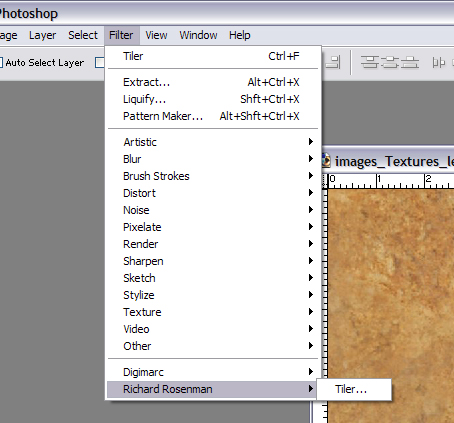
-
Pete,
Have you seen Arroways new vaneers? I bought both and they are fantstic
Scott
-
Scott, I have those also, I bought them for this in the hopes they would work, but just not close enough to clients samples.
-
Damn clients



Hello! It looks like you're interested in this conversation, but you don't have an account yet.
Getting fed up of having to scroll through the same posts each visit? When you register for an account, you'll always come back to exactly where you were before, and choose to be notified of new replies (either via email, or push notification). You'll also be able to save bookmarks and upvote posts to show your appreciation to other community members.
With your input, this post could be even better 💗
Register Login


Advertisement