sketchucation logo sketchucation
    • Login
    Oops, your profile's looking a bit empty! To help us tailor your experience, please fill in key details like your SketchUp version, skill level, operating system, and more. Update and save your info on your profile page today!
    ⚠️ Update | Sketchucation Tools 5.0.8 released with licensing improvements and bugfixes Download

    How to remove a house from a photo

    Scheduled Pinned Locked Moved SketchUp Discussions
    sketchup
    22 Posts 14 Posters 4.6k Views 14 Watching
    Loading More Posts
    • Oldest to Newest
    • Newest to Oldest
    • Most Votes
    Reply
    • Reply as topic
    Log in to reply
    This topic has been deleted. Only users with topic management privileges can see it.
    • Al HartA
      Al Hart
      last edited by

      @massimo said:

      Photoshop Cs5 is quite a nice tool. A 5 sec work. Just made a rough selection then pressed canc. Obviously you can complete better the job with some additional work. 😄

      Wow!

      Are you telling me that CS made the third image from the 1st image all on its own?

      Al Hart

      http://wiki.renderplus.com/images/e/ef/Render_plus_colored30x30).PNG
      IRender nXt from Render Plus

      1 Reply Last reply
      Reply Quote 0
      • Chris FullmerC
        Chris Fullmer
        last edited by

        Yes! <in summary> It has to be the newest CS5. And GiMP has had it for a few years, though possibly not quite as clean as the expensive photoshop version.

        And all previous versions of Photoshop had tools that let you do it manually very quickly (again, depending on the photo - some are rather time consuming to fix).

        But still, that CS5 example above is very impressive! I hope some day my office decides to upgrade. I have a feeling we'll be skipping 5 altogether though 😞

        Chris

        Lately you've been tan, suspicious for the winter.
        All my Plugins I've written

        1 Reply Last reply
        Reply Quote 0
        • massimoM
          massimo Moderator
          last edited by

          @unknownuser said:

          Wow!

          Are you telling me that CS made the third image from the 1st image all on its own?

          Exactly Al, just what I said: a lasso selection and canc. That's all.
          Obviously the result depends on the base image and often you need some additional work.
          Here you have another example made with the "spot healing brush tool": paint on the objects you want to remove, then release the left button of the mouse...

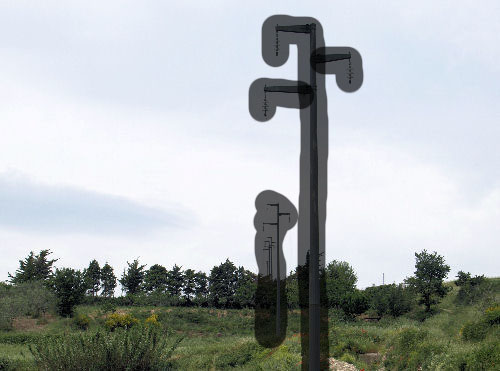

          20100528_7_500.jpg


          20100528_7_500_3.jpg


          20100528_7_500_2.jpg

          1 Reply Last reply
          Reply Quote 0
          • D
            dylan
            last edited by

            Amazing tools. Maybe I should upgrade my CS4!

            http://dmdarchitecture.co.uk/

            1 Reply Last reply
            Reply Quote 0
            • bmikeB
              bmike
              last edited by

              Where in GIMP?

              I'm running 2.6 (just downloaded a few weeks ago).
              Can't seem to find it!

              mike beganyi design + consulting llc

              1 Reply Last reply
              Reply Quote 0
              • A
                Aerilius
                last edited by

                It is a plugin "gimp-resynthesizer". You can download it here: http://www.logarithmic.net/pfh/resynthesizer

                1 Reply Last reply
                Reply Quote 0
                • N
                  notareal
                  last edited by

                  This technique was represented in SIGGRAPH some years ago. There is also another image operator called seam carving that supports content-aware image resizing (CS4 and greater).

                  Welcome to try Thea Render, Thea support | kerkythea.net -team member

                  1 Reply Last reply
                  Reply Quote 0
                  • daleD
                    dale
                    last edited by

                    You can also remove an image in PS Elements with the "magic extractor", but I think you will have to fill the space manually with clone tool etc.
                    The Gimp plugin is windows only, or used to be anyway.

                    Just monkeying around....like Monsanto

                    1 Reply Last reply
                    Reply Quote 0
                    • A
                      Aerilius
                      last edited by

                      The Gimp plugin supports many platforms. The easiest installation is in Linux, Windows is a bit more to do by hand and the site offers also a download for OS X:
                      http://www.logarithmic.net/pfh/resynthesizer/history

                      1 Reply Last reply
                      Reply Quote 0
                      • daleD
                        dale
                        last edited by

                        Thanks, that's good to know, I'm using Gimp more and more. It does fairly good bump and normal maps as well.

                        Just monkeying around....like Monsanto

                        1 Reply Last reply
                        Reply Quote 0
                        • E
                          ericschimel
                          last edited by

                          That new CS5 "Content Aware" tool is just amazing.

                          This video is the most compelling use of Content Aware 🤣

                          -Eric
                          http://plugin.sketchthis.net
                          Sketchup Kitchen Design Plugin
                          Custom Models

                          1 Reply Last reply
                          Reply Quote 0

                          Hello! It looks like you're interested in this conversation, but you don't have an account yet.

                          Getting fed up of having to scroll through the same posts each visit? When you register for an account, you'll always come back to exactly where you were before, and choose to be notified of new replies (either via email, or push notification). You'll also be able to save bookmarks and upvote posts to show your appreciation to other community members.

                          With your input, this post could be even better 💗

                          Register Login
                          • 1
                          • 2
                          • 1 / 2
                          • First post
                            Last post
                          Buy SketchPlus
                          Buy SUbD
                          Buy WrapR
                          Buy eBook
                          Buy Modelur
                          Buy Vertex Tools
                          Buy SketchCuisine
                          Buy FormFonts

                          Advertisement