sketchucation logo sketchucation
    • 登入
    Oops, your profile's looking a bit empty! To help us tailor your experience, please fill in key details like your SketchUp version, skill level, operating system, and more. Update and save your info on your profile page today!
    🔌 Smart Spline | Fluid way to handle splines for furniture design and complex structures. Download

    Struggling with shape bender

    已排程 已置頂 已鎖定 已移動 Newbie Forum
    sketchup
    22 貼文 8 Posters 7.0k 瀏覽 8 Watching
    正在載入更多貼文
    • 從舊到新
    • 從新到舊
    • 最多點贊
    回覆
    • 在新貼文中回覆
    登入後回覆
    此主題已被刪除。只有擁有主題管理權限的使用者可以查看。
    • S 離線
      stillhouse
      最後由 編輯

      I can't seem to get shape bender to work. It asks me to select the line that is on the red axis and when I try to select it it won't work. What am I doing wrong?
      I really need to bend a cone, and the project I'm working on is dead in the water until then.
      Please help.
      Sincerely
      BW

      1 條回覆 最後回覆 回覆 引用 0
      • GaieusG 離線
        Gaieus
        最後由 編輯

        Hi BW,

        Could you attach the file? At least the cone you are trying to bend...

        Gai...

        1 條回覆 最後回覆 回覆 引用 0
        • BoxB 離線
          Box
          最後由 編輯

          I found shape bender a little confusing to start with, a bit of reading and watching Tutorials always helps.

          But you need to remember that the straight line on the Red Axis is a separate line and not part of the thing you want to bend.
          And the Arc of the Bend is also it's own line.

          An easy way to see what it is doing,

          Place your cone with the fat part on the green/blue axis so the point is heading along the red axis (the cone needs to be a group or component).

          Draw a straight line along the red axis the same length as your cone.
          Draw an Arc the same length next to but not touching the straight line and pull it up in the blue direction.
          Now select the cone, activate Bender, click on the straight line and then the arc.
          It will show you a preview, which you can alter with the up/down keys, hit enter.

          That is the very basics of it as I see, once you understand that you can go on to more complex bending.
          If that isn't your problem, perhaps this will help someone else.

          1 條回覆 最後回覆 回覆 引用 0
          • TIGT 離線
            TIG Moderator
            最後由 編輯

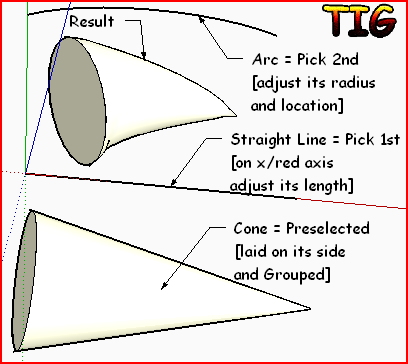
            In support of Box's explanation here's an image...Capture.PNG

            TIG

            1 條回覆 最後回覆 回覆 引用 0
            • S 離線
              stillhouse
              最後由 編輯

              @box said:

              I found shape bender a little confusing to start with, a bit of reading and watching Tutorials always helps.

              But you need to remember that the straight line on the Red Axis is a separate line and not part of the thing you want to bend.
              And the Arc of the Bend is also it's own line.

              An easy way to see what it is doing,

              Place your cone with the fat part on the green/blue axis so the point is heading along the red axis (the cone needs to be a group or component).

              Draw a straight line along the red axis the same length as your cone.
              Draw an Arc the same length next to but not touching the straight line and pull it up in the blue direction.
              Now select the cone, activate Bender, click on the straight line and then the arc.
              It will show you a preview, which you can alter with the up/down keys, hit enter.

              That is the very basics of it as I see, once you understand that you can go on to more complex bending.
              If that isn't your problem, perhaps this will help someone else.

              I've done this I made the cone a component selected it, activated shape bender and it won't let me select the straight line.

              1 條回覆 最後回覆 回覆 引用 0
              • Chris FullmerC 離線
                Chris Fullmer
                最後由 編輯

                Please upload the model. Thanks,

                Lately you've been tan, suspicious for the winter.
                All my Plugins I've written

                1 條回覆 最後回覆 回覆 引用 0
                • S 離線
                  stillhouse
                  最後由 編輯

                  @chris fullmer said:

                  Please upload the model. Thanks,

                  Sadly I'm not sure how to do that.

                  1 條回覆 最後回覆 回覆 引用 0
                  • D 離線
                    dylan
                    最後由 編輯

                    @stillhouse said:

                    Sadly I'm not sure how to do that.


                    Screen shot 2010-08-06 at 09.48.18.jpg

                    http://dmdarchitecture.co.uk/

                    1 條回覆 最後回覆 回覆 引用 0
                    • Chris FullmerC 離線
                      Chris Fullmer
                      最後由 編輯

                      Well, it worked for. So that is good news! It means you have it set up correctly. There are a good dozen stnadard problems accidentaly run into when trying to set up the bending process.

                      So now we can rule out anything with the model.

                      Now open the "Ruby Console" from the Window menu. Then try to run shape bender again. Copy any errors it gives you in the console and paste them here to this thread. hopefully one of us here will be able to see pretty quickly what the problem is from those errors. Thanks for being patient!

                      Chris

                      Lately you've been tan, suspicious for the winter.
                      All my Plugins I've written

                      1 條回覆 最後回覆 回覆 引用 0
                      • S 離線
                        stillhouse
                        最後由 編輯

                        Ok here it is.

                        /Library/Application Support/Google SketchUp 7/SketchUp/Plugins/clf_shape_bender.rb:223:in onLButtonUp' /Library/Application Support/Google SketchUp 7/SketchUp/Plugins/clf_shape_bender.rb:176:in onMouseMove'
                        /Library/Application Support/Google SketchUp 7/SketchUp/Plugins/clf_shape_bender.rb:168

                        1 條回覆 最後回覆 回覆 引用 0
                        • Chris FullmerC 離線
                          Chris Fullmer
                          最後由 編輯

                          There must have been more at the top. Try opening the console, then try to run shapebender, and make sure you get the errors at the very top.

                          Thanks,

                          Chris

                          Lately you've been tan, suspicious for the winter.
                          All my Plugins I've written

                          1 條回覆 最後回覆 回覆 引用 0
                          • S 離線
                            stillhouse
                            最後由 編輯

                            sorry about this....

                            Error: #<TypeError: no implicit conversion from nil to integer>
                            /Library/Application Support/Google SketchUp 7/SketchUp/Plugins/clf_shape_bender.rb:168:in set_cursor' /Library/Application Support/Google SketchUp 7/SketchUp/Plugins/clf_shape_bender.rb:168:in onSetCursor'
                            /Library/Application Support/Google SketchUp 7/SketchUp/Plugins/clf_shape_bender.rb:168

                            1 條回覆 最後回覆 回覆 引用 0
                            • Chris FullmerC 離線
                              Chris Fullmer
                              最後由 編輯

                              Great, thanks for posting it all. I removed the extra lines and left the important bits.

                              That is saying (in a round about way) that the cursor icon image files are not in the correct location. You should have a single clf_shape_bender_loader.rb file in the main plugins folder. Then all other files should put inside the clf_shape_bender folder.

                              Winzip sometimes will ignore the folder structure inside the zip file. If you unzip directly into the plugins folder, it will put all files where they should go. But if you just drag them into the plugins folder, there is a good chance it will remove the folder structure. My guess is that is what happened here. So you might just try reinstalling.

                              Let me know how it goes,

                              Chris

                              Lately you've been tan, suspicious for the winter.
                              All my Plugins I've written

                              1 條回覆 最後回覆 回覆 引用 0
                              • S 離線
                                stillhouse
                                最後由 編輯

                                Attached is a pic of my plugins folder. I'm not sure what you meant about folders what needs to go in what?
                                Thanks,
                                BW
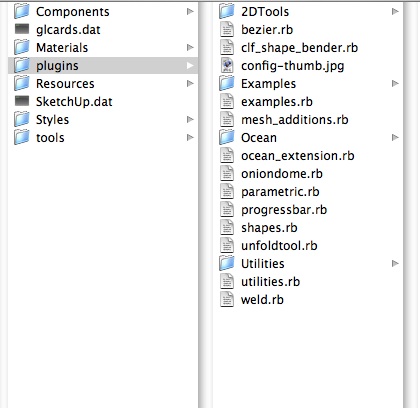

                                image.jpg

                                1 條回覆 最後回覆 回覆 引用 0
                                • Chris FullmerC 離線
                                  Chris Fullmer
                                  最後由 編輯

                                  Hmm, where did you get that copy of shape bender? You're missing a lot of important files. Please go re-download it from the forum here. It should be a zip file attached to the first post of the shape bender thread.

                                  http://forums.sketchucation.com/viewtopic.php?f=323&t=18210

                                  Chris

                                  Lately you've been tan, suspicious for the winter.
                                  All my Plugins I've written

                                  1 條回覆 最後回覆 回覆 引用 0
                                  • S 離線
                                    stillhouse
                                    最後由 編輯

                                    @stillhouse said:

                                    Attached is a pic of my plugins folder. I'm not sure what you meant about folders what needs to go in what?
                                    Thanks,
                                    BW

                                    I fixed it!
                                    Thanks everyone I really needed this script.
                                    Sincerly,
                                    Brendan

                                    1 條回覆 最後回覆 回覆 引用 0
                                    • S 離線
                                      stillhouse
                                      最後由 編輯

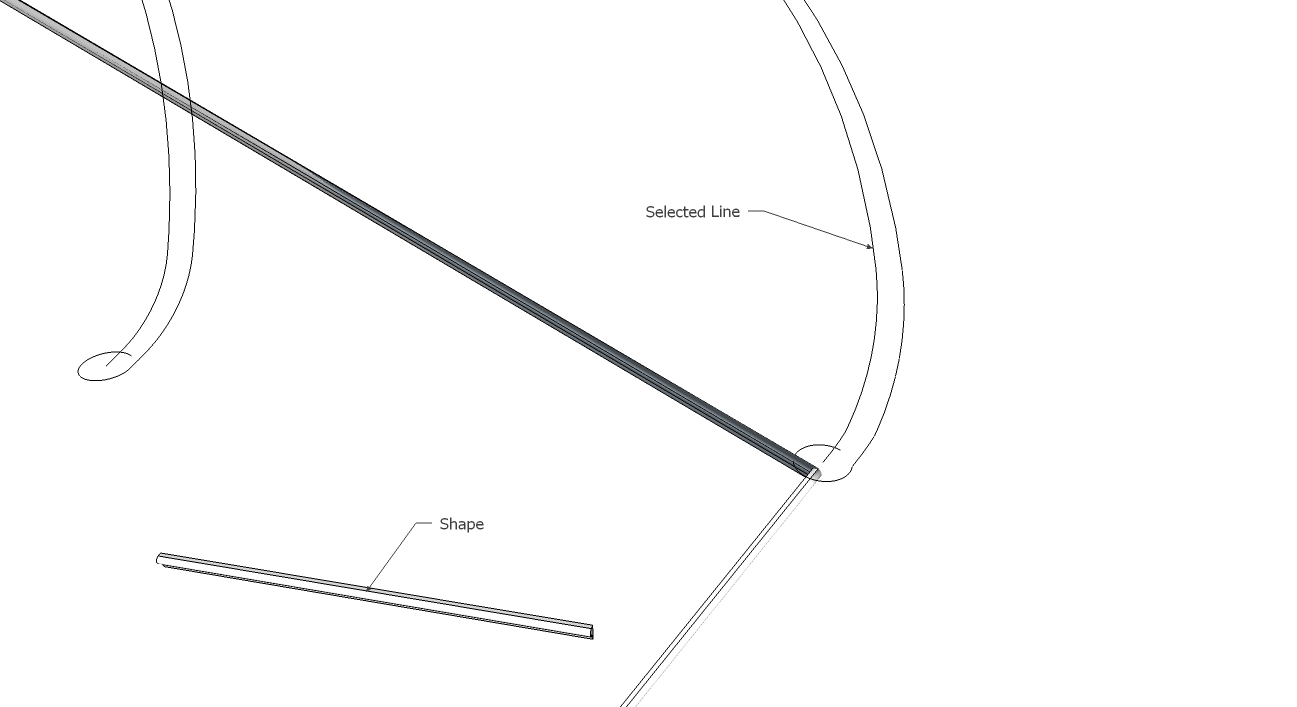
                                      I realized I didn't know which image you wanted so here is my attempt to make shape bender work
                                      I use the arrow and select the cone then go under plugins and select shape bender, it asks me to select the line on the red axis, and I try but it won't let me select it and thats where is get stuck? Could I be lacking some other script that I need to make shape bender work?(I thought I had installed the prerequisite script)
                                      Any thoughts?
                                      Sincerely,
                                      Brendan

                                      1 條回覆 最後回覆 回覆 引用 0
                                      • S 離線
                                        stillhouse
                                        最後由 編輯

                                        @unknownuser said:

                                        @stillhouse said:

                                        Sadly I'm not sure how to do that.

                                        Thanks,
                                        I'm trying to add a bent cone at the top that starts at the diameter of the top circle and bends to the right of the image reducing to a 6" circle at a 10 degree downward slope. sorry I'm not explaining this well. Its a 18" frustum the base is the diameter of the circle at the top of the image and the top diameter is 6". It is bent 100 degrees to the right.

                                        1 條回覆 最後回覆 回覆 引用 0
                                        • Chris FullmerC 離線
                                          Chris Fullmer
                                          最後由 編輯

                                          Great, glad you got it working now. Sorry it took so long,

                                          Chris

                                          Lately you've been tan, suspicious for the winter.
                                          All my Plugins I've written

                                          1 條回覆 最後回覆 回覆 引用 0
                                          • S 離線
                                            sasrabirawa
                                            最後由 編輯

                                            Hi Chris
                                            I just try this Shape Bender Plugins. Sometimes it works but sometimes doesn't. I try to bend the shape into a curved line but the result usually something different (see the attachment)
                                            And there's another one, in my computer, shape bender shows the pre result in green color before hitting the ENTER key, but in another computer it doesn't show anything

                                            What's wrong with the plugin..?


                                            stairs.jpg

                                            Just an ordinary Sketchup user

                                            1 條回覆 最後回覆 回覆 引用 0
                                            • 1
                                            • 2
                                            • 2 / 2
                                            • 第一個貼文
                                              最後的貼文
                                            Buy SketchPlus
                                            Buy SUbD
                                            Buy WrapR
                                            Buy eBook
                                            Buy Modelur
                                            Buy Vertex Tools
                                            Buy SketchCuisine
                                            Buy FormFonts

                                            Advertisement