sketchucation logo sketchucation
    • Login
    Oops, your profile's looking a bit empty! To help us tailor your experience, please fill in key details like your SketchUp version, skill level, operating system, and more. Update and save your info on your profile page today!
    Mac User? | Join the Rayscaper Beta for Mac Learn More

    Drop group or component to surface below?

    Scheduled Pinned Locked Moved Plugins
    23 Posts 10 Posters 11.8k Views 10 Watching
    Loading More Posts
    • Oldest to Newest
    • Newest to Oldest
    • Most Votes
    Reply
    • Reply as topic
    Log in to reply
    This topic has been deleted. Only users with topic management privileges can see it.
    • GaieusG
      Gaieus
      last edited by

      Also, that plugin will drop (and stop) the components/groups at their origin so on a sloped surface, they will either merge or float. See example below (component axes displayed however faintly they can be seen).
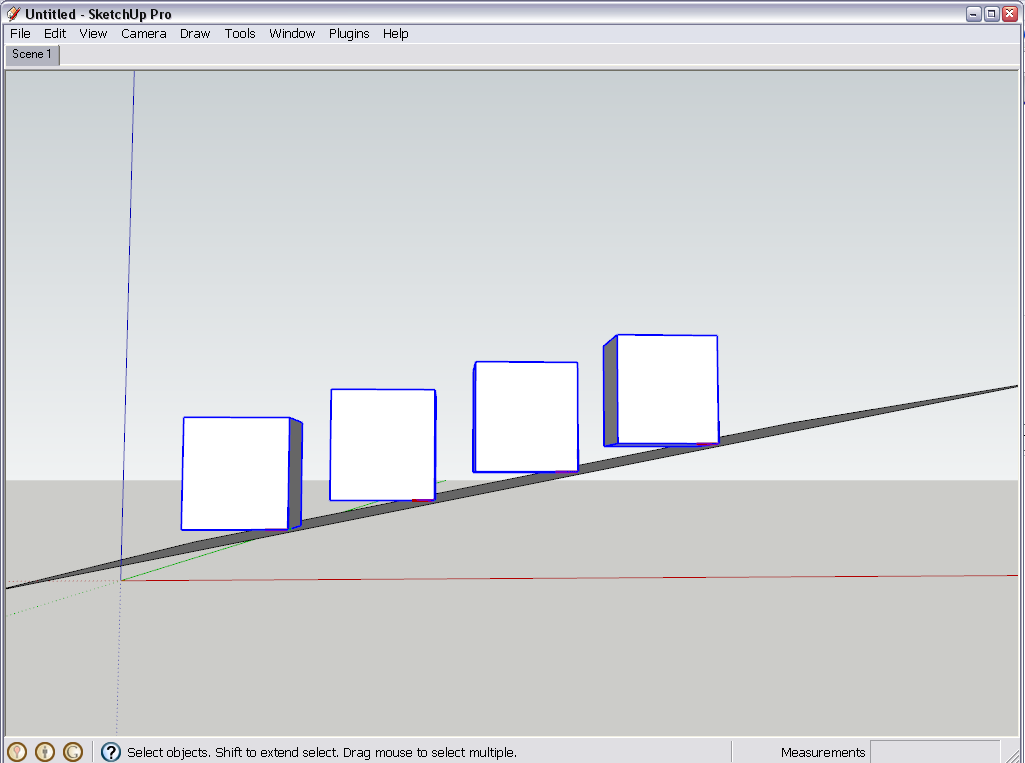
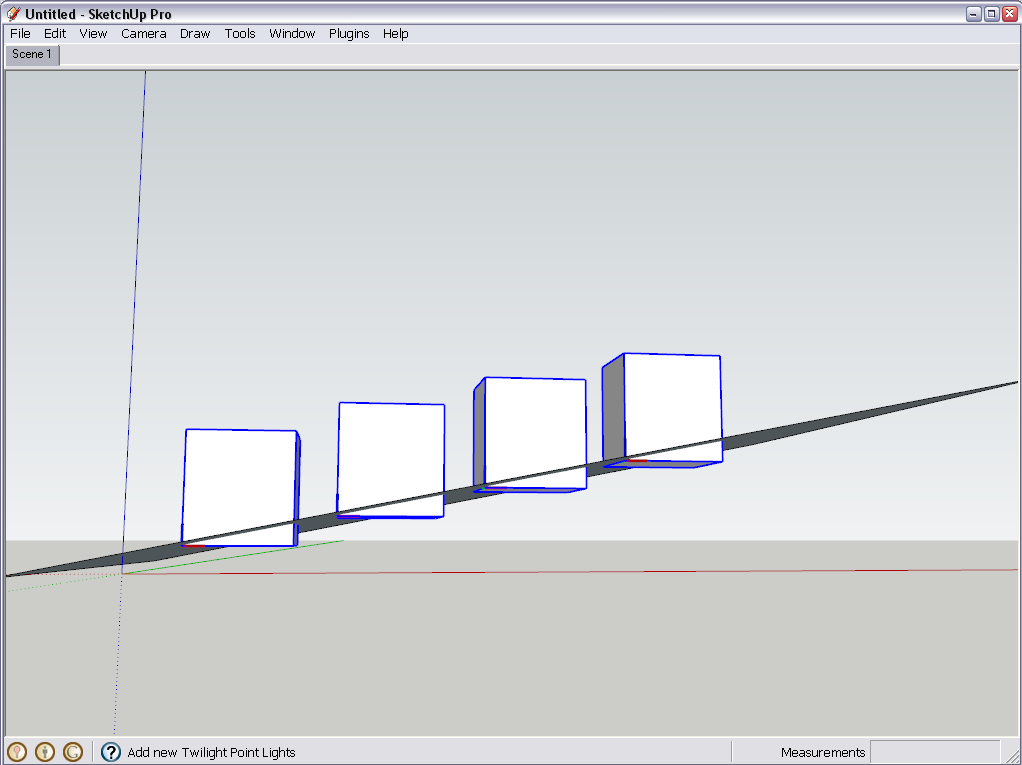
      drop1.png
      drop2.png
      Another thing is that when undoing, you have to undo them one by one. Nevertheless I keep using it and find it extremely useful when populating terrains with entourage and such. Still I sometimes miss a thing or two as you can see with one of the benches sunk into the ground here (and after hours of rendering). πŸ˜’

      Gai...

      1 Reply Last reply
      Reply Quote 0
      • thomthomT
        thomthom
        last edited by

        I believe SmartDrop will align the bottom to the surface: http://forums.sketchucation.com/viewtopic.php?f=180&t=3474
        But it also suffers from stopping at hidden entities.

        Thomas Thomassen β€” SketchUp Monkey & Coding addict
        List of my plugins and link to the CookieWare fund

        1 Reply Last reply
        Reply Quote 0
        • GaieusG
          Gaieus
          last edited by

          Well, nned to check out, thanks.

          And the credits ("thanks...") also remind me to purchase Tavi's randor (and when I am at it, also his stereo) plugins... πŸ˜’

          Gai...

          1 Reply Last reply
          Reply Quote 0
          • thomthomT
            thomthom
            last edited by

            randor and stereo plugins? what's this?

            Thomas Thomassen β€” SketchUp Monkey & Coding addict
            List of my plugins and link to the CookieWare fund

            1 Reply Last reply
            Reply Quote 0
            • GaieusG
              Gaieus
              last edited by

              randor will randomly scale and rotate objects. Stereo creates two cameras slightly apart from each other so that you can export/render two images and combine them into those 3D images to be watched with those fancy red/green glasses.

              Gai...

              1 Reply Last reply
              Reply Quote 0
              • thomthomT
                thomthom
                last edited by

                is randor different from the random scale and rotate plugin Chris got?

                Thomas Thomassen β€” SketchUp Monkey & Coding addict
                List of my plugins and link to the CookieWare fund

                1 Reply Last reply
                Reply Quote 0
                • GaieusG
                  Gaieus
                  last edited by

                  πŸ˜’
                  I will check.

                  Gai...

                  1 Reply Last reply
                  Reply Quote 0
                  • GaieusG
                    Gaieus
                    last edited by

                    Hm... Even Chris mentions randor here.
                    http://forums.sketchucation.com/viewtopic.php?p=139970#p139970

                    anyway, I have downloaded and will check out...

                    Gai...

                    1 Reply Last reply
                    Reply Quote 0
                    • thomthomT
                      thomthom
                      last edited by

                      hm.. I've not tried that one. Does it deal with hidden entities?

                      Thomas Thomassen β€” SketchUp Monkey & Coding addict
                      List of my plugins and link to the CookieWare fund

                      1 Reply Last reply
                      Reply Quote 0
                      • CadFatherC
                        CadFather
                        last edited by

                        yes, it drops the component only to the next visible entity
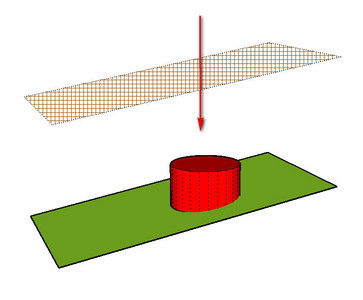
                        dr.jpg

                        .

                        1 Reply Last reply
                        Reply Quote 0
                        • CadFatherC
                          CadFather
                          last edited by

                          Jim's Mover script drops components pretty well too.. (press CTRL)
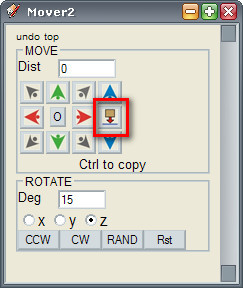
                          mv.jpg
                          .

                          1 Reply Last reply
                          Reply Quote 0
                          • thomthomT
                            thomthom
                            last edited by

                            Also if the entity itself isn't hidden, but on a hidden layer?

                            Thomas Thomassen β€” SketchUp Monkey & Coding addict
                            List of my plugins and link to the CookieWare fund

                            1 Reply Last reply
                            Reply Quote 0
                            • CadFatherC
                              CadFather
                              last edited by

                              no not in that case

                              1 Reply Last reply
                              Reply Quote 0
                              • Chris FullmerC
                                Chris Fullmer
                                last edited by

                                I have been meaning to write a smart drop plugin too that drops to a specified group. I normally want to drop trees down onto a ground plane, and that ground plane is always in a group. So I've meant to write one that will let you select what to drop and then select a group to drop onto. Have not gotten around to it yet though.

                                And my rotate and scale multiple is essentially the same thing as randor. I was not aiming to re-write that plugin when I started it. I was just supposed to scale multiple components at the same time, based on each one's location. But then it kept evolving and turned into scaling and rotating randomly.

                                Chris

                                Lately you've been tan, suspicious for the winter.
                                All my Plugins I've written

                                1 Reply Last reply
                                Reply Quote 0
                                • thomthomT
                                  thomthom
                                  last edited by

                                  @chris fullmer said:

                                  I have been meaning to write a smart drop plugin too that drops to a specified group. I normally want to drop trees down onto a ground plane, and that ground plane is always in a group. So I've meant to write one that will let you select what to drop and then select a group to drop onto. Have not gotten around to it yet though.

                                  Ditto! πŸ˜‰

                                  Thomas Thomassen β€” SketchUp Monkey & Coding addict
                                  List of my plugins and link to the CookieWare fund

                                  1 Reply Last reply
                                  Reply Quote 0
                                  • onzkiO
                                    onzki
                                    last edited by

                                    @autarchos said:

                                    try this one:

                                    File Not Found

                                    favicon

                                    (www.smustard.com)

                                    Hello everyone! I know this is an old thread, but still in demand feature lol πŸ˜„ .. The link no longer available, anybody knows an alternative? Thanks!


                                    [/hr]Dell Alienware Area-51. SKU 2021 Pro. AutoCAD 2023. Landscape design firm

                                    1 Reply Last reply
                                    Reply Quote 0
                                    • S
                                      samodelkin_77
                                      last edited by

                                      I`m using Curic Align, its work for any face\edge\middle point
                                      Thanks to creature this plugin ))

                                      1 Reply Last reply
                                      Reply Quote 0
                                      • Didier BurD
                                        Didier Bur
                                        last edited by

                                        Hi,
                                        I don't know if it can help, but take a look at my Components Spray tool:
                                        https://extensions.sketchup.com/extension/213a8e60-208f-4b6d-95ff-ab367c09a959/compo-spray

                                        Regards,

                                        DB

                                        1 Reply Last reply
                                        Reply Quote 0
                                        • cottyC
                                          cotty
                                          last edited by

                                          ThrowTo is another option too...
                                          http://sketchucation.com/forums/viewtopic.php?p=465353#p465353

                                          my SketchUp gallery

                                          1 Reply Last reply
                                          Reply Quote 0

                                          Hello! It looks like you're interested in this conversation, but you don't have an account yet.

                                          Getting fed up of having to scroll through the same posts each visit? When you register for an account, you'll always come back to exactly where you were before, and choose to be notified of new replies (either via email, or push notification). You'll also be able to save bookmarks and upvote posts to show your appreciation to other community members.

                                          With your input, this post could be even better πŸ’—

                                          Register Login
                                          • 1
                                          • 2
                                          • 2 / 2
                                          • First post
                                            Last post
                                          Buy SketchPlus
                                          Buy SUbD
                                          Buy WrapR
                                          Buy eBook
                                          Buy Modelur
                                          Buy Vertex Tools
                                          Buy SketchCuisine
                                          Buy FormFonts

                                          Advertisement