sketchucation logo sketchucation
    • 登入
    Oops, your profile's looking a bit empty! To help us tailor your experience, please fill in key details like your SketchUp version, skill level, operating system, and more. Update and save your info on your profile page today!
    🔌 Smart Spline | Fluid way to handle splines for furniture design and complex structures. Download

    [Plugin] jf_get_dimensions.rb

    已排程 已置頂 已鎖定 已移動 Plugins
    61 貼文 21 Posters 70.6k 瀏覽 21 Watching
    正在載入更多貼文
    • 從舊到新
    • 從新到舊
    • 最多點贊
    回覆
    • 在新貼文中回覆
    登入後回覆
    此主題已被刪除。只有擁有主題管理權限的使用者可以查看。
    • J 離線
      Jim
      最後由 編輯

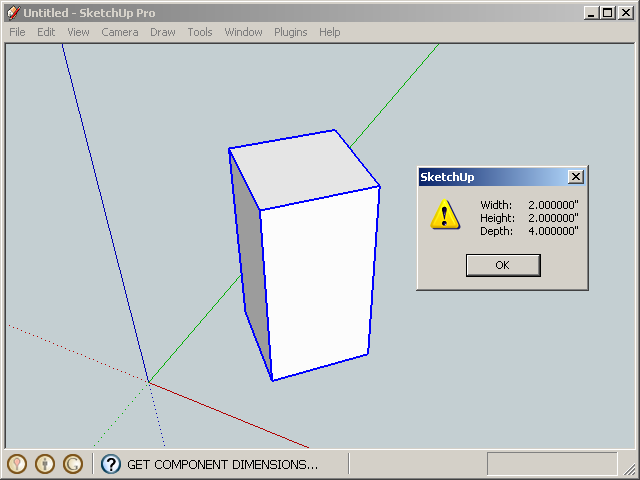
      This simple plugin displays the dimensions (width, length, depth) of a selected Group or Instance.

      Unlike the BoundingBox dimensions, the dimensions are correct even when the object is rotated and scaled. Units are displayed in the model units.

      (Width, Height, Depth) correspond to the object's (X, Y, Z) dimensions.

      Menu: Plugins / jf Get Dimensions
      405.png

      reference: http://forums.sketchucation.com/viewtopic.php?f=323&t=28842


      version 1.1 2014-04-02

      Hi

      1 條回覆 最後回覆 回覆 引用 0
      • J 離線
        Jim
        最後由 編輯

        I like what this does, but menus are so clunky. Can anyone envision an interface that is fast yet non-intrusive?

        What about a small, button-size webdialog that activates on an onMouseOver event? No clicking, just activates as you pass your mouse over it.

        Or maybe on the other end of the spectrum, a complete alternative to the Entity Info window, but with much more information?

        Hi

        1 條回覆 最後回覆 回覆 引用 0
        • thomthomT 離線
          thomthom
          最後由 編輯

          Entity Into window with collapsible sections of data.

          Thomas Thomassen — SketchUp Monkey & Coding addict
          List of my plugins and link to the CookieWare fund

          1 條回覆 最後回覆 回覆 引用 0
          • Dave RD 離線
            Dave R
            最後由 編輯

            Jim, I didn't know I needed this plugin but it is very useful. Although I assigned a keyboard shortcut to it, I like your idea of mouseover so you don't have to reactivate the tool for each component.

            Etaoin Shrdlu

            %

            (THERE'S NO PLACE LIKE)

            G28 X0.0 Y0.0 Z0.0

            M30

            %

            1 條回覆 最後回覆 回覆 引用 0
            • thomthomT 離線
              thomthom
              最後由 編輯

              Yesterday I hacked the Query tools that comes with SU to display the .bounds dimension for the entity you hover over by request from someone at my office.

              Both a query tool that display info on screen and an enhanced Entity Info window has its uses.

              What if you have this Entity Info++ window, where at each section you also have a checkbox. That checkbox controls what info you get on screen with Query Tool++.
              ❓ 💭


              TT Hack

              Thomas Thomassen — SketchUp Monkey & Coding addict
              List of my plugins and link to the CookieWare fund

              1 條回覆 最後回覆 回覆 引用 0
              • D 離線
                dedmin
                最後由 編輯

                This is the most used plugin in my toolbox - assigned shortcut "N" to it! Thanks again Jim for improving it!! 🎉 🎉

                1 條回覆 最後回覆 回覆 引用 0
                • D 離線
                  dedmin
                  最後由 編輯

                  @thomthom said:

                  Yesterday I hacked the Query tools that comes with SU to display the .bounds dimension for the entity you hover over by request from someone at my office.

                  Both a query tool that display info on screen and an enhanced Entity Info window has its uses.

                  What if you have this Entity Info++ window, where at each section you also have a checkbox. That checkbox controls what info you get on screen with Query Tool++.
                  ❓ 💭

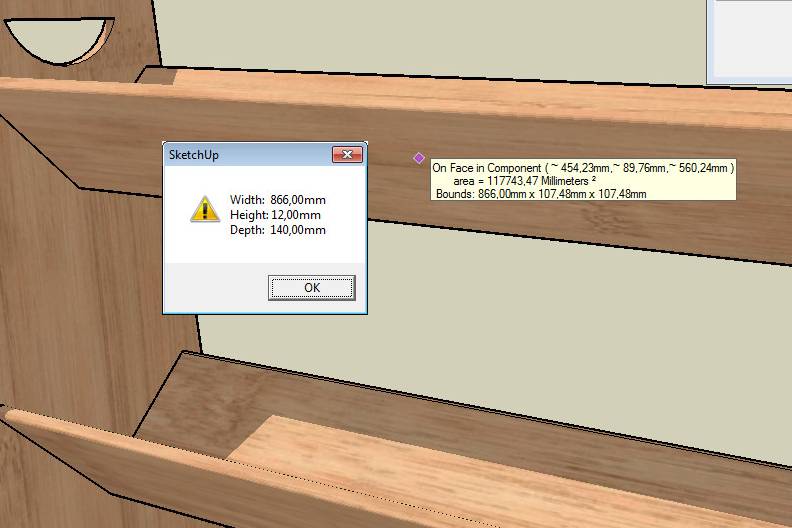
                  The same problem with components not aligned to the world axes as the old Get Dimensions plugin:
                  2010-06-08_164546.jpg

                  1 條回覆 最後回覆 回覆 引用 0
                  • thomthomT 離線
                    thomthom
                    最後由 編輯

                    ah! oops!

                    Thomas Thomassen — SketchUp Monkey & Coding addict
                    List of my plugins and link to the CookieWare fund

                    1 條回覆 最後回覆 回覆 引用 0
                    • B 離線
                      Ben Ritter
                      最後由 編輯

                      Jim, thank you for sharing.

                      1 條回覆 最後回覆 回覆 引用 0
                      • D 離線
                        dedmin
                        最後由 編輯

                        2010-06-24_092943.jpg

                        1 條回覆 最後回覆 回覆 引用 0
                        • thomthomT 離線
                          thomthom
                          最後由 編輯

                          In SketchUp when it rounds of a value it prefix it with a tilde ~.
                          If the lenght is 10.522221 and your model units are set to display only two decimals, SU will display that as "~ 10.52"

                          Thomas Thomassen — SketchUp Monkey & Coding addict
                          List of my plugins and link to the CookieWare fund

                          1 條回覆 最後回覆 回覆 引用 0
                          • D 離線
                            dedmin
                            最後由 編輯

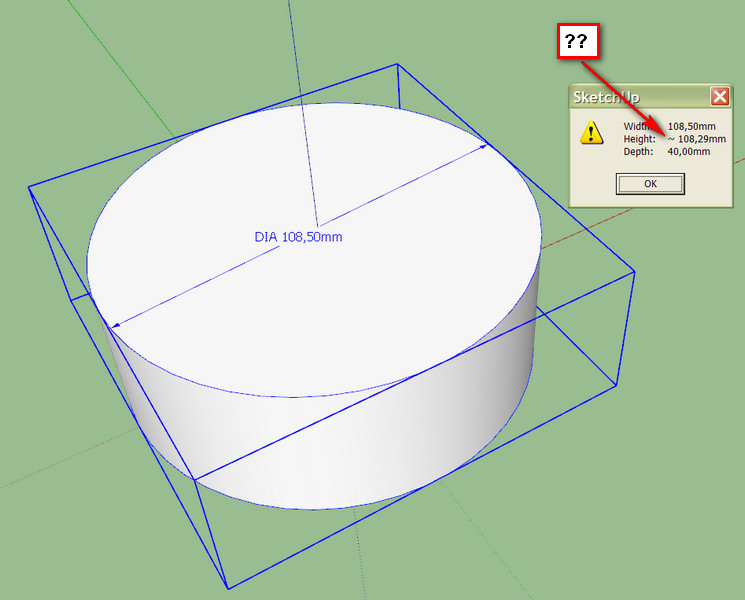
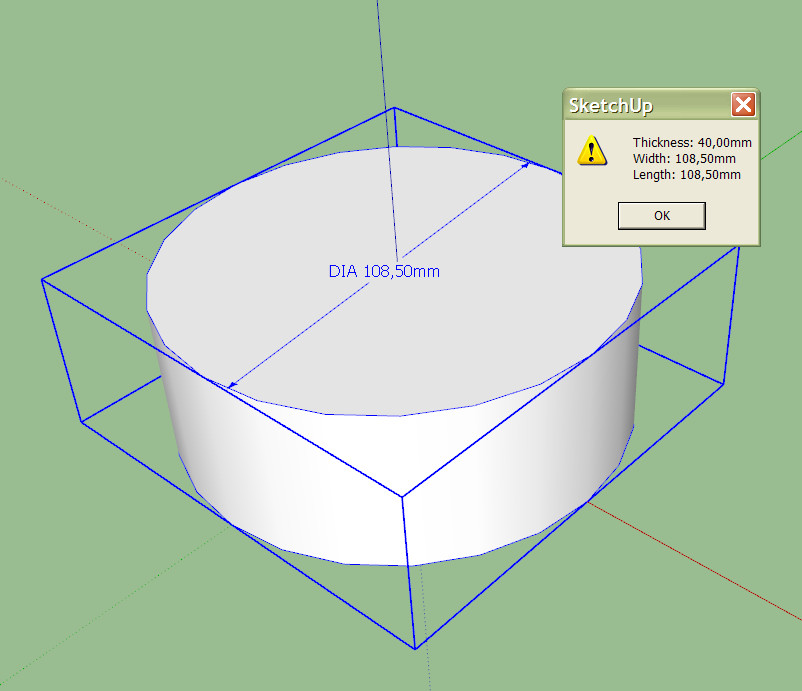
                            The problem is that the plugin can't recognize SketchUP's circles - it shows different sizes for x and y. Here is the old plugin:
                            2010-06-24_095545.jpg

                            1 條回覆 最後回覆 回覆 引用 0
                            • B 離線
                              Ben Ritter
                              最後由 編輯

                              Jim, thank you.

                              1 條回覆 最後回覆 回覆 引用 0
                              • J 離線
                                Jim
                                最後由 編輯

                                @ben ritter said:

                                Jim, thank you.

                                You're welcome.
                                @dedmin said:

                                The problem is that the plugin can't recognize SketchUP's circles - it shows different sizes for x and y. Here is the old plugin:

                                This knows nothing of circles, or any other actual geometry. It only reports the BoundingBox dimensions adjusted for rotation.

                                Dave, that is the only way I can reproduce the results. And it makes sense (to me, anyway) that an odd-sided circle has differing dimensions due to the segments being non-symmetrical.

                                Hi

                                1 條回覆 最後回覆 回覆 引用 0
                                • Dave RD 離線
                                  Dave R
                                  最後由 編輯

                                  I get the same results as dedmin if I drag out the radius of the circle off axis or if I use an odd number (25) of sides for the circle instead of an even number. On the other hand, with the radius dragged out on axis and an even number of sides, I get the same value for x and y even with Precision set to 0.000001mm it is the same value. Those results are all understandable since the plugin is reporting the size of the bounding box.

                                  Etaoin Shrdlu

                                  %

                                  (THERE'S NO PLACE LIKE)

                                  G28 X0.0 Y0.0 Z0.0

                                  M30

                                  %

                                  1 條回覆 最後回覆 回覆 引用 0
                                  • D 離線
                                    dedmin
                                    最後由 編輯

                                    I see. Thanks for the explanation. This SketchUp "geometry" is becoming a big problem for me. To bad, but I have to move to other more precise software.

                                    1 條回覆 最後回覆 回覆 引用 0
                                    • thomthomT 離線
                                      thomthom
                                      最後由 編輯

                                      Sounds like you might need a NURBS modeller - one that understand circles.
                                      Bonzai or Rhino comes to mind.

                                      Thomas Thomassen — SketchUp Monkey & Coding addict
                                      List of my plugins and link to the CookieWare fund

                                      1 條回覆 最後回覆 回覆 引用 0
                                      • D 離線
                                        dedmin
                                        最後由 編輯

                                        Rhino is my choice - the new version 5 is very promising. Gonna miss SketchUp's components, FredoScale and the community!

                                        1 條回覆 最後回覆 回覆 引用 0
                                        • D 離線
                                          dedmin
                                          最後由 編輯

                                          Here is a new version that displays the dimensions on the status bar
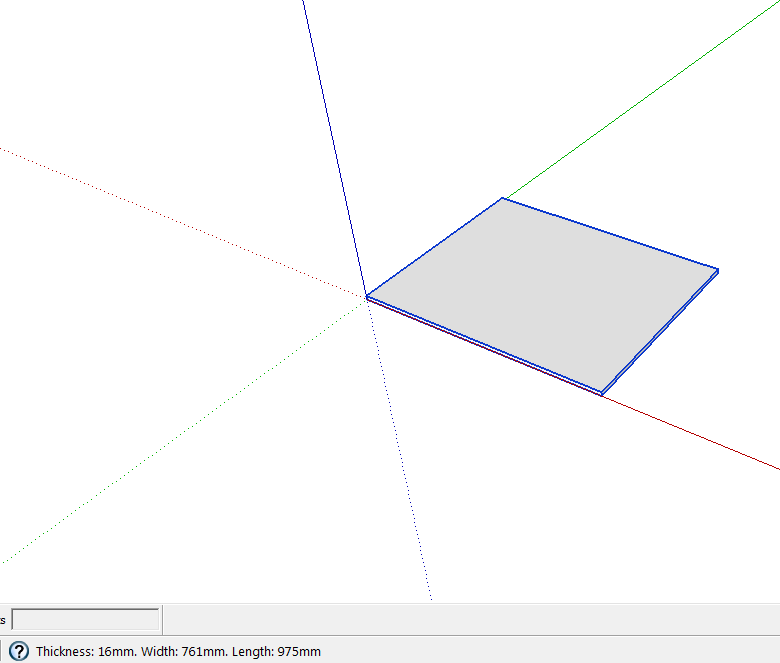
                                          Screen.png

                                          Made by a russian guy called 'newsposting'
                                          GetDimensions.rb

                                          1 條回覆 最後回覆 回覆 引用 0
                                          • mitcorbM 離線
                                            mitcorb
                                            最後由 編輯

                                            Hi, dedmin:
                                            Can you point to the source of the Russian guy's plugin?

                                            I take the slow, deliberate approach in my aimless wandering.

                                            1 條回覆 最後回覆 回覆 引用 0
                                            • 1
                                            • 2
                                            • 3
                                            • 4
                                            • 1 / 4
                                            • 第一個貼文
                                              最後的貼文
                                            Buy SketchPlus
                                            Buy SUbD
                                            Buy WrapR
                                            Buy eBook
                                            Buy Modelur
                                            Buy Vertex Tools
                                            Buy SketchCuisine
                                            Buy FormFonts

                                            Advertisement