sketchucation logo sketchucation
    • Login
    Oops, your profile's looking a bit empty! To help us tailor your experience, please fill in key details like your SketchUp version, skill level, operating system, and more. Update and save your info on your profile page today!
    Mac User? | Join the Rayscaper Beta for Mac Learn More

    [Plugin] jf_get_dimensions.rb

    Scheduled Pinned Locked Moved Plugins
    61 Posts 21 Posters 79.1k Views 21 Watching
    Loading More Posts
    • Oldest to Newest
    • Newest to Oldest
    • Most Votes
    Reply
    • Reply as topic
    Log in to reply
    This topic has been deleted. Only users with topic management privileges can see it.
    • D
      dedmin
      last edited by

      I see. Thanks for the explanation. This SketchUp "geometry" is becoming a big problem for me. To bad, but I have to move to other more precise software.

      1 Reply Last reply
      Reply Quote 0
      • thomthomT
        thomthom
        last edited by

        Sounds like you might need a NURBS modeller - one that understand circles.
        Bonzai or Rhino comes to mind.

        Thomas Thomassen — SketchUp Monkey & Coding addict
        List of my plugins and link to the CookieWare fund

        1 Reply Last reply
        Reply Quote 0
        • D
          dedmin
          last edited by

          Rhino is my choice - the new version 5 is very promising. Gonna miss SketchUp's components, FredoScale and the community!

          1 Reply Last reply
          Reply Quote 0
          • D
            dedmin
            last edited by

            Here is a new version that displays the dimensions on the status bar
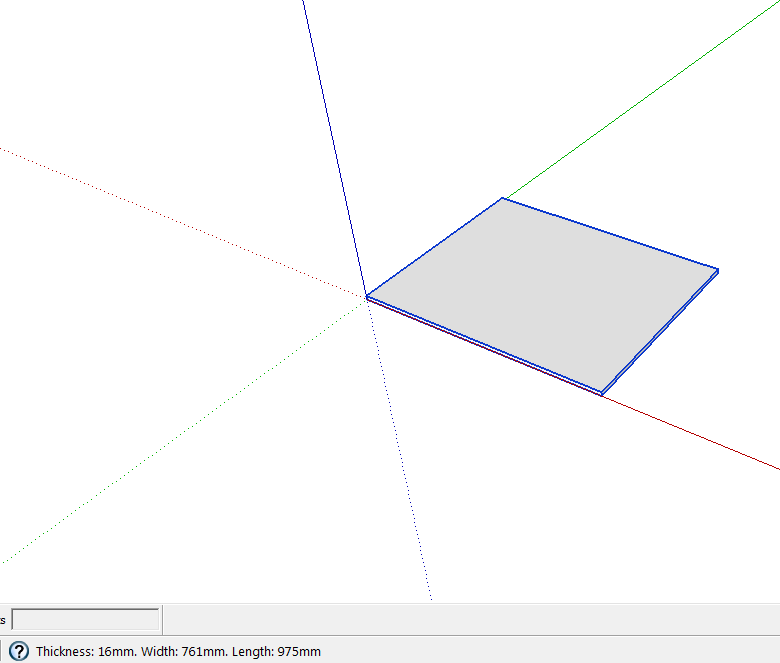
            Screen.png

            Made by a russian guy called 'newsposting'
            GetDimensions.rb

            1 Reply Last reply
            Reply Quote 0
            • mitcorbM
              mitcorb
              last edited by

              Hi, dedmin:
              Can you point to the source of the Russian guy's plugin?

              I take the slow, deliberate approach in my aimless wandering.

              1 Reply Last reply
              Reply Quote 0
              • TIGT
                TIG Moderator
                last edited by

                Because this particular short code 'sorts' the three dimensions then the 'thickness' is always the least of them and the 'length' always the greatest and the 'width' is what's left over.
                Be aware that it does not return the X/Y/Z dimensions - these would be dims[1], dims[0] and dims[2] respectively IF dims.sort! were to be omitted... 🤓

                TIG

                1 Reply Last reply
                Reply Quote 0
                • Dave RD
                  Dave R
                  last edited by

                  For my use I'm not so worried about which is X, Y or Z. Thickness is generally the lowest value and length is usually (although not always) the longest dimension.

                  This new version puts a menu entry in the Tools menu but does not display dimensions anywhere for my selected component. Doesn't work on groups either.

                  Etaoin Shrdlu

                  %

                  (THERE'S NO PLACE LIKE)

                  G28 X0.0 Y0.0 Z0.0

                  M30

                  %

                  1 Reply Last reply
                  Reply Quote 0
                  • N
                    newsposting
                    last edited by

                    Thank dedmin, that upload changed plugin. I looked at the comments in the forum and would immediately respond.

                    1. I did not change the algorithm for determining the length, width and height, and left it in its original form, only changed the location of information display.

                    2. Call plugin from the menu is not convenient, since after a mouse movement information is lost. But it is very convenient to assign a hot key, such as (W), and using the command Select, selected element, press W, and the information appears at the bottom, select the next element, and then press W again appear at the bottom of the data about the object. As for me it is very convenient. In this Select command is not disabled, which is also very convenient.

                    1 Reply Last reply
                    Reply Quote 0
                    • D
                      dedmin
                      last edited by

                      Sorry, I didn't check it by myself - there were no SketchUP installed. This version works by a shortcut - You assign a shortcut to this plugin and when select group or component press the shortcut - You see the dimensions in the status bar - as soon as You move the mouse they are gone. Pretty useful actually.

                      1 Reply Last reply
                      Reply Quote 0
                      • Dave RD
                        Dave R
                        last edited by

                        There's a big difference. Thank you for the explanation.

                        Etaoin Shrdlu

                        %

                        (THERE'S NO PLACE LIKE)

                        G28 X0.0 Y0.0 Z0.0

                        M30

                        %

                        1 Reply Last reply
                        Reply Quote 0
                        • N
                          newsposting
                          last edited by

                          Hi, all.

                          This, I modified the plugin Get Dimensions. If you have any questions I can answer.

                          1 Reply Last reply
                          Reply Quote 0
                          • N
                            newsposting
                            last edited by

                            I upgraded the plugin, and now SketchUp automatically show the dimensions, without click menu item and hotkey, and this feature can be disabled if it interferes.

                            Download link:
                            Dimensions Tool

                            Menu:
                            Tools > Dimensions Tool > Get Dimensions - old functional
                            Tools > Dimensions Tool > Auto Display Dimensions - checked menu item, which switch auto get dimensions functionality after select object.

                            P.S. Let me know if you need to modify the algorithm and move plugin to another menu for the convenience.

                            1 Reply Last reply
                            Reply Quote 0
                            • D
                              dedmin
                              last edited by

                              1 Reply Last reply
                              Reply Quote 0
                              • thomthomT
                                thomthom
                                last edited by

                                @newsposting said:

                                I upgraded the plugin, and now SketchUp automatically show the dimensions, without click menu item and hotkey, and this feature can be disabled if it interferes.

                                Could you post this as a new separate post? It makes it easier to find the plugins. When they are hidden in the middle of a thread it's very hard to find.

                                Thomas Thomassen — SketchUp Monkey & Coding addict
                                List of my plugins and link to the CookieWare fund

                                1 Reply Last reply
                                Reply Quote 0
                                • D
                                  dedmin
                                  last edited by

                                  @newsposting said:

                                  I upgraded the plugin, and now SketchUp automatically show the dimensions, without click menu item and hotkey, and this feature can be disabled if it interferes.

                                  Download link:
                                  [attachment=0:er7emh3n]<!-- ia0 -->DimensionsTool.zip<!-- ia0 -->[/attachment:er7emh3n]

                                  Menu:
                                  Tools > Dimensions Tool > Get Dimensions - old functional
                                  Tools > Dimensions Tool > Auto Display Dimensions - checked menu item, which switch auto get dimensions functionality after select object.

                                  P.S. Let me know if you need to modify the algorithm and move plugin to another menu for the convenience.

                                  I noticed that this version doesn't display correct dimensions when component/group is not aligned with the world axes - can You fix this?
                                  Thanks.

                                  1 Reply Last reply
                                  Reply Quote 0
                                  • HumpmetwiceH
                                    Humpmetwice
                                    last edited by

                                    New computer and new sketchup8 with all maintenance updates installed but Get dimension, trim & keep no longer work for groups only components. Two of my favorites. Please help

                                    1 Reply Last reply
                                    Reply Quote 0
                                    • J
                                      Jim
                                      last edited by

                                      I made a minor update to version 1.1 for SketchUp 2014, but didn't really see why it didn't work. See 1st post.

                                      Hi

                                      1 Reply Last reply
                                      Reply Quote 0
                                      • Dave RD
                                        Dave R
                                        last edited by

                                        Hi Kurt, as you know I don't use groups but I just made a couple and tested Get Dimension and it works just fine on them. According to the description for Trim and Keep, the thing that gets trimmed must be a component. The idea for that plugin was to have a tool similar to the Solid Tools Trim tool which didn't result in components being converted to groups. For me that conversion of components to groups is a big down side to using the Solid Tools. I'd love to see Jim create new versions of the other Solid tools that keep the components like Trim and Keep does.

                                        Etaoin Shrdlu

                                        %

                                        (THERE'S NO PLACE LIKE)

                                        G28 X0.0 Y0.0 Z0.0

                                        M30

                                        %

                                        1 Reply Last reply
                                        Reply Quote 0
                                        • Z
                                          Zacchia
                                          last edited by

                                          Hi
                                          Is there in the newest Version not a small Icon for that plugin? I have to go to Plugins/get dimensions?

                                          1 Reply Last reply
                                          Reply Quote 0
                                          • Dave RD
                                            Dave R
                                            last edited by

                                            No. There is no toolbar for this and it isn't needed. Just assign it a keyboard shortcut.

                                            Etaoin Shrdlu

                                            %

                                            (THERE'S NO PLACE LIKE)

                                            G28 X0.0 Y0.0 Z0.0

                                            M30

                                            %

                                            1 Reply Last reply
                                            Reply Quote 0

                                            Hello! It looks like you're interested in this conversation, but you don't have an account yet.

                                            Getting fed up of having to scroll through the same posts each visit? When you register for an account, you'll always come back to exactly where you were before, and choose to be notified of new replies (either via email, or push notification). You'll also be able to save bookmarks and upvote posts to show your appreciation to other community members.

                                            With your input, this post could be even better 💗

                                            Register Login
                                            • 1
                                            • 2
                                            • 3
                                            • 4
                                            • 4 / 4
                                            • First post
                                              Last post
                                            Buy SketchPlus
                                            Buy SUbD
                                            Buy WrapR
                                            Buy eBook
                                            Buy Modelur
                                            Buy Vertex Tools
                                            Buy SketchCuisine
                                            Buy FormFonts

                                            Advertisement