sketchucation logo sketchucation
    • Login
    Oops, your profile's looking a bit empty! To help us tailor your experience, please fill in key details like your SketchUp version, skill level, operating system, and more. Update and save your info on your profile page today!
    ⚠️ Update | Sketchucation Tools 5.0.8 released with licensing improvements and bugfixes Download

    [Plugin][$] Curviloft 2.0a - 31 Mar 24 (Loft & Skinning)


    Scheduled Pinned Locked Moved Plugins
    1.3k Posts 300 Posters 3.1m Views 298 Watching
    Loading More Posts
    • Oldest to Newest
    • Newest to Oldest
    • Most Votes
    Reply
    • Reply as topic
    Log in to reply
    This topic has been deleted. Only users with topic management privileges can see it.
    • I
      iheartpi
      last edited by

      Awesome plugin! You know what I am thinking. I'll draw lines on my friends face, take a snapshot, using the snapshot as reference draw the lines in sketchup, then curviloft it πŸ˜„

      1 Reply Last reply
      Reply Quote 0
      • U
        uniflipp
        last edited by

        @antonio555 said:

        Hi. I use Curviloft 1.2 d. It works good, but I see the error every time, when I start work in my ScetchUp 8.

        Error Loading File bootstrap_Curviloft.rb
        uninitialized constant Curviloft::T6Error Loading File CurviloftAlgo.rb
        uninitialized constant Curviloft::T6Error Loading File CurviloftCurveMover.rb
        uninitialized constant Curviloft::T6Error Loading File CurviloftPalette.rb
        uninitialized constant Curviloft::T6Error Loading File CurviloftTool.rb
        uninitialized constant Curviloft::T6

        How can I improve this?
        Thank You.

        Be sure to extract the folder CURVILOFT_Dir_12 into the plugins folder. I extracted the *.rb files straight into plugins at first and got the same errors.

        1 Reply Last reply
        Reply Quote 0
        • W
          woodmaster2013
          last edited by

          I just install curviloft plug in and I cant see in my sketchup window. Any comments please? im a newbie here. Thank you admin ... πŸ˜’ πŸ˜’ πŸ˜’

          1 Reply Last reply
          Reply Quote 0
          • M
            Mvmcneil
            last edited by

            I am testing a lofting workflow on simple geometry and Sketchup keeps crashing when trying to loft simple lines.

            The process is this:
            Draw a line
            copy 4 times some distance
            move 3 lines vertically up some to distance
            select each line in sequence left to right
            run curviloft

            The tool activates then hangs sketchup. If I loft arcs or other shapes it seems to work fine.

            I am using Sketchup 8 and Sketchup2013 on OSX 10.8.5. Both seem to be affected.

            Thanks,

            Mike

            1 Reply Last reply
            Reply Quote 0
            • cottyC
              cotty
              last edited by

              @woodmaster2013 said:

              I just install curviloft plug in and I cant see in my sketchup window. Any comments please? im a newbie here. Thank you admin ... πŸ˜’ πŸ˜’ πŸ˜’

              Some more infos woudl help us to help you (how did you install it, ...)

              @unknownuser said:

              select each line in sequence left to right
              run curviloft

              Try it the other way round: run curviloft and afterwards, select the lines in the right order.

              my SketchUp gallery

              1 Reply Last reply
              Reply Quote 0
              • Dave RD
                Dave R
                last edited by

                @woodmaster2013 said:

                I just install curviloft plug in and I cant see in my sketchup window. Any comments please? im a newbie here. Thank you admin ... πŸ˜’ πŸ˜’ πŸ˜’

                As cotty says, more information would be useful. I expect you've not installed it correctly and/or you didn't bother to install the required LibFredo6 files.

                Etaoin Shrdlu

                %

                (THERE'S NO PLACE LIKE)

                G28 X0.0 Y0.0 Z0.0

                M30

                %

                1 Reply Last reply
                Reply Quote 0
                • Dave RD
                  Dave R
                  last edited by

                  @unknownuser said:

                  I am testing a lofting workflow on simple geometry and Sketchup keeps crashing when trying to loft simple lines.

                  The process is this:
                  Draw a line
                  copy 4 times some distance
                  move 3 lines vertically up some to distance
                  select each line in sequence left to right
                  run curviloft

                  The tool activates then hangs sketchup. If I loft arcs or other shapes it seems to work fine.

                  I am using Sketchup 8 and Sketchup2013 on OSX 10.8.5. Both seem to be affected.

                  Thanks,

                  Mike

                  How about posting an example SKP file of what you tried to describe?

                  Etaoin Shrdlu

                  %

                  (THERE'S NO PLACE LIKE)

                  G28 X0.0 Y0.0 Z0.0

                  M30

                  %

                  1 Reply Last reply
                  Reply Quote 0
                  • M
                    Mvmcneil
                    last edited by

                    @dave r said:

                    @unknownuser said:

                    I am testing a lofting workflow on simple geometry and Sketchup keeps crashing when trying to loft simple lines.

                    The process is this:
                    Draw a line
                    copy 4 times some distance
                    move 3 lines vertically up some to distance
                    select each line in sequence left to right
                    run curviloft

                    The tool activates then hangs sketchup. If I loft arcs or other shapes it seems to work fine.

                    I am using Sketchup 8 and Sketchup2013 on OSX 10.8.5. Both seem to be affected.

                    Thanks,

                    Mike

                    How about posting an example SKP file of what you tried to describe?

                    The file is not complicated is it only 5 lines and nothing more and it is a fresh file just after Sketchup starts. This is created in Sketchup 8.

                    I did try as Cotty suggested above to run Curviloft then select the lines. It worked and didn't crash Sketchup, but other geometry seems to work without running Curviloft first.

                    Mike.


                    lines-test.skp

                    1 Reply Last reply
                    Reply Quote 0
                    • Dave RD
                      Dave R
                      last edited by

                      It may not be complicated but you don't describe which direction you copied the lines or how far. why would you even want to use Curviloft of those lines? What sort of result are you expecting?

                      Etaoin Shrdlu

                      %

                      (THERE'S NO PLACE LIKE)

                      G28 X0.0 Y0.0 Z0.0

                      M30

                      %

                      1 Reply Last reply
                      Reply Quote 0
                      • M
                        Mvmcneil
                        last edited by

                        @dave r said:

                        It may not be complicated but you don't describe which direction you copied the lines or how far. why would you even want to use Curviloft of those lines? What sort of result are you expecting?

                        I am using a workflow process that is not uncommonly used in Rhino to connect two planes or surfaces without using arcs. I am trying to use simple geometry as a test first before it would be used later on a more complex model. I like to test things like this out on simple models before I try incorporate it into my modeling process, and I noticed this was causing sketchup to freeze on OSX. I am not sure if the same behavior happens in Windows as I am not at work to try it in that environment.

                        Mike.

                        1 Reply Last reply
                        Reply Quote 0
                        • jgbJ
                          jgb
                          last edited by

                          @unknownuser said:

                          Draw a line
                          copy 4 times some distance
                          move 3 lines vertically up some to distance
                          select each line in sequence left to right
                          run curviloft

                          The tool activates then hangs sketchup. If I loft arcs or other shapes it seems to work fine.

                          Thanks,

                          Mike

                          I do not understand what you think CL will do with a set of unconnected lines. CL needs a closed perimeter of some sort to create the intervening mesh. With 5 parallel unconnected lines, CL can do nothing. I tried it and got the usual CL "I'm stumped" color codes. It did NOT hang my system.


                          jgb

                          1 Reply Last reply
                          Reply Quote 0
                          • BoxB
                            Box
                            last edited by

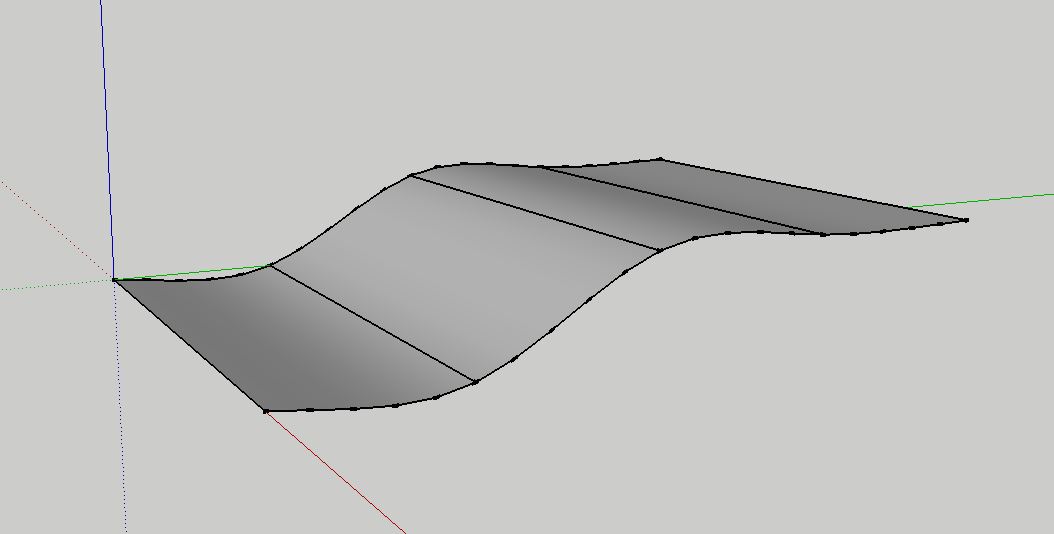
                            Selected the correct way it creates this, but the wrong way freezes SU.

                            Curvi.JPG

                            1 Reply Last reply
                            Reply Quote 0
                            • Dave RD
                              Dave R
                              last edited by

                              It works fine for me, too.

                              It doesn't need to be a closed loop.


                              lines-test~.skp

                              Etaoin Shrdlu

                              %

                              (THERE'S NO PLACE LIKE)

                              G28 X0.0 Y0.0 Z0.0

                              M30

                              %

                              1 Reply Last reply
                              Reply Quote 0
                              • J
                                jasonotero247
                                last edited by

                                hello,

                                I autoinstalled Libfredo 5.2 and curviloft using skecthucation pluginstore 2.0. But now I am having trouble locating them in sketchup in order to begin using them. Can anyone help. Thank you.

                                • Jason
                                1 Reply Last reply
                                Reply Quote 0
                                • Dave RD
                                  Dave R
                                  last edited by

                                  Did you read the first post in this thread? It tells you where to look.

                                  Etaoin Shrdlu

                                  %

                                  (THERE'S NO PLACE LIKE)

                                  G28 X0.0 Y0.0 Z0.0

                                  M30

                                  %

                                  1 Reply Last reply
                                  Reply Quote 0
                                  • J
                                    jasonotero247
                                    last edited by

                                    I did look under the tools tab and there is nothing there.
                                    I am using Bootcamp, Windows 7, SU 2013 and using the sketchucation plugin store to autoinstall the plugins.

                                    1 Reply Last reply
                                    Reply Quote 0
                                    • D
                                      daloop
                                      last edited by

                                      Hi everybody,

                                      I have the same problem as Missy_X a few posts above.
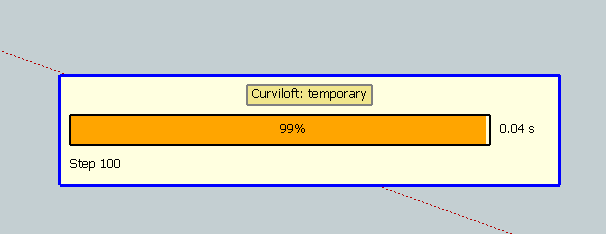
                                      Whenever I activate one of the Curviloft functions in SU2013 (Windows 7, 64Bit), the "Curviloft: Temporary" window pops up immediately. I don't get the usual Fredo-Bar on top of the editor and the plug-in does not work. I can select edges behind the popup, but there's no preview and no lofting.

                                      The Ruby console shows nothing at all. I do have all the latest versions (including libFredo 6.5.2) installed.

                                      This is going on for a few days now. The plugins used to work fine. My current workflow relies on setting up 3D-Bezier curves and skinning them with Curviloft.

                                      Any help would be greatly appreciated.

                                      1 Reply Last reply
                                      Reply Quote 0
                                      • fredo6F
                                        fredo6
                                        last edited by

                                        @daloop,

                                        Could you post an exmaple of the error traces (there is the button in the temporary window to export the trace file).

                                        Thanks very much

                                        Fredo

                                        1 Reply Last reply
                                        Reply Quote 0
                                        • D
                                          daloop
                                          last edited by

                                          @fredo6 said:

                                          Could you post an exmaple of the error traces (there is the button in the temporary window to export the trace file).

                                          Thanks for your support.

                                          Sorry, but I can't find any buttons on the window:
                                          CurviloftTemporary.PNG

                                          1 Reply Last reply
                                          Reply Quote 0
                                          • fredo6F
                                            fredo6
                                            last edited by

                                            Then, could you post the model you are working on.

                                            Thanks

                                            Fredo

                                            1 Reply Last reply
                                            Reply Quote 0

                                            Hello! It looks like you're interested in this conversation, but you don't have an account yet.

                                            Getting fed up of having to scroll through the same posts each visit? When you register for an account, you'll always come back to exactly where you were before, and choose to be notified of new replies (either via email, or push notification). You'll also be able to save bookmarks and upvote posts to show your appreciation to other community members.

                                            With your input, this post could be even better πŸ’—

                                            Register Login
                                            • 1
                                            • 2
                                            • 45
                                            • 46
                                            • 47
                                            • 48
                                            • 49
                                            • 65
                                            • 66
                                            • 47 / 66
                                            • First post
                                              Last post
                                            Buy SketchPlus
                                            Buy SUbD
                                            Buy WrapR
                                            Buy eBook
                                            Buy Modelur
                                            Buy Vertex Tools
                                            Buy SketchCuisine
                                            Buy FormFonts

                                            Advertisement