sketchucation logo sketchucation
    • 登入
    Oops, your profile's looking a bit empty! To help us tailor your experience, please fill in key details like your SketchUp version, skill level, operating system, and more. Update and save your info on your profile page today!
    🔌 Smart Spline | Fluid way to handle splines for furniture design and complex structures. Download

    [Plugin][$] Curviloft 2.0a - 31 Mar 24 (Loft & Skinning)


    已排程 已置頂 已鎖定 已移動 Plugins
    1.3k 貼文 299 Posters 2.5m 瀏覽 297 Watching
    正在載入更多貼文
    • 從舊到新
    • 從新到舊
    • 最多點贊
    回覆
    • 在新貼文中回覆
    登入後回覆
    此主題已被刪除。只有擁有主題管理權限的使用者可以查看。
    • B 離線
      Ben Ritter
      最後由 編輯

      Fredo, thank you again.

      1 條回覆 最後回覆 回覆 引用 0
      • dereiD 離線
        derei
        最後由 編輯

        One question, this version doesn't use anymore ZLoader__Curviloft.rb file? I downloaded it and I found just the directory inside.

        Thank you.

        DESIGNER AND ARTIST DEREI.UK

        1 條回覆 最後回覆 回覆 引用 0
        • fredo6F 離線
          fredo6
          最後由 編輯

          @unknownuser said:

          One question, this version doesn't use anymore ZLoader__Curviloft.rb file? I downloaded it and I found just the directory inside.

          Thank you.

          With LibFredo6 v4.0 and above, the ZLoader__xxx files are no longer used.
          You can purge them by using the menu Windows > LibFredo6 Settings... > Purge Obsolete Files

          Fredo

          1 條回覆 最後回覆 回覆 引用 0
          • dereiD 離線
            derei
            最後由 編輯

            thanks, I did it!

            DESIGNER AND ARTIST DEREI.UK

            1 條回覆 最後回覆 回覆 引用 0
            • I 離線
              ivreich
              最後由 編輯

              Hi Fredo

              I'm not sure if this question has been answered before, but is there a way to ensure all segments in a loft have the same number of columns of quads and that all the junction curves meet up? I have played around with all the various lofting options with no success.

              For example, in this image below all three profile curves have 30 segments but the resulting mesh has disjointed junction curves, making it hard to use thomthom's loop/ring selection tools properly. Also, some of the quads seem to be merged into a single long surface?

              Cheers,

              Joel
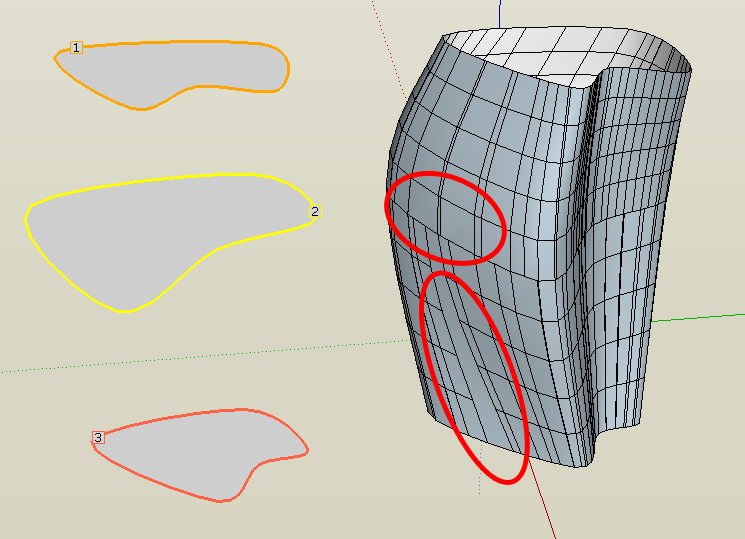

              All 3 profiles curves have 30 segments but junction curves do not match up

              1 條回覆 最後回覆 回覆 引用 0
              • fredo6F 離線
                fredo6
                最後由 編輯

                Joel,

                Sections are computed idependently for the vertex matching, so if contours are very different, you may end up with the situation you describe.

                So far, the only possibility is to use the Global F-spline options. It draws a mesh between the first and last contours trying to be as close as posible to the intermediate contours (but not matching their vertex).
                This method is the first one of the group of two icons at the right of the Junction methods section in the palette.

                Thanks to tell me if this option is useful (I included it just in case....)

                Fredo

                1 條回覆 最後回覆 回覆 引用 0
                • I 離線
                  ivreich
                  最後由 編輯

                  @unknownuser said:

                  So far, the only possibility is to use the Global F-spline options. It draws a mesh between the first and last contours trying to be as close as posible to the intermediate contours (but not matching their vertex).
                  This method is the first one of the group of two icons at the right of the Junction methods section in the palette.

                  Thanks to tell me if this option is useful (I included it just in case....)

                  Fredo

                  Hi Fredo

                  Thanks for your reply. yes i did try the global F-spline options and these are the only options which work. They are definitely very useful; thanks for including them!

                  What I don't understand however is that the 3 profile curves shown in my example are very similar: they are actually three copies of the same uniform b-spline with slight adjustments to each. They have exactly same number of segments and the segments are all aligned approximately above each other, So I'm not sure why curviloft creates extra intermediate junction curves in some places?

                  Is it possible for Curviloft to gauge when all the profile curves have the same number of segments and do direct vertex matching without the extra junction curves? The reason being that the most logical way/neatest way of doing a loft is to use Bezierspline to give each of the profile curves the same number of segments before lofting.

                  Also, any idea about the second issue? the one where the quads are all merged into a single long face? Sorry if I'm a bit long winded, but I'm just very excited about the integration between Curviloft and Quad face tools...

                  Cheers,

                  Joel

                  1 條回覆 最後回覆 回覆 引用 0
                  • fredo6F 離線
                    fredo6
                    最後由 編輯

                    Could you post the model so that I have a closer look

                    Thanks

                    Fredo

                    1 條回覆 最後回覆 回覆 引用 0
                    • jgbJ 離線
                      jgb
                      最後由 編輯

                      @ivreich said:

                      They have exactly same number of segments and the segments are all aligned approximately above each other, So I'm not sure why curviloft creates extra intermediate junction curves in some places?
                      Joel

                      I too have noticed (and remarked about a long time ago) CL's penchant for adding multiple vertexes where none should be logical.

                      CL does a fantastic job of lofting, but often adds a lot of unnecessary lines that I spend a lot of time simplifying by simply deleting the redundant lines and triangulating the quad face. It is rarely a logical midpoint on a straight-line split, they seem to me to be almost random in generation, both position and number.

                      I haven't tried the new version yet, and I won't have time for a while, as I only get less than an hour on the PC a day due to a temp. 12 hour a day job.


                      jgb

                      1 條回覆 最後回覆 回覆 引用 0
                      • I 離線
                        ivreich
                        最後由 編輯

                        @unknownuser said:

                        Could you post the model so that I have a closer look

                        Thanks

                        Fredo

                        Hi Fredo

                        I've attached a model showing the problems I described. I've showed the exact steps i took and colour coded/labelled the problematic areas.

                        Thanks so much for looking into this!

                        Cheers,

                        Joel
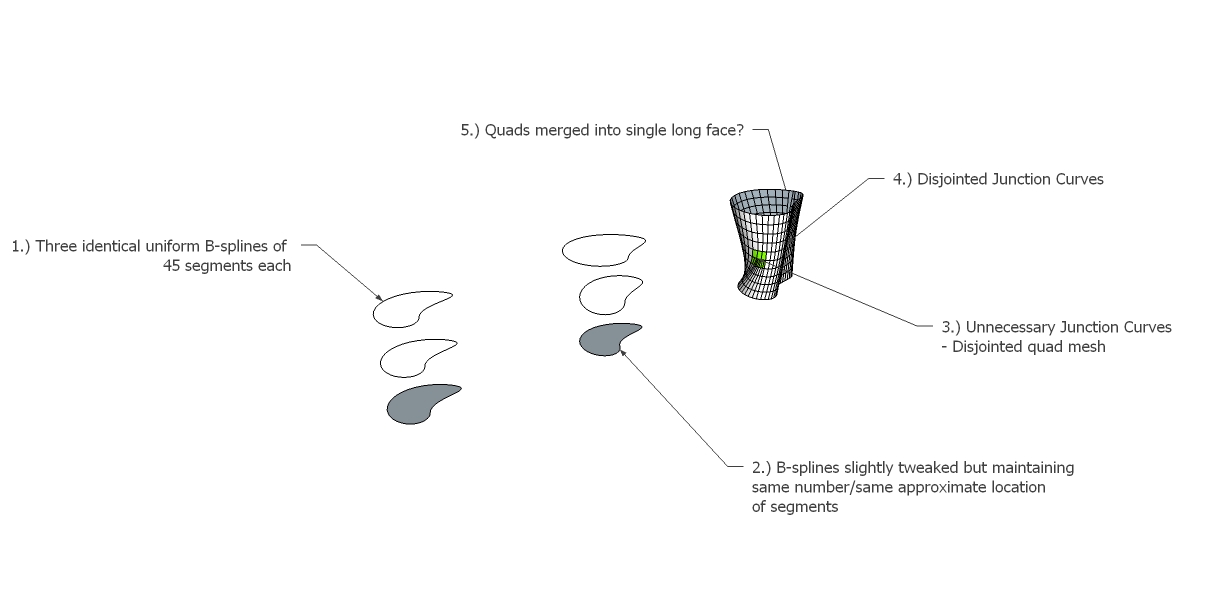

                        Model Screenshot


                        CL Test Model

                        1 條回覆 最後回覆 回覆 引用 0
                        • pilouP 離線
                          pilou
                          最後由 編輯

                          Have you same result when you scale the B Splines *100 ?

                          Frenchy Pilou
                          Is beautiful that please without concept!
                          My Little site :)

                          1 條回覆 最後回覆 回覆 引用 0
                          • fredo6F 離線
                            fredo6
                            最後由 編輯

                            @ivreich said:

                            I've attached a model showing the problems I described. I've showed the exact steps i took and colour coded/labelled the problematic areas.

                            Joel,

                            I had a look and there is definitely a problem in the vertex matching. Actually, even if the number of vertices are the same, thereare some which are very close and unequally spaced. This create issues with the current matching algorithm which still needs to be improved in case there is no 'sharp' edges to be used as a reference start point.
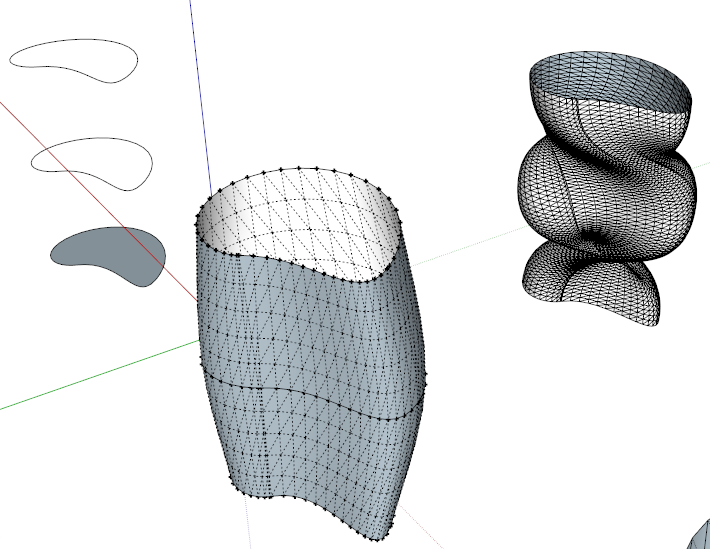
                            Curviloft Matching vertices.png

                            In addition, the problem of vertex matching makes the Global F-Spline method not really work. But I knew I had problem on this one.

                            I am afraid that this cannot be fixed instantly. What I suggest is that you play with the vertex matchning by dragging the junction curves and eliminating the auto-pairs.

                            Fredo

                            1 條回覆 最後回覆 回覆 引用 0
                            • I 離線
                              ivreich
                              最後由 編輯

                              @unknownuser said:

                              I am afraid that this cannot be fixed instantly. What I suggest is that you play with the vertex matchning by dragging the junction curves and eliminating the auto-pairs.

                              Fredo

                              Thanks for looking into it anyway Fredo. I guess this issue of vertex matching becomes very important now that there is a lot of buzz going on around thomthom's quad face tools which require a regular set-out of quad faces in order to properly utilise features such as loop and ring select etc.

                              My dream is that one day this kind of quad-based system will lead to a free-form paneliser tool for SU. I posted a topic on it here:

                              http://forums.sketchucation.com/viewtopic.php?f=323&t=39992

                              It has huge architectural implications for architects like me who use SU heavily as a design tool. Not many people seem to be interested in it though...which is rather strange.

                              Cheers,

                              Joel

                              1 條回覆 最後回覆 回覆 引用 0
                              • K 離線
                                konara
                                最後由 編輯

                                thanks freddo ...!!unbeleivable..

                                1 條回覆 最後回覆 回覆 引用 0
                                • M 離線
                                  Mcgee2005
                                  最後由 編輯

                                  Hello everyone! I'm newbie to this community so I just wanted to thank you for sharing this wonderful information in this thread, it really helped me a lot!

                                  1 條回覆 最後回覆 回覆 引用 0
                                  • T 離線
                                    taiyungokjoseph
                                    最後由 編輯

                                    this is great

                                    1 條回覆 最後回覆 回覆 引用 0
                                    • thomthomT 離線
                                      thomthom
                                      最後由 編輯

                                      I'm loving this tool Fredo! So quick to generate a nice clean mesh - and with the latest Quad option - working with it afterwards is such a joy!

                                      Thomas Thomassen — SketchUp Monkey & Coding addict
                                      List of my plugins and link to the CookieWare fund

                                      1 條回覆 最後回覆 回覆 引用 0
                                      • fredo6F 離線
                                        fredo6
                                        最後由 編輯

                                        @thomthom said:

                                        I'm loving this tool Fredo! So quick to generate a nice clean mesh - and with the latest Quad option - working with it afterwards is such a joy!

                                        Glad to see that this is useful for real-world modelling.
                                        I have installed the Quadtools and start playing with it, trying to catch the essence of the tutorial videos. So far, I am still struggling to understand how to do a simple application of an image texture on a shape, but I will try again.

                                        Fredo

                                        1 條回覆 最後回覆 回覆 引用 0
                                        • thomthomT 離線
                                          thomthom
                                          最後由 編輯

                                          I got on my todo list to make some more tutorials.
                                          I also need to update QuadFace Tools to give proper feedback to the user when the shape can't be mapped to a 2D grid. Please post back with the things you find troublesome - with sample models would be great.

                                          Thomas Thomassen — SketchUp Monkey & Coding addict
                                          List of my plugins and link to the CookieWare fund

                                          1 條回覆 最後回覆 回覆 引用 0
                                          • L 離線
                                            lauris.gouiran
                                            最後由 編輯

                                            Bonjour
                                            est ce que Curviloft marche sous Sketchup8 (mac)?
                                            Merci

                                            Hello,
                                            does Curviloft work under Sketchup8 for mac?

                                            Thank you

                                            1 條回覆 最後回覆 回覆 引用 0
                                            • 1
                                            • 2
                                            • 60
                                            • 61
                                            • 62
                                            • 63
                                            • 64
                                            • 65
                                            • 66
                                            • 62 / 66
                                            • 第一個貼文
                                              最後的貼文
                                            Buy SketchPlus
                                            Buy SUbD
                                            Buy WrapR
                                            Buy eBook
                                            Buy Modelur
                                            Buy Vertex Tools
                                            Buy SketchCuisine
                                            Buy FormFonts

                                            Advertisement



