sketchucation logo sketchucation
    • 登入
    Oops, your profile's looking a bit empty! To help us tailor your experience, please fill in key details like your SketchUp version, skill level, operating system, and more. Update and save your info on your profile page today!
    🔌 Smart Spline | Fluid way to handle splines for furniture design and complex structures. Download

    [Plugin][$] Curviloft 2.0a - 31 Mar 24 (Loft & Skinning)


    已排程 已置頂 已鎖定 已移動 Plugins
    1.3k 貼文 299 Posters 2.5m 瀏覽 297 Watching
    正在載入更多貼文
    • 從舊到新
    • 從新到舊
    • 最多點贊
    回覆
    • 在新貼文中回覆
    登入後回覆
    此主題已被刪除。只有擁有主題管理權限的使用者可以查看。
    • olisheaO 離線
      olishea
      最後由 編輯

      this really is a different league of plugin!!

      something i've been wanting for a LONG time. how come you don't charge? its amazing

      oli

      1 條回覆 最後回覆 回覆 引用 0
      • mariochaM 離線
        mariocha
        最後由 編輯

        Testing the beta, the skin command cannot complete this file, attached.
        EEbyrails does it well tought.


        No-skin.skp

        %(#008000)[Mario C.
        Every rule has exceptions, but some.]

        1 條回覆 最後回覆 回覆 引用 0
        • TIGT 離線
          TIG Moderator
          最後由 編輯

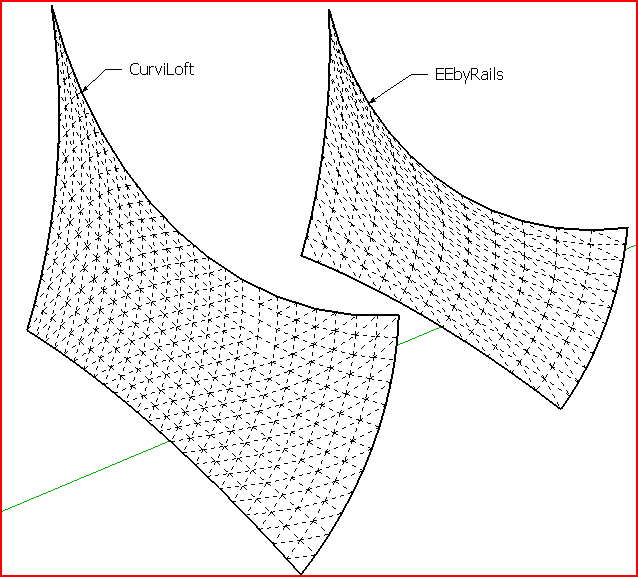
          Both work for me... but there are more facets in CurviLoft's result...Capture.PNG

          TIG

          1 條回覆 最後回覆 回覆 引用 0
          • mariochaM 離線
            mariocha
            最後由 編輯

            Thanks TIG,
            So I tried it on the PC side of my MAC, and it worked just fine.
            frustrated me 😢
            Strange, cause other curves were ok.

            %(#008000)[Mario C.
            Every rule has exceptions, but some.]

            1 條回覆 最後回覆 回覆 引用 0
            • fredo6F 離線
              fredo6
              最後由 編輯

              @mariocha said:

              Testing the beta, the skin command cannot complete this file, attached.
              EEbyrails does it well tought.

              Mariocha,

              I think I know what it is and why it is specific to Mac. I'll publish a fix soon with a new release.

              By the way, you can adjust the density of meshing by using the Interpoland OverSamplingboxes. If you deactivate both, then you get a mesh strictly built on the original contour vertices.
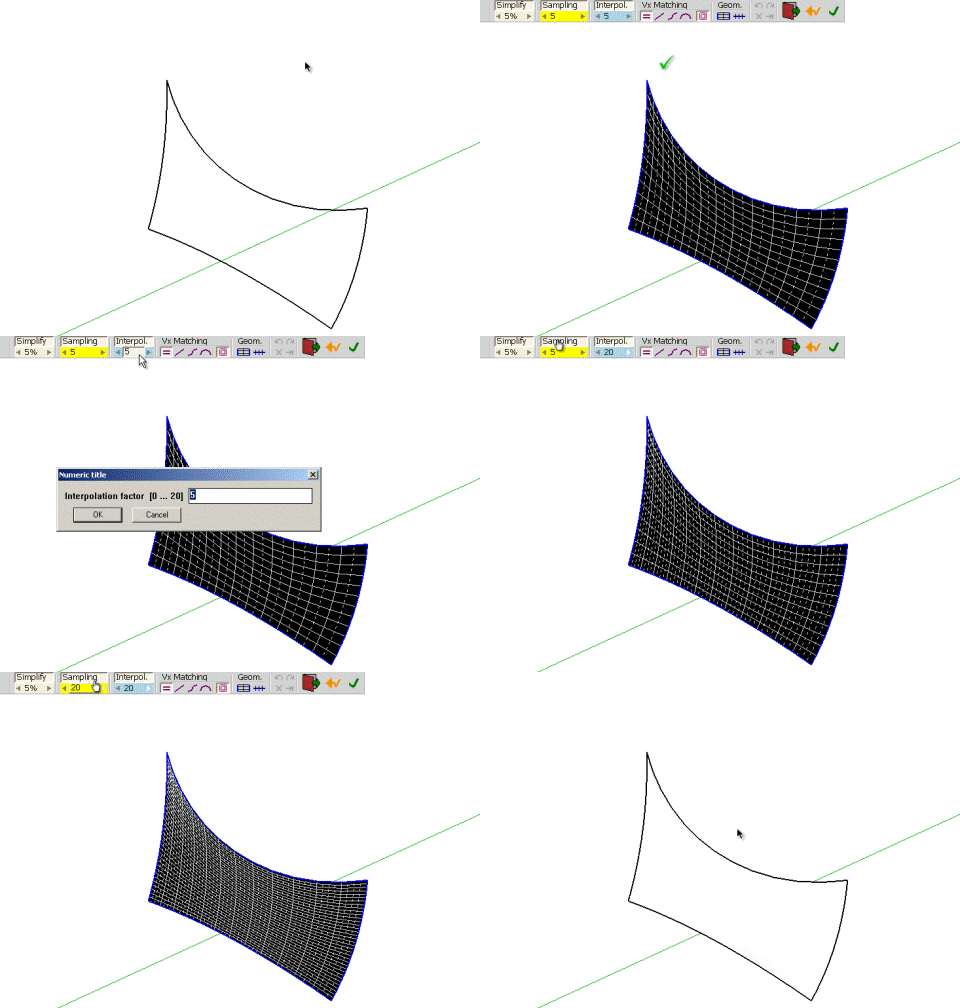
              Curvi-sampling.gif

              Fredo

              1 條回覆 最後回覆 回覆 引用 0
              • mariochaM 離線
                mariocha
                最後由 編輯

                A new relase ? Great !! 👍 👍 👍
                And Oversampling & Interpol will be so usefull for designing !
                C'est vraiment super !
                as I'm working on a tensile structure these days.

                %(#008000)[Mario C.
                Every rule has exceptions, but some.]

                1 條回覆 最後回覆 回覆 引用 0
                • cmeedC 離線
                  cmeed
                  最後由 編輯

                  help.
                  I see skinning videos posted within this thread but i can't get this shape to work. it seems so simple.....
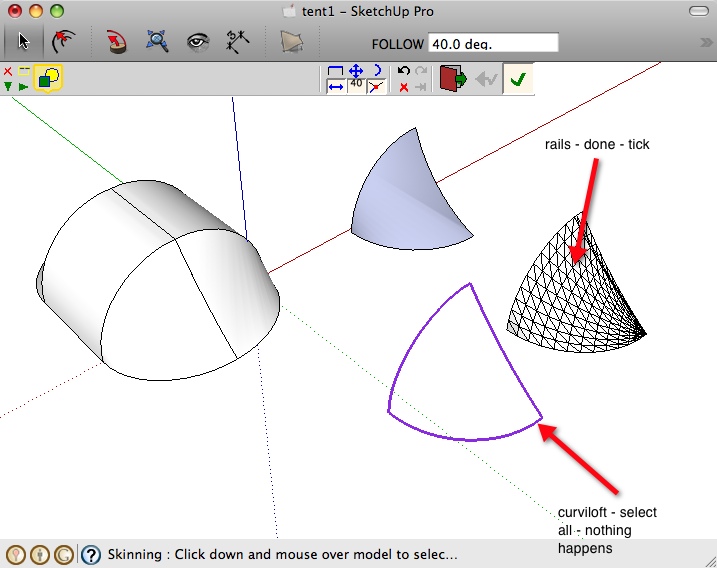
                  I click contours, click space, i then repeat until all three lines are coloured and click the tick button or open space. i get a PLEASE WAIT then nothing happens.
                  Am I doing something wrong, is it Because i'm on a mac?

                  the last picture is tig's rails but i have to make a 4th rail for it to work.
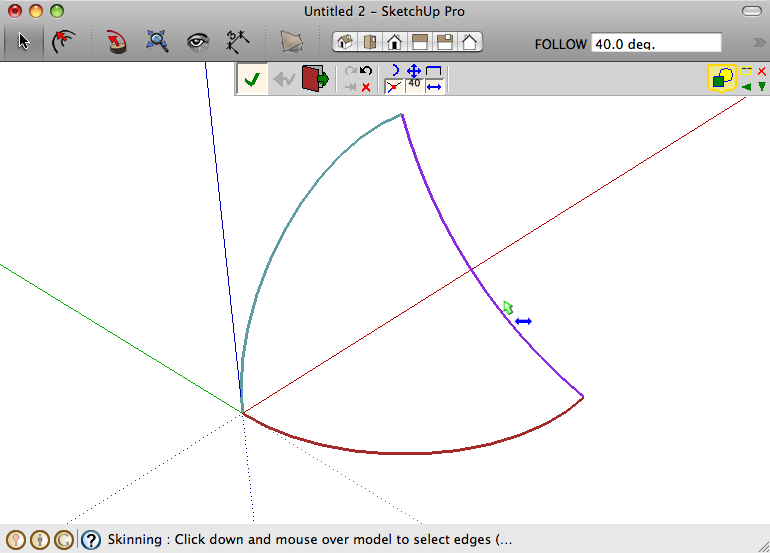

                  Skinning.jpg


                  Skinning2.jpg


                  Skinning3.jpg

                  1 條回覆 最後回覆 回覆 引用 0
                  • TIGT 離線
                    TIG Moderator
                    最後由 編輯

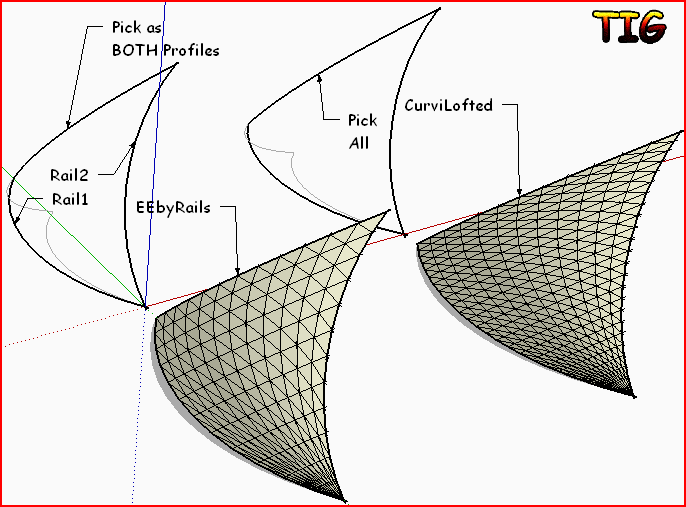
                    Should work with the 3 curves in either Fredo's or mine. With EEbyRails Pick the curve as the profile then the 2 side rails and then re-pick the profile again as the melding-profile - it will end with a point and triangular faces opposite the profile's end, as desired...Capture.PNG

                    TIG

                    1 條回覆 最後回覆 回覆 引用 0
                    • cmeedC 離線
                      cmeed
                      最後由 編輯

                      Thank you for your speedy reply. Tig your plugin is working great (i didn't know about going back to my first curve to make three curves work, cheers)
                      what i'm making is a field of 800 tents - the ones you can put up in 3 seconds. So i need a way of using the contours and keeping the the polys down.
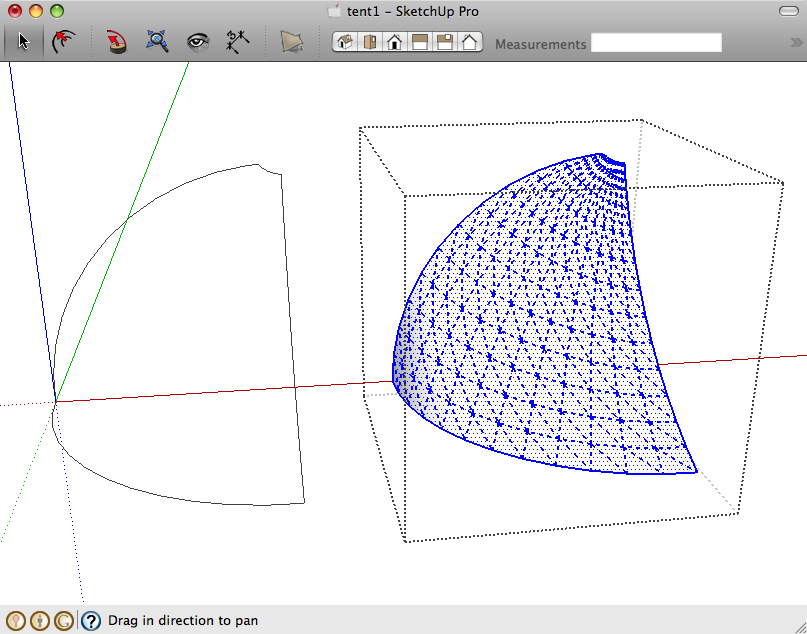
                      see pic tent - I used the loft by spline to get this but its not that great, Skinning didn't work.
                      i wanted to used fredos to get the polys down.


                      Skinning4.jpg

                      1 條回覆 最後回覆 回覆 引用 0
                      • TIGT 離線
                        TIG Moderator
                        最後由 編輯

                        Reduce the number of segments in the arcs for the profiles/rails for EEbyRails with Entity Info [before scaling or making a 'non-arc'] ?

                        TIG

                        1 條回覆 最後回覆 回覆 引用 0
                        • cmeedC 離線
                          cmeed
                          最後由 編輯

                          Thank you Tig. damn ! i knew that.... mmmm

                          1 條回覆 最後回覆 回覆 引用 0
                          • fredo6F 離線
                            fredo6
                            最後由 編輯

                            @cmeed said:

                            help.
                            I see skinning videos posted within this thread but i can't get this shape to work. it seems so simple.....
                            I click contours, click space, i then repeat until all three lines are coloured and click the tick button or open space. i get a PLEASE WAIT then nothing happens.
                            Am I doing something wrong, is it Because i'm on a mac?

                            the last picture is tig's rails but i have to make a 4th rail for it to work.
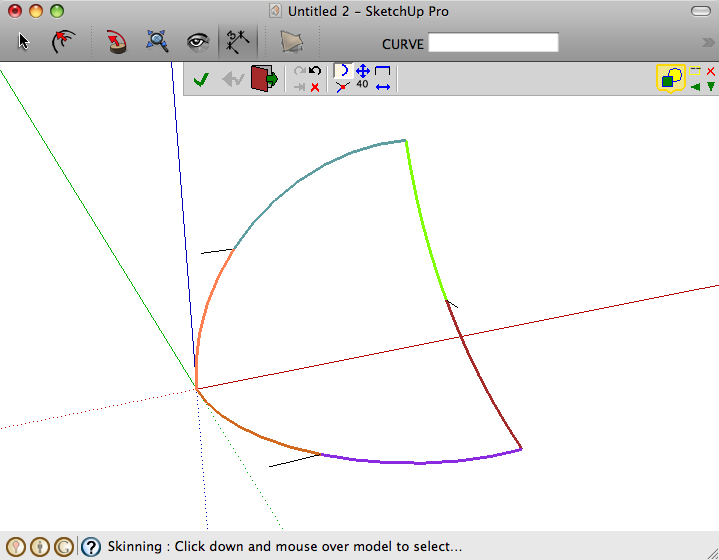
                            COuld you please post your model so that I can have a look and see what is going wrong.

                            Thanks

                            fredo

                            1 條回覆 最後回覆 回覆 引用 0
                            • cmeedC 離線
                              cmeed
                              最後由 編輯

                              Here you go...Thanks for looking...
                              I am almost sure it will work for you. Its so simple a shape.


                              tent1.skp

                              1 條回覆 最後回覆 回覆 引用 0
                              • fredo6F 離線
                                fredo6
                                最後由 編輯

                                @cmeed said:

                                Here you go...Thanks for looking...
                                I am almost sure it will work for you. Its so simple a shape.

                                This bug, specific to Mac, has been corrected, but I did not publish the fix yet (due to work on the Loft Along Path). I'll do soon.
                                It was already mentioned by Mariocha (see http://forums.sketchucation.com/viewtopic.php?f=323&t=28586&start=210#p262564)

                                Fredo

                                1 條回覆 最後回覆 回覆 引用 0
                                • fredo6F 離線
                                  fredo6
                                  最後由 編輯

                                  By the way, I forgot to mention that, when Skinning shapes, you can swap rails and profiles, which may be useful when the surface to generate is made from 3 contours.
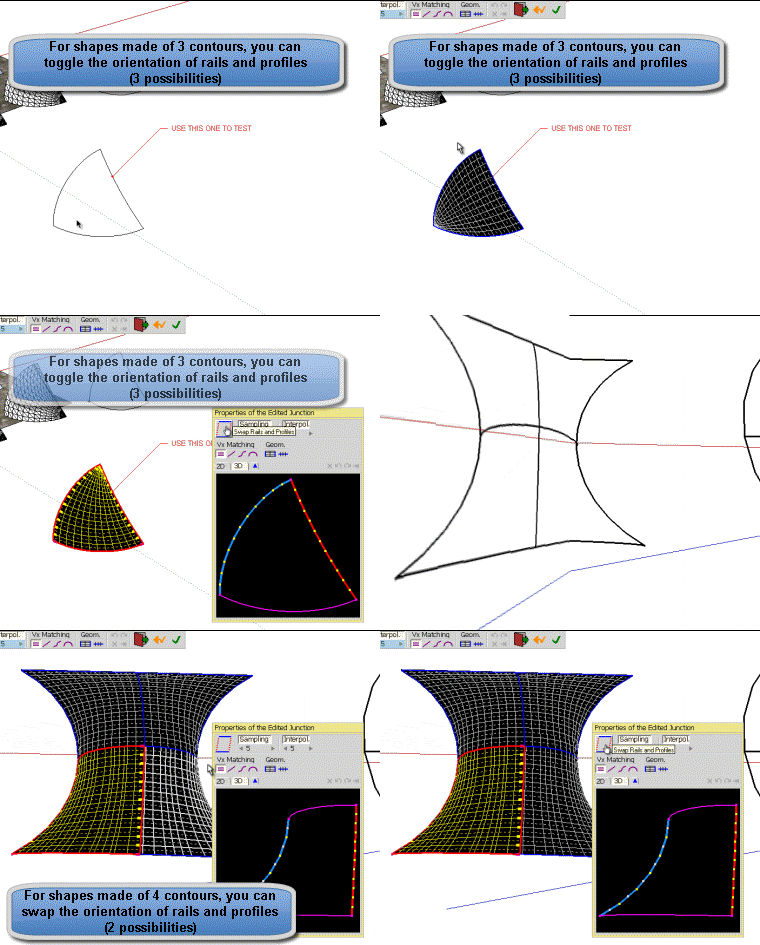
                                  Swap Skin.gif

                                  Fredo

                                  1 條回覆 最後回覆 回覆 引用 0
                                  • utilerU 離線
                                    utiler
                                    最後由 編輯

                                    Fredo, this tool is quite incredible! I just haven't had time to play with it yet but have been following with much interest!! You really have 'user operation' high on your list.

                                    Incredibly well done!!

                                    Just Curious...

                                    1 條回覆 最後回覆 回覆 引用 0
                                    • fredo6F 離線
                                      fredo6
                                      最後由 編輯

                                      New Beta version of Curviloft 1.0c and LibFredo6 3.5c - 20 Aug 10
                                      see Main Post for download

                                      This is an interim version whose purpose is to fix some bugs signaled by users and to prepare a next release which will be more functional. Again, thanks to all users for their help and contribution.

                                      1. Skinning: Bug on Mac preventing to Skin even simple shapes. Thanks to Mariocha and to Cmeed for signaling

                                      2. Skinning: Pre-selection mode should work with more shapes. Thanks to Daniel S. for providing some good examples.
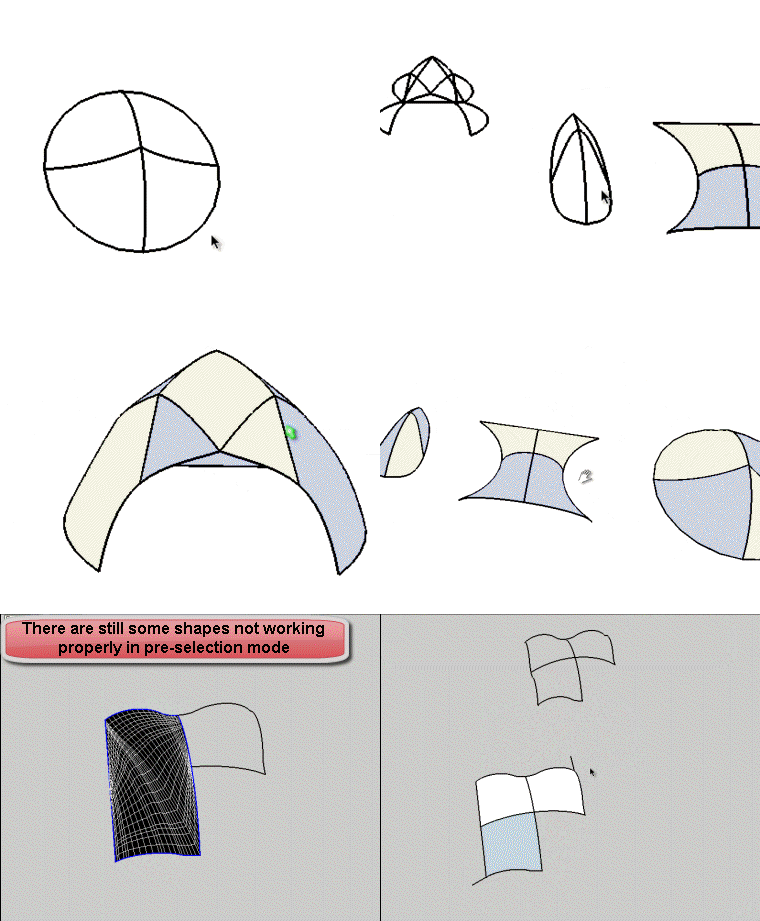
                                        Skin now working.gif

                                      3. Loft Along Path: Still not finished. At least I have tried to improve the single-contour mode (kind of Follow Me, but accepting contours even non perpendicualr to the rail).
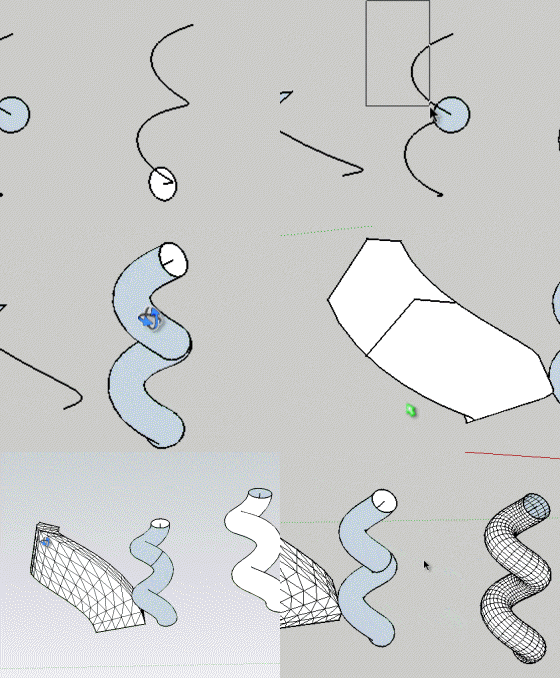
                                        Along one contour.gif
                                        By the way, I noticed some differences with the native SU FollowMe tool.
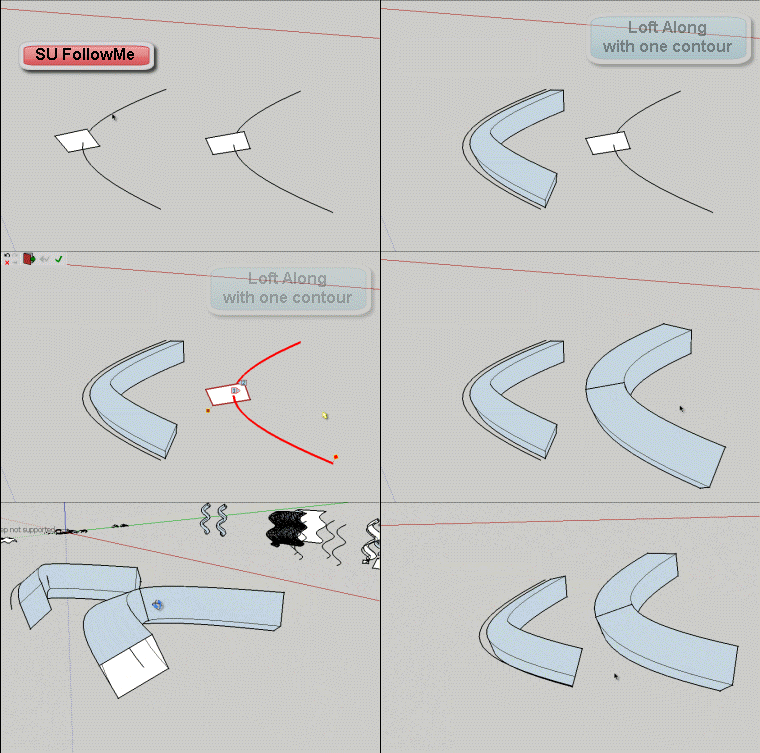
                                        Follow vs Loft Along.gif
                                        Fredo

                                      1 條回覆 最後回覆 回覆 引用 0
                                      • Rich O BrienR 離線
                                        Rich O Brien Moderator
                                        最後由 編輯

                                        Thank You Fredo, great update 👍

                                        Download the free D'oh Book for SketchUp 📖

                                        1 條回覆 最後回覆 回覆 引用 0
                                        • EarthMoverE 離線
                                          EarthMover
                                          最後由 編輯

                                          Awesome. Thanks Fredo!

                                          3D Artist at Clearstory 3D Imaging
                                          Guide Tool at Winning With Sketchup
                                          Content Creator at Skapeup

                                          1 條回覆 最後回覆 回覆 引用 0
                                          • mariochaM 離線
                                            mariocha
                                            最後由 編輯

                                            Soon as I heard the good news, I gave a quick try to the new 1.0c
                                            It worked just great on the file causing problems before (on Mac). 👍
                                            I will give it a more thorough spin tomorow.
                                            and find the donation menu ...
                                            mille merci !!

                                            %(#008000)[Mario C.
                                            Every rule has exceptions, but some.]

                                            1 條回覆 最後回覆 回覆 引用 0
                                            • 1
                                            • 2
                                            • 61
                                            • 62
                                            • 63
                                            • 64
                                            • 65
                                            • 66
                                            • 63 / 66
                                            • 第一個貼文
                                              最後的貼文
                                            Buy SketchPlus
                                            Buy SUbD
                                            Buy WrapR
                                            Buy eBook
                                            Buy Modelur
                                            Buy Vertex Tools
                                            Buy SketchCuisine
                                            Buy FormFonts

                                            Advertisement