[Plugin][$] Curviloft 2.0a - 31 Mar 24 (Loft & Skinning)


-
@rv1974 said:
Fredo, could you please DISABLE Loft by spline tool working with PRE-selected set of edges?
Or at least give some give pop-up warning (this operation will take a loot of time co compute blah blah blah)?
So MANY times I have to shut down skp session (=loosing 15 min of work ) because it's freezing forever trying to guess the appropriate order
Do you have a model example where this happens
Fredo
-
Select all 7 (not one by one), then run loft by spline-
permanent freeze. Very common thing.
-
This is just a bug, due to the fact that all contours is exactly spaced at the same distance.
Thanks for signaling
I fixed it in version 1.7d, just published.
Fredo
PS: Actually, the long waiting time you had is not infinite. After a number of seconds, you get back control. So there was no need to force an exit of Sketchup.
-
NEW RELEASE: Curviloft v1.7d - 31 May 18
Curviloft 1.7d is a maintenance release fixing a bug in the automatic ordering of contours for the Spline tool.
See Plugin Page of Curviloft for Download (or use the Sketchup PluginStore plugin for auto-installation.
Fredo
-
Unprecedented responsiveness Fredo,many thanks!
I'll test the update later today.
Another imperfection (?, - maybe I just can't find right buttons) I encountered with Loft by spline is that
the inter-medial segments can't keep exact dimensions of initial profiles (lowest and highest ones in attached example 12X81m*, storey height is 3.5m). Another issue is that segments are slightly OFFXY Plane.Is it possible to develop some special mode that'd keep segments exactly parallel to the input profiles, and if initial profiles are equal it'd keep their dimensions?
- P.S. In this particular case of 50+ storey towers PlayitItAgain script helped a lot.
-
This seems to be a problem of geometry which you can simulate manually.
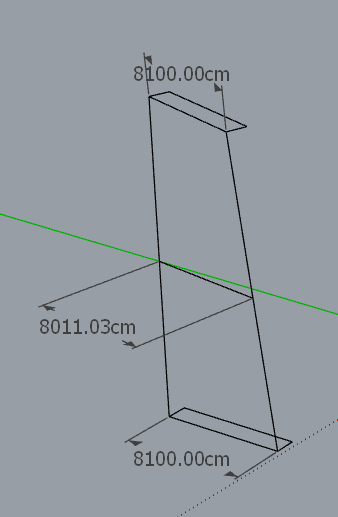
If you wish to keep the junction straight, then the intermediate profiles do not keep the same dimensions.
Also, the intermediate sections are parallel to the initial profiles. Do you have something different?
Fredo
-
With prussian pedantry I took all horizontal segments, run make faces and...
it did it all which proves you are right- they are horizontal. What misleads is "~" sign in measurements, must be some SU glitch.
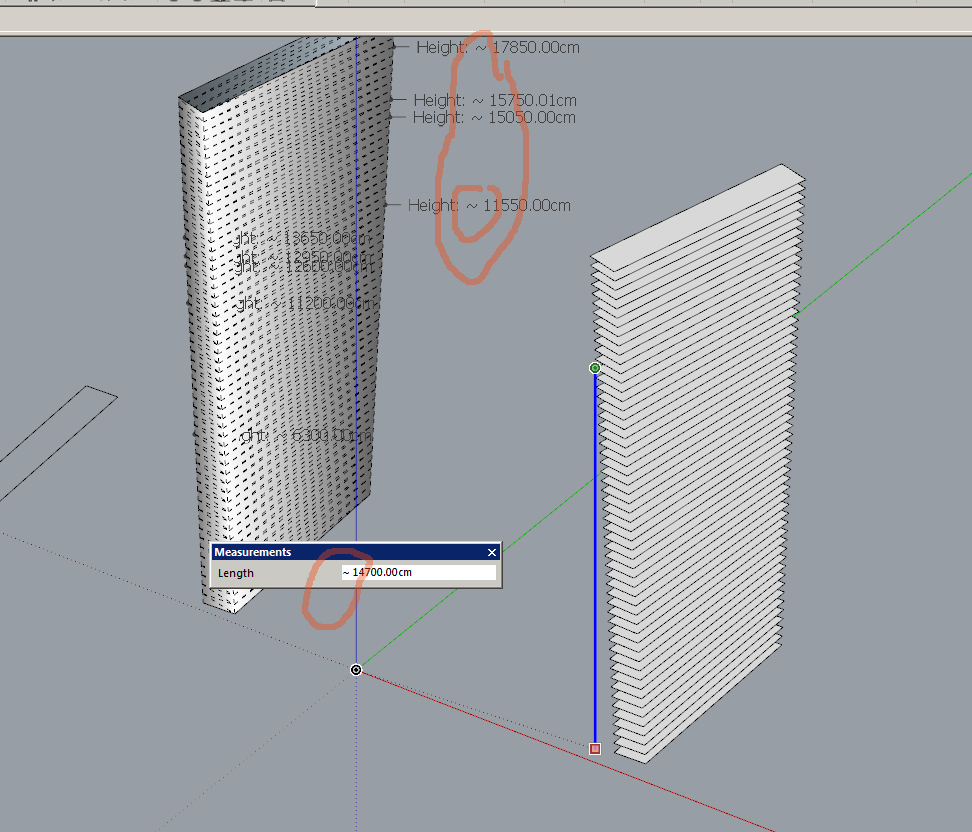
-
This seems to be a problem of geometry which you can simulate manually. If you wish to keep the junction straight, then the intermediate profiles do not keep the same dimensions.If you wish to keep the junction straight
No, what is needed is intermediate segments to preserve initial dimentions of the profile.
In attached file the red body is OK (all horizontal segments keep right sizing),
and the blue one (lofting with 51 intermediate segments) misbehaves.
-
@rv1974 said:
No, what is needed is intermediate segments to preserve initial dimensions of the profile.
Then, Curviloft is not adapted, and you should use FollowMe Rotate or TIG Grow extensions.
With rotated profile, line joining the begin and end profile corner does not meet the corner of the intermediate profiles.
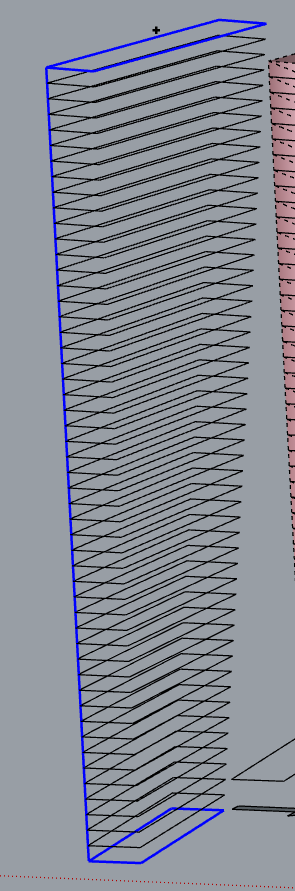
In your red shape, you can see that the short segments joining stores are not aligned and do not form a big straight line.
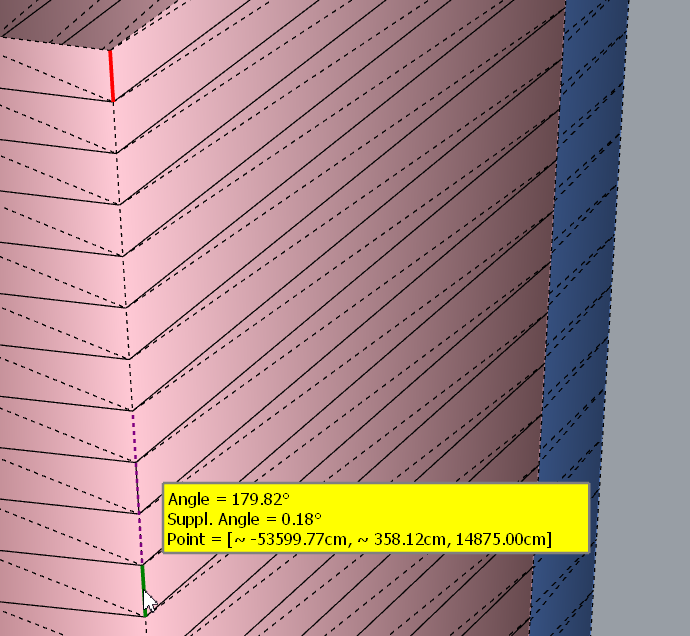
Fredo
-
Thanks for mentioning those alternatives- I'll check them. I'm so glued to your tools that completely forgot others

BTW the straight line on a blue tower shows the horizontal segments don't sit perfectly on it. The gap is ridiculously small in real life scale (~0.3cm in the middle floors, but big enough to spoil the model -
-
@rv1974 said:
Fredo could you take a look please
I need to consider this case of indetical profiles more seriously, which Curviloft did not really do.
So I'll come with something more robust.
Fredo
-
Hi there,
When selecting more than 3 edge curves, and choosing for junction by orthogonal bezier curves, the surfaces do not get the reach the right spline method result.
Here is what the ruby console shows
Error: #<ArgumentError: Cannot create unit vector from zero length vector>
c:/users/mbe/appdata/roaming/sketchup/sketchup 2018/sketchup/plugins/fredo6_!libfredo6/lib6profile.rbe:119:inaxes' c:/users/mbe/appdata/roaming/sketchup/sketchup 2018/sketchup/plugins/fredo6_!libfredo6/lib6profile.rbe:119:incompute_by_offset'
c:/users/mbe/appdata/roaming/sketchup/sketchup 2018/sketchup/plugins/fredo6_!libfredo6/lib6profile.rbe:58:incompute_by_vectors2' c:/users/mbe/appdata/roaming/sketchup/sketchup 2018/sketchup/plugins/fredo6_!libfredo6/lib6profile.rbe:86:incompute_by_normals'
c:/users/mbe/appdata/roaming/sketchup/sketchup 2018/sketchup/plugins/fredo6_curviloft/curviloftspline.rbe:357:inblock in spline_profiling_construct' c:/users/mbe/appdata/roaming/sketchup/sketchup 2018/sketchup/plugins/fredo6_curviloft/curviloftspline.rbe:351:ineach'
c:/users/mbe/appdata/roaming/sketchup/sketchup 2018/sketchup/plugins/fredo6_curviloft/curviloftspline.rbe:351:ineach_with_index' c:/users/mbe/appdata/roaming/sketchup/sketchup 2018/sketchup/plugins/fredo6_curviloft/curviloftspline.rbe:351:inspline_profiling_construct'
c:/users/mbe/appdata/roaming/sketchup/sketchup 2018/sketchup/plugins/fredo6_curviloft/curviloftspline.rbe:249:inspline_junction_construct' c:/users/mbe/appdata/roaming/sketchup/sketchup 2018/sketchup/plugins/fredo6_curviloft/curviloftalgo.rbe:497:ingeneric_junction_construct'
c:/users/mbe/appdata/roaming/sketchup/sketchup 2018/sketchup/plugins/fredo6_curviloft/curviloftalgo.rbe:1418:injunction_construct' c:/users/mbe/appdata/roaming/sketchup/sketchup 2018/sketchup/plugins/fredo6_curviloft/curviloftalgo.rbe:407:inblock in link_construct_all'
c:/users/mbe/appdata/roaming/sketchup/sketchup 2018/sketchup/plugins/fredo6_curviloft/curviloftalgo.rbe:407:ineach' c:/users/mbe/appdata/roaming/sketchup/sketchup 2018/sketchup/plugins/fredo6_curviloft/curviloftalgo.rbe:407:inlink_construct_all'
c:/users/mbe/appdata/roaming/sketchup/sketchup 2018/sketchup/plugins/fredo6_curviloft/curviloftalgo.rbe:396:inlink_calculate_all' c:/users/mbe/appdata/roaming/sketchup/sketchup 2018/sketchup/plugins/fredo6_curviloft/curviloftalgo.rbe:530:inoption_set_prop'
c:/users/mbe/appdata/roaming/sketchup/sketchup 2018/sketchup/plugins/fredo6_curviloft/curvilofttool.rbe:206:inoption_set_prop' c:/users/mbe/appdata/roaming/sketchup/sketchup 2018/sketchup/plugins/fredo6_curviloft/curviloftpalette.rbe:773:incall'
c:/users/mbe/appdata/roaming/sketchup/sketchup 2018/sketchup/plugins/fredo6_curviloft/curviloftpalette.rbe:773:inblock in pal_family_spline_method' c:/users/mbe/appdata/roaming/sketchup/sketchup 2018/sketchup/plugins/fredo6_!libfredo6/body_lib6palette.rbe:3963:incall'Just ask me for the file if needed!
Cheers
Manuel
... -
@architure said:
Just ask me for the file if needed!
Yes the file would be useful, as this seems to be a special case.
Thanks
Fredo
-
Hi there,
Sorry for my late reply. Here is the attached 2018 skp file . You can see that the selected mode is only applied between the first 3 curves.
Let me know if I can provide more information.
Cheers
-
NEW RELEASE: Curviloft v1.8a - 31 Oct 18
Curviloft 1.8a is a maintenance release for bug fixing.
See Plugin Page of Curviloft for Download (or use the Sketchup PluginStore plugin for auto-installation.
Fredo
-
Looking forward to another excellent work.
-
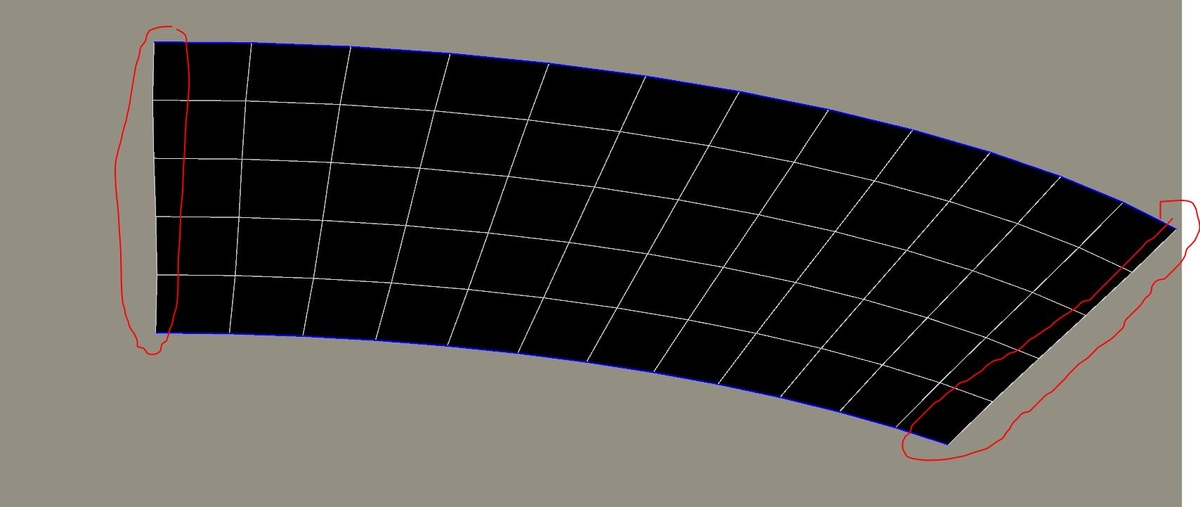
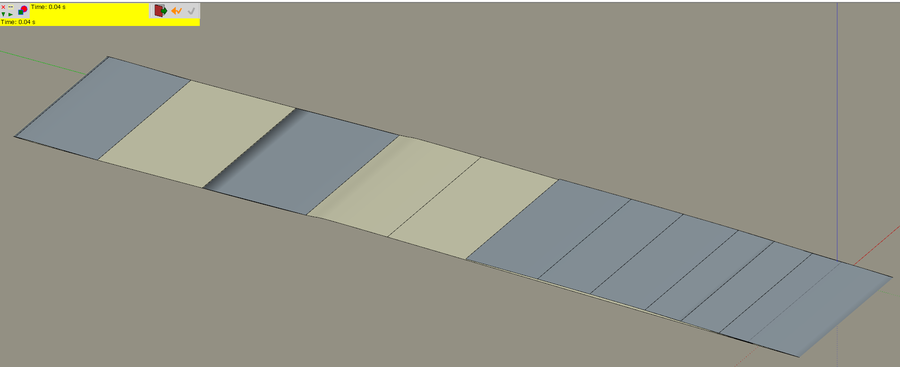
In 99% of of lofting uses I have to straighten borders connnecting ends of segments afterwards(thanks Thom there're Edge tools so it's not manual). Could there be an optionto keep them straight when creating?
Thanks -
@rv1974 said:
In 99% of of lofting uses I have to straighten borders connnecting ends of segments afterwards(thanks Thom there're Edge tools so it's not manual). Could there be an optionto keep them straight when creating?
ThanksNot too sure what you mean by 'straighten'.
Maybe an example would be helpful.Fredo
-
Edit: Only after posting I figured out 'junction by connected lines' in 'spline method' fixes this problem'



Advertisement