sketchucation logo sketchucation
    • Login
    Oops, your profile's looking a bit empty! To help us tailor your experience, please fill in key details like your SketchUp version, skill level, operating system, and more. Update and save your info on your profile page today!
    Mac User? | Join the Rayscaper Beta for Mac Learn More

    Dulux launches trade paint colour selector plugin

    Scheduled Pinned Locked Moved Extensions & Applications Discussions
    extensions
    14 Posts 8 Posters 9.2k Views 8 Watching
    Loading More Posts
    • Oldest to Newest
    • Newest to Oldest
    • Most Votes
    Reply
    • Reply as topic
    Log in to reply
    This topic has been deleted. Only users with topic management privileges can see it.
    • L
      linea
      last edited by

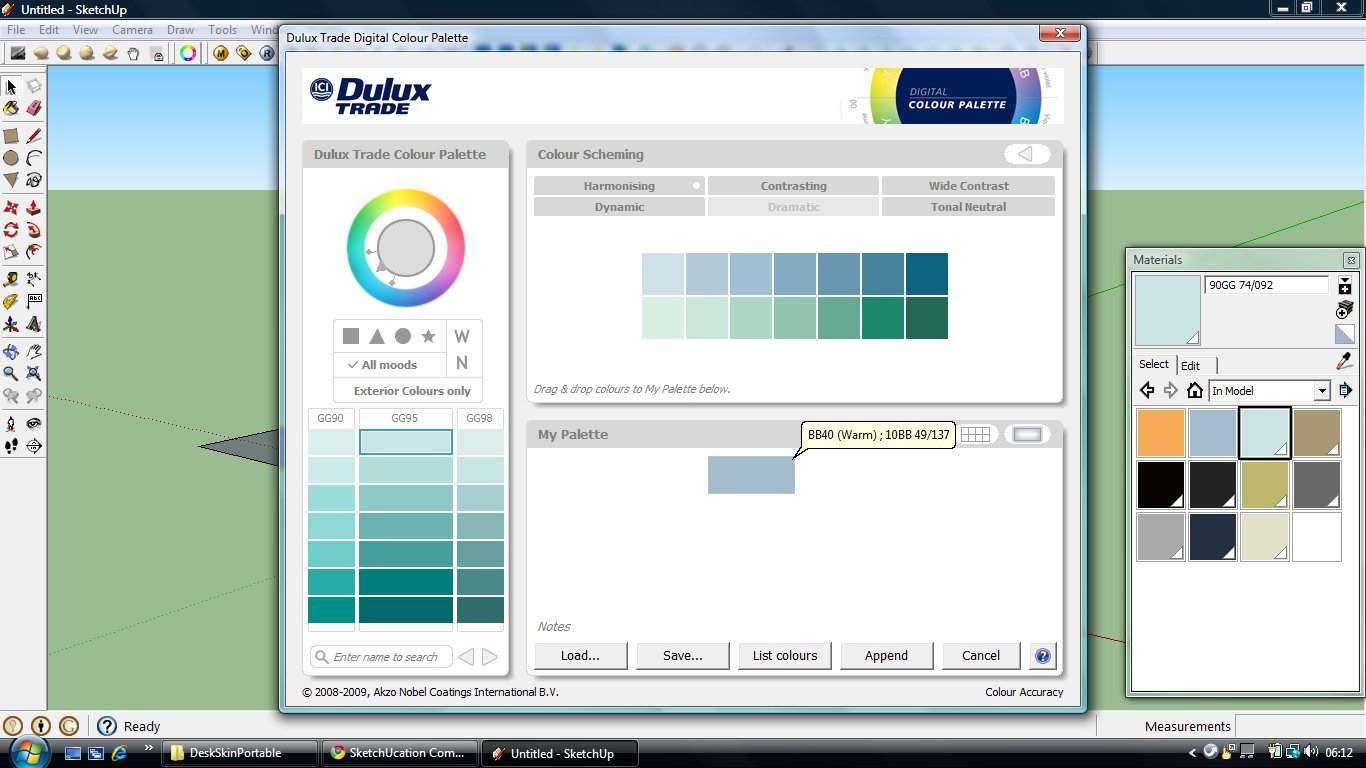
      This has actually been out a while so perhaps this has been mentioned before, sorry if it has. ICI the manufacturers of Dulux paints have released a plugin that allows you to select colours from a colour wheel and transfers them to the materials palette with the trade paint code. Works well.

      @unknownuser said:

      Dulux Trade has launched a new digital colour tool to enable architects and designers to download 2,000 shades into an existing design software package.

      The free digital resource contains all the shades in the Dulux Trade Colour Palette 4 fandeck, allowing specifiers to select real Dulux Trade colours in their digital designs.

      Synchronising seamlessly with popular digital design packages, including Photoshop, Autocad, Archicad and Sketchup, the smart colour ‘plug in’ is designed to put an end to complicated colour conversions between the design and specification stages.

      The software can be downloaded from the Dulux Trade website from September 2009. Architects and designers can also order the free Dulux Trade Colour Palette 4 fandeck online for use in conjunction with their software.

      It also features a smart colour selection tool to help build palettes of coordinating shades for bespoke colour schemes
      404 Not Found

      favicon

      (www.icipaints.co.uk)


      dulux.jpg

      1 Reply Last reply
      Reply Quote 0
      • A
        aboagdoed
        last edited by

        Thanks for sharing!!!
        I'm curious about the plugins on the upper left corner of the screen... ❓

        1 Reply Last reply
        Reply Quote 0
        • TIGT
          TIG Moderator
          last edited by

          Good tip...

          TIG

          1 Reply Last reply
          Reply Quote 0
          • EscapeArtistE
            EscapeArtist
            last edited by

            If you're referring to the plugins with the sphere that's been deformed on the top left of the toolbar, that would be BTM's Sculpt tools: http://forums.sketchucation.com/viewtopic.php?f=323&t=20781&hilit=sculpt#p174501

            1 Reply Last reply
            Reply Quote 0
            • L
              linea
              last edited by

              Certainly is, but I haven't worked out how to use it yet!

              1 Reply Last reply
              Reply Quote 0
              • R
                REGIS
                last edited by

                HI

                Looks like a great plugin, unfortunately, I don't live in UK, no way to create an account on Dulux site.

                Any idea ?

                cheers

                1 Reply Last reply
                Reply Quote 0
                • EscapeArtistE
                  EscapeArtist
                  last edited by

                  Try using a free proxy service.

                  1 Reply Last reply
                  Reply Quote 0
                  • W
                    watkins
                    last edited by

                    Jon,

                    I note that it is a .exe file. What does it do? Does it simply put files into your materials folder, or does it install a progam on your C drive?

                    I am always wary about launching downloaded applications until I know what they do.

                    Regards,
                    Bob

                    1 Reply Last reply
                    Reply Quote 0
                    • TIGT
                      TIG Moderator
                      last edited by

                      The PC only .exe installs various rb/rbs and toolbar/browser files in Plugins - it's pretty safe - I've loaded it without problem...

                      TIG

                      1 Reply Last reply
                      Reply Quote 0
                      • DareDevilD
                        DareDevil
                        last edited by

                        @regis said:

                        Looks like a great plugin, unfortunately, I don't live in UK, no way to create an account on Dulux site.

                        Any idea ?

                        Just input a valid UK postcode.
                        http://en.wikipedia.org/wiki/Postcodes_in_the_United_Kingdom#Format

                        For me it's ok 😉

                        1 Reply Last reply
                        Reply Quote 0
                        • R
                          REGIS
                          last edited by

                          🤣 Works fine.
                          Unfortunately it's a only windows plugin.

                          cheers

                          1 Reply Last reply
                          Reply Quote 0
                          • W
                            watkins
                            last edited by

                            Dear TIG,
                            Thanks for the explanation.
                            Regards,
                            Bob

                            1 Reply Last reply
                            Reply Quote 0
                            • L
                              linea
                              last edited by

                              Hi Watkins, sorry been off the forum for a while so didn't see your reply. It is safe and works very well. As an interface for picking colours it is actually a good alternative to picking colours from the su materials pallette.

                              1 Reply Last reply
                              Reply Quote 0
                              • T
                                tue.tue
                                last edited by

                                Thanks for sharing 👍
                                cool plugin 😍 😍 😍

                                1 Reply Last reply
                                Reply Quote 0

                                Hello! It looks like you're interested in this conversation, but you don't have an account yet.

                                Getting fed up of having to scroll through the same posts each visit? When you register for an account, you'll always come back to exactly where you were before, and choose to be notified of new replies (either via email, or push notification). You'll also be able to save bookmarks and upvote posts to show your appreciation to other community members.

                                With your input, this post could be even better 💗

                                Register Login
                                • 1 / 1
                                • First post
                                  Last post
                                Buy SketchPlus
                                Buy SUbD
                                Buy WrapR
                                Buy eBook
                                Buy Modelur
                                Buy Vertex Tools
                                Buy SketchCuisine
                                Buy FormFonts

                                Advertisement